
Disclosure: Zelobiz may earn a commission if you buy through an AppSumo link on this page, at no extra cost to you. This review is based on AppMySite’s public product pages, its AppSumo listing, and published comparisons with BuildFire and Shoutem, not on building and publishing a real app with it ourselves.
Turning a website into a real, installable mobile app used to require hiring a developer or learning Swift and Kotlin. AppMySite is one of several no-code tools built to remove that requirement, letting a website owner or agency generate native iOS and Android apps without writing code. It ran an AppSumo lifetime deal across ten separate tiers, a wider spread than most listings in this review series. This review covers what AppMySite actually does, what those tiers included, and how it holds up against BuildFire and Shoutem, the two names it gets compared to most often.
What AppMySite actually is
AppMySite is a DIY mobile app builder aimed at website owners, freelancers, and digital agencies who want to convert an existing website, particularly a WordPress or WooCommerce site, into a native mobile app without custom development. The output is a real installable app, not just a mobile-optimized web wrapper, built with drag-and-drop customization and push notification support, then submitted to the Apple App Store and Google Play through AppMySite’s publishing tools.
It positions itself specifically as a BuildFire alternative for the website-to-app conversion use case, which is a narrower and more specific job than general-purpose no-code app builders like Bubble or Glide, which let you build an app’s logic and data model from scratch rather than starting from an existing website.
Current AppSumo deal status
As of this review, AppMySite’s AppSumo listing shows Sold out!, with a notify-me option for when it returns. The lifetime deal spanned ten separate license tiers, an unusually wide range for a listing in this category:
| Tier | Price | Apps included |
|---|---|---|
| Tier 1 | $199 | 3 apps |
| Tier 2 | $299 | 10 apps |
| Tier 3 | $399 | 25 apps |
| Tier 4 | $499 | 50 apps |
| Tiers 6-10 | Up to $5,999 | Agency and white-label tiers |
Every tier included lifetime access and core functionality: Android and iOS app creation, the drag-and-drop builder, and push notifications. The higher tiers add unlimited team collaboration, faster app build times, and white-label capabilities aimed specifically at agencies reselling app-building services to their own clients. All tiers came with the standard 60-day refund window and were covered by AppSumo’s own “We Got Your Back” guarantee, unlike several of the partner-managed listings elsewhere in this review series.
Key features
- No-code conversion of an existing website, especially WordPress and WooCommerce, into a native mobile app
- Drag-and-drop app design and customization
- Push notification support for customer engagement
- App store submission and publishing tools for both Apple App Store and Google Play
- Team collaboration features on higher tiers
- White-label options for agencies building apps under their own brand for clients
Why a native app instead of a mobile-friendly website
A reasonable question before spending anything on this category of tool: why does a business need a native app at all when a responsive, mobile-friendly website already works on every phone? The honest answer is that a native app buys a few specific things a website cannot: a home screen icon that keeps a brand visible without the user having to remember a URL, push notifications that reach a customer even when they aren’t actively browsing, and generally faster performance for content already cached locally on the device. None of that is universally necessary. A business with infrequent customer interactions, a one-time service provider, for example, gets less value from an app than a business with frequent repeat engagement, like an ecommerce store running regular promotions or a restaurant handling recurring orders, where push notifications and quick repeat access genuinely change customer behavior.
AppMySite’s own marketing leans on this ecommerce and repeat-engagement use case, which lines up with its focus on WooCommerce conversion specifically. A content-only blog converting to an app gets a smaller version of these benefits than a store or service business does, which is worth factoring into whether the cost is justified for your specific site.
What the build and publish process actually involves
Even with a no-code builder, publishing to the Apple App Store and Google Play is not instantaneous. Apple in particular runs a review process that can take anywhere from a day to over a week, and can reject an app for reasons unrelated to the tool that built it, incomplete privacy disclosures, broken links, or content policy issues, all of which have to be fixed and resubmitted. AppMySite’s publishing tools streamline the technical packaging and submission steps, but they do not eliminate app store review as a gatekeeper, and anyone planning a specific launch date should build in buffer time for at least one round of review feedback, since a first submission getting flagged for a fixable issue is common enough across this entire product category to plan for rather than treat as a surprise. Building in a two-to-three week buffer between finishing an app build and any hard external launch date, a marketing campaign, a store opening, an event, is a reasonable rule of thumb regardless of which specific no-code builder actually produced the finished mobile app in the first place.
Pros and cons
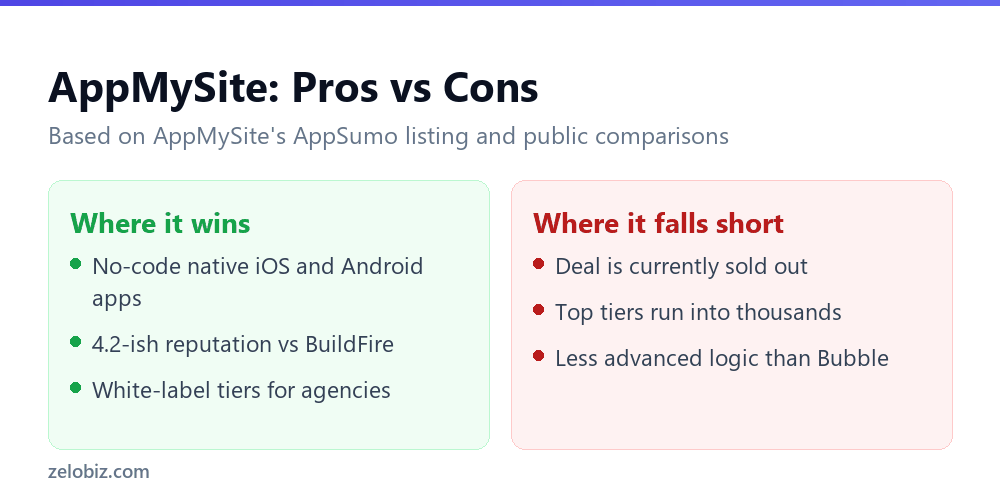
Pros
- Removes the need for custom iOS and Android development for a straightforward website-to-app conversion
- Ten tiers give a genuinely wide range of entry points, from a single small business to a full agency reselling app builds
- Covered by AppSumo’s own vetted guarantee, a stronger backing than several other deals in this review series
- Holds a roughly 4.2 rating on G2, putting it in reasonable standing relative to competitors like BuildFire and Shoutem
Cons
- The AppSumo deal is currently sold out
- Higher tiers run into the thousands of dollars, a serious commitment even as a one-time payment
- Built specifically around converting an existing website, it is a poor fit if you need an app with custom logic, workflows, or a data model that doesn’t map to a website’s existing structure
- More advanced no-code platforms like Bubble offer far deeper app logic customization, at the cost of a steeper learning curve
How AppMySite compares to the alternatives
BuildFire offers more advanced customization and a wider range of integrations than AppMySite, but that flexibility comes with more complexity to learn, and AppMySite specifically markets itself as the simpler, more affordable alternative for the common case of converting an existing site. Shoutem covers a different range of app types, including community and events-focused apps, with its own tiered pricing structure. For a broader comparison, G2 users rate Appy Pie (4.7) and Glide (4.7) as strong alternatives to BuildFire generally, both scoring higher in user satisfaction, though neither is a direct like-for-like replacement for AppMySite’s specific website-conversion focus.
The honest positioning here is that AppMySite is a solid, narrower tool. If your actual need is “turn my existing WordPress site into an app,” it is purpose-built for that. If your need is “build a mobile app with custom functionality that doesn’t already exist as a website,” a general-purpose platform like Bubble or Glide is the better starting point, and AppMySite would be the wrong tool regardless of price.
Who this is actually for
AppMySite fits a small business, blogger, or ecommerce store owner with an existing WordPress or WooCommerce site who wants a companion mobile app without hiring a developer, and an agency that wants to offer app-building as a productized service to its own clients under the white-label tiers. It is a weaker fit for anyone building an app from scratch with custom data models, workflows, or logic that has no existing website equivalent to convert from.
Picking a tier without overbuying
With ten tiers spanning a 30x price range, the temptation on a lifetime deal is to buy more capacity than you need because the discount looks bigger on paper. That’s the wrong way to size this purchase. The number that matters is how many separate apps you actually need to build and maintain, not how good a deal a higher tier looks like relative to its regular price. A single business with one website converting to one app needs Tier 1’s three-app allowance at most, and the jump to Tier 2’s ten apps only makes sense if there’s a real plan for multiple apps, separate apps for different brands, a staging and production version, client work, not just headroom for a hypothetical future need. Agencies are the clearer case for the higher tiers, where the ten, twenty five, or fifty app allowances map directly to a client roster rather than sitting unused.
Maintenance after the app is live
Publishing an app is not a one-time event. Both Apple and Google periodically update their platform requirements, new privacy disclosure rules, updated SDK requirements, changes to how push notifications are handled, and an app that goes untouched for too long risks removal from the store for non-compliance with current guidelines. A no-code builder like AppMySite is meant to handle a lot of that platform-side maintenance automatically as part of the ongoing lifetime access, which is a real advantage over a custom-built native app that would need a developer to manually implement each platform change. It’s still worth confirming, directly with AppMySite, how platform requirement changes get rolled into apps built on the lifetime plan, and whether there’s ever a scenario where an older app needs to be manually rebuilt or resubmitted to stay compliant with current App Store or Google Play policies.
What to check before buying a higher tier
Because the higher tiers run into serious money even at a one-time price, it is worth confirming exactly what “unlimited team collaboration” and “faster app build times” mean in practice before assuming the jump from Tier 4 to a higher agency tier is worth the cost difference. An agency evaluating the white-label tiers should also confirm what ongoing App Store and Google Play developer account fees look like separately from the AppMySite license itself, since publishing an app under your own brand typically still requires your own developer account with each platform, a cost AppMySite’s lifetime price does not cover.
Frequently asked questions
Is the AppMySite AppSumo deal still available?
No. As of this review, the listing shows as sold out, with a notify-me option for when it returns.
Does AppMySite build apps from scratch or only convert existing websites?
It is built primarily around converting an existing website, especially WordPress and WooCommerce sites, into a native app. It is not designed for building custom app logic from scratch the way a platform like Bubble is.
Are App Store and Google Play fees included in the AppMySite price?
No. Publishing an app typically requires your own separate developer account with Apple and Google, which carries its own fees outside of the AppMySite license.
Is AppMySite covered by AppSumo’s own guarantee?
Yes, unlike several other deals in this review series, AppMySite’s listing was covered by AppSumo’s “We Got Your Back” guarantee in addition to the standard 60-day refund window.
How many apps do I actually need before buying a higher tier?
Base the tier choice on a real plan for multiple apps, separate brands, staging versus production, or client work, rather than buying extra headroom just because a higher tier looks like a bigger discount.
Verdict
AppMySite does one specific job well: turning an existing website into a real, installable mobile app without custom development, and it does it at a range of price points wide enough to fit both a small business and a full agency. It is not a general-purpose app builder, and buyers expecting to build something with custom logic from a blank slate should look elsewhere. The deal is sold out as of this review, so the realistic step is watching for it to return and confirming your specific website platform, WordPress, WooCommerce, or otherwise, is fully and currently supported before committing to a higher, agency-priced tier.