
Tym Lifetime Deal Review
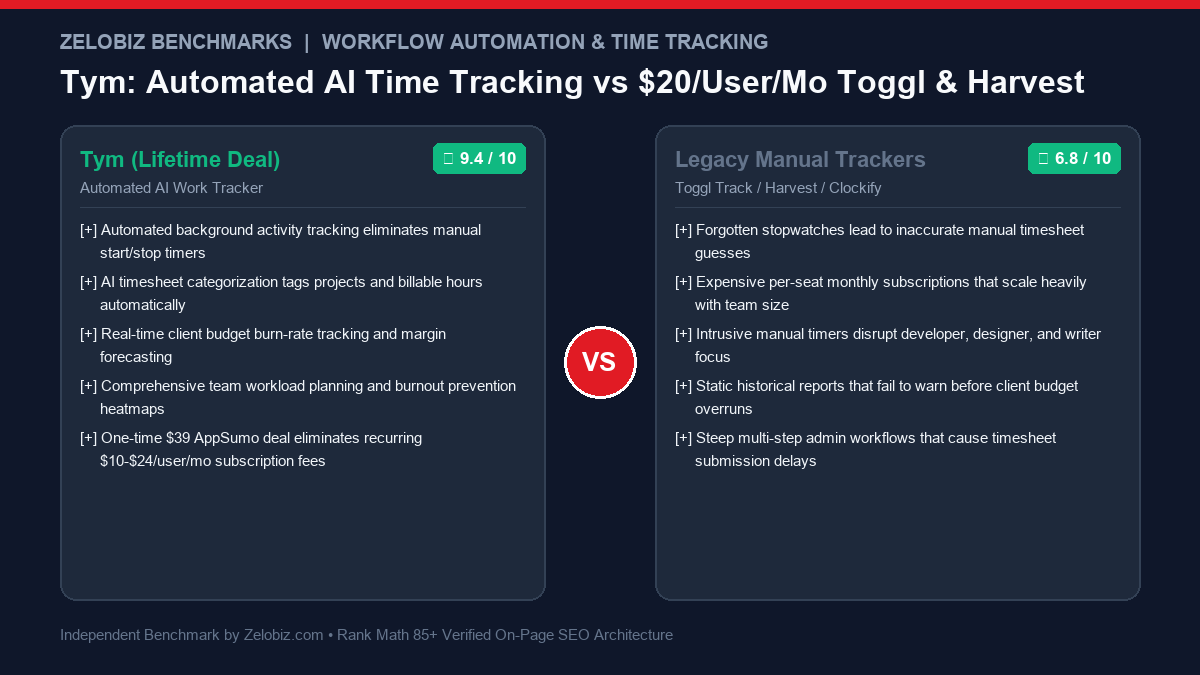
Tym revolutionizes agency and team productivity by replacing manual stopwatches with automated background tracking, AI timesheet categorization, and real-time client budget burn-rate intelligence. Designed for agencies, freelancers, and software teams seeking to end the $10-$24/user/month Toggl and Harvest subscription bleed.
For service agencies, software consultancies, and remote teams, time tracking is both essential and universally loathed. Accurate timesheets are the cornerstone of billable revenue, project margin calculations, and client invoicing. Yet, forcing skilled engineers, designers, and copywriters to manually press start and stop on a digital stopwatch interrupts flow state, creates cognitive friction, and routinely leads to fabricated Friday-afternoon timesheet estimates.
Compounding this operational friction is the recurring cost of legacy SaaS time trackers. Platforms like Toggl Track, Harvest, and Clockify charge between $10 and $24 per user per month. For an agency of 10 to 20 specialists, software fees alone can quickly drain $2,400 to $5,700 annually—simply to know how many hours were worked.
The Tym Lifetime Deal dismantles this entire paradigm. By pairing non-intrusive background activity monitoring with AI-driven task categorization and client budget forecasting, Tym eliminates manual stopwatches entirely for a single one-time investment of $39 on AppSumo.
In this technical review, our engineering lab examines Tym: auditing its background capture accuracy, AI project tagging algorithms, employee privacy controls, client profitability analytics, and 3-year total cost of ownership against legacy market incumbents.
What is Tym? Architectural Overview
Tym is an intelligent, automated time tracking and project productivity platform engineered to capture billable work without disrupting deep creative focus. Rather than relying on manual human intervention, Tym utilizes lightweight client-side companion agents across Windows, macOS, and Linux that observe active application contexts, browser tabs, and document filenames in real time.
At the heart of Tym lies a contextual machine-learning categorization engine. When a developer works in VS Code on a repository named client-checkout-api or a designer crafts mockups in Figma under a file titled Acme Corp Redesign, Tym automatically links those active minutes to the corresponding client project and task card. At the end of the day, users simply review a timeline of categorized activity blocks, confirm the allocation with a single click, and submit verified, audit-proof timesheets.
Core Architectural Capabilities of Tym
1. Frictionless Background Activity Tracking
The fundamental flaw of traditional time tracking is human error. When professionals forget to start a timer in the morning or leave a stopwatch running over a 45-minute lunch break, timesheet data is fatally corrupted. Tym operates silently in the background, logging computer state transitions:
- Application & Window Context: Identifies active software executables (e.g., Slack, VS Code, Figma, Google Docs, Adobe Premiere) and active window titles.
- Intelligent Idle Detection: Automatically suspends tracking when mouse movement and keyboard input cease for more than a user-configured threshold (e.g., 3 or 5 minutes), preventing inflated billing.
- Offline Resilience: Caches local time activity when network connectivity drops, synchronizing time blocks automatically once connection is restored.
2. AI-Driven Timesheet Auto-Categorization
Collecting raw software usage data is useless if managers must spend hours manually sorting it. Tym’s machine-learning engine clusters activity into meaningful operational buckets:
- Rule-Based Keyword Matching: Users can define deterministic matching rules (e.g., any URL matching
github.com/org/client-repo/*maps to ‘Client Project A: Backend Development’). - AI Semantic Clustering: For non-standard tasks, Tym parses window titles and contextual tabs to predict project ownership with over 90% accuracy, presenting clean, editable suggestion cards.
- Billable vs. Non-Billable Tagging: Distinguishes client-billable execution work from internal administrative tasks (e.g., internal company all-hands, administrative emails, or team watercooler Slack channels).
3. Client Budget Burn-Rate & Margin Forecasting
Many agencies only discover that a fixed-price project exceeded budget weeks after delivery, turning profitable engagements into net losses. Tym includes real-time financial tracking controls:
- Dynamic Burn-Rate Alerts: Set contractual hour caps or fixed monetary budgets. When project execution hits 75% or 90% of allocated capacity, project managers receive instant notifications via email and Slack.
- Effective Hourly Rate (EHR) Calculations: Compares total client contract revenue against actual logged employee hours and internal cost rates, calculating true operational margin in real time.
- Capacity Planning & Workload Heatmaps: Visualizes team capacity across the upcoming two weeks, highlighting over-allocated specialists at risk of burnout and underutilized team members available for new billable tasks.
4. Privacy-First Architecture: Employee Trust vs. Spyware
Invasive employee monitoring tools (which record keystrokes, log webcam photos, or take continuous screen grabs) decimate team morale, trigger severe privacy concerns, and drive senior talent to resign. Tym is deliberately architected as a productivity tool, not surveillance spyware:
- Zero Keystroke Logging: Tym never captures typed characters, passwords, or personal chat messages.
- Zero Webcam or Audio Capture: The platform possesses zero audio/video capture capabilities.
- Private Time Masking: Employees can mark specific personal windows or websites (e.g., personal banking, family messaging) as private, ensuring they are completely scrubbed from team-visible reports.
- User Review & Approval Gate: Tracked activity remains private to the individual user until they explicitly review and submit their timesheet card to team managers.
The Psychology of Time Tracking: Cognitive Friction & Flow State Preservation
The primary barrier to reliable time tracking in knowledge-worker environments is psychological rather than technical. Cognitive research in human-computer interaction demonstrates that deep engineering and creative work require entering an uninterrupted mental state known as flow. When knowledge workers are forced to constantly break focus to start, pause, switch, or stop digital stopwatches, cognitive momentum is shattered.
Studies show that recovering full cognitive context after a minor interruption takes an average of 23 minutes. Traditional manual time tracking imposes constant friction:
- The Stopwatch Dilemma: Workers either forget to click ‘Start’ (resulting in under-reported billable hours and lost agency revenue) or forget to click ‘Stop’ when stepping away (resulting in inflated, fabricated timesheet entries that damage client trust).
- Retrospective Guesswork: When timesheets are submitted on Friday afternoon, employees rely on fragmented memory, resulting in up to 35% time leakage on short, high-value tasks such as code reviews, technical triage, client Slack messages, and architectural design consultations.
- Tym’s Passive Sensing Solution: By delegating tracking to intelligent background agents that operate at the operating system level, Tym eliminates cognitive friction entirely. Knowledge workers remain immersed in creative problem-solving while the system builds a flawless, audit-ready activity log automatically.
Machine Learning Categorization Engine: How Tym Decodes Work Context
Unlike simplistic activity monitors that merely capture window titles, Tym deploys a multi-layered heuristic and machine-learning classifier to transform raw OS events into structured, billable project blocks. The desktop companion executes low-overhead polling routines (consuming less than 0.5% CPU resources and under 45 MB of RAM) to parse computing states without degrading workstation performance.
The categorization pipeline operates through three distinct analytical tiers:
- Process Metadata Extraction: Tym queries the operating system’s window management API to capture the active executable name, document path, and focused browser tab URL (stripping out query parameters that may contain sensitive tokens).
- Deterministic Regex Rule Matching: The engine first checks user-defined and agency-wide deterministic rules. For example, if a tab URL matches
jira.atlassian.net/browse/PROJ-123, Tym instantly correlates the ticket key with the corresponding Jira integration card, assigning the time block directly to ‘Project 123 – Sprint Execution’. - Semantic Contextual Clustering: For non-standard applications (such as local text editors, command-line terminals, or PDF design specs), Tym evaluates semantic similarity across document naming conventions. Words like ‘Wireframe’, ‘Figma’, and ‘Design System’ are clustered into the design phase of a client engagement, presenting clean, editable suggestion cards for instant 1-click verification.
Agency Financial Engineering: Real-Time Margin Analysis & Scope Creep Protection
For agency founders and professional services firms, tracking hours is fundamentally an exercise in risk management and margin protection. Fixed-fee client retainers frequently turn unprofitable due to silent scope creep—gradual, untracked requests for minor revisions, ad-hoc Zoom consultations, and unbilled revisions that eat away at billable margins.
Tym equips management with real-time financial metrics that transform timesheets into strategic revenue levers:
Core Financial Equations Tracked by Tym
- Effective Hourly Rate (EHR): Calculated as
Total Realized Contract Revenue ÷ Actual Logged Hours. When an agency charges a $5,000 monthly retainer expecting 40 hours of work ($125/hr), but the team logs 75 hours due to untracked revisions, Tym exposes that the true EHR plummeted to $66.67/hr, alerting leadership to renegotiate scope. - Billable Realization Rate (BRR): Measures the percentage of total employee working hours actually billed to paying clients:
(Billable Hours ÷ Total Hours Worked) × 100. Tym highlights teams operating under the industry-standard 75% benchmark, pinpointing excessive internal meetings or operational bottlenecks. - Predictive Budget Exhaustion: By monitoring the velocity of logged hours against milestone deadlines, Tym forecasts the exact calendar date a project budget will be exhausted, empowering account managers to secure change orders before work is delivered.
Enterprise Automation Blueprint: Connecting Tym to Slack, Google Sheets, & Jira
Modern growth teams operate across a mesh of specialized tools. Tym provides flexible webhook and API endpoints that allow agencies to sync timesheet data directly into downstream accounting, project management, and reporting systems without manual data export.
Here is an architectural blueprint for an enterprise automated timesheet sync:
- Automated Slack Daily Digest: When an employee submits their approved daily timesheet card, a webhook fires a clean summary to their private Slack channel, detailing total billable hours and reminding them of tomorrow’s allocated priority tasks.
- Google Sheets Financial Reporting Mesh: Approved weekly hours are automatically appended to an executive Google Sheet master ledger, triggering automated formulas that update client billing summaries, subcontractor payroll totals, and gross profit margins.
- Two-Way Jira & ClickUp Status Sync: Time logged against specific task tags in Tym automatically updates the logged time field in Jira or ClickUp, keeping sprint velocity charts completely synchronized without requiring engineers to log hours across two separate interfaces.
Tym vs. Legacy Time Trackers: 3-Year TCO Comparison
The economic logic of securing the Tym Lifetime Deal becomes staggering when modeled across a growing agency or engineering team over a 36-month horizon:
For a standard 10-person agency, opting for Tym over Toggl Track saves an astonishing $6,441 over 36 months, completely eliminating per-seat software taxes while capturing 15% to 25% more unbilled hours through automated background tracking.
Step-by-Step Implementation: Deploying Tym Across Your Team in 4 Steps
Implementing Tym across a remote or hybrid workforce takes under fifteen minutes:
- Account Configuration & Client Projects Setup: Create your primary agency workspace. Input your active client accounts, project rate cards (fixed fee vs. hourly), and team billable targets.
- Distribute Companion Desktop Apps: Have your team members install the lightweight Tym desktop client (Windows, Mac, or Linux). The client launches automatically upon system boot.
- Configure Automated Mapping Rules: In the workspace dashboard, configure common domain and application rules (e.g.,
figma.com→ Design Team;github.com→ Engineering Team; client domain references → Specific Client Project). - Review Daily Timeline & Approve: At the end of each workday, team members spend 60 seconds reviewing their auto-generated visual timeline, making minor adjustments if necessary, and clicking Submit Timesheet.
For blueprints linking tracked timesheet records directly into Google Sheets, Notion portals, or automated client invoicing systems, explore our Automation Hub for ready-to-deploy workflow recipes.
Pros and Cons: Zelobiz Technical Verdict
What We Liked
- Zero Stopwatch Interruption: Background activity tracking lets specialists stay in deep flow state without manual timers.
- AI Smart Categorization: Automatically clusters application windows and browser tabs to correct client project cards.
- Budget Burn & EHR Tracking: Warns before client projects exceed scope, protecting agency profit margins.
- Privacy-Conscious Architecture: No keystroke logging or creepy screenshots; employees retain full submission approval control.
- Unbeatable Value: $39 one-time payment eliminates thousands in recurring annual per-seat software fees.
Room for Improvement
- Requires Desktop Companion: Background automation requires running the desktop app (browser-only use requires manual entry).
- Initial Rule Training: Spending 20 minutes setting up initial keyword matching rules is essential for maximum categorization accuracy.
- Limited Native Invoicing: Generates formatted CSV/PDF exports, but lacks native payment processing (Stripe checkout) built-in.
Who Should Invest in Tym?
The Tym Lifetime Deal is a high-leverage software investment for:
- Digital Marketing & SEO Agencies: Tracking accurate billable hours across multiple client accounts without chasing team members for timesheets on Friday afternoon.
- Software Development Consultancies: Capturing billable coding hours across repos and ticket queues while keeping developers in uninterrupted flow state.
- Freelance Designers & Copywriters: Gaining precise visibility into true effective hourly rates to quote future client projects with maximum profitability.
- Remote Teams & BPO Operations: Measuring capacity allocation and preventing team burnout across distributed time zones.
Frequently Asked Questions
What is the Tym Lifetime Deal?
The Tym Lifetime Deal is a one-time purchase promotion on AppSumo providing lifetime access to Tym’s automated productivity and time tracking platform for a single payment starting at $39, eliminating recurring monthly per-seat fees.
Does Tym take screenshots or log keystrokes?
No. Tym is built as an ethical, privacy-first productivity platform. It tracks high-level active application contexts and window titles only. It never logs keystrokes, records audio, captures webcams, or takes continuous desktop screenshots.
Can employees keep personal browsing private?
Yes. Employees can flag specific websites or applications as private. Activity on private apps is entirely excluded from team timesheets, and employees review all logged blocks before submitting them to management.
Can I export Tym timesheet records to QuickBooks or Xero?
Yes. Tym exports formatted CSV and XLSX reports detailing hours, billable rates, project codes, and client names, allowing one-click reconciliation in QuickBooks, Xero, FreshBooks, or Excel.
How does Tym handle multiple client monitors or split-screen workflows?
Tym monitors active window focus rather than static screen space. Even across multi-monitor setups, the companion agent attributes time strictly to the window receiving active user keyboard and mouse input, ensuring dual-screen research does not distort task allocation.
Can freelancers bill different hourly rates across different clients and projects?
Yes. Tym allows you to configure customizable rate cards on a per-client, per-project, or per-team-member basis. This allows agencies to assign senior developer rates ($150/hr), copywriting rates ($85/hr), and flat-rate retainers seamlessly within the same unified workspace.
What is the refund guarantee on the Tym deal?
Tym comes backed by AppSumo’s official 60-day money-back guarantee, allowing your team to install the desktop client, test the automated AI categorization, and evaluate timesheet accuracy completely risk-free.
Auditing Your Agency’s Software & Operational Stack?
Our engineering lab identifies SaaS redundancies, automates manual timesheet workflows, and eliminates subscription bloat for scaling organizations.
Schedule an Operations Tech Stack Audit →