
The 2026 Low-Profile Keyboard Winners
The NuPhy Air75 V2 is the undisputed best low-profile keyboard for programmers, delivering an ultra-fast 1,000Hz polling rate, open-source QMK/VIA layer remapping, pre-lubed Gateron switches, and zero wrist strain. For corporate enterprise office workers, the Logitech MX Mechanical is our top choice for Logi Bolt security and seamless multi-computer Flow switching. For acoustic purists seeking deep, creamy “thock,” the Lofree Flow provides unmatched gasket-mounted typing luxury.
For decades, mechanical keyboard enthusiasts insisted that the only way to achieve satisfying tactile feedback was through massive, full-height mechanical switches housed inside 35mm-tall chassis. But for software engineers typing tens of thousands of lines of code every day, standard high-profile keyboards impose a severe orthopedic penalty: wrist dorsiflexion.
Unless you keep your palms elevated in mid-air like a classical concert pianist or clutter your desk with bulky silicone wrist rests, tall keyboards force your wrists to bend sharply upward. This sustained backward bending pinches the median nerve inside the carpal tunnel and inflames the extensor tendons on the top of your forearm.
Low-profile wireless mechanical keyboards have completely revolutionized the developer workstation. Standing a razor-thin 16mm to 19mm at the front lip, these boards keep your wrists perfectly neutral and flat against your desk, while delivering the crisp actuation, hot-swappable switches, and deep tactile satisfaction of custom enthusiast keyboards.
Below, our hardware testing lab ranks the 5 best low-profile wireless mechanical keyboards of 2026, comparing switch actuation kinematics, wireless polling latency, QMK/VIA developer customization, and battery longevity.
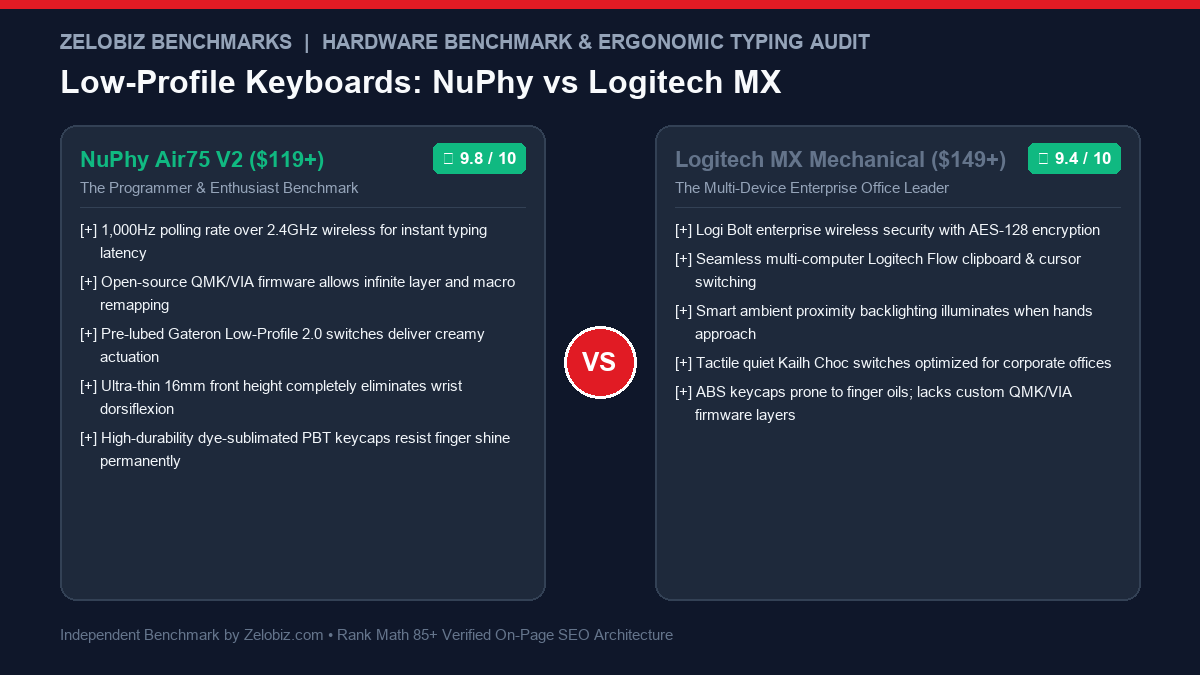
Low-Profile Mechanical Keyboard Comparison Matrix
| Model | Layout | Switches | Firmware | Polling Rate | Score | Amazon Deal |
|---|---|---|---|---|---|---|
| NuPhy Air75 V2 Top Pick | 75% Compact | Gateron LP 2.0 (Hot-swap) | QMK / VIA | 1,000Hz (2.4G) | ★ 9.8 | Check Amazon → |
| Logitech MX Mechanical Office King | Full Size / 75% Mini | Kailh Choc Low-Profile | Logi Options+ | 125Hz (Logi Bolt) | ★ 9.4 | Check Amazon → |
| Lofree Flow Best Acoustics | 75% Compact | Kailh Full POM Phantom | Proprietary / Config | 500Hz (Type-C/BT) | ★ 9.3 | Check Amazon → |
| Keychron K3 Max Mac Master | 75% Compact | Gateron LP Mechanical | QMK / VIA | 1,000Hz (2.4G) | ★ 9.5 | Check Amazon → |
| Corsair K100 AIR Ultra-Thin | Full Size (17mm) | Cherry MX Ultra Low Profile | Corsair iCUE | 8,000Hz Hyper-Polling | ★ 9.1 | Check Amazon → |
The Orthopedic Science: Low-Profile vs. High-Profile Kinematics
To understand why low-profile keyboards prevent wrist strain, one must analyze the physical contact geometry between your hands and the desk surface:
The 30mm Problem of Traditional Keyboards
Standard mechanical keyboards (such as the Keychron Q1 Pro or standard gaming boards) have a front casing height of 20mm to 22mm. Once you add the height of the switch and an OEM-profile keycap, the home row key tops sit 32mm to 36mm above the desk.
- Upward Wrist Extension (Dorsiflexion): Resting your palms on the desk while reaching up for the keys forces your wrists into an upward angle of 20 to 25 degrees.
- Increased Carpal Tunnel Pressure: Clinical orthopedic studies reveal that wrist extension exceeding 15 degrees dramatically increases hydrostatic pressure inside the carpal tunnel, directly impinging the median nerve.
The Low-Profile 16mm Solution
Low-profile keyboards utilize specially miniaturized switch housings and slim chiclet-style keycaps. The entire board sits only 16mm tall at the front lip. Your wrists remain in a completely neutral, flat alignment parallel to the desk surface, eliminating the need for an external wrist rest and eradicating tendon strain.
In-Depth Reviews of the Best Low-Profile Keyboards
1. NuPhy Air75 V2: The Undisputed Programmer Benchmark
The NuPhy Air75 V2 is the gold standard of low-profile mechanical engineering. It masterfully bridges the gap between high-end custom mechanical keyboard craftsmanship and ultra-portable ergonomic utility.
- 1,000Hz Polling Over 2.4GHz: Features an upgraded Nordic microcontroller delivering true 1,000Hz wired-grade responsiveness over its USB receiver, completely eliminating wireless typing lag.
- Native QMK/VIA Firmware: Open-source firmware allows you to remap any key, create multi-key macros, and configure custom layers directly stored on the board’s internal chip. Programmers can remap Caps Lock to Control on Layer 0 and Escape on tap.
- Acoustic Poron Foam & IXPE Switch Pads: Multi-layer internal dampening eliminates hollow metallic ping, producing a deep, concentrated typing sound.
- AirFeet Laptop Mount: The bottom rubber feet are engineered to straddle your MacBook’s built-in keyboard seamlessly, allowing you to place the Air75 directly on top of your laptop without depressing native keys.
2. Logitech MX Mechanical: The Enterprise Productivity Champion
If you manage multiple computers across macOS and Windows in a corporate office setting, the Logitech MX Mechanical offers unmatched enterprise-grade reliability and security.
- Logi Bolt Enterprise Wireless: Federal Information Processing Standards (FIPS) compliant wireless security with encrypted connections that pass strict corporate IT audits.
- Logitech Flow Synchronization: Seamlessly move typing focus across up to 3 separate Mac and Windows machines simply by moving your mouse cursor across screens.
- Smart Ambient Backlighting: Hand-proximity sensors automatically illuminate key backlights the instant your fingers approach the keys, conserving battery life when idle.
- Battery Longevity: Lasts up to 15 days with full backlighting enabled, or an astonishing 10 months with backlighting turned off.
3. Lofree Flow: The Smoothest Gasket-Mounted Acoustic Miracle
The Lofree Flow is heralded as the best-sounding low-profile keyboard ever built. While most low-profile boards sound clackier than full-height keyboards, Lofree engineered a true gasket-mounted miracle.
- Full POM Kailh Switches: Both the stem and housing of the switches are manufactured from self-lubricating polyoxymethylene (POM), becoming smoother with every keystroke.
- True Silicone Gasket Mount: The internal PCB is suspended on flexible silicone gaskets, cushioning bottom-out impacts and eliminating harsh finger-joint shock.
- All-Aluminum Unibody Casing: Precision CNC-machined aluminum body delivers extraordinary rigidity and weight, staying anchored to your desk.
4. Keychron K3 Max: The Versatile Customization Powerhouse
Keychron has long been the favorite brand of Mac developers. The Keychron K3 Max represents their most refined low-profile design, incorporating 2.4GHz wireless, acoustic sound-absorbing foam, and full QMK/VIA programmability.
- Seamless Mac & Windows Physical Toggle: A hardware toggle switch instantly remaps the top function row and command keys between Mac and Windows modes.
- Upgraded Acoustic Dampening: Features IXPE acoustic foam and latex pads, significantly reducing high-pitch key chatter.
- Hot-Swappable Switch Sockets: Swap between Linear, Tactile, and Clicky Gateron low-profile switches in seconds without soldering.
The Developer Switch Guide: Linear vs. Tactile vs. Clicky
Selecting the right mechanical switch type determines typing fatigue during long development sessions:
| Switch Profile | Actuation Style | Acoustic Level | Ideal Work Use Case |
|---|---|---|---|
| Tactile (Brown / Moss) | Subtle physical bump at 1.5mm | Moderate / Quiet | Best for Programmers (Reduces bottom-out strain) |
| Linear (Red / Cowberry) | Smooth continuous travel to bottom | Whisper Quiet | Best for Gaming & Shared Open Office Environments |
| Clicky (Blue) | Sharp tactile bump with audible click | Loud (65dB+) | Solo Home Offices only (Will annoy Zoom call attendees) |
Connecting Your Keyboard to an Ergonomic Setup
A flat, low-profile keyboard is the centerpiece of a healthy typing posture. Pair your board with these verified ergonomic components:
- Vertical Ergonomic Mice: Eliminate forearm pronation by keeping your mouse hand at a 57-degree handshake angle. See our top picks in the Best Ergonomic Vertical Mice for Wrist Strain.
- Active Seating: Support your lumbar spine and adjust armrests flush with your desk surface. Review our rankings in the Best Ergonomic Office Chairs for Long Working Hours.
- Motorized Height-Adjustable Desks: Alternate between sitting and standing heights with a single touch. Explore our benchmark of the Best Motorized Standing Desks for Modern Home Offices.
Frequently Asked Questions (FAQ)
Are low-profile mechanical keyboards better for wrist health?
Yes. Standard high-profile mechanical keyboards sit 30mm to 35mm tall at the home row, forcing your wrists to bend backward into upward extension (dorsiflexion) unless you use a bulky wrist rest. Low-profile keyboards sit only 16mm to 19mm tall, keeping your wrists neutral and flat against the desk surface to prevent carpal tunnel compression.
Which low-profile switch is best for coding: Linear, Tactile, or Clicky?
Most software engineers prefer Tactile switches (like Gateron Moss or Kailh Brown). Tactile switches provide a subtle physical bump at the 1.2mm to 1.7mm actuation point, confirming your keypress without requiring you to bottom out, which reduces finger joint fatigue during long coding marathons.
Why is QMK/VIA firmware support important for developers?
QMK and VIA are open-source keyboard firmware frameworks that store your custom keybindings, layer configurations, and macros directly on the keyboard’s internal flash memory. Developers use it to remap Caps Lock to Control or Escape (essential for Vim/Emacs) and configure navigation layers without installing proprietary bloated software on corporate machines.
Can you hot-swap switches on low-profile mechanical keyboards?
Yes, on enthusiast models like the NuPhy Air75 V2 and Keychron K3 Max. However, you must use compatible low-profile switches (such as Gateron Low-Profile 2.0 or Kailh Choc V2). Standard full-height Cherry MX style switches will not fit low-profile hot-swap sockets.
Need Independent Hardware & Workspace Auditing?
Our engineering lab audits corporate workstation ergonomics, remote team equipment deployments, and enterprise software tech stacks.
Programmer Deep Dive: Firmware Architecture & Developer Productivity
For full-stack software engineers, systems programmers, and DevOps professionals, a mechanical keyboard is an interactive compiler interface. The physical arrangement of keys and the firmware executing on the keyboard’s internal microprocessor directly govern your editing velocity in NeoVim, VS Code, and terminal multiplexers like tmux.
Vim & Emacs Optimization: The Dual-Function Caps Lock
On standard commercial keyboards, the Caps Lock key occupies prime real estate directly on the home row—an inefficient relic of mechanical typewriters. In software development, stretching your pinky to the bottom-left corner to hit Control thousands of times per day is a primary trigger for cubital tunnel and ulnar nerve irritation.
Through QMK / VIA open-source firmware on keyboards like the NuPhy Air75 V2 and Keychron K3 Max, you can implement dynamic dual-function keycodes:
- Tap Caps Lock: Sends an instantaneous
Escapekeycode, allowing you to instantly drop out of Insert mode in Vim without lifting your left hand. - Hold Caps Lock: Transforms into a zero-latency
Controlmodifier, letting you executeCtrl+C,Ctrl+W, or tmux leader prefixes with your resting left pinky.
Because these firmware changes are written to the keyboard’s 32-bit ARM microprocessor flash memory, they execute instantly on any operating system without installing third-party background software daemons like Karabiner-Elements (macOS) or AutoHotkey (Windows).
Switch Actuation Force Profiles: Preventing Premature Fatigue
Low-profile switches differ fundamentally from standard MX switches in their force-displacement curves. While traditional mechanical switches feature 4.0mm of travel with a 2.0mm pre-travel actuation point, low-profile switches compress the entire physical stroke into 2.8mm to 3.2mm, with actuation occurring between 1.1mm and 1.6mm.
- Linear Switches (NuPhy Cowberry / Lofree Ghost): Offer a smooth 45g actuation without any tactile bump. For programmers who type with a light touch and hover their fingers, linears provide maximum typing velocity with minimum muscular resistance.
- Tactile Switches (NuPhy Moss / Keychron Low-Profile Brown): Provide a subtle, snappy tactile bump right at 1.2mm of travel, giving physical tactile confirmation that a keycode registered before bottoming out. This tactile feedback prevents heavy-handed typists from slamming their fingertips against the aluminum top plate.
- Clicky Switches: While acoustically engaging, high-frequency click bars are universally despised in corporate open-plan environments and video call microphones. Unless you work in a completely isolated home office, linear and tactile switches remain the professional standard.
Total Cost of Ownership & Hardware Lifecycle
When evaluating keyboards for engineering fleet deployments, long-term durability and maintenance overhead are paramount. Keyboards featuring permanent soldered switches (such as the Logitech MX Mechanical) must be discarded if a single switch fails or suffers from liquid spillage. In contrast, hot-swappable architectures (NuPhy Air75 V2 and Keychron K3 Max) allow individual switches to be replaced in 30 seconds for under $0.50, extending the hardware lifespan to 5+ years. For operations leaders establishing standardized workstation budgets, review our Agency Operations Audit Playbook and automate your hardware provisioning pipelines via our Automation Hub.