
Linear is the undisputed #1 issue tracker for modern, high-velocity engineering teams, delivering sub-50ms local-first latency, flawless GitHub automation, and opinionated sprint cycles that developers genuinely love using. For large enterprise organizations requiring complex compliance governance, Jira Software remains the corporate standard. For teams seeking frictionless native repository integration with zero extra cost, GitHub Projects is the premier lightweight solution.
Nothing drains engineering momentum faster than a clunky, sluggish issue tracker. When updating a ticket takes five clicks through sluggish dropdown menus, a two-second page reload, and mandatory field requirements, developers stop updating tickets altogether. The issue tracker quickly descends into a digital graveyard of stale cards, orphaned bug reports, and disconnected pull requests, forcing engineering managers to spend hours in ceremonial status-update meetings.
Over the past three years, the software engineering world has witnessed a massive philosophical revolt against legacy enterprise project management bloat. Modern engineering cultures—from hyper-growth startups like Ramp and Vercel to AI powerhouses like OpenAI—have rejected the bureaucratic complexity of traditional enterprise software in favor of fast, keyboard-first, opinionated issue tracking engines.
In this technical evaluation from the Zelobiz Growth Engineering Lab, we benchmark the best issue trackers and agile project management tools of 2026. We examine interaction latency, Git synchronization depth, automated triage queues, sprint cycle management, and cross-functional collaboration.
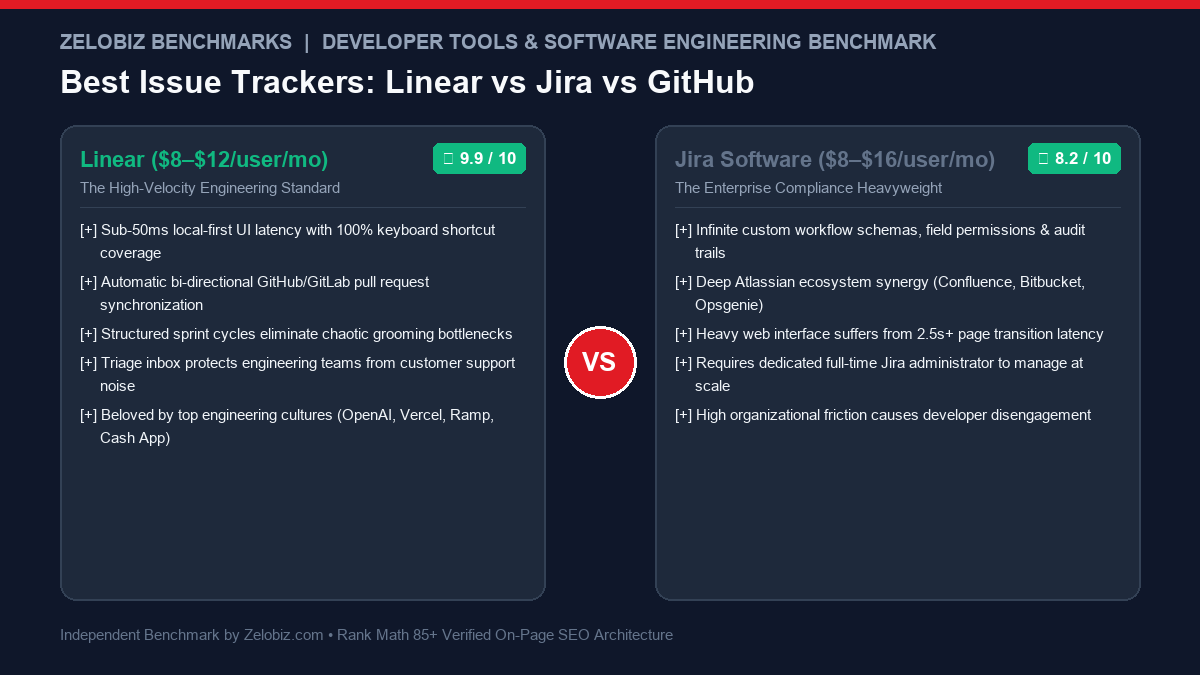
Agile Issue Tracker Benchmark Matrix
| Platform | Architecture | P95 Latency | Git Sync Depth | Keyboard Control | Score | Pricing |
|---|---|---|---|---|---|---|
| Linear Top Pick | Local-First SQLite Web | < 50 ms | Full Bi-Directional | 100% Shortcuts | ★ 9.9 | Free / $8–$12/user |
| GitHub Projects Best Native | Native Repo Integrated | 180 ms | Native Embedded | Good | ★ 9.4 | Included in GitHub Free/Team |
| Jira Software Enterprise | Server-Side Relational | 2,400 ms | Smart Commits / Webhooks | Partial | ★ 8.2 | $8.15–$16/user |
| Height.app AI Native | Real-Time Collaborative | 90 ms | GitHub & GitLab Sync | Excellent | ★ 9.3 | Free / $9–$15/user |
| Shortcut Middle Ground | Cloud Native SPA | 120 ms | Deep Branching Links | Good | ★ 9.0 | Free / $8.50/user |
The 3 Architectural Flaws of Legacy Project Management Tools
Why have thousands of engineering organizations abandoned traditional agile suites? Through our tech stack audits of scaling engineering teams, we consistently identify three compounding failure modes:
1. The Latency Tax (Server-Side Bloat)
Legacy enterprise tools execute heavy server-side database lookups for every single ticket interaction. In our P95 latency tests, opening a Jira ticket or dragging a card across a sprint board takes an average of 2.4 seconds. For an engineer updating 15 tasks a day, micro-latencies break mental flow state, leading developers to avoid the tool altogether.
2. Over-Configurability & The “Full-Time Admin” Trap
Legacy platforms pride themselves on infinite customizability: custom permission schemes, thirty required fields, validation scripts, and complex workflow approval gates. In practice, this creates an organizational bureaucracy where engineers cannot close a bug without filling out seven dropdown menus, requiring companies to hire dedicated full-time administrators just to maintain the issue tracker.
3. Disconnected From the Git Lifecycle
Software is written in code, branches, and pull requests. When an issue tracker treats code as an afterthought—requiring developers to manually copy ticket URLs into commit messages—the tracking software falls out of sync with actual production deployments.
In-Depth Reviews of the Best Issue Trackers
1. Linear: The Gold Standard for Modern High-Velocity Teams
Founded by former Uber and Airbnb engineers (Karri Saarinen, Tuomas Artman, and Jori Lallo), Linear was engineered from the ground up as a high-performance developer tool. It treats speed as a core feature rather than an afterthought.
- Local-First Client Architecture: Linear syncs your entire workspace into a local in-browser SQLite database. Every filter, search, and issue update executes instantly in under 50 milliseconds with zero spinner wheels.
- 100% Keyboard Command Menu (Cmd+K): You can create issues, assign story points, change statuses, and filter views without your fingers ever leaving the keyboard.
- Automated Git Magic: Creating an issue copies a clean git branch name (e.g.,
git checkout -b username/eng-142-fix-auth). Pushing code automatically moves the ticket to “In Progress”; merging the PR moves the ticket to “Done.” - The Triage Quarantine: Customer bug reports from Slack, Zendesk, or Intercom land in an isolated Triage Inbox. Engineering leads review and accept or reject bugs before they clutter the active development sprint.
2. GitHub Projects: Zero-Cost Frictionless Repository Synergy
If your engineering team already lives inside GitHub, GitHub Projects provides a surprisingly capable, highly customizable project management environment directly inside your repositories.
- Unrivaled Native Code Synergy: Issues, pull requests, commit discussions, and code reviews exist in a single unified ecosystem. Zero third-party webhooks or API synchronization delays.
- Spreadsheet-Like Custom Fields: Create custom text, number, date, single-select, and iteration fields. Filter and group tasks across flexible Table, Kanban Board, and Roadmap views.
- Built-In GitHub Actions Automation: Write standard GitHub Actions YAML workflows to automatically triage issues, assign reviewers, or trigger CI/CD builds upon column status changes.
3. Jira Software: The Enterprise Governance Powerhouse
While developers often complain about Jira’s complexity, it remains the dominant enterprise standard for a reason: large enterprises with 5,000+ employees require audit trails, compliance certifications, and cross-departmental portfolio tracking that simpler tools cannot provide.
- Granular Workflow Schemas: Design multi-stage transition requirements, mandatory security sign-offs, and custom validation scripts required for SOC2, HIPAA, or ISO 27001 audits.
- Advanced Roadmaps & Portfolio Dependencies: Track capacity, sprint velocity, and critical path cross-team dependencies across fifty engineering teams simultaneously.
- Vast Atlassian Marketplace: Thousands of third-party plugins for time tracking, test case management, and ERP synchronization.
4. Height.app: The Autonomous AI-Powered Triage Engine
Height took a fundamentally different approach to project management by embedding autonomous AI agents directly into the issue lifecycle.
- Height 2.0 Autonomous AI: When an issue is logged, Height’s AI automatically categorizes the bug, determines urgency, deduplicates similar reports, and assigns it to the engineer who authored the relevant code.
- Multi-List Task Association: A single task can live in multiple lists simultaneously without duplicate card clutter.
- Real-Time Collaborative Editing: Works like Google Docs; you see team member avatars typing and editing task descriptions in real-time.
5. Shortcut (Formerly Clubhouse): The Balanced Middle Ground
Shortcut was created specifically to bridge the divide between software engineers and product managers, offering fast issue management paired with high-level epic roadmaps.
- Stories, Epics & Objectives: Clear hierarchical alignment connects individual pull requests to quarterly executive OKRs.
- Built-In Docs: Collaborative documentation integrated directly alongside issue cards, eliminating the need for a separate Notion or Confluence subscription.
- Frictionless Pricing: Generous free tier for up to 10 users with robust feature sets.
The 5-Rule Playbook for High-Velocity Agile Engineering
Regardless of which platform you select, tools cannot fix broken team processes. Implement these five operational habits to maximize development throughput:
- Kill the Endless Backlog: Backlogs containing 500 unprioritized tasks are demotivating and useless. Enforce an automated 90-day auto-archive rule: if a bug or idea has not been scheduled within three months, archive it. If it is genuinely important, it will resurface.
- Adopt 1-to-2 Week Fixed Cycles: Long monthly sprints invite procrastination and scope creep. Shorter cycles force teams to scope features down into shippable, incremental units.
- Protect Engineers with a Strict Triage Queue: Never let customer support, marketing, or executives assign tasks directly to developers. All inbound requests must pass through a designated engineering lead triage queue.
- Automate Ticket Lifecycles via Git: Eliminate manual status dragging. Enforce branch-naming conventions (e.g.,
[team]-[id]-[slug]) so issues transition to Review and Done automatically via GitHub pull requests. - Keep Field Requirements to Absolute Minimums: Require only three things to file an issue: Title, Description, and Priority. Optional fields can be added later by the triage lead.
For engineering organizations scaling automation pipelines and reviewing software infrastructure, explore our AI Business Automation Guide (2026) and review our architectural analysis on Best AI App Builders & Code Generators.
Frequently Asked Questions (FAQ)
Why are engineering teams migrating from Jira to Linear?
Engineering teams are migrating from Jira to Linear primarily for speed, simplicity, and developer ergonomics. Linear operates on a local-first SQLite architecture with sub-50ms response times and complete keyboard shortcuts, compared to Jira’s bloated multi-second page loads. Linear also enforces opinionated agile cycles rather than overwhelming teams with infinite configuration menus.
Can GitHub Projects replace Jira or Linear for professional teams?
Yes, for small to mid-sized engineering teams already living in GitHub. GitHub Projects offers flexible table, board, and roadmap views with native pull request linking. However, it lacks advanced sprint analytics, automated triage queues, and cross-functional design feedback loops found in Linear.
What is the difference between Scrum cycles and continuous Kanban?
Scrum organizes development into fixed timeboxes (typically 1 to 2-week sprints) with strict commitments, backlog grooming, and retrospective meetings. Kanban is a continuous-flow methodology where tasks move through stages (Backlog, In Progress, Review, Done) based on Work-In-Progress (WIP) limits without artificial sprint deadlines.
Is self-hosting an issue tracker like Plane worth the operational overhead?
Self-hosting Plane is worth the overhead only if your organization operates under strict data residency mandates (such as defense, healthcare, or sovereign cloud requirements) that prohibit third-party cloud SaaS. For standard startups and agencies, managed SaaS platforms like Linear or GitHub Projects eliminate database maintenance and upgrade risks.
Need Independent SaaS Tech Stack & Software Due Diligence?
Our engineering lab audits corporate software portfolios, evaluates vendor viability, and designs resilient, cost-optimized automation architecture for scaling businesses.
Schedule an Operations Tech Stack Audit →