
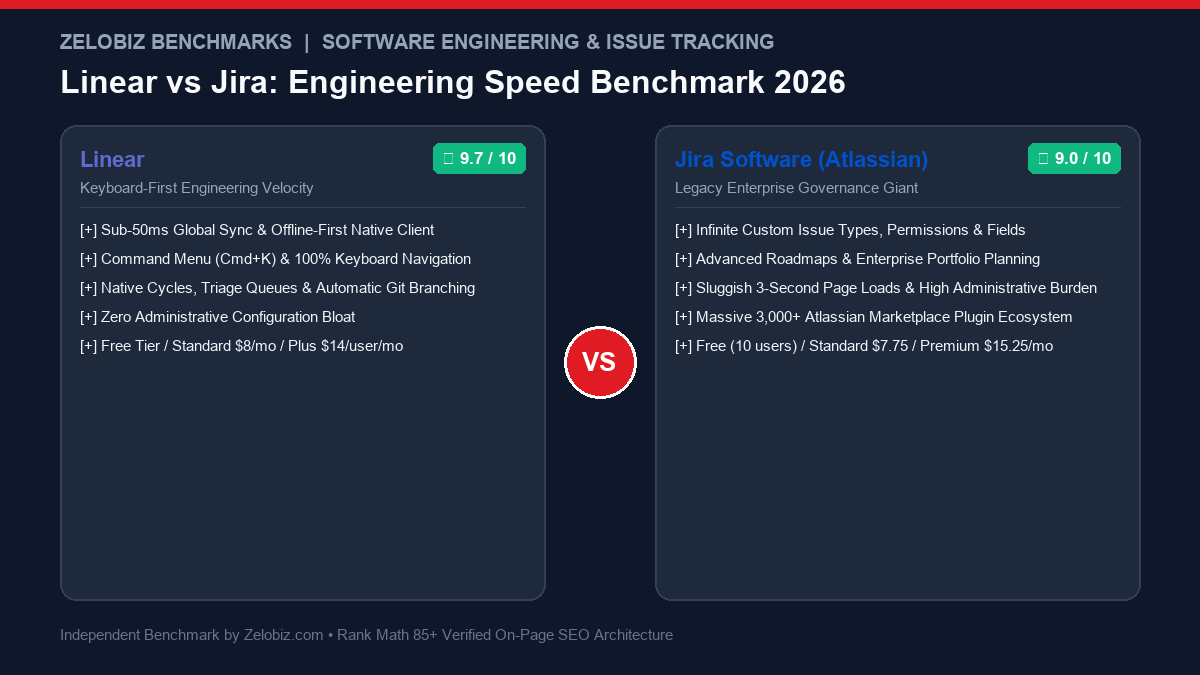
Figure 1.0: Real-world engineering benchmark comparing Linear vs Jira across interaction latency, keyboard-first navigation, Git pull request automations, and administrative maintenance overhead.
Executive Summary: The Great Engineering Revolt Against Atlassian
For more than two decades, Jira Software was the undisputed default operating system for software development. Created by Atlassian in 2002, Jira became ubiquitous by catering to every conceivable corporate requirement: custom workflows, multi-tiered permission matrices, compliance audit trails, and Scrum estimation ceremonies. However, over 20 years of feature accretion, Jira mutated into the very antithesis of agile software engineering—a sluggish, administrative monolith where engineers spend more time updating tickets than shipping production code.
Linear was engineered as an uncompromising antidote to Atlassian bloat. Built on an offline-first architecture with sub-50 millisecond sync, total keyboard navigation (Cmd+K), and opinionated development cycles, Linear treats issue tracking as a high-performance developer tool rather than a corporate surveillance suite. Today, thousands of top-tier engineering organizations—from OpenAI and Vercel to Cash App and Substack—have migrated their entire engineering velocity onto Linear.
The Zelobiz Verdict: Choose Linear if you lead a modern product engineering team, venture-backed startup, or high-velocity agency where developer happiness, instantaneous load times, and frictionless GitHub workflows translate directly into shipping software faster. Choose Jira only if you are an enterprise conglomerate with 1,000+ employees governed by rigid compliance frameworks (FedRAMP, HIPAA), complex multi-departmental approval chains, or deeply entrenched Atlassian ecosystem tooling.
Side-by-Side Comparison: Linear vs Jira
To quantify how both platforms impact real-world software velocity, we evaluated their core technical parameters across interaction latency, developer ergonomics, and governance overhead.
1. The “Latency Tax”: How Jira Destroys Flow State
Software development is a cognitive discipline where deep focus is the single most valuable asset. When an engineer finishes writing a unit test, context-switching to an issue tracker should take less than 5 seconds.
In Jira Cloud, opening a ticket initiates a cascade of API requests, custom field validators, and third-party marketplace plugin scripts. A standard issue view takes between 2.0 and 4.5 seconds to render. Updating a status dropdown or adding a comment triggers additional spinners. This cumulative delay is known as the Latency Tax: it creates cognitive micro-interruptions that pull engineers out of flow state.
Linear operates at 60 frames per second. Built with an offline-first local SQLite database on desktop and web, every interaction—filtering 2,000 issues, assigning a teammate, changing a priority tag—happens in under 50 milliseconds. Background sync workers reconcile changes across your team instantaneously, meaning the interface never blocks or makes you wait for a server spinner.
2. Developer Ergonomics: The Cmd+K Superpower
In Linear, developers rarely need to lift their hands from the keyboard. The entire interface is driven by hotkeys and a universal command menu (Cmd+K or Ctrl+K):
Linear Keyboard Ergonomics in Practice:
- C: Instantly create a new issue from anywhere in the application.
- Cmd + Shift + .: Copy git branch name (e.g.,
git checkout -b mamun/lin-340-stripe-webhook). - P: Change issue priority (Urgent, High, Medium, Low).
- A: Assign issue to a teammate without opening a modal.
- Spacebar: Peek issue details in a sleek sidebar without navigating away from the sprint board.
3. Cycles vs Scrum Sprints: The Death of Punitive Point Estimation
Traditional Scrum in Jira often descends into a bureaucratic theater of story point poker, sprint retrospectives dissecting “burndown charts,” and managers chastising developers because an arbitrary velocity metric dropped 5%.
Linear fundamentally rejects this toxic cycle through Cycles:
- Automated Timeboxes: Cycles run continuously (e.g., every 2 weeks). When a cycle ends, uncompleted tasks automatically rollover into the next cycle without requiring manual sprint closure ceremonies or generating punitive “incomplete sprint” warnings.
- Triage Queues: Linear introduces a dedicated Triage inbox for customer bug reports and non-urgent requests. Senior engineers can review, accept, snooze, or decline issues before they ever clutter the team’s active sprint board.
- Project Initiatives & Milestones: High-level product roadmaps are tied directly to actual commit activity, giving leadership transparent progress bars based on shipped code rather than optimistic status checkboxes.
4. Where Jira Still Wins: Enterprise Bureaucracy and Compliance
Despite Linear’s overwhelming developer popularity, Jira remains deeply entrenched in specific enterprise environments for valid organizational reasons:
- Custom Permission Schemes: In Jira, you can configure a rule where Contractor Group B can view issues in Project X but cannot edit the description field if the ticket is in “Security Review” state. Linear offers clean team-level permissions, but deliberately avoids this level of micro-granular complexity.
- The Atlassian Suite Integration: If an organization relies heavily on Confluence for corporate knowledge, Jira Service Management for ITIL helpdesk ticketing, and Bitbucket for hosting, Jira serves as the central administrative hub.
- Marketplace Plugin Ecosystem: With over 3,000 apps in the Atlassian Marketplace, Jira can integrate with legacy ERPs, SAP, Salesforce, and bespoke enterprise systems that Linear does not natively support.
5. Strategic Migration Framework
When deciding whether to migrate your organization, use this operational checklist:
To audit total operational software costs across your development and project management subscriptions, explore our SaaS Cost Calculator.
Frequently Asked Questions (FAQ)
Why are engineering teams migrating from Jira to Linear in 2026?
Engineering teams are abandoning Jira for Linear primarily due to speed and developer ergonomics. Linear operates with sub-50ms interaction latency, keyboard-first navigation (Cmd+K), and opinionated development cycles. Jira has accumulated decades of configuration bloat, custom field overhead, and slow 2-to-4 second page loads that constantly break developers’ flow state.
Can Linear handle complex enterprise sprint planning and roadmaps?
Yes. Linear handles sprint planning through ‘Cycles’ (automated non-punitive timeboxes) and multi-team roadmaps through ‘Projects’ and ‘Initiatives’. However, it intentionally rejects Jira’s rigid story point estimation ceremonies and micro-management metrics in favor of automated progress tracking.
How does Git integration compare between Linear and Jira?
Linear’s GitHub and GitLab integration is best-in-class. When an engineer clicks an issue, Linear copies a git branch name formatted with the issue key (e.g., `git checkout -b mamun/lin-402-auth-fix`). Creating a pull request automatically links the issue, drafting PR descriptions, moving cards to ‘In Review’, and auto-closing tickets upon merge.
When does Jira Software remain the better choice?
Jira remains necessary for legacy Fortune 500 enterprises with strict compliance mandates (HIPAA, FedRAMP), complex cross-departmental approval chains, bespoke security permission schemes, and organizations deeply tied into Atlassian Confluence, Jira Service Management, and Bitbucket.
How does pricing compare between Linear and Jira?
Linear offers a free plan (up to 250 active issues), followed by Standard ($8/user/month) and Plus ($14/user/month). Jira offers a free plan (up to 10 users), followed by Standard ($7.75/user/month) and Premium ($15.25/user/month). Total costs are comparable, but Linear eliminates the need for dedicated full-time Jira administrators.
Accelerate Your Engineering Velocity with Zelobiz
Ready to eliminate project management friction, automate development pipelines, and scale shipping speed across your engineering squad?
Book Your Free Engineering Audit →