
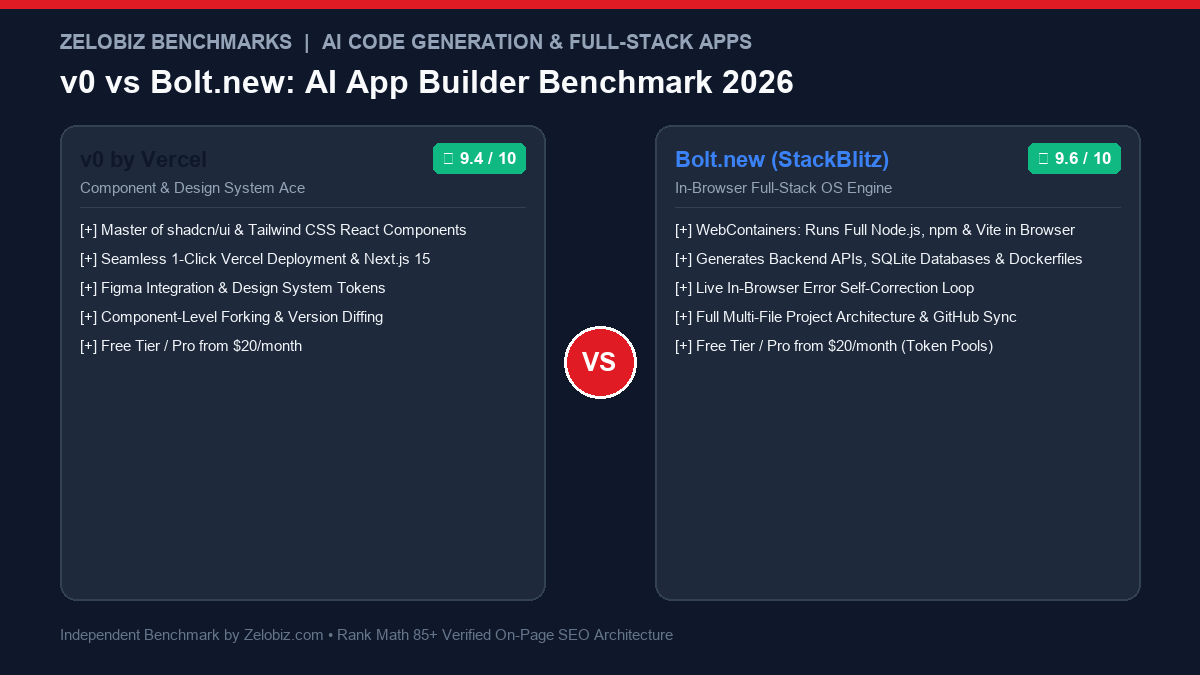
Figure 1.0: Real-world engineering benchmark comparing v0 by Vercel vs Bolt.new across runtime environments, full-stack npm execution, UI component aesthetics, and self-healing debug loops.
Executive Summary: The Dawn of Autonomous In-Browser Software Construction
Software development has reached a historic inflection point. For decades, building a modern web application demanded hours of manual scaffolding: configuring bundlers (Vite/Webpack), wrestling with Node version managers, setting up TypeScript configs, installing UI libraries, and writing boilerplate CRUD endpoints. Today, AI app builders allow founders and engineers to manifest fully functioning web applications from single natural language prompts in under two minutes.
In this arena, two platforms dominate modern discourse: v0 by Vercel and Bolt.new by StackBlitz. While both promise to turn ideas into code, their architectural philosophies are radically distinct: v0 is a masterclass in frontend UI craftsmanship—deeply integrated with Next.js 15, Tailwind CSS, and shadcn/ui to produce production-grade design systems. Bolt.new is an autonomous full-stack operating system—leveraging StackBlitz WebContainers to run a complete Node.js environment, install npm packages, spin up backend servers, and fix terminal runtime errors in real time directly inside your browser.
The Zelobiz Verdict: Choose Bolt.new if you need to build a complete, functional prototype or MVP from scratch with backend routing, database connectivity, and full multi-file directory structures without touching a local terminal. Choose v0 by Vercel if you already have an existing Next.js codebase and need world-class, accessible, perfectly styled React components that can be dropped seamlessly into production via the shadcn CLI.
Side-by-Side Technical Comparison: v0 vs Bolt.new
To quantify how both platforms behave in production environments, we evaluated their core technical foundations, developer ergonomics, and build capabilities.
1. The WebContainer Magic: Why Bolt.new Feels Like a Real IDE
The defining technological breakthrough of Bolt.new is WebContainers, a proprietary technology engineered by StackBlitz that allows a full Node.js runtime to execute inside the browser’s WebAssembly sandbox.
When you prompt Bolt.new to “Build a CRM dashboard with SQLite, full-text contact search, and CSV import,” it does not merely output a string of React code into an iframe. It actually:
- Initializes a complete virtual file system in your browser memory.
- Runs
npm install lucide-react better-sqlite3 clsxinside an interactive in-browser terminal. - Spins up a Vite development server with Hot Module Replacement (HMR).
- Renders the live application on
localhostdirectly inside the preview tab.
If an npm package fails to resolve or throws a TypeScript compilation error, Bolt’s autonomous agent detects the terminal stdout error and writes a patch automatically—a true self-healing development loop.
2. Design System Precision: Why v0 Dominates Frontend Quality
While Bolt.new is an engineering marvel, its frontend design output can occasionally look generic, messy, or utilitarian. In contrast, v0 by Vercel is unmatched in visual taste and architectural component design.
Because v0 was trained and curated by Vercel’s elite design team—the same engineers behind Next.js, shadcn/ui, and Radix UI—every component generated by v0 follows rigorous aesthetic standards:
Why Production Engineers Prefer v0 for UI Components:
- Zero Visual Debt: Components use proper semantic HTML, accessible ARIA attributes, responsive grid layouts, and consistent Tailwind spacing variables.
- The shadcn CLI Workflow: You do not need to download zip files or copy-paste messy code. You simply copy the generation ID and run
npx v0 add bZ38xLpin your existing Next.js project. It writes the clean component directly into yourcomponents/ui/directory. - Figma & Screenshot Ingestion: You can upload a screenshot of a high-fidelity Figma frame, and v0 will reproduce the exact layout, button states, and color palette with 95%+ precision.
3. The Real-World MVP Build Test: A SaaS Stripe Checkout Flow
We tested both platforms with an identical enterprise prompt: “Build a multi-tier SaaS pricing calculator with dynamic seat selection, monthly/annual billing toggles, Stripe Checkout redirect, and customer testimonial sliders.”
Test Results Breakdown:
Bolt.new Build (3 mins 40 secs): Created a complete multi-file Vite application. It configured a mock Express backend to simulate the Stripe API webhook, installed @stripe/stripe-js, created realistic server routes, and rendered a working slider. The code was immediately ready to connect to a real Stripe secret key.
v0 by Vercel Build (1 min 15 secs): Created a breathtakingly gorgeous pricing component utilizing shadcn sliders, subtle hover animations, and crisp typography. However, the Stripe checkout was mocked with a simple client-side alert modal; connecting real backend payment webhooks required migrating the code into a separate Next.js API route.
4. The Ideal Modern AI Engineering Workflow
Forward-thinking developers and agencies do not treat this as a zero-sum competition. The most lethal engineering teams combine both tools into a unified pipeline:
The 2026 High-Velocity Stack:
Step 1 (Architecture & Scaffolding – Bolt.new): Use Bolt.new to scaffold your full project structure, configure database models, set up auth routes, and verify backend logic inside the in-browser terminal.
Step 2 (UI Refinement & Polish – v0 by Vercel): Generate complex UI components (pricing calculators, analytics dashboards, data tables) in v0 using shadcn/ui.
Step 3 (Production Refactoring – Cursor / Windsurf): Export the combined repository to GitHub and use IDE agents like Cursor or Windsurf (see our AI IDE Benchmark) for deep codebase refactoring and unit tests.
To audit total operational software costs across development and AI tools, explore our SaaS Cost Calculator.
Frequently Asked Questions (FAQ)
What is the primary difference between v0 by Vercel and Bolt.new?
v0 by Vercel is primarily a generative UI component tool specialized in creating pristine Next.js, React, Tailwind CSS, and shadcn/ui frontend interfaces. Bolt.new (powered by StackBlitz WebContainers) is an in-browser operating system that compiles, installs npm packages, runs backend Node.js servers, and builds full-stack working applications directly inside your web browser.
Can Bolt.new build full-stack applications with databases and APIs?
Yes. Because Bolt.new runs a complete Node.js environment in WebContainers, it can scaffold Express or Fastify backends, configure SQLite or PGlite client-side databases, connect to Supabase or Firebase, and test API endpoints in real time without requiring local development environment setup.
Which platform produces better frontend UI and component styling?
v0 by Vercel produces significantly better frontend UI styling. Because it was trained extensively on Vercel’s design ecosystem, shadcn/ui, and Radix primitives, v0 generates clean, production-grade accessible components with immaculate spacing, micro-interactions, and dark mode support.
Can you export code from v0 and Bolt.new to GitHub?
Both platforms support direct GitHub export. Bolt.new can push an entire multi-file repository with package.json and config files directly to GitHub with 1 click. v0 allows users to copy components via the shadcn CLI (`npx v0 add`) or deploy the entire project directly to Vercel.
How does pricing compare between v0 and Bolt.new?
Both platforms offer free plans with limited monthly generations and $20/month Pro subscriptions. v0 Premium provides 5,000 monthly credits with priority model access. Bolt.new Pro provides 10M tokens per month with access to frontier Claude 3.7 Sonnet and OpenAI models.
Build Next-Gen Web Applications with Zelobiz
Looking to build scalable SaaS products, automate frontend development, or architect fault-tolerant cloud backends?
Schedule Your Free Technical Consultation →