
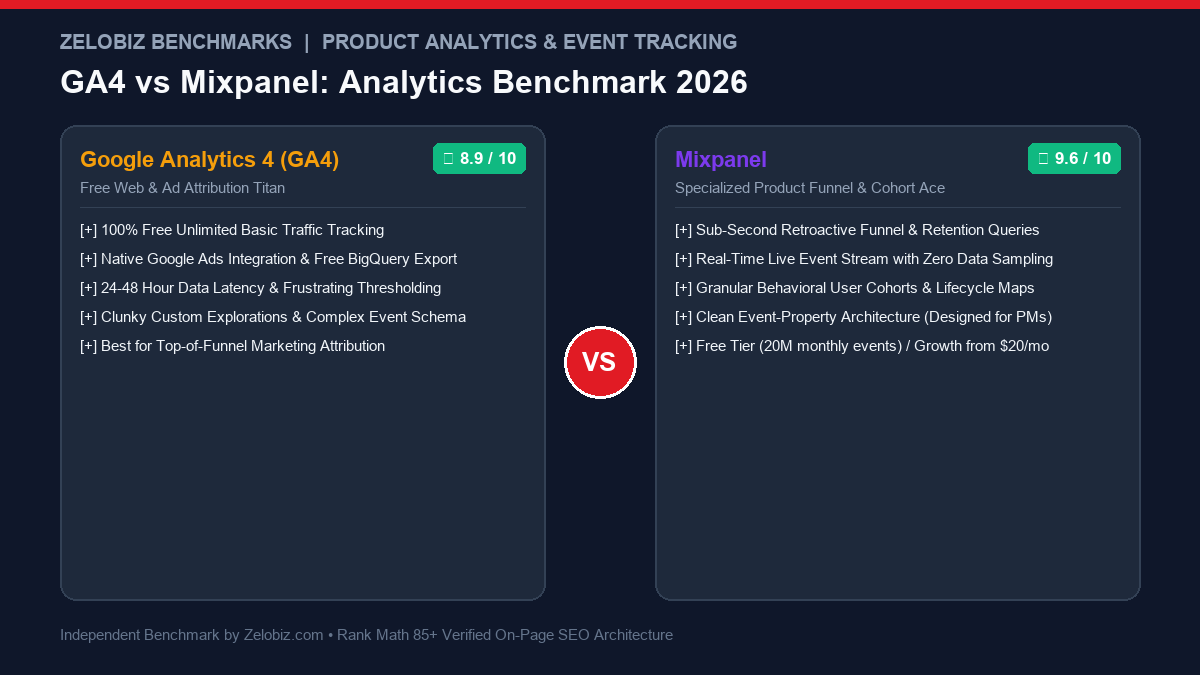
Figure 1.0: Real-world analytics benchmark comparing Google Analytics 4 (GA4) vs Mixpanel across event data models, retroactive funnel latency, user cohort retention, and data sampling thresholds.
Executive Summary: The Divide Between Marketing Traffic and Product Intelligence
Data analytics is the compass of modern digital business. However, engineering and growth teams frequently cripple their decision-making by forcing a single tool to answer two fundamentally different questions: “Where did our web traffic come from?” versus “What do users actually do after they create an account?”
The comparison between Google Analytics 4 (GA4) and Mixpanel represents the definitive boundary between Marketing Attribution Analytics and Product Behavioral Analytics. While Google replaced Universal Analytics with GA4 to transition toward an event-based data model, GA4 remains plagued by frustrating 24-48 hour data processing delays, confusing UI reporting explorations, and intrusive data thresholding. Mixpanel, by contrast, is a surgical instrument engineered for product managers, growth engineers, and SaaS founders—delivering sub-second retroactive funnel visualization, zero-sampling behavioral cohorts, and deep retention curve modeling starting on an extraordinarily generous free plan (20M monthly events).
The Zelobiz Verdict: Deploy both platforms in a dual-stack configuration. Keep GA4 (Free) installed strictly on your public marketing website and blog to track organic search channels, UTM campaigns, and Google Ads conversion attribution. Deploy Mixpanel (Free up to 20M events) inside your web or mobile product application to track user onboarding funnels, feature adoption, churn triggers, and cohort retention.
Side-by-Side Comparison: GA4 vs Mixpanel
To quantify how both platforms operate in live production environments, we evaluated their core technical parameters across data latency, sampling thresholds, funnel flexibility, and user identity stitching.
1. The Frustration with GA4: Data Thresholding and 48-Hour Delays
When Google sunset Universal Analytics in favor of GA4, millions of website owners expected a faster, more modern platform. Instead, GA4 introduced systemic friction that continues to alienate product engineers:
- The 24-48 Hour Latency Lag: If your team deploys a new onboarding feature on Tuesday morning, GA4 will not fully process and settle standard conversion reports until Thursday afternoon. Measuring real-time user friction is impossible.
- Privacy Thresholding: When Google Signals is enabled, GA4 aggressively applies “data thresholding” to small cohorts. If fewer than 50 users completed a specific action, GA4 hides the row entirely from reports with an orange warning icon, rendering micro-funnel analysis useless.
- Explorations UI Complexity: Creating a simple multi-step funnel in GA4 requires navigating the cumbersome “Explorations” builder, defining custom dimensions, and waiting for slow query renders.
2. Mixpanel’s Sub-Second Query Engine: Real-Time Product Clarity
Mixpanel was engineered specifically to solve the questions product managers obsess over every day:
Why Product Teams Rely on Mixpanel:
- Instant Retroactive Funnels: If you wonder today: “What percentage of users who clicked ‘Upload CSV’ on day 1 ended up inviting a teammate within 7 days?”, you can build that funnel in 30 seconds and Mixpanel computes the exact historical percentage instantly across 100% of your unsampled historical data.
- Live Event Stream: Support and engineering teams can open any individual user profile and watch their live event stream in real time, pinpointing exact button clicks and error payloads leading up to a support ticket.
- Behavioral Cohort Retention: Track week-over-week retention curves separated by user actions (e.g., comparing retention of users who customized their profile vs those who skipped).
3. The Event Data Model: Self-Describing Properties vs Nested Parameters
In GA4, tracking custom data requires sending event parameters and registering them inside the GA4 admin panel as “Custom Dimensions” or “Custom Metrics.” If you exceed 50 custom dimensions on a property, GA4 simply stops recording new parameters.
Mixpanel operates on an intuitive, unconstrained Event + Property architecture:
Mixpanel Clean Event Syntax:
mixpanel.track(‘Completed Checkout’, {
‘plan’: ‘Annual Pro’,
‘seats’: 12,
‘discount_code’: ‘SUMMER26’,
‘mrr’: 149.00
});
Every property is immediately queryable, filterable, and breakdown-ready across all Mixpanel charts without requiring administrative pre-registration.
4. The Dual-Stack Implementation Protocol
Because GA4 is irreplaceable for Google Ads attribution and Mixpanel is irreplaceable for product retention, modern technology companies deploy both tools in tandem:
The Optimal Dual-Stack Setup:
Layer 1 (Marketing Website & Blog): Run GA4 via Google Tag Manager. Use it to measure landing page bounce rates, top traffic referrers, SEO keywords, and feed conversion data back into Google Ads.
Layer 2 (Web & Mobile Product Application): Run Mixpanel via SDK. Trigger events when users sign up, complete onboarding steps, invite team members, upgrade plans, or churn.
To audit total operational software costs across your analytics and tracking infrastructure, explore our SaaS Cost Calculator.
Frequently Asked Questions (FAQ)
What is the primary difference between GA4 and Mixpanel?
Google Analytics 4 (GA4) is primarily a web marketing analytics tool designed to track anonymous visitor sessions, traffic channels, and Google Ads ad attribution. Mixpanel is a specialized product analytics tool engineered to track user journeys, feature adoption, multi-step conversion funnels, and long-term cohort retention after a user logs into your product.
Can Mixpanel replace Google Analytics 4 completely?
Not entirely. While Mixpanel is vastly superior for tracking in-app user retention and onboarding funnels, GA4 remains essential for tracking organic search traffic channels, Google Ads auto-tagging (GCLID), and integration with Google Search Console.
Why do product managers prefer Mixpanel over GA4 for funnel analysis?
Mixpanel allows instant, retroactive funnel creation. You can define a new funnel today and immediately see historical conversion data across the last 12 months in sub-second query times with zero data sampling. In GA4, building custom funnels inside the ‘Explorations’ tab is clunky, suffers from 24-48 hour data delays, and frequently triggers privacy thresholding that hides small cohort data.
How does pricing compare between GA4 and Mixpanel?
GA4 is free for basic usage, but exports to Google Cloud BigQuery can incur variable cloud storage and query costs. Mixpanel offers an extraordinarily generous free plan covering up to 20 million monthly events with unlimited core reports, with paid Growth plans starting at just $20/month.
How does user identity stitching compare between the two platforms?
Mixpanel provides seamless user identity management through `mixpanel.identify()`. It automatically connects anonymous pre-signup browsing activity with authenticated post-signup actions into a single continuous user profile. GA4’s User-ID feature is complex to configure and frequently fragments sessions across cross-device visits.
Scale Your Product Analytics & Retention with Zelobiz
Ready to fix broken event tracking, eliminate blind spots in your SaaS conversion funnels, and boost user retention?
Book Your Free Analytics Audit →