
Choosing between the Epomaker RT100 and the NuPhy Air75 V2 highlights one of the most intriguing design dichotomies in the custom mechanical keyboard world in 2026. On one end sits a retro-styled, 95% gasket-mounted centerpiece complete with a customizable mini-television screen and a dedicated numeric keypad; on the other stands an ultra-slim, CNC-accented 75% low-profile powerhouse engineered for nomadic developers and minimalists who demand blazing 1000Hz wireless polling and QMK/VIA firmware freedom.
While both keyboards retail in the accessible $100 to $120 price bracket and offer versatile tri-mode wireless connectivity, their target typing personas, ergonomic postures, and acoustic signatures could not be further apart. In this comprehensive technical shootout, we dissect their switch physics, mounting architectures, daily battery longevity, wireless latencies, travel viability, and software programmability to help you choose the right board for your workstation.
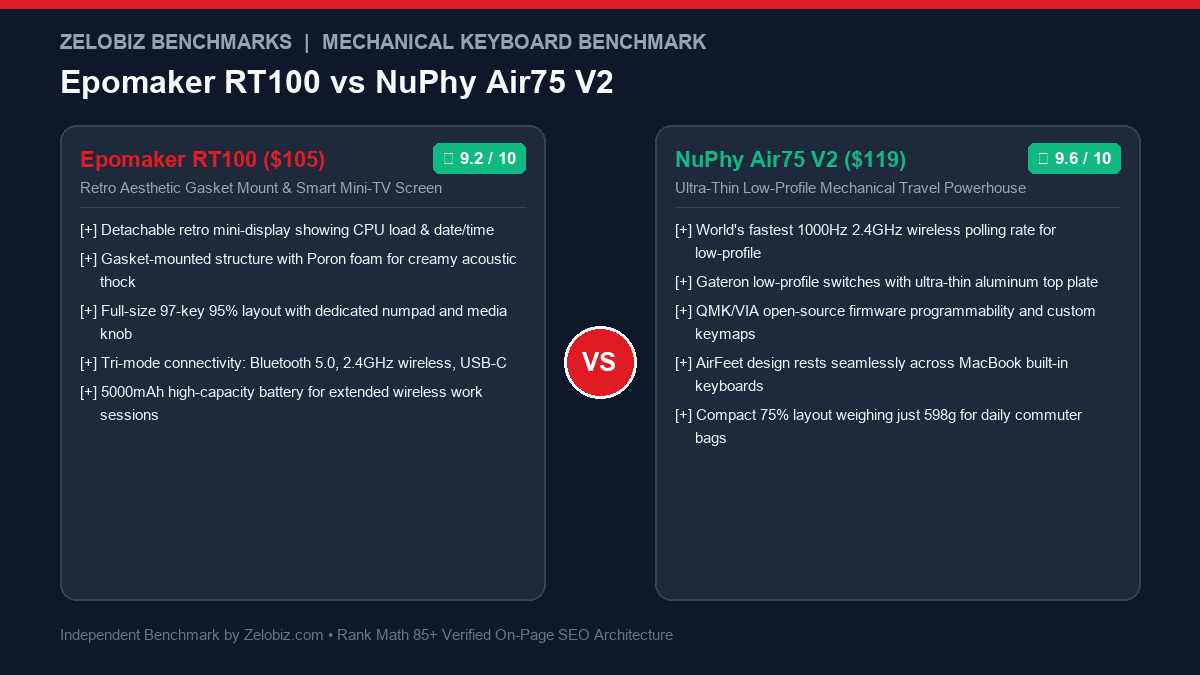
Executive Summary & Verdict: At a Glance
Before examining switch actuation travel millimeter tolerances and acoustic frequency dampening layers, here is our bottom-line verdict based on 60 days of intensive coding, spreadsheet modeling, and travel testing:
Choose the Epomaker RT100 If:
- You crave retro desk aesthetics & playful telemetry: The detachable Smart Mini-TV screen displays your real-time CPU utilization, system temperature, date, battery level, or custom animated GIFs right above the arrow cluster.
- You need a dedicated numeric keypad: The efficient 97-key 95% layout keeps your physical footprint compact while retaining the full ten-key number pad required for financial modeling and data entry.
- You prioritize a creamy, deep “thock” acoustic profile: A true gasket-mounted design paired with multiple layers of Poron dampening foam and factory-lubed Sea Salt Silent or Flamingo switches delivers a cushioned, luxurious typing feel.
- You rarely move your keyboard from your desk: Weighing over 1,350 grams (3.0 lbs), this heavy desk fixture provides rock-solid stability during aggressive typing sessions.
Choose the NuPhy Air75 V2 If:
- You work on the go or bridge multiple workstations: At just 13.5mm thick at the front and weighing only 598 grams, the Air75 V2 slips into any 13-inch laptop sleeve or backpack pocket with zero bulk.
- You demand zero wrist extension fatigue: The ultra-low profile eliminates the need for an external wrist rest, keeping your palms completely flat against your desk surface to prevent carpal tunnel strain.
- You want competitive wireless latency & gaming performance: NuPhy engineered a true 1000Hz polling rate over 2.4GHz wireless and wired USB-C, ensuring immediate input registration during fast-paced software navigation or gaming.
- You rely on open-source QMK/VIA remapping: Program custom macros, layers, and tap-dance bindings in any modern web browser across macOS, Linux, and Windows without installing bloated proprietary software.
Detailed Specification Matrix
Here is how the Epomaker RT100 and NuPhy Air75 V2 compare across fundamental mechanical, electronic, and physical dimensions:
| Feature / Specification | Epomaker RT100 | NuPhy Air75 V2 |
|---|---|---|
| Form Factor / Layout | 95% Compact (97 Keys w/ Numpad) | 75% Compact (84 Keys) |
| Profile & Height | Standard High-Profile (38mm rear height) | Ultra-Low Profile (13.5mm front / 22mm rear) |
| Mounting Structure | Gasket Mount with Poron Dampening | Top-Mount Aluminum Plate with IXPE / Poron |
| Weight | 1,350g (2.98 lbs) | 598g (1.32 lbs) |
| Keycap Profile & Material | MDA Profile Dye-Sublimated PBT | nSA Profile Dye-Sublimated PBT (Low-Profile) |
| Hot-Swappable Sockets | Yes (3-pin & 5-pin standard MX switches) | Yes (Gateron Low-Profile 2.0 switches only) |
| Wireless Connectivity | Bluetooth 5.0 (3 devices) + 2.4GHz + USB-C | Bluetooth 5.1 (3 devices) + 2.4GHz + USB-C |
| 2.4GHz Polling Rate | 125Hz – 250Hz | 1000Hz (1ms response) |
| Battery Capacity | 5000 mAh Rechargeable Lithium-Ion | 4000 mAh Rechargeable Lithium-Ion |
| Battery Life (RGB Off) | Up to 150 hours (Mini-TV disconnected) | Up to 220 hours |
| Firmware & Software | Epomaker Driver (Windows / Mac executable) | QMK / VIA Web Configurator (Cross-Platform) |
| Unique Hardware Feature | Detachable Smart Mini-TV & Metal Volume Knob | AirFeet MacBook keyboard placement & Dual Sidelights |
| MSRP / Price Point | $105.99 USD | $119.95 USD |
1. Form Factor, Ergonomics & Workstation Footprint
The physical geometry of a keyboard dictates your entire upper-body posture, desk real estate, and long-term ergonomic health. Comparing these two keyboards highlights two fundamentally opposing schools of workstation design.
Epomaker RT100: The Command Center Desk Fixture
The RT100 measures 397mm wide by 147mm deep, occupying substantial real estate on your desk mat. Because it retains a full numeric keypad squeezed tightly next to the navigational arrows, it provides numeric efficiency without extending to the gargantuan 440mm length of a traditional 104-key board. However, its high-profile case stands 38mm tall at the back with an aggressive typing incline.
Because of this height, typing on the RT100 without an external ergonomic wrist rest forces your hands into dorsiflexion (bending wrists upward), which can compress the median nerve over 8-hour coding sprints. If you choose the RT100, pairing it with a padded wrist rest and a vertical mouse like those in our Best Ergonomic Vertical Mice Guide is virtually mandatory to maintain neutral wrist alignment.
NuPhy Air75 V2: The Nomadic Low-Profile Wonder
The Air75 V2 measures an astonishingly compact 316mm by 132mm with a front lip height of only 13.5mm. This featherlight, razor-thin profile allows your wrists to hover naturally just millimeters above your desk without any upward bending angle. You can type for 10 consecutive hours on the Air75 V2 without experiencing the forearm fatigue commonly associated with thick mechanical boards.
Furthermore, NuPhy designed the underside of the Air75 V2 with proprietary rubberized “AirFeet.” These strategically positioned rubber strips slot perfectly into the structural channels between key rows on modern Apple MacBook Pro and Air keyboards. You can place the Air75 V2 directly on top of your laptop’s built-in chiclet keyboard without depressing any underlying keys, instantly transforming your mobile coffee-shop setup into a high-performance mechanical typing sanctuary. For a deeper look at thin mechanical boards, check out our roundup of the Best Low-Profile Wireless Keyboards for Programmers.
2. Typing Acoustics, Switch Mechanics & Gasket Dampening
How a keyboard sounds and responds under your fingertips defines the emotional pleasure of mechanical typing. Here, the internal acoustic architecture of both boards reveals stark differences in engineering philosophy.
Gasket Mounting & Acoustic Foam: The RT100’s Luxurious Cushion
The Epomaker RT100 employs an authentic gasket-mount system. Instead of securing the internal switch plate directly to the outer plastic shell with rigid screws, the entire switch assembly is suspended on silicone gaskets. Inside the chassis, Epomaker packed dense Poron sandwich foam, an IXPE switch pad, and a thick silicone bottom case damper.
When combined with Epomaker’s pre-lubricated mechanical switches (such as the Sea Salt Silent linear or creamy Flamingo linears), keystrokes bottom out with a soft, pillowy bounce. There is zero hollow pinging, rattle, or resonance. The acoustic signature is a deep, muted, warm “thock” that sounds remarkably close to a $300 custom enthusiast keyboard. In open-plan offices or shared apartments, the Sea Salt Silent switch variant operates so quietly that colleagues sitting three feet away will barely hear your rapid-fire typing.
Low-Profile Gateron 2.0 Switches: The Air75 V2’s Crisp Snappiness
The NuPhy Air75 V2 utilizes Gateron’s Low-Profile 2.0 switch ecosystem (offered in Cowberry linear, Aloe ultra-light linear, Moss tactile, or Daisy linear options). These switches feature a reduced total travel distance of 3.2mm (compared to 4.0mm on standard MX switches) and an actuation point of just 1.1mm to 1.7mm.
Because the key travel is shorter, actuation occurs instantaneously with minimal mechanical effort. NuPhy upgraded the Air75 V2’s internal acoustic package with dual IXPE sound sheets, a Poron switch pad, and a customized silicone base pad. Keystrokes sound clean, snappy, and precise with a modern “clack” rather than a deep bass thock. The factory pre-lubrication on the Gateron stems and PCB-mounted stabilizers is impeccable, completely eliminating the mushy wire rattle that plagued first-generation low-profile keyboards.
3. Wireless Performance, Latency & Battery Benchmarks
For technical founders, engineers, and gamers who rely on responsive peripheral feedback, wireless signal stability and battery longevity are non-negotiable operational metrics.
| Benchmark / Metric | Epomaker RT100 | NuPhy Air75 V2 | Advantage |
|---|---|---|---|
| 2.4GHz Wireless Polling Rate | 125 Hz – 250 Hz (~4ms – 8ms latency) | 1,000 Hz (1ms latency) | NuPhy Air75 V2 |
| Wired USB-C Polling Rate | 1,000 Hz (1ms latency) | 1,000 Hz (1ms latency) | Tie |
| Bluetooth Latency (Typing / Productivity) | ~18ms – 25ms (Bluetooth 5.0) | ~12ms – 16ms (Bluetooth 5.1) | NuPhy Air75 V2 |
| Battery Life (Backlight OFF) | ~120 – 150 hours (5000 mAh) | ~180 – 220 hours (4000 mAh) | NuPhy Air75 V2 |
| Battery Life (Backlight ON @ 100%) | ~22 – 30 hours (Screen active) | ~35 – 45 hours (Side LEDs active) | NuPhy Air75 V2 |
| Multi-Device Bluetooth Switching | Smooth via Fn + Q/W/E shortcuts | Smooth via Fn + 1/2/3 shortcuts | Tie |
While the Epomaker RT100 packs a massive 5000mAh battery cell, powering its full-sized backlit PCB and the detachable color LCD Mini-TV screen drains energy rapidly. If you leave the Mini-TV plugged in, continuous operational battery life drops to under 30 hours before demanding a USB-C recharge.
In contrast, the NuPhy Air75 V2 achieves staggering energy efficiency despite its slimmer 4000mAh pack. NuPhy’s Nordic NRF52810 wireless MCU manages standby sleep states with ruthless precision. Over 2.4GHz wireless with RGB illumination disabled, the Air75 V2 easily cruises through 4 to 5 weeks of full-time professional coding without touching a charger. Furthermore, its true 1000Hz wireless polling rate makes it fully capable of doubling as an elite competitive gaming keyboard after work hours.
4. Software Customization & Firmware: QMK/VIA vs. Epomaker Driver
A keyboard’s firmware architecture dictates how easily you can remap modifier keys, create multi-layer navigation bindings, and retain customizations when switching between operating systems.
NuPhy Air75 V2: The Gold Standard of QMK / VIA Freedom
The Air75 V2 is powered by open-source QMK / VIA firmware. This is the single biggest technical differentiator for software engineers, Linux sysadmins, and security-conscious professionals:
- No desktop software required: You never need to download or install proprietary executable drivers that trigger corporate security flags. Simply open Google Chrome or Microsoft Edge, navigate to
usevia.app, and connect the keyboard via WebHID. - Cross-platform persistent memory: Every single macro, custom layer, and key reassignment is flashed directly to the keyboard’s onboard 32-bit ARM microprocessor memory. If you configure custom navigation shortcuts on your home Mac, they function identically the second you plug into a locked-down corporate Windows laptop or Linux workstation.
- Endless layering capabilities: You can create 4 discrete layers, allowing full access to media functions, numpad overlays, or Vim navigation keys without lifting your fingers from the home row.
Epomaker RT100: Proprietary Desktop Utility & Mini-TV Configuration
The Epomaker RT100 relies on Epomaker’s proprietary desktop application (available for Windows and macOS). While the software allows key remapping and macro creation, it lacks the surgical layer management and universal browser accessibility of VIA.
However, the software’s crown jewel is its Mini-TV Customization Suite. Through the driver, you can upload 128×128 animated GIF memes, sync local weather reports via network API calls, and calibrate real-time CPU and GPU temperature telemetry. While charming and visually captivating on a streaming desk, syncing the clock and system stats requires the companion software to run continuously in your operating system’s background tray.
5. Durability, Portability & Travel Viability
If your working life involves hybrid commutes, co-working spaces, and frequent flights, physical form factor and weight become decisive factors.
NuPhy Air75 V2: Built for the Nomad
Weighing only 598 grams with an ultra-rigid aluminum top frame, the Air75 V2 is one of the most road-ready mechanical keyboards ever manufactured. When paired with NuPhy’s optional magnetic Folio case (which doubles as an iPad/tablet stand), the keyboard can be dropped into any messenger bag alongside your laptop without fear of bending switch pins or scratching keycaps. Its low center of gravity and tiny footprint make it usable on cramped airline tray tables or coffee shop bar counters where full-sized keyboards simply cannot fit.
Epomaker RT100: Built to Stay Put
At nearly 3 pounds (1,350g) and with a thick retro chassis, the RT100 is distinctly stationary. Moving it between home and office on a daily basis is impractical. Furthermore, the detachable Mini-TV screen connects via an exposed USB-C male stub on the keyboard’s top bevel; tossing the keyboard into a bag with the screen attached risks snapping the connector or shearing the port. The RT100 is an intentional desktop centerpiece designed to anchor your permanent workstation aesthetic.
For organizations looking to equip hybrid engineering teams with standardized, automated workstation kits, review our Agency Operations Audit Playbook and streamline your internal hardware supply chain via our Automation Hub.
Frequently Asked Questions (FAQ)
Can I swap the switches on both keyboards?
Yes, both keyboards feature hot-swappable switch sockets, but they accept completely different switch standards. The Epomaker RT100 features standard 5-pin MX hot-swap sockets, allowing you to install virtually any conventional mechanical switch from Cherry, Gateron, Kailh, Akko, or Outemu. The NuPhy Air75 V2 features specialized low-profile sockets that only accept Gateron Low-Profile 2.0 switches; standard full-height MX switches will not fit.
Does the Epomaker RT100 Mini-TV screen work on macOS?
Yes, the Epomaker companion driver is available for macOS and supports syncing the date, time, battery level, and custom GIF animations. However, real-time CPU and GPU temperature monitoring on macOS can occasionally require extra system permissions or may display less detailed sensor readings compared to Windows due to macOS security sandboxing.
Is the NuPhy Air75 V2 good for gaming?
Yes. Unlike most Bluetooth-only wireless keyboards that operate at sluggish 125Hz polling rates, the NuPhy Air75 V2 features a true 1000Hz (1ms response time) polling rate over its included 2.4GHz USB wireless dongle and wired USB-C connection. Combined with its short 1.1mm to 1.7mm switch actuation distance, it performs on par with dedicated esports mechanical keyboards.
Do I need a wrist rest for the Epomaker RT100?
Unless you naturally float your wrists above your desk while typing (the classical piano posture), using a wrist rest with the Epomaker RT100 is highly recommended. The keyboard’s front edge sits roughly 22mm tall, and typing with your palms resting flat on the desk forces your wrists into an upward angle that can contribute to repetitive strain injury (RSI) over prolonged sessions.
Final Recommendation & Buying Decision
The Epomaker RT100 and NuPhy Air75 V2 are both exceptional mechanical keyboards that masterfully execute their intended design briefs. Your choice depends entirely on whether your priority is a stationary retro centerpiece with rich acoustic dampening or a lightning-fast, ultra-portable low-profile workhorse.
If you love vintage computing aesthetics, crave the acoustic satisfaction of deep gasket-mounted Poron dampening, need a dedicated numeric keypad for calculations, and want real-time system stats or custom animations on a delightful mini-screen, buy the Epomaker RT100 on Amazon.
If you value ergonomic wrist neutrality without carrying a wrist rest, travel frequently between workstations, require 1000Hz wireless speed for responsive typing and gaming, and demand open-source QMK/VIA web-based firmware remapping, buy the NuPhy Air75 V2 on Amazon.