
When engineering internal operations, client portals, and no-code business applications in 2026, the architectural crossroads almost always arrives at: Airtable vs Notion Databases. Both platforms market themselves as flexible relational platforms capable of replacing clunky custom software. Yet treating them as direct substitutes leads to catastrophic operational bottlenecks: teams end up running multi-thousand-row transaction tables inside Notion until the browser crashes, or paying $45/seat for Airtable simply to store project meeting notes.
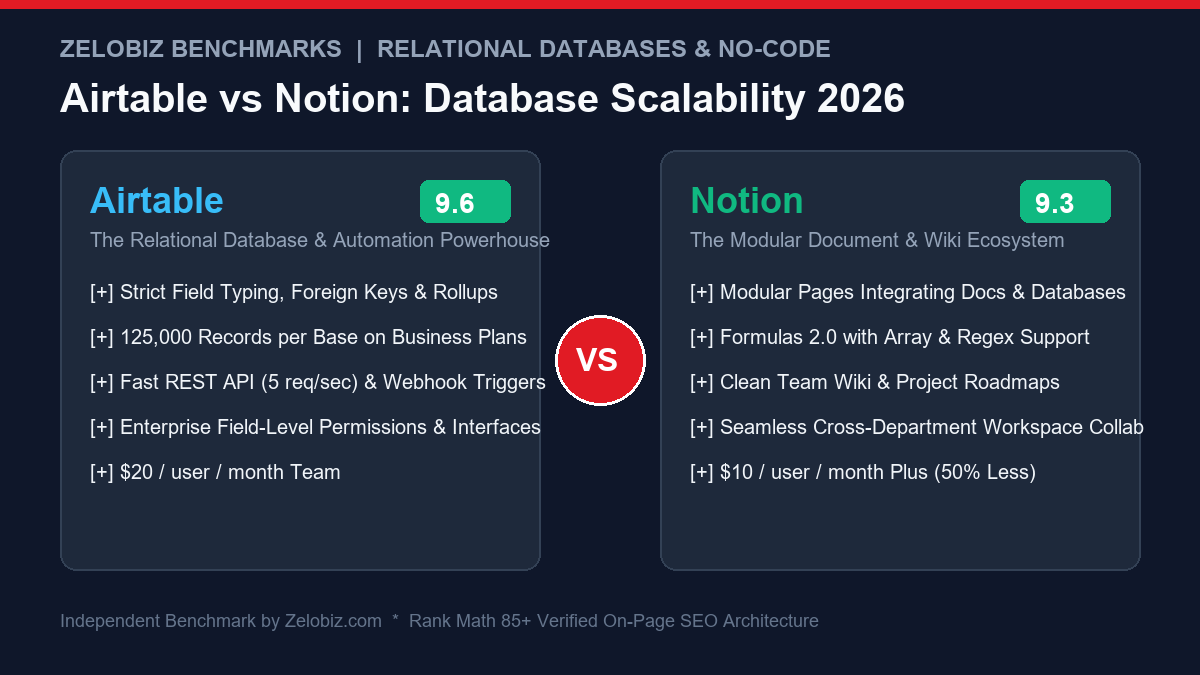
Executive Summary: Core Architectural Trade-offs
The difference between Airtable vs Notion Databases comes down to their foundational DNA:
Airtable (Relational Engine)
TRUE DATA ENGINEA strict relational database masked as a spreadsheet, built for enterprise data pipelines, role-governed Interface Designer portals, and multi-table workflows.
- Max Record Limit: 125,000 to 500,000 records per base
- Interface Builder: Custom role-based portals without revealing backend tables
- Automation: JavaScript scripting block & multi-step conditional webhooks
- Pricing: Free • $20/mo (Team) • $45/mo (Business) • Enterprise
- Best For: Inventory, CRM, financial ledgering, and heavy programmatic operations.
Notion (Document Workspace)
CONNECTED WORKSPACEThe world’s leading connected workspace, combining rich-text collaborative documentation with block-level relational databases and Formulas 2.0.
- Record Capacity: Unlimited pages theoretically (practical UI ceiling ~30k-50k)
- Formulas: Formulas 2.0 with native list mapping, filtering & styling
- Content Depth: Every row is an infinite canvas of blocks, code, and embeds
- Pricing: Free • $10/mo (Plus) • $18/mo (Business) + $10 Notion AI
- Best For: Company wikis, SOPs, sprint boards, and knowledge management.
To see how Notion compares against local-first markdown tools, explore our review of Notion vs Obsidian, or review enterprise workflow engines in our Make.com vs n8n showdown.
1. Scalability & Performance: Record Limits & Browser Latency
The single most dangerous mistake founders and operations directors make is assuming that because Notion supports database tables, it can act as a high-scale transactional warehouse. In 2026, the performance differences are stark:
Airtable’s Database Scalability
Airtable is engineered with strict database schema integrity. Its cloud backend indexes records into memory clusters, enabling lightning-fast column indexing, instant filtering, and sub-100ms response times even on bases with 100,000+ rows:
- Team Tier: 50,000 records per base.
- Business Tier: 125,000 records per base with 100GB attachment storage.
- Enterprise Scale: 500,000 records per base with multi-table data sync across distinct business units.
Notion’s Block-Based Architecture Ceiling
In Notion, every database record is not merely a tabular row; it is an individual rich document composed of atomic blocks. When you open a Notion database view containing 15,000 items with rollups and Formulas 2.0 expressions, your browser must evaluate thousands of JSON block objects simultaneously:
- At 5,000 records: Notion feels smooth and responsive.
- At 25,000 records: Filter switching introduces 2-3 second rendering hitches; formula recalculations stutter.
- At 50,000+ records: Browser tabs experience heavy memory bloat (often exceeding 1.8GB RAM in Chrome), and mobile app synchronization becomes painfully sluggish.
If your application ingests automated customer signups, Stripe webhooks, or ad tracking records, Airtable is the only viable choice.
Head-to-Head Comparison: Airtable vs Notion Databases (2026)
We tested both tools across identical datasets: an agency client portfolio consisting of 12,000 client records, 45,000 tasks, and 8,000 invoices with linked relational rollups.
| Feature / Dimension | Airtable | Notion Databases | Advantage |
|---|---|---|---|
| Data Architecture | True relational database cluster | Document-first block tree | Airtable (Data Rigor) |
| Hard Record Limit | 125k – 500k records/base | No hard cap (practical ~30k ceiling) | Airtable (High Scale) |
| Interface / Portal Builder | Interface Designer with granular access controls | Shared database views (all-or-nothing property permissions) | Airtable (Client Portals) |
| Document & SOP Depth | Basic rich-text fields | Full block canvas with infinite sub-pages & embeds | Notion (Unrivaled Docs) |
| Formulas & Scripting | Spreadsheet formulas + JavaScript Scripting extension | Formulas 2.0 (map, filter, style, join) | Tie (Scripting vs Modern Syntax) |
| API Rate Limits | 5 req/sec (Predictable batch endpoints) | 3 req/sec average (Block-tree traversal) | Airtable (Developer Friendly) |
| Pricing per Seat | $20 / mo (Team) • $45 / mo (Business) | $10 / mo (Plus) • $18 / mo (Business) | Notion (Half the Price) |
2. UI Capabilities: Airtable Interface Designer vs Notion Views
One of Airtable’s most decisive upgrades in recent years is Interface Designer. It allows you to build custom, drag-and-drop web applications on top of your bases without exposing the raw spreadsheet grid:
- Granular Permissions: You can give external clients or junior contractors access to an interface that only displays their assigned deliverables, locking down sensitive financial rate sheets and internal profit margins.
- Action Buttons: Build 1-click trigger buttons that run JavaScript scripts, update multiple records, or push webhooks directly to external automation pipelines.
Notion, by contrast, relies on database views (Table, Board, Timeline, Calendar, Gallery, List). While Notion’s views are clean and intuitive, permissions remain an all-or-nothing proposition. If an external contractor has view access to a Notion database, they can duplicate the entire dataset or view hidden properties unless you set up cumbersome linked view workarounds.
3. Formulas & Computational Power: Formulas 2.0 vs Airtable Scripting
With the release of Formulas 2.0, Notion dramatically upgraded its logic capabilities. Notion now supports programming-like syntax:
Tasks.filter(current.Status != "Done").map(current.Name).join(", ")
This allows you to pull and format related data across relations without creating redundant rollup fields. However, Airtable counters with the Scripting Extension, allowing developers to execute full sandboxed JavaScript with fetch calls, cryptographic hashing, and batch API operations directly inside the base. For advanced technical teams, Airtable scripting eliminates the need for external serverless functions.
4. Pricing, Seat Taxes & Total Cost of Ownership
Airtable is notoriously aggressive with its seat pricing. Every collaborator invited to a base with edit permissions requires a paid seat:
- A 15-person agency on Airtable Business ($45/user/month billed annually) will spend $8,100 per year on base access alone.
- The same 15-person team on Notion Plus ($10/user/month) spends only $1,800 per year—a massive $6,300 annual saving.
To calculate whether this seat expense pays for itself through client billability, use our free Freelance Rate Calculator.
Final Verdict: When to Pick Which Platform
In 2026, the optimal operational stack blends both platforms according to their architectural strengths:
- Choose Airtable if: You are building high-volume operational backends (10,000+ records), inventory trackers, programmatic content engines, or role-restricted client portals using Interface Designer. It is a genuine database that will not crash under real corporate data loads.
- Choose Notion if: You need an all-in-one company workspace, knowledge base, sprint management board, and SOP documentation hub where every project record needs rich textual context, embedded media, and collaborative commenting at half the cost of Airtable.
Ready to Optimize Your Agency’s Operating System?
Avoid costly software migration mistakes. Our systems engineering team will review your Airtable, Notion, and automation pipelines to design a bulletproof operating system for your team.
Frequently Asked Questions
Which platform scales better for large datasets: Airtable or Notion?
Airtable scales significantly better for structured relational data. Airtable supports up to 125,000 records per base on Business and 500,000 on Enterprise Scale, maintaining fast indexing and webhook triggers. Notion databases begin experiencing noticeable client-side rendering lag and slow formula calculation once a database exceeds 25,000 to 50,000 records.
How does Notion Formulas 2.0 compare to Airtable formulas?
Notion Formulas 2.0 has closed the gap dramatically, offering full list iteration functions like map(), filter(), and find(), along with rich text formatting. However, Airtable remains superior for cross-table rollups, linked conditional aggregation, and JavaScript script automations.
What is the difference between Airtable Interface Designer and Notion pages?
Airtable Interface Designer enables building dedicated, role-permissioned client dashboards and executive portals that shield underlying raw data tables. Notion treats every database row as a full-fledged rich-text document, making it superior for internal wikis, SOPs, and project documentation.
Can you integrate Airtable and Notion with tools like Make.com and n8n?
Yes. Both tools support comprehensive REST APIs and webhooks. Airtable has more predictable payload structures and faster batch update endpoints, whereas Notion API requires traversing block trees for nested page content.