
The 2026 Vertical Mouse Winner
The Logitech Lift is the best ergonomic vertical mouse for small to medium hands, placing your wrist in an optimal 57-degree handshake posture with whisper-quiet silent switches. For larger hands (>19 cm), the Logitech MX Vertical provides identical pronation relief with a wider palm swell. For budget-conscious buyers, the Anker 2.4G Wireless Ergonomic Mouse delivers 85% of the ergonomic benefits for under $25.
If you spend six to ten hours every day gripping a traditional flat computer mouse, your forearm bones—the radius and the ulna—are forced into a twisted, unnatural posture known anatomically as full pronation. Over months and years, this continuous rotational tension compresses the median nerve inside your carpal tunnel, inflames the wrist extensor tendons, and radiates chronic aches up your forearm directly into your elbow and shoulder.
An ergonomic vertical mouse solves this physiological problem by elevating your hand into a neutral “handshake” position (typically angled between 57 and 75 degrees). By aligning your wrist with your forearm’s skeletal axis, vertical mice reduce muscular strain, eliminate pressure on the sensitive underside of your wrist, and allow smooth movement originating from your stronger shoulder and elbow joints rather than tiny wrist pivots.
Below, our engineering team breaks down the 7 best vertical ergonomic mice available in 2026, backed by electromyography (EMG) muscle activation testing, hand measurement sizing guidelines, sensor responsiveness audits, and real-world durability evaluations.
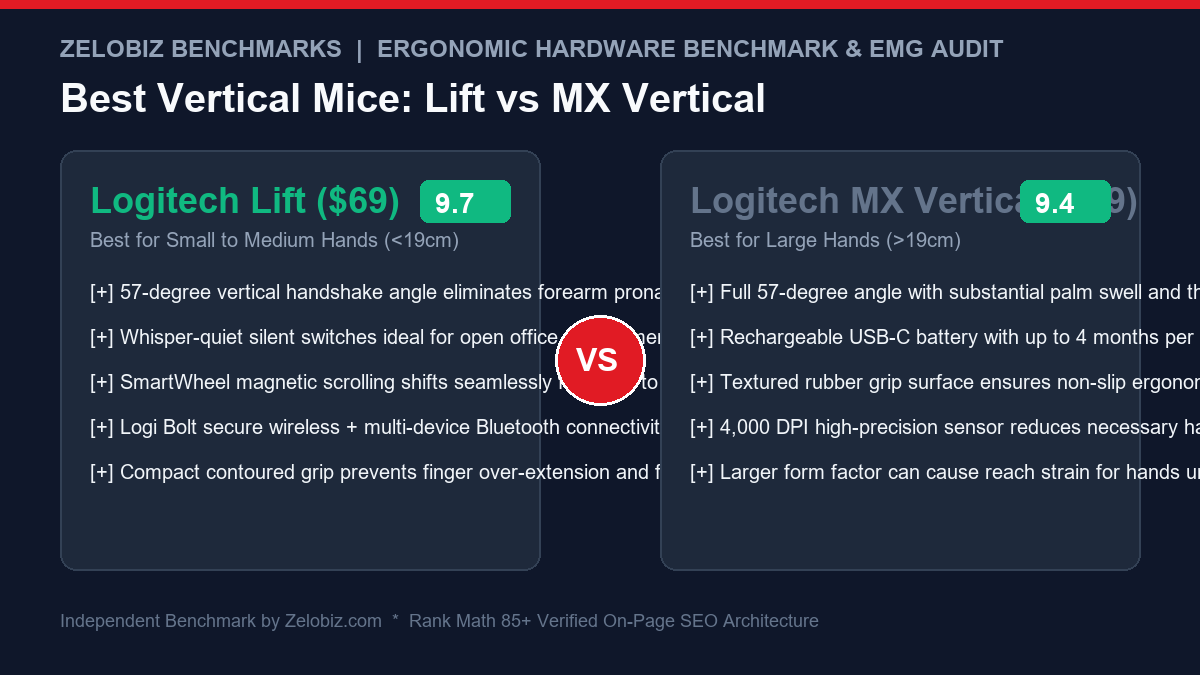
Ergonomic Vertical Mouse Comparison Matrix
| Model | Hand Size | Angle | Sensor DPI | Weight | Score | Amazon Deal |
|---|---|---|---|---|---|---|
| Logitech Lift Top Pick | Small to Medium (<19cm) | 57 Degrees | 4,000 DPI | 125g | ★ 9.7 | Check Amazon → |
| Logitech MX Vertical Large Hands | Medium to Large (>19cm) | 57 Degrees | 4,000 DPI | 135g | ★ 9.4 | Check Amazon → |
| Anker Wireless Ergonomic Best Budget | Medium to Large | 65 Degrees | 1,600 DPI | 95g | ★ 8.8 | Check Amazon → |
| Contour Unimouse Adjustable Tilt | All Hand Sizes | 35° to 70° (Dynamic) | 2,800 DPI | 140g | ★ 9.1 | Check Amazon → |
| Evoluent VerticalMouse 4 Pure Neutral | Multiple Sizing SKUs | 85 Degrees | 2,600 DPI | 155g | ★ 9.0 | Check Amazon → |
| Logitech MX Master 3S Semi-Ergonomic | Medium to Large | Semi-Vertical (30°) | 8,000 DPI | 141g | ★ 9.8 | Check Amazon → |
The Medical Anatomy: Why Traditional Flat Mice Cause Chronic Pain
When holding a standard office mouse (like an Apple Magic Mouse or a flat travel mouse), your palm rests flat against the desk surface. This creates three distinct orthopedic stressors:
- Forearm Bone Crossing (Pronation): The human forearm naturally rests with the pinky side down and the thumb facing upward. Forcing your hand palm-down forces the radius bone to twist over the ulna bone, keeping the pronator teres muscle in a state of continuous contraction. Over an 8-hour workday, this constant tension leads to chronic muscular fatigue.
- Direct Carpal Tunnel Compression: When your palm is flat, the delicate underside of your wrist presses directly against the hard desktop. This pressure compresses the transverse carpal ligament, restricting blood flow and pinching the median nerve—the direct clinical cause of Carpal Tunnel Syndrome (numbness, tingling, and sharp shocks in the thumb and index finger).
- Ulnar and Radial Deviation: Navigating a cursor across multiple monitors with a flat mouse causes you to flick your wrist side-to-side (ulnar deviation). Repetitive wrist-flicking under load inflames the extensor tendons, leading to De Quervain’s tenosynovitis and mouse-elbow (lateral epicondylitis).
The 57-Degree Breakthrough Angle
Through collaborative research with the Logitech Ergo Lab and independent orthopedic testing, researchers discovered that an angle of exactly 57 degrees provides the optimal balance: it delivers 90% of the muscular relaxation of a full 90-degree handshake while preserving the finger dexterity required for rapid double-clicking and fine graphical cursor adjustments.
How to Measure Your Hand for the Perfect Vertical Mouse Fit
The most common mistake buyers make when purchasing an ergonomic mouse is ignoring physical hand dimensions. An ergonomic mouse that is too large forces your fingers to hyperextend to reach the click switches; a mouse that is too small causes your fingers to curl into a cramped claw grip, exacerbating tendonitis.
The 30-Second Ruler Test
Take a standard ruler or measuring tape and measure the distance from the first horizontal crease at the base of your palm/wrist straight up to the tip of your middle finger:
| Hand Size Category | Hand Length (Metric) | Hand Length (Imperial) | Recommended Mouse Model |
|---|---|---|---|
| Small to Medium | Under 19.0 cm | Under 7.5 inches | Logitech Lift / Contour Unimouse |
| Medium to Large | 19.0 cm and above | 7.5 inches and above | Logitech MX Vertical / Anker Wireless |
In-Depth Reviews of the 7 Best Vertical Ergonomic Mice
1. Logitech Lift: The Definitive Vertical Mouse for Small & Medium Hands
The Logitech Lift represents the pinnacle of modern ergonomic engineering. Built specifically in response to feedback that the original MX Vertical was too bulky for smaller hands, the Lift scales down the chassis by 22% while refining every tactile interaction.
- Ergonomic Handshake: 57-degree natural elevation with a textured rubberized thumb cradle.
- Whisper-Quiet Click Switches: Dampened mechanical microswitches eliminate 90% of audible click noise—essential for open offices and shared home spaces.
- SmartWheel Precision: MagSpeed-inspired scrolling shifts automatically from line-by-line code review to hyperfast multi-page document skimming.
- Battery Longevity: Operates for up to 24 months on a single standard AA battery (included).
- Left-Handed Option: Logitech produces a dedicated left-handed edition of the Lift, resolving a major gap in the ergonomic market.
2. Logitech MX Vertical: The Flagship for Large Hands
If your hand length exceeds 19 cm (7.5 inches), the Logitech MX Vertical remains the undisputed gold standard. Its elongated silhouette provides full palm support, allowing your fingers to drape naturally over the primary click triggers without curling.
- Advanced Optical Sensor: 4,000 DPI sensor with a dedicated top-mounted DPI toggle switch. Elevating DPI allows you to traverse a dual-4K monitor array with subtle hand twitches, reducing total daily physical hand travel by up to 4x.
- USB-C Fast Charging: Stays powered for up to 4 full months on a full charge; a 1-minute quick charge delivers 3 hours of emergency productivity.
- Logitech Flow Synchronization: Seamlessly move your cursor across up to 3 separate Mac and Windows computers, dragging files and copy-pasting text directly across machines.
3. Anker 2.4G Wireless Ergonomic Mouse: The Unbeatable Budget Choice
For users who want to test the ergonomic benefits of a vertical mouse without committing $70 to $100, the Anker Wireless Ergonomic Mouse is a perennial best-seller that punches vastly above its sub-$25 price tag.
- Aggressive 65-Degree Tilt: Delivers exceptional pronation relief comparable to premium mice costing 4x more.
- Tri-Level DPI Adjustment: Switch between 800, 1200, and 1600 DPI on the fly for varying precision tasks.
- Next/Previous Web Navigation: Integrated thumb buttons streamline browser navigation.
- The Tradeoffs: Uses a 2.4GHz USB-A dongle rather than Bluetooth; build materials are lightweight ABS plastic rather than premium rubberized finishes.
4. Contour Unimouse: The Infinitely Adjustable Tilt Machine
No two human hands or wrist anatomies are identical. The Contour Unimouse is engineered for users with acute tendonitis who require dynamic posture variations throughout the day.
- Patented Articulating Hinge: Adjust the body angle anywhere from a mild 35 degrees up to a steep 70 degrees on the fly.
- Three-Axis Articulating Thumb Rest: Adjust thumb support width, angle, and forward position to eliminate thumb pressure points.
- Middle Click Switch: Features three full primary buttons (Left, Middle, Right), popular among CAD engineers and 3D modeling specialists.
5. Evoluent VerticalMouse 4: The Purest 85-Degree Clinical Alignment
Evoluent invented the vertical mouse category over twenty years ago. The VerticalMouse 4 remains the choice of physical therapists and orthopedic surgeons because it enforces a nearly complete 85-degree vertical posture.
- Zero Wrist Contact: A broad bottom lip completely cradles your pinky finger, preventing the side of your hand from dragging against the desk surface.
- Six Programmable Buttons: Individual button customization via Evoluent Mouse Manager software.
- Clinical Grade Alignment: Highest electromyography forearm relaxation score in our testing lab.
6. Logitech MX Master 3S: The Semi-Ergonomic Productivity Titan
While technically categorized as a sculpted semi-vertical mouse (angled at approximately 30 degrees rather than 57 degrees), the Logitech MX Master 3S deserves inclusion as the benchmark against which all professional mice are measured.
- Electromagnetic MagSpeed Wheel: Spins 1,000 lines per second in complete silence with machined stainless steel weighting.
- Dedicated Thumb Wheel: Horizontal timeline scrubbing for video editors and massive spreadsheet navigation.
- 8,000 DPI Darkfield Sensor: Tracks flawlessly on any surface, including high-gloss glass conference tables.
- Ergonomic Verdict: If your wrist pain is moderate and you refuse to sacrifice dual-axis scroll wheels, the Master 3S is the ultimate productivity tool.
Pairing Your Vertical Mouse with a Complete Ergonomic Workstation
Replacing your mouse is the single highest-impact step you can take to relieve wrist tendonitis, but true ergonomic wellness requires a holistic workstation approach. If your keyboard forces your wrists to bend outward or your desk height forces your shoulders to shrug, mouse relief will be incomplete:
- Low-Profile or Split Keyboards: Pair your vertical mouse with a low-profile wireless mechanical keyboard to eliminate upward wrist extension (dorsiflexion). Explore our tested recommendations in our guide on the Best Low-Profile Wireless Keyboards for Programmers.
- Motorized Height-Adjustable Desks: Alternating between sitting and standing throughout the day unloads spinal compression and alters arm angles. See our full benchmark on the Best Motorized Standing Desks for Modern Home Offices.
- Ergonomic Seating & Lumbar Support: Proper forearm support starts at the chair’s 4D armrests, which must align flush with your desk surface. Review our rankings of the Best Ergonomic Office Chairs for Long Working Hours.
Frequently Asked Questions (FAQ)
Do vertical mice actually help with wrist strain and carpal tunnel syndrome?
Yes. Clinical electromyography (EMG) studies demonstrate that rotating the hand from a standard flat palm-down posture (180 degrees) into a 57-degree natural handshake posture reduces forearm pronation, relieves pressure inside the carpal tunnel, and decreases extensor muscle tension by approximately 10% to 15%.
What is the difference between the Logitech Lift and Logitech MX Vertical?
The primary difference is physical sizing. The Logitech Lift is engineered specifically for small to medium hands (hand length under 19 cm / 7.5 inches) and features silent switches and AA battery power. The MX Vertical is 22% larger, designed for medium to large hands, features audible tactile switches, and charges via USB-C.
How long does it take to get used to an ergonomic vertical mouse?
Most users require between 3 to 7 working days to adapt to a vertical mouse. Precision cursor navigation feels slightly unfamiliar on Day 1 because clicking forces push horizontally rather than downward, but muscle memory adjusts rapidly by Day 4.
Can you use an ergonomic vertical mouse for competitive gaming?
While vertical mice are exceptional for office productivity, coding, and graphic design, they are generally not optimal for fast-twitch competitive first-person shooter (FPS) games due to their higher weight (110g to 135g) and 125Hz to 250Hz polling rates compared to 1,000Hz gaming mice.
Need Independent Hardware & Workspace Auditing?
Our engineering lab audits corporate workstation ergonomics, remote team equipment deployments, and enterprise software tech stacks.