
Otter.ai’s free Basic plan advertises 300 transcription minutes a month, a number that reads like roughly five hours of meetings. The figure that actually determines whether a single meeting gets fully transcribed is a different one: a 30-minute cap per conversation, applied regardless of how much of the monthly pool remains untouched.
This covers the current numbers for all four Otter.ai tiers, straight from Otter’s own pricing page, and why the per-conversation cap is usually the constraint that matters more than the monthly total.
Short answer: Otter.ai’s free Basic plan includes 300 transcription minutes a month, but caps each individual conversation at 30 minutes, regardless of how much of the monthly allowance is left. A 45-minute meeting gets cut off at the 30-minute mark even on the first day of the month with 270 minutes still unused. Pro raises the per-meeting cap to 90 minutes with 1,200 monthly minutes; Business and Enterprise raise it further to 4 hours per meeting with unlimited monthly minutes. Verified directly against Otter.ai’s own pricing page on 6 September 2026.
The Current Numbers
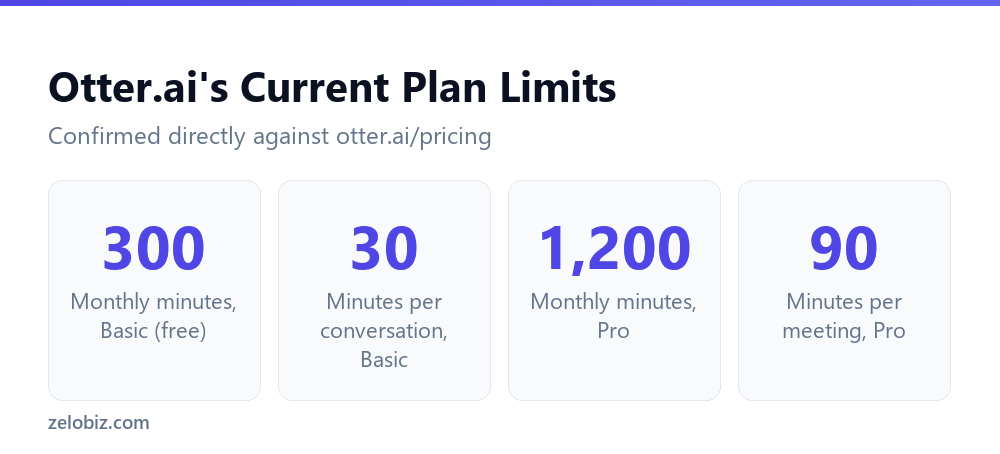
Basic’s lifetime cap of 3 file imports is separate from its monthly minute allowance and worth noting on its own: it isn’t a monthly reset like the transcription minutes, it’s a total that never refreshes on the free plan.
Why the Monthly Total Is the Wrong Number to Watch
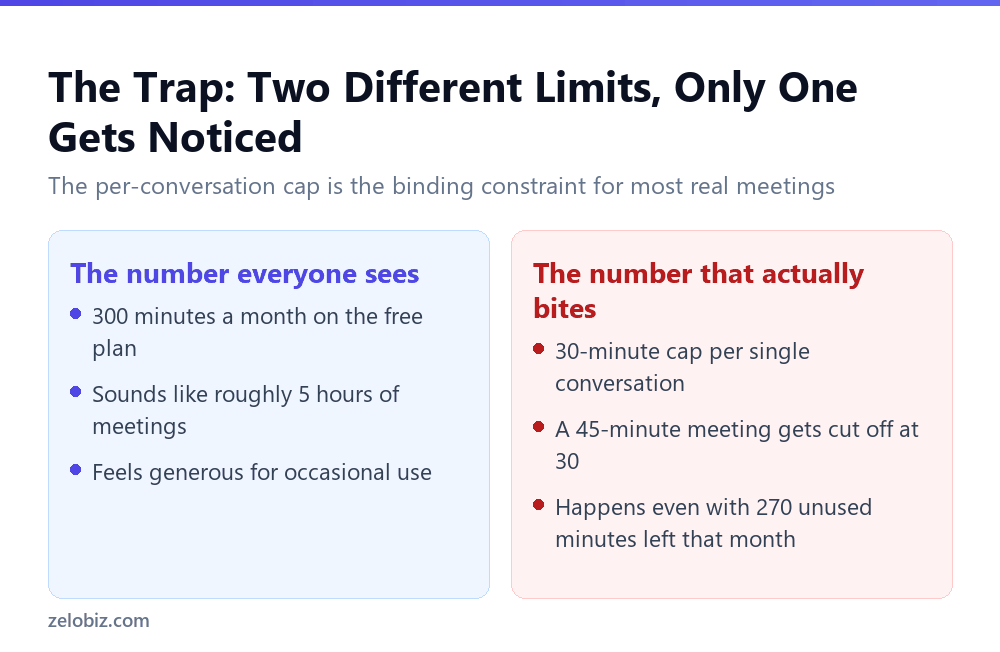
This distinction matters most for anyone whose meetings regularly run 30 to 60 minutes, which describes a large share of standard one-on-ones, client calls, and team syncs. The monthly total of 300 minutes would comfortably cover ten 30-minute meetings, but the per-conversation cap means any meeting that runs even five minutes over 30 loses transcription for everything after that point, in the same meeting, regardless of monthly balance.
⚠️ Watch out: If your typical meeting length is anywhere near or above 30 minutes, the free Basic plan’s real constraint isn’t how many meetings you can record in a month, it’s whether any single one of them finishes before hitting the cap.
How the Cap Changes Across Plans
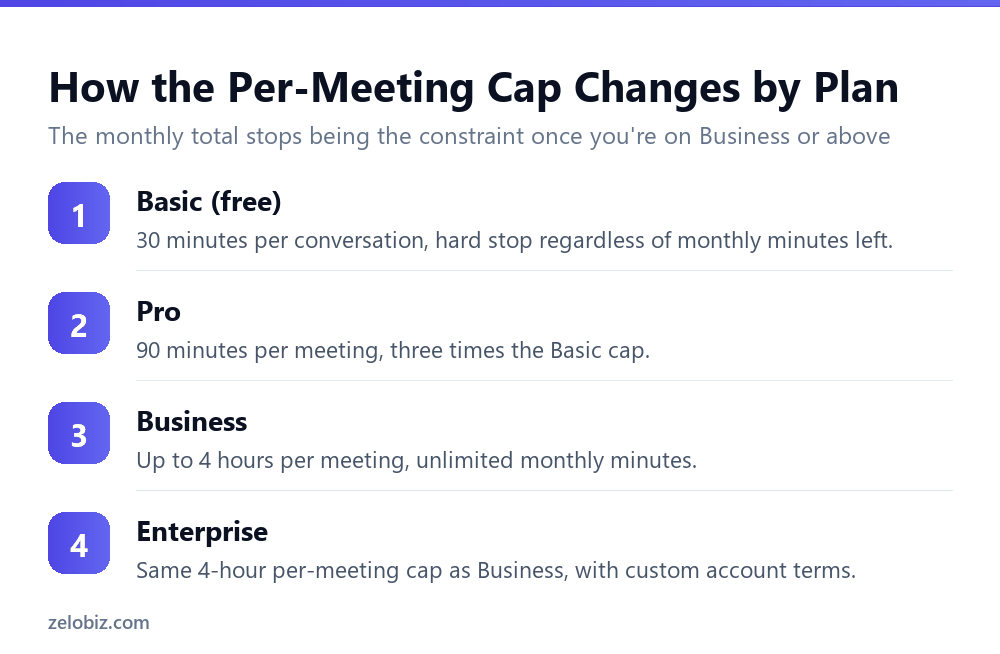
Pro triples the per-meeting cap to 90 minutes, alongside raising the monthly pool to 1,200 minutes per user. For most standard meeting lengths, that removes the per-conversation ceiling as a practical concern, since a 90-minute cap comfortably covers the large majority of business meetings, workshops, and calls.
Business and Enterprise both extend the per-meeting cap to 4 hours and remove the monthly minute total entirely, listed as unlimited. At that tier, the binding constraint shifts from either limit to whatever length the meeting itself actually runs, which for nearly all practical purposes means both limits stop mattering.
💡 Pro tip: Before choosing between Basic and Pro based on the monthly minute total alone, check your typical meeting length first. Someone with occasional short meetings might never hit either limit on Basic, while someone with routine 45-to-60-minute calls will hit the per-conversation cap long before exhausting the monthly pool.
📊 Note: Pricing for Pro is $16.99 per user per month billed monthly, or $8.33 per user per month billed annually at $99.99 a year, per Otter’s own pricing page. Business pricing showed some inconsistency between different parts of Otter’s own site during verification, so it’s worth confirming the current figure directly on otter.ai/pricing before budgeting against it.
A Realistic Month on the Free Plan
Walking through a hypothetical month of typical meeting use makes the gap between the monthly total and the per-conversation cap concrete. This is an illustrative estimate based on the published limits, not usage data Otter.ai itself publishes.
Only the first two rows in that table are fully covered by the Basic plan’s per-conversation cap. Everything longer than 30 minutes loses transcription partway through, even in a month where the 300-minute total is barely touched. For anyone whose calendar is mostly standard 45-to-60-minute meetings, the free plan’s real usable capacity is closer to 30 minutes times the number of meetings than it is to a flat 300-minute budget.
This is the core reason the per-conversation cap deserves more attention than the monthly total when evaluating whether Otter’s free plan actually fits a given workflow. Someone attending mostly short calls under 30 minutes could use the free plan for months without hitting either limit. Someone whose meetings routinely run longer will hit the per-conversation wall on nearly every call, independent of how the monthly total is tracking.
What Happens to the Rest of a Cut-Off Meeting
When a conversation hits the 30-minute cap on Otter’s free plan, transcription for that specific meeting stops at that point going forward. The portion already recorded and transcribed up to the 30-minute mark remains available; it’s the remainder of the meeting, past the cap, that isn’t captured.
⚠️ Watch out: There’s no mid-meeting warning built into a calendar invite or a countdown visible to every participant by default, so a cut-off often isn’t noticed until after the meeting ends and someone goes looking for a section of the transcript that simply isn’t there.
💡 Pro tip: For any meeting expected to run close to or past 30 minutes on the free plan, treat the transcript as a partial record rather than assuming full coverage. Taking manual notes for the portion likely to fall past the cap is a reasonable backup until upgrading to a plan with a higher per-meeting limit.
Free vs. Pro: What the Cap Alone Would Justify
Isolating just the per-meeting cap, separate from the monthly total, makes the Free-to-Pro decision clearer for meeting-heavy users. Pro’s 90-minute cap comfortably covers nearly all standard business meetings, while Basic’s 30-minute cap only reliably covers short check-ins and tightly time-boxed calls.
For someone whose meetings are consistently under 30 minutes, the monthly total is more likely to be the actual constraint, and the 300-minute Basic allowance may be entirely sufficient without needing Pro’s larger 1,200-minute pool. For someone whose meetings regularly exceed 30 minutes, the per-conversation cap makes Basic effectively unusable for full transcription of those calls, regardless of how much of the monthly total goes unused.
📊 Note: The specific dollar cost of Pro, $16.99 per user monthly or $8.33 per user annually per Otter’s own pricing page, is worth weighing against how many meetings each month actually run past 30 minutes, rather than against the monthly minute total alone.
Working Around the Cap Without Upgrading
For anyone not ready to move to a paid plan, a few practical adjustments reduce how often the 30-minute cap actually costs something. None of these are workarounds documented by Otter.ai directly; they’re reasonable ways to structure meetings around a known, fixed constraint.
- Split naturally long meetings into two shorter calls where the agenda allows it, so each segment starts a new recording under the 30-minute cap.
- Front-load the most important discussion into the first 30 minutes of any meeting expected to run longer, since that portion is guaranteed to be captured.
- Pair Otter with manual notes for any meeting expected to exceed 30 minutes, treating the transcript as a supplement rather than the sole record.
- Track which recurring meetings routinely get cut off to build a concrete case for whether Pro’s 90-minute cap is worth the monthly cost for your specific schedule.
None of these fully substitute for the higher per-meeting cap on Pro, Business, or Enterprise, but they reduce how much of a routinely long meeting goes untranscribed while still on the free plan.
How This Compares to a Simple Monthly Quota
Many free tools cap usage with a single number: a fixed amount of storage, a fixed number of exports, a fixed number of API calls, all measured against one monthly total with no secondary constraint layered on top. Otter’s structure is different by design, because transcription happens in real time during a live meeting rather than as discrete, poolable units of work.
A reasonable explanation, though not one Otter.ai states directly, is that this real-time nature is why a per-conversation cap exists alongside the monthly total in the first place: a transcription tool processes a continuous audio stream during a single session rather than discrete, poolable units of work. Whatever the exact reason, the practical effect is the same: the 30-minute cap functions as a hard boundary on a single continuous recording session, separate from the monthly total.
💡 Pro tip: Understanding why the per-conversation cap exists, rather than treating it as an arbitrary restriction, makes it easier to plan around: it’s tied to the length of a single continuous recording, not to total activity across a month.
Common Questions
How many minutes does Otter.ai’s free plan include?
300 transcription minutes a month, according to Otter.ai’s own pricing page.
What is Otter.ai’s per-meeting limit on the free plan?
30 minutes per conversation. This applies regardless of how much of the monthly 300-minute pool is still unused.
Does a long meeting on Otter’s free plan use up my monthly minutes faster?
A meeting is capped at 30 minutes of transcription regardless of length, so it can never consume more than 30 minutes of your monthly pool in a single conversation, even if the meeting itself runs much longer.
What’s the per-meeting cap on Otter.ai Pro?
90 minutes per meeting, three times the Basic plan’s 30-minute cap, alongside 1,200 monthly minutes per user.
Does Otter.ai Business have a monthly minute limit?
No. Business and Enterprise both list unlimited monthly minutes, with a per-meeting cap of up to 4 hours.
How many file imports does the free Otter.ai plan allow?
3 lifetime audio or video file imports, a one-time total rather than a monthly allowance that resets.
Which limit should I check before choosing a free transcription plan?
The per-conversation or per-meeting cap, not just the advertised monthly total. A generous-sounding monthly figure can still cut off a single normal-length meeting.
The Short Version
- →Otter.ai’s free Basic plan includes 300 monthly minutes and a 30-minute per-meeting cap.
- →The per-meeting cap applies regardless of unused monthly minutes.
- →A meeting longer than 30 minutes gets cut off at that point on Basic, not later.
- →Pro raises the per-meeting cap to 90 minutes with 1,200 monthly minutes per user.
- →Business and Enterprise raise the cap to 4 hours with unlimited monthly minutes.
- →Check your typical meeting length, not just the monthly total, before picking a plan.
Whichever plan ends up being the right fit, the number worth writing down before committing to it isn’t the monthly total on its own. It’s the per-meeting cap, checked against how long a typical meeting on the calendar actually runs.