
Grammarly’s AI prompt limits are specific, documented numbers, not a vague usage policy. What’s less obvious is how the monthly refill actually works, and it isn’t the calendar month most people assume.
This covers the exact current allowance for each plan, straight from Grammarly’s own pricing page, and the reset mechanism that means your personal refill date has nothing to do with the 1st of the month.
Short answer: Grammarly’s Free plan includes 100 AI prompts a month, Pro includes 2,000, and Enterprise offers unlimited prompts per member per month. Allowances refill automatically each month, but on a date determined by when generative AI first became available on your specific account, not the calendar month. Running out shows an error and a lightbulb icon reading 0 prompts, and paid subscribers who exhaust their allowance early can contact support for help before their personal reset date arrives. Verified directly against Grammarly’s own pricing and support pages on 6 September 2026.
The Current Numbers
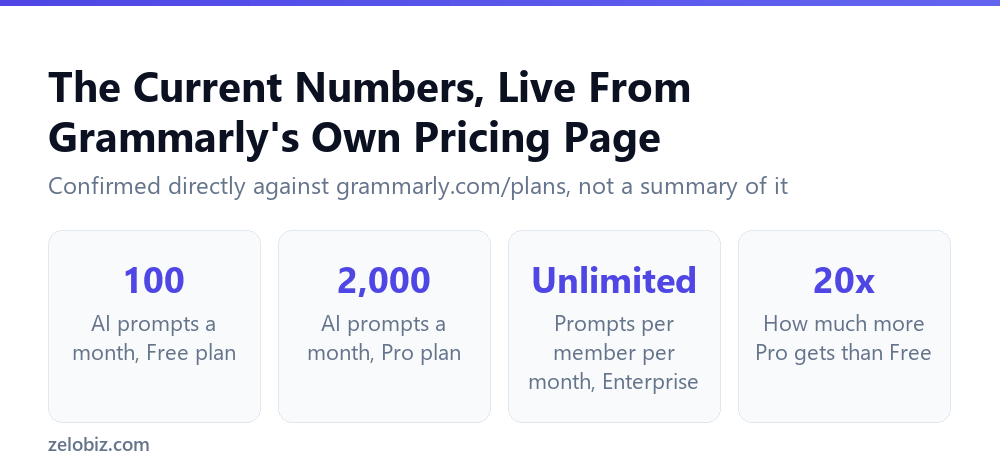
Grammarly’s own pricing page states the current structure plainly: generate text with 100 AI prompts on Free, 2,000 AI prompts on Pro, and unlimited prompts per member per month on Enterprise.
Pro’s 2,000 prompts represents twenty times the Free allowance, a large enough gap that anyone using Grammarly’s AI features regularly for drafting or rewriting will likely feel the Free plan’s ceiling well before reaching the middle of a normal month.
Why the Refill Date Isn’t the 1st
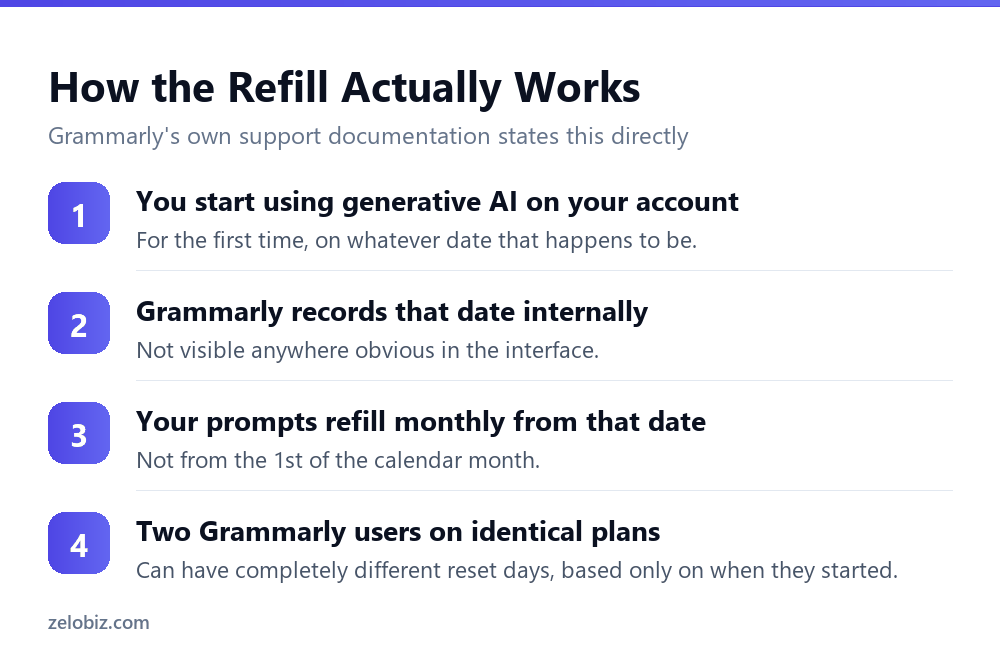
Grammarly’s own support documentation states the mechanism directly: allocations refill automatically each month on a monthly basis, determined by the day generative AI first became available within your account.
This detail matters most for anyone planning heavy AI use around a specific deadline. If your personal reset date happens to fall a week after you need a large batch of prompts, there’s no way to shift it earlier, and the calendar month itself is not a reliable guide to when your allowance actually refills.
💡 Pro tip: If prompt timing matters for your work, track your own actual reset date by noting when your allowance last refilled, rather than assuming it aligns with the 1st of the month or your billing date. The two dates are not guaranteed to match.
What Happens at Zero
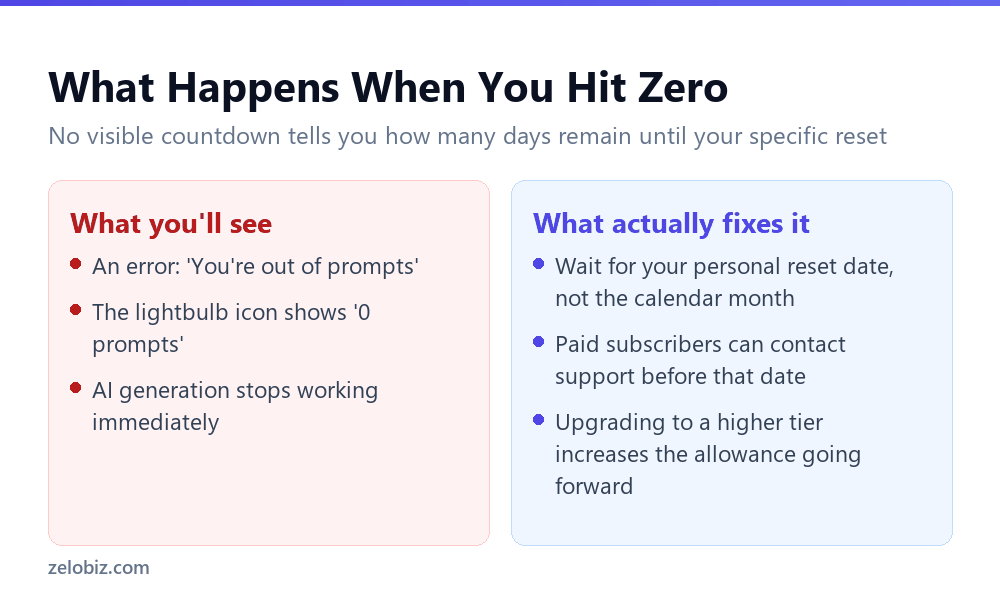
Running out produces a specific, documented error: You’re out of prompts. You can confirm this directly by clicking the lightbulb icon, which displays 0 prompts in the upper right corner rather than a countdown warning you in advance.
⚠️ Watch out: There’s no visible warning as you approach your limit, only a hard stop once you hit zero. If prompt usage matters to your workflow, it’s worth tracking manually rather than assuming the interface will flag it before you run out.
For paid subscribers who exhaust their allowance before their personal refill date arrives, Grammarly’s own guidance is to contact support directly for assistance, rather than describing any automatic top-up option. Upgrading to a plan with a higher monthly allowance is the other practical route, though that increases the ceiling going forward rather than restoring the current month’s exhausted allowance.
📊 Note: Grammarly’s support documentation and current pricing page don’t always describe the same plan names, a naming inconsistency worth understanding on its own, covered separately in why Grammarly’s own help docs don’t match its pricing page.
Doing the Math on a Typical Month
A flat number like 100 or 2,000 prompts a month is easier to judge once it’s broken down into something closer to daily use. Neither figure is a rate Grammarly publishes directly, but the arithmetic is straightforward from the monthly totals themselves.
On the Free plan, roughly three to four prompts a day is the entire budget if usage is spread evenly across the month. That’s enough for occasional rewrites or short generations, but it disappears quickly for anyone drafting multiple emails, outlines, or long-form sections in a single sitting. Pro’s per-day equivalent is high enough that most individual users would need a genuinely heavy, daily AI-writing workflow to approach it.
The catch with any average like this is that usage is rarely even. A single busy day spent drafting several long pieces can burn through a large share of a monthly allowance in hours, even if the rest of the month sees almost no AI use at all. The monthly total is a ceiling, not a daily allowance that resets each morning.
How to Check Your Own Remaining Prompts
Grammarly surfaces prompt usage through the lightbulb icon in its interface, the same indicator that reads 0 prompts once the allowance is exhausted. Checking it periodically is the only practical way to track standing before hitting the hard stop, since there’s no proactive warning as the allowance runs low.
- Click the lightbulb icon wherever Grammarly’s AI features are accessible, typically in the toolbar or sidebar of the editor.
- The count shown reflects prompts remaining in the current cycle, not a percentage or days-remaining estimate.
- There’s no separate settings page documented for viewing historical usage across past months, only the current standing.
💡 Pro tip: Get in the habit of checking the lightbulb icon before starting a large writing task, not after. Discovering a zero mid-task, with no advance warning, is the more common failure mode than running out gradually.
Free vs. Pro: Who Actually Needs the Upgrade
The honest answer depends entirely on usage pattern, not on whether AI features get used at all. Someone who occasionally asks Grammarly to rewrite a paragraph or tighten a sentence a few times a week will likely never brush against the Free plan’s ceiling. Someone drafting multiple long documents, outlines, or repeated rewrites in a single sitting can exhaust 100 prompts within days.
Pro’s 2,000-prompt allowance removes that ceiling for all but the heaviest individual workflows, at the cost of paying for headroom that may go unused most months. There’s no documented way to test this without simply tracking actual Free-plan usage for a few weeks and watching how close the lightbulb icon gets to zero before the cycle resets.
⚠️ Watch out: Because the reset date is tied to account history rather than the calendar, there’s no way to time an upgrade to align neatly with a fresh cycle. Upgrading mid-cycle increases the allowance going forward, but doesn’t shift the underlying reset date.
What Actually Counts as One Prompt
Grammarly’s own pricing and support pages state the monthly totals clearly, but neither spells out precisely what counts as a single prompt in every scenario. It’s reasonable to assume one request for a rewrite, one generated draft, or one AI-assisted reply each counts as one prompt, but Grammarly’s published material doesn’t explicitly confirm edge cases, such as whether requesting multiple tone variations in a single action counts once or multiple times.
⚠️ Watch out: Because the exact counting rules for edge cases aren’t spelled out in Grammarly’s published documentation, the safest approach is to treat every distinct AI action as potentially counting against the allowance, rather than assuming batched or repeated requests are free.
This ambiguity matters more on the Free plan, where the 100-prompt ceiling is tight enough that a miscounted assumption could mean running out several days earlier than expected. On Pro’s 2,000-prompt allowance, the same ambiguity is far less consequential, since the larger buffer absorbs uncertainty about exactly how individual actions are tallied.
A Realistic Week on the Free Plan
Walking through a hypothetical week of typical use helps make the 100-prompt ceiling concrete. This is an illustrative estimate based on the published monthly total, not a usage log or a number Grammarly itself publishes.
A single busy week like this can consume 35 to 55 prompts, roughly a third to half of the entire monthly Free allowance, if usage is even moderately active. Extend that pattern across four weeks and the ceiling becomes the binding constraint well before the personal reset date arrives, which is exactly the scenario where Pro’s much larger buffer becomes worth the cost for anyone with a similar workload.
How This Compares to a Flat Monthly Reset
Most subscription products that meter usage, whether storage, API calls, or export credits, reset on a fixed calendar boundary: the 1st of the month, or the exact date of the billing cycle. Grammarly’s account-specific reset date is a less common design, and it means the usual mental shortcut of “it resets next month” doesn’t map cleanly onto a specific calendar day without checking.
The practical difference shows up most clearly for anyone who signs up mid-month. A person who starts using Grammarly’s AI features on the 20th of a month gets a reset date tied to the 20th going forward, not the 1st of the following month. Without reading Grammarly’s own support documentation, there’s no way to infer this from the product itself.
Common Questions
How many AI prompts does Grammarly Free include?
100 AI prompts a month, according to Grammarly’s own current pricing page.
How many AI prompts does Grammarly Pro include?
2,000 AI prompts a month, twenty times the Free plan’s allowance.
Does Grammarly Enterprise have a prompt limit?
No. Grammarly states Enterprise includes unlimited prompts per member per month.
When do Grammarly’s AI prompts reset each month?
On a date determined by when generative AI first became available on your specific account, not the 1st of the calendar month. This means different users can have different personal reset dates.
What happens when I run out of Grammarly AI prompts?
You’ll see an error message reading You’re out of prompts, and the lightbulb icon will show 0 prompts. There’s no advance warning before you hit zero.
Can I get more prompts before my next reset date?
Paid subscribers who exhaust their allowance early are directed to contact Grammarly support for assistance. Upgrading to a higher plan increases the allowance going forward.
Is there a way to see exactly when my prompts will refill?
Grammarly’s documentation doesn’t describe a visible countdown or date display for this. Tracking your own usage and noting your last refill date is the practical way to estimate it.
The Short Version
- →Free gets 100 AI prompts a month, Pro gets 2,000, Enterprise is unlimited.
- →The monthly refill date is based on your account’s AI start date, not the calendar.
- →Two users on the same plan can have different personal reset dates.
- →Running out shows an error with zero advance warning.
- →Paid subscribers who run out early should contact support directly.
- →Upgrading raises the ceiling going forward; it doesn’t restore the current month.