
Attaching a file to a Copilot prompt and asking a question about it feels like exactly the kind of action an organisation’s data loss prevention policy exists to catch. Microsoft’s own documentation says it doesn’t. Not partially, not with limitations: it does not happen at all.
This covers what DLP for Copilot actually inspects, the three real protections that do exist and their genuine scope, and why none of them touch the single most common way sensitive content ends up in front of the model.
Short answer: Microsoft states plainly that DLP can’t scan the contents of files you upload directly into a Copilot prompt, and that evaluation of the uploaded file for sensitive data doesn’t occur. DLP only checks the text you type into the prompt itself. Three genuine DLP protections exist around Copilot, covering typed prompt text, stored or open files with sensitivity labels, and external email by sender domain, but none of the three inspects an uploaded attachment’s content. Verified against Microsoft Purview documentation on 4 September 2026.
The Sentence Worth Reading Twice
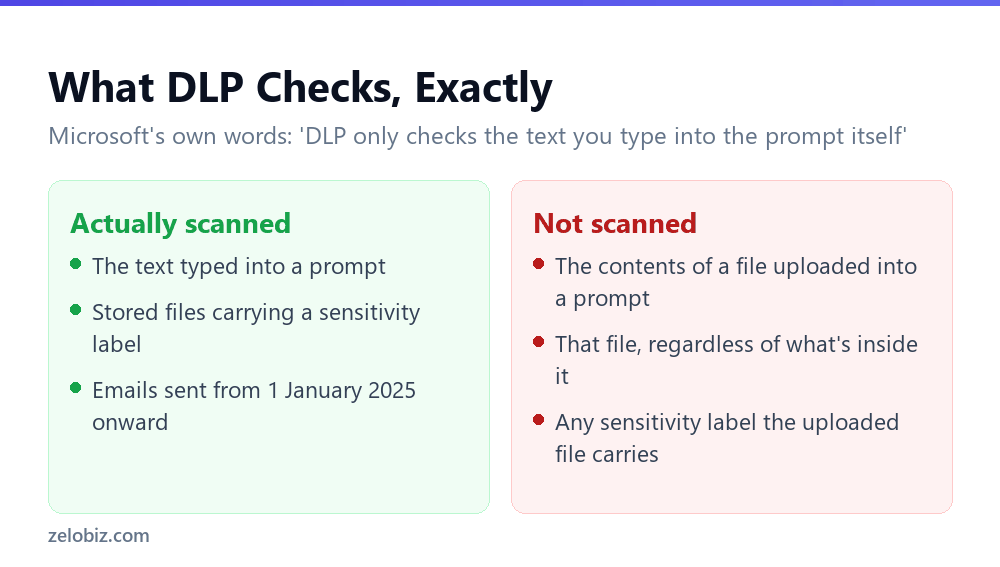
Microsoft’s documentation states this directly, without qualification: you can upload files when you craft a prompt for Microsoft 365 Copilot to analyze. DLP can’t scan the contents of files that you upload directly into prompts, so evaluation of the uploaded file for sensitive data doesn’t occur. DLP only checks the text you type into the prompt itself.
⚠️ Watch out: This applies even to a file that carries a sensitivity label the organisation has configured a DLP policy around. The label-based protection covers stored and actively open files. A copy of that same file dropped directly into a prompt as an attachment is a different action, and it is not covered.
The Three Protections That Do Exist
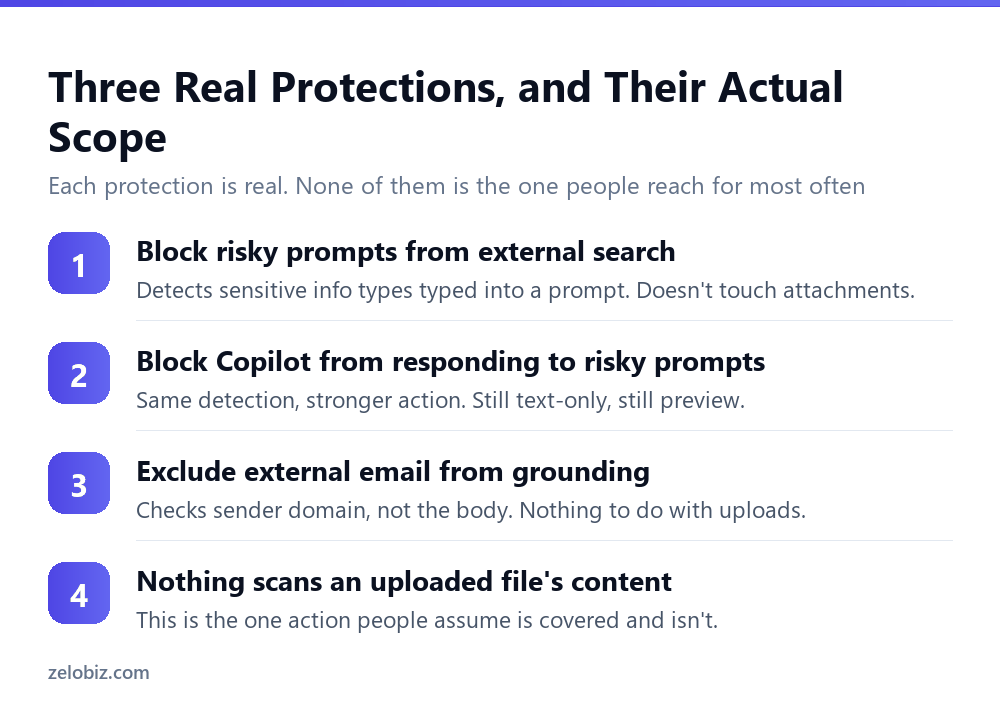
None of this means DLP for Copilot doesn’t work. Three real, documented protections exist. Understanding their actual scope is what reveals the gap, rather than assuming the gap doesn’t exist because other protections do.
Blocking sensitive prompt text from external search
When a typed prompt contains configured sensitive information types, such as credit card numbers or passport numbers, a policy can stop Copilot from sending that prompt to external web search providers. Copilot still answers, using only permitted internal Microsoft 365 data sources instead.
Blocking Copilot from responding to sensitive prompt text at all
A stronger version, in preview at the time this was checked, prevents Copilot from returning any response when the typed prompt contains configured sensitive information types. The user sees a message that their request can’t be completed because it contains sensitive information the organisation has blocked.
Excluding external email from grounding
A separate, also-preview protection can exclude email received from outside the organisation’s accepted domains from being used to ground Copilot’s responses. Microsoft is specific about what this checks: the policy evaluates email metadata only, specifically the sender domain. The body of the email isn’t inspected.
The sensitivity label protection, covered in full in Copilot and sensitivity labels: the citation still shows up, applies to files sitting in SharePoint, OneDrive, or open in an Office app. A file dropped straight into a prompt window is neither of those things, which is exactly why it falls outside every protection listed above.
Why This Gap Matters More Than the Others
Every other limitation in this series describes a boundary on what an AI feature can read or do. This one is different: it describes an action people take constantly, specifically because it feels like the safe, contained version of using Copilot with sensitive material.
Somebody who would never paste a client’s financial data into a public chatbot might not think twice about attaching the same spreadsheet to a Copilot prompt inside their own organisation’s Microsoft 365 tenant. The instinct that it’s more contained because it’s internal is reasonable. It is also unrelated to whether the file’s content gets scanned, because it does not, at all, either way.
📊 Note: None of this means the data leaves the organisation’s Microsoft 365 environment in an unsafe way by default. It means the specific data-loss-prevention check that organisations set up to catch sensitive content doesn’t run on this particular action, which is a narrower and more useful thing to understand than a blanket security concern.
Where This Fits Among the Other Copilot Protections
Seen alongside the rest of the Copilot DLP toolkit, the uploaded-file gap is not an oversight so much as a boundary of what the current tooling was built to inspect. Each protection targets a specific, well-defined action, and an upload simply isn’t one of the actions any of them were designed around yet.
That framing matters for how an organisation should talk about it internally. This isn’t a case where a policy was misconfigured or a feature failed to work as documented. It’s a case where the documented feature set has a real edge, and the practical response is knowing exactly where that edge sits rather than assuming coverage that doesn’t exist.
What would actually change this
Microsoft has extended DLP for Copilot several times, including the sensitivity label protection and the external email exclusion, both marked as newer additions or previews at the time this was checked. Coverage for uploaded prompt attachments would be a natural next extension, but nothing in current documentation commits to a timeline for it. Treat the gap as current fact, not as a permanent limitation, and check back periodically rather than assuming today’s boundary is fixed.
What Actually Closes the Gap Today
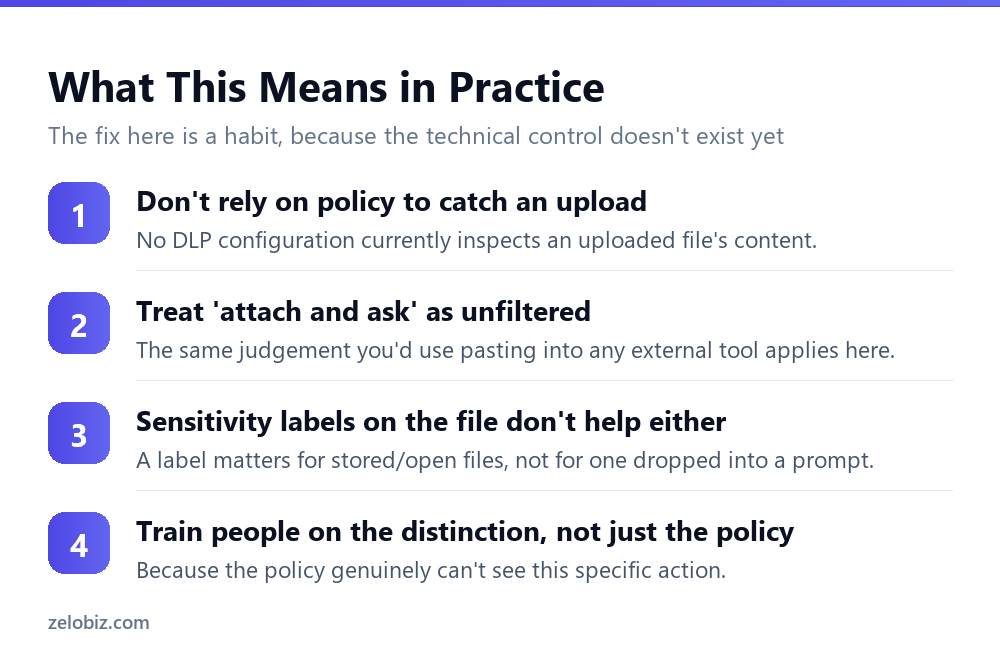
There is no policy setting that currently closes this specific gap. The realistic response is behavioural rather than technical, at least until Microsoft extends scanning to cover it.
Treat an upload the way you’d treat pasting into any outside tool
The judgement people already apply before pasting something into an external chatbot is the right judgement to apply before attaching a file to a Copilot prompt. The fact that it’s the organisation’s own Copilot licence doesn’t change what gets scanned.
Don’t assume a sensitivity label travels with the upload
A file’s sensitivity label is meaningful for the DLP protections that check stored and open files. It does not extend any protection to a copy of that same file attached directly to a prompt, since that action isn’t covered by the label-based policy at all.
This is a training point, not a configuration checkbox
Because no current policy setting addresses this, closing the gap in practice means making sure the people using Copilot understand the distinction, rather than assuming an administrator has already handled it somewhere in the DLP configuration.
💡 Pro tip: If your organisation trains staff on what not to paste into public AI tools, extend the same training explicitly to file uploads inside Copilot. The natural assumption that an internal tool’s DLP policy covers this action is exactly the assumption Microsoft’s documentation contradicts.
A Worked Comparison
The difference between a covered action and an uncovered one is easiest to see side by side, using the exact same document in three different situations.
Nothing about the file changed between the three rows. What changed is the mechanism used to give Copilot access to it, and that mechanism alone determines whether any DLP protection applies. A user moving between these three ways of working with the same document, without realising the protection changes underneath them, is exactly how this gap gets used unintentionally rather than maliciously.
Common Questions
Does DLP scan files I upload directly into a Copilot prompt?
No. Microsoft states directly that DLP can’t scan the contents of files uploaded directly into prompts, and that evaluation of the uploaded file for sensitive data doesn’t occur. DLP only checks the text typed into the prompt itself.
If a file has a sensitivity label, is it protected when uploaded into a prompt?
No. Sensitivity label DLP protection covers stored files and files actively open in an application. A copy of that file uploaded directly into a prompt as an attachment is a different action and isn’t covered by that protection.
What does Copilot DLP actually protect against?
Three documented protections exist: blocking prompt text containing sensitive information types from reaching external web search, blocking Copilot from responding to prompts containing sensitive information types, and excluding external email from being used to ground responses based on sender domain.
Does the external email protection read the body of the email?
No. Microsoft states the policy evaluates email metadata only, specifically the sender domain compared against the organisation’s accepted domains. The email body isn’t inspected.
Is there a way to make Copilot scan an uploaded file for sensitive content?
Not currently, based on Microsoft’s documentation. The realistic response is treating an upload with the same caution used before pasting content into any external tool, since no DLP policy setting currently inspects uploaded file content.
Why does this gap matter more than other Copilot limitations?
Because attaching a file to a prompt is a common, routine action that feels contained since it happens inside the organisation’s own Copilot. That feeling is unrelated to whether the file’s content actually gets scanned, which it does not, regardless of sensitivity.
Are these DLP protections available on every Microsoft 365 plan?
Licensing requirements are covered separately in Microsoft’s documentation and vary by enterprise plan. Confirm current licensing details for your specific plan rather than assuming availability.
The gap described here sits specifically around content someone uploads directly. It is unrelated to whether Copilot can see a file through search or a configured knowledge source, which follows the permission and sensitivity-label rules covered elsewhere in this series. Keeping the two mental models separate, what Copilot finds on its own versus what someone hands it directly, is the clearest way to reason about where protection actually applies.
None of this is a reason to avoid Copilot uploads altogether. Most of what people attach to a prompt carries no sensitivity at all, and the entire point of knowing where this specific boundary sits is being able to make that judgement deliberately rather than assuming a policy is silently making it for you.
The Short Version
- →DLP does not scan the contents of a file uploaded directly into a Copilot prompt.
- →It only checks the text typed into the prompt itself.
- →Three real protections exist: prompt text, sensitivity-labelled stored files, external email by domain.
- →None of the three covers a file attached directly to a prompt.
- →A sensitivity label on a file doesn’t extend protection to an uploaded copy of it.
- →Closing this gap today is a training and habit question, not a configuration setting.