
Blocking Copilot from a Confidential file sounds like making that file invisible to it. Microsoft’s own documentation says something more specific and more useful to know in advance: the content is excluded from what Copilot uses, and the file itself can still surface as a named citation.
This covers exactly what a sensitivity label DLP policy for Copilot does and does not cover, the specific timing gap that catches people applying a label to a file already open, and where the coverage has edges that don’t match the intuitive assumption.
Short answer: A DLP policy can prevent Copilot from processing a file or email carrying a specific sensitivity label, meaning its content won’t be read or used in a response. Microsoft states directly that the item could still be available in the citations of the response, just without its content contributing anything. Coverage includes stored and open files plus emails from 1 January 2025 onward, but not calendar invites. In Word, Excel and PowerPoint, the check happens when a file opens, so a label applied mid-session doesn’t take effect until the file is reopened. Verified against Microsoft Purview documentation on 4 September 2026.
Excluded From the Answer, Not From the Response
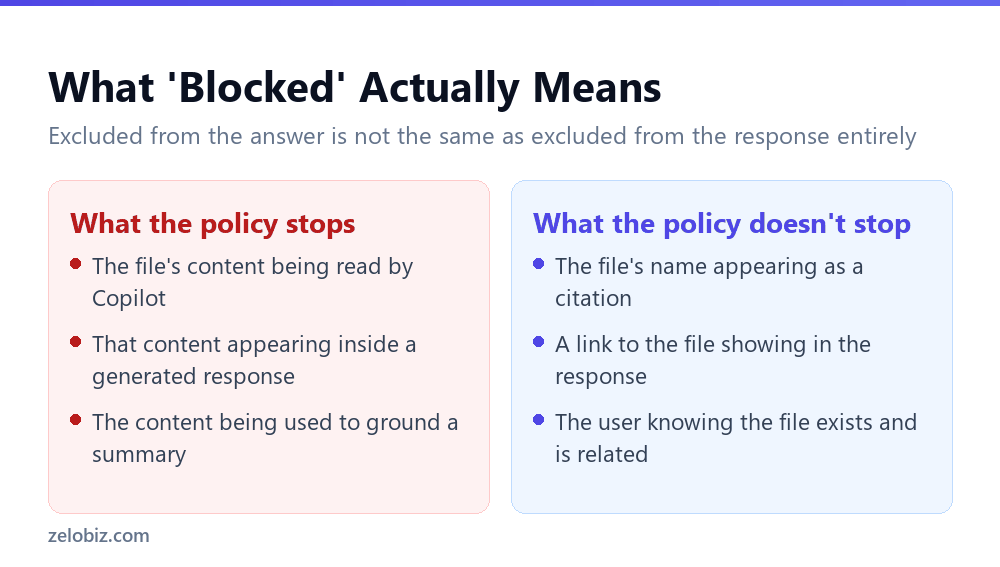
Microsoft’s own wording is precise and worth reading exactly as written: identified items still appear in the citations of the response, but the content of the item isn’t used in the response or accessed by Copilot.
That is a narrower protection than block this file from Copilot suggests. The file’s existence, its name, and a link to it can still appear when Copilot cites its sources. What is actually prevented is the file’s contents being read and folded into the generated answer.
⚠️ Watch out: If the concern behind labelling a file Highly Confidential is that its existence shouldn’t be surfaced to certain users at all, a Copilot DLP policy on the sensitivity label doesn’t fully address that. It stops the content from being used, not the file from being named as a citation to anyone who otherwise has permission to see it.
Where Coverage Actually Starts and Stops
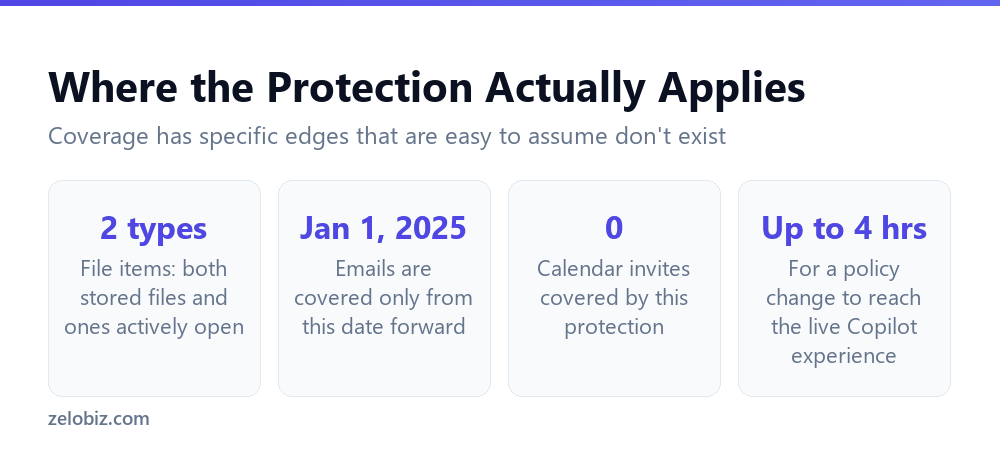
Coverage has specific, documented boundaries that are easy to assume don’t exist until you check.
Files: both stored and actively open
The policy covers file items whether they are simply stored somewhere or are actively open in an application at the time. Supported file types follow the same list used elsewhere for sensitivity labels in SharePoint and OneDrive.
Emails, but only from a specific date forward
Email coverage is not universal across your entire mailbox history. Microsoft states the policy covers emails sent on or after 1 January 2025. Older email is outside this protection’s coverage.
Calendar invites are not covered at all
Microsoft states plainly that calendar invites aren’t supported. A sensitive meeting invite carrying details you’d rather Copilot not summarise is not something this policy type protects, regardless of any sensitivity label applied to it.
The File-Open Timing Gap
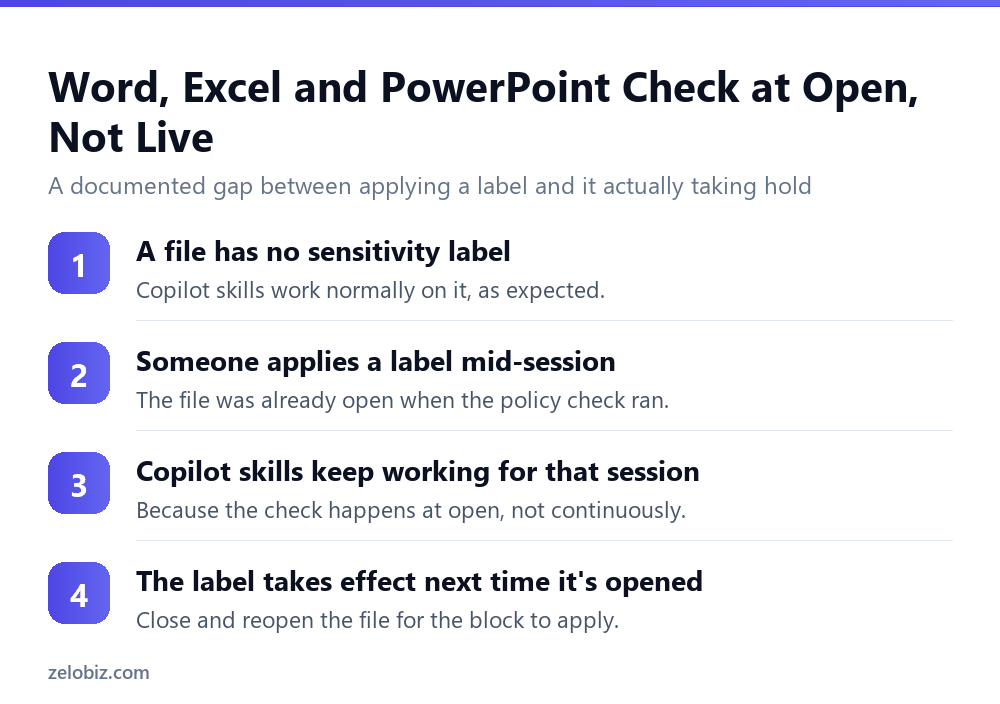
This is the detail most likely to produce a confusing support ticket. In Word, Excel and PowerPoint specifically, the policy to prevent Copilot from processing content is evaluated at file open. If a sensitivity label is applied mid-session, Microsoft states the policy will be enforced starting the next time the file is opened.
In practice: someone opens a document with no label, works on it with Copilot’s help, then applies a Highly Confidential label partway through, expecting the protection to kick in immediately. It does not. The document was already open when the label check would have run, and Copilot’s skills for that file continue working normally until the file is closed and reopened.
📊 Note: Microsoft adds a further nuance: certain experiences that don’t reference file content, or that aren’t using any large language models, aren’t currently blocked by this control even after enforcement takes hold. The block specifically targets skills that read and use the document’s content.
💡 Pro tip: If a document needs to be protected from Copilot immediately after labelling, close and reopen it rather than assuming the label alone changes anything for the current session. This is a five second action that closes a real, documented gap.
Checking Whether a Label Is Actually Blocking Anything
Because a blocked file can still surface as a citation, a quick glance at a Copilot response doesn’t tell you whether the policy is working. Confirming it needs a slightly more deliberate check.
- Ask a direct question the labelled file should answer. If the response cites the file but doesn’t actually use facts from it, that’s the expected behaviour, not a failure.
- Compare against an unlabelled version of similar content. The difference in how much detail comes back is the clearest sign the exclusion is active.
- Don’t judge by whether the file appears in citations. It appearing there is expected and doesn’t indicate the policy failed.
- Check the Purview reporting directly for a definitive answer. The policy’s own logs are more reliable than inferring behaviour from Copilot’s output alone.
This distinction matters most when someone reports that a Confidential file is showing up in Copilot despite the policy being active. In most cases the file is showing up exactly as documented, as a citation with no content behind it, and the policy is working correctly. The report is really asking a different question: whether the citation-only appearance is itself acceptable, which is a policy design decision rather than a technical fault.
Setting Two Conditions in the Same Policy
One structural limit is worth knowing before designing a policy: you can’t use both content contains sensitive info types and content contains sensitivity labels conditions in the same rule. Microsoft’s guidance is to create a separate rule for each condition within the same policy rather than combining them in one rule.
This is a configuration detail rather than a coverage gap, but it explains a common setup mistake: an admin tries to build one rule that checks both a sensitive information type and a sensitivity label at once, and the policy interface will not allow it. The fix is two rules, not one combined rule.
Designing a Label Taxonomy With This Behaviour in Mind
Microsoft’s own example use case is worth adapting for how it structures a label set around this specific behaviour, rather than treating labels as a flat list of confidentiality tiers.
The example uses five labels: Highly Confidential, Confidential, Internal, Public and Personal, with a policy excluding items carrying Personal or Highly Confidential from being processed in Copilot’s response summary. That is a deliberate choice about which labels warrant this specific protection, not every label an organisation might use.
Excluding too many labels from Copilot processing makes the tool less useful without a proportionate security benefit, since users will find Copilot unable to help with a large share of everyday content. The judgement call is which labels genuinely warrant the citation-only behaviour described above, rather than applying it uniformly.
💡 Pro tip: Start narrow. Apply this exclusion to the one or two labels carrying the most serious risk, observe how it affects real usage, and expand only if a specific gap shows up. Starting broad and loosening later is harder than starting narrow and tightening.
Who Can Actually Set This Up
Microsoft lists several specific roles authorised to create or edit this kind of DLP policy, including Microsoft Entra AI Admin, Purview Data Security AI Admin, Purview Compliance Administrator, and a small number of related Purview and Entra roles. Global Administrator also works, but Microsoft’s own guidance recommends against defaulting to it: minimising the number of users with Global Administrator access is described as better practice for organisational security generally.
Once a policy is live, changes are not instant. Updates can take up to four hours to reflect in the Copilot experience, which is worth knowing before assuming a just-saved policy change should already be working. We cover that delay and several other timing gotchas in how long a Copilot DLP policy actually takes to work.
Common Questions
If I block a sensitivity label from Copilot, is the file invisible to it?
Not entirely. Microsoft states the item could still be available in the citations of the response, even though its content isn’t used or accessed. The file’s existence and a link to it can still surface; only the content is excluded.
Does a sensitivity label DLP policy cover all my email?
No. It covers emails sent on or after 1 January 2025. Email from before that date falls outside this specific protection’s coverage.
Are calendar invites protected by Copilot sensitivity label policies?
No. Microsoft states calendar invites aren’t supported by this DLP policy type, regardless of any sensitivity label applied to the invite.
If I label a document while it’s open, does Copilot stop working on it immediately?
No, in Word, Excel and PowerPoint specifically. The policy is evaluated at file open, so a label applied mid-session only takes effect the next time the file is opened, not during the current session.
Can I combine a sensitive information type condition and a sensitivity label condition in one rule?
No. Microsoft states these two conditions can’t be used in the same rule, though you can create a separate rule for each within the same overall policy.
How long does a Copilot DLP policy take to start working after I save it?
Up to four hours to reflect in the live Copilot experience. A policy that appears inactive immediately after saving may simply not have propagated yet.
What roles can create a Copilot DLP policy based on sensitivity labels?
Several specific Purview and Entra roles, including Microsoft Entra AI Admin, Purview Data Security AI Admin, and Purview Compliance Administrator. Global Administrator also works, but Microsoft recommends using a role with fewer permissions instead.
One last point worth carrying forward: the behaviour documented throughout this article is specific to the sensitivity-label DLP policy for Copilot. Other protections, such as blocking sensitive text typed directly into a prompt, work differently and are covered separately in the rest of this series. Treating every Copilot control as if it behaves identically is the fastest way to misconfigure one of them.
The Short Version
- →A blocked sensitivity label excludes content from Copilot’s response, not the citation.
- →Email coverage starts 1 January 2025. Calendar invites aren’t covered at all.
- →In Word, Excel and PowerPoint, the check runs at file open, not continuously.
- →A label applied mid-session needs a close and reopen to actually take effect.
- →Sensitive info type and sensitivity label conditions can’t share one rule.
- →Policy changes can take up to four hours to reach the live Copilot experience.