
Before you buy anything, it is worth knowing what you already own. Most businesses asking how to use AI in Microsoft 365 or Google Workspace are already paying for some of it, and paying separately for a second tool that overlaps.
The two vendors handle this very differently. Microsoft sells AI as an add-on with a price you can look up. Google bundles it into the plan you already have, then caps how often you can use it in the apps where it matters most.
Short answer: Microsoft charges extra. Microsoft 365 Copilot Business is $18 per user per month paid yearly, or $25.20 billed monthly, and it sits on top of a qualifying base plan. Google includes Gemini in paid Workspace plans at no extra cost, but meters it: Sheets and Slides are capped at 100 uses a month on Business Standard and Plus, and Business Starter gets none at all. Prices and limits verified 30 August 2026.
The Fundamental Difference
Microsoft’s model is simple to understand and easy to underestimate. Copilot is an add-on. You keep paying for your Microsoft 365 plan, and Copilot is an extra line on the invoice for every person who needs it.
Google’s model is the opposite. Gemini is folded into the Workspace plan you already pay for, so there is no separate purchase for most businesses. The catch is not price. It is volume.
That single difference decides most of what follows. With Microsoft you are asking whether the value justifies the extra spend. With Google you are asking whether the included allowance covers how much you would actually use it.
What Microsoft 365 Copilot Actually Costs
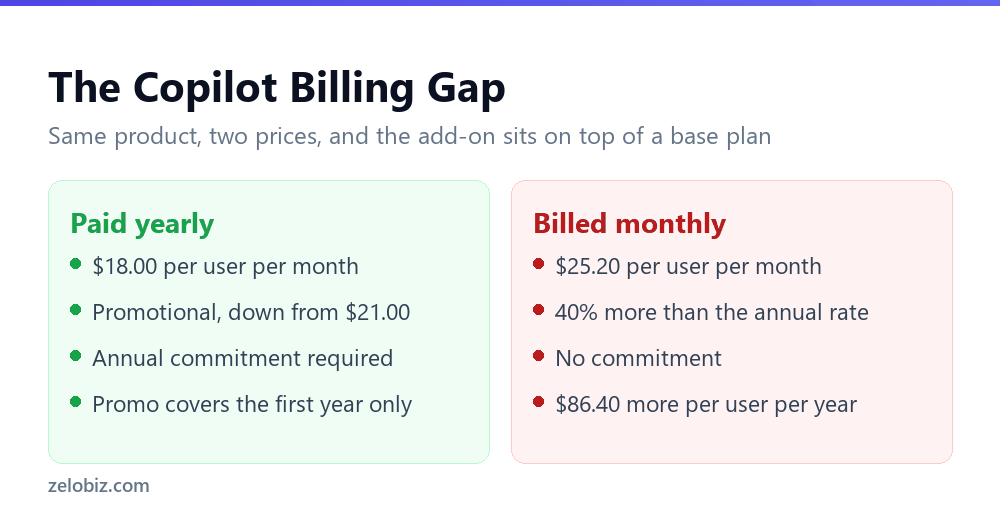
The headline figure is $18 per user per month. That number is accurate and incomplete, and the gap between the two is where budgets go wrong.
Three things in that table deserve attention. The first is the billing gap. Choosing monthly over annual costs $7.20 more per user per month, which is $86.40 a year for each person. On a team of ten that is $864 a year for the privilege of not committing.
The second is that $18 is promotional. It is discounted from $21, it runs through 31 December 2026, and Microsoft states it applies to the first year only. A budget built on $18 indefinitely is a budget that breaks in year two.
The third is the base plan. The standalone add-on does not include Microsoft 365. You need a qualifying business plan underneath it, so the real per-seat cost is the base plan plus the add-on.
💡 Pro tip: Compare the bundles before buying the add-on. Business Standard with Copilot at $23.50 includes the base plan. If you were going to pay for Business Standard anyway, that single line can work out cheaper than buying the two separately.
Why Copilot in Excel Sometimes Does Nothing
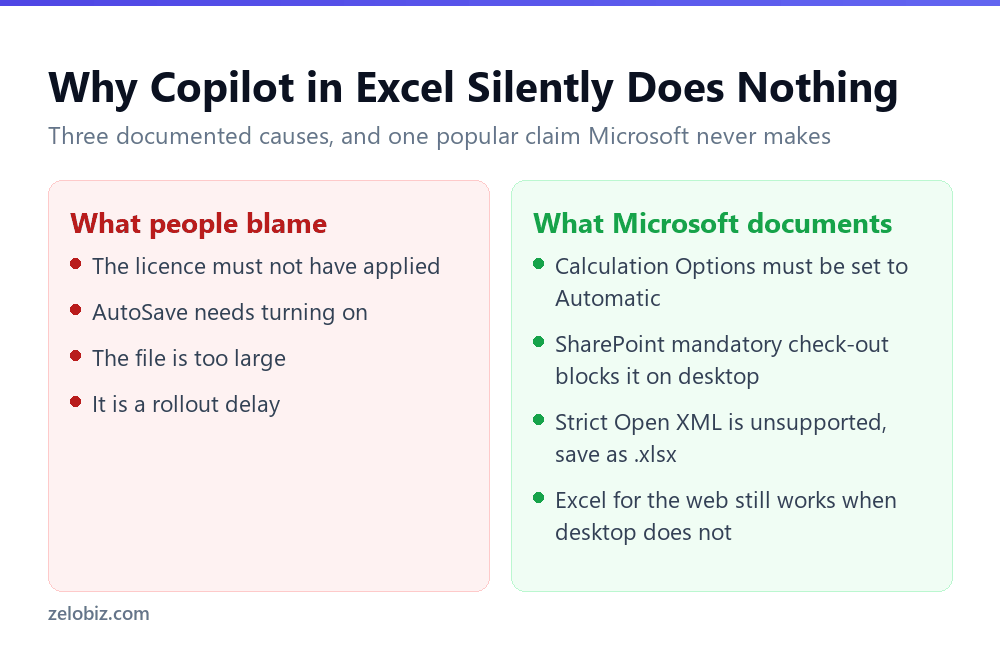
This is the part worth reading before you pay. Plenty of people buy the licence, open a spreadsheet, and find Copilot either missing or refusing to edit anything. There are documented reasons, and they are not the ones usually blamed.
Calculation Options must be set to Automatic
Microsoft states that Copilot editing is only supported when Calculation Options are set to Automatic. If you work on a large model and switched calculation to Manual to keep it responsive, which is a common and sensible thing to do, Copilot will not edit the file.
You will find that setting under Formulas, then Calculation Options. This is the single most likely explanation for Copilot appearing to be installed and doing nothing.
SharePoint check-out blocks it on desktop
If your organisation requires mandatory check-out for editing on a SharePoint site, Copilot in Excel will not work on Windows or Mac for files from that site. Excel for the web still works, which is a useful escape hatch.
A file that is simply checked out by someone produces an unsupported file state error. Checking it back in, then closing and reopening it, clears that.
The file format has to be right
Strict Open XML Spreadsheet is not supported. Saving the workbook as a standard Excel Workbook in .xlsx format resolves it. This one is rare but it is silent when it bites.
⚠️ Watch out: You will read in many places that AutoSave must be switched on for Copilot in Excel to work. Microsoft’s own FAQ does not state that. It states the Calculation Options requirement and the SharePoint check-out limitation. We are repeating what the documentation says rather than what circulates around it.
Google Includes Gemini, Then Meters It
Google’s message is that Gemini comes with Workspace at no extra cost. That is true, and it hides the number that actually matters.
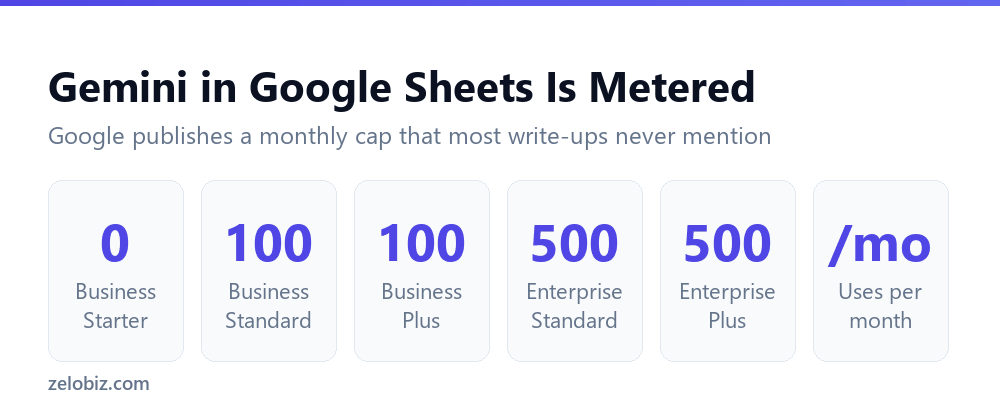
Gemini in Google Sheets and Google Slides is capped per month, and the cap depends on your edition.
Two findings fall out of that table. Business Starter, the entry plan, gets no Gemini in Sheets or Slides at all. If you are on Starter and expecting AI in your spreadsheets because Gemini is included with Workspace, it is not.
And paying more does not always raise the ceiling. Business Plus costs considerably more than Business Standard, but the Sheets allowance is identical at 100 a month. The jump to 500 comes at Enterprise, not at Business Plus.
Google does also sell an AI Expanded Access add-on for higher limits, available on Business Standard and above. Google does not publish a fixed price for it, because it varies by currency and subscription term, and the figure appears in your admin console. Treat any specific dollar amount you read elsewhere with suspicion.
What the Workspace Tiers Cost
For a business that wants AI in spreadsheets, the meaningful decision is Starter to Standard. That step is roughly six dollars per user per month and it is the difference between no access and an allowance.
The step from Standard to Plus is a larger amount of money for the same Sheets allowance. There are other reasons to choose Business Plus, including storage and security controls, but more Gemini in Sheets is not one of them.
Which One Are You Already Paying For?
Most businesses do not get to choose freely. They are already on one platform, and the practical question is what to do from there.
- Already on Microsoft 365, small team. Price the bundles alongside the add-on. Business Standard with Copilot at $23.50 may beat your base plan plus $18, and it removes the promotional expiry question from your budget.
- Already on Microsoft 365, undecided. Check Calculation Options and your SharePoint check-out policy first. If a mandatory check-out policy applies, desktop Excel will not use Copilot and you should know that before purchase.
- Already on Workspace Starter. You have no Gemini in Sheets. The upgrade to Business Standard is the cheapest route to any allowance at all.
- Already on Workspace Standard or Plus. You have 100 uses a month in Sheets. Use them for a fortnight before buying anything else, because that number is either plenty or obviously not, and you will know quickly.
- On neither, and choosing. Do not choose a productivity suite on its AI features. Choose it on everything else, then treat the AI as a bonus, because both vendors are changing these terms every few months.
A Two-Week Test Before You Commit
Whichever platform you are on, the same short exercise tells you more than any feature list.
Pick the three tasks you personally repeat most often. Not the impressive ones, the boring recurring ones. Drafting the same kind of email, building the same monthly summary, cleaning the same export.
Do each one with the AI available on your current plan, and time yourself honestly, including the time spent checking the output. That last part is where most enthusiasm quietly disappears, and it is the only number that matters.
📊 Note: If you are on Workspace, this test also spends part of your 100 monthly Sheets uses, which is useful information in itself. Running out in two weeks tells you the allowance is too small. Barely denting it tells you an upgrade would be wasted.
Common Questions
How much does Microsoft 365 Copilot cost per user?
Microsoft 365 Copilot Business is $18.00 per user per month paid yearly, which is a promotional rate reduced from $21.00, available through 31 December 2026 with an annual commitment and applying to the first year only. Billed monthly it is $25.20 per user per month. Either way you also need a qualifying Microsoft 365 base plan.
Is Gemini free with Google Workspace?
Gemini is included in paid Workspace plans at no extra charge, but usage in Sheets and Slides is capped. Business Standard and Business Plus allow 100 uses a month in each. Enterprise editions allow 500. Business Starter has no access to Gemini in Sheets or Slides at all.
Why is Copilot not working in my Excel file?
The most common documented reason is that Calculation Options are not set to Automatic, because Copilot editing is only supported in Automatic mode. Other causes are a SharePoint site with mandatory check-out, which blocks Copilot in Excel on Windows and Mac, and an unsupported file format such as Strict Open XML.
Does Copilot in Excel require AutoSave to be turned on?
Microsoft’s own Copilot in Excel FAQ does not state AutoSave as a requirement. It documents the Calculation Options setting, SharePoint check-out limitations, and file format requirements. The AutoSave claim circulates widely but is not in the official documentation.
Which Google Workspace plan do I need for AI in Sheets?
Business Standard is the cheapest plan that includes any Gemini access in Sheets, at 100 uses per month. Business Plus costs more but has the same 100-per-month Sheets allowance, so upgrading from Standard to Plus does not increase it.
Is it cheaper to buy Copilot as an add-on or a bundle?
It depends on the base plan you need. The standalone add-on is $18 per user per month paid yearly plus your existing plan. Business Standard with Copilot is $23.50 and Business Premium with Copilot is $32.00, both including the base plan. Price all three against what you already pay.
Does the $18 Copilot price last?
No. Microsoft states it is promotional, discounted from $21.00, available through 31 December 2026, and applies to the first year only. Plan for the standard rate when budgeting beyond the first year.
Can I use AI in Excel without paying for Copilot?
Yes, though not inside the application. You can copy data into a general assistant such as ChatGPT, Claude or Gemini and paste results back, which costs nothing beyond any assistant subscription you already have. It is slower than in-app AI but it works on any Excel version.
The Short Version
- →Microsoft charges extra for AI. Google includes it and caps how much you can use.
- →Copilot is $18 per user per month paid yearly, $25.20 billed monthly, plus a base plan.
- →The $18 rate is promotional through 31 December 2026 and covers the first year only.
- →Gemini in Sheets is capped at 100 uses a month on Business Standard and Business Plus.
- →Workspace Business Starter has no Gemini in Sheets or Slides at all.
- →If Copilot in Excel does nothing, check Calculation Options is set to Automatic first.
The honest summary is that both vendors describe their AI more generously than the terms support. Microsoft’s price is real but conditional. Google’s inclusion is real but metered. Knowing which condition applies to you is worth more than any feature comparison.
Pricing and limits in this article were checked against Microsoft’s and Google’s own documentation on 30 August 2026. Both vendors revise these terms frequently, so verify current figures before you buy.