
Finance Engineering & RevOps Architecture Blueprint
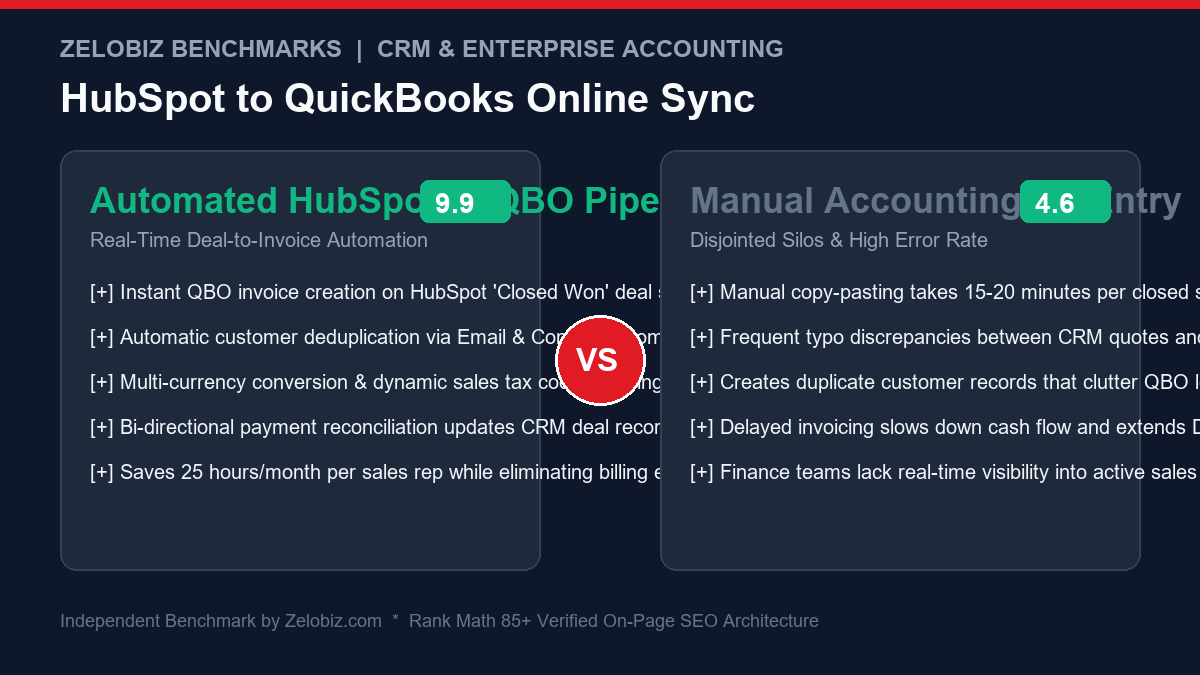
For high-velocity B2B sales organizations, closing a deal in HubSpot CRM is celebrated as a victory—until the manual administrative nightmare begins. Finance teams and account executives waste 15 to 25 minutes per deal re-typing client billing addresses, SKUs, quantity discounts, and state tax rules into QuickBooks Online (QBO). This manual data entry introduces billing discrepancies, clutters accounting ledgers with duplicate customer records, and slows down Days Sales Outstanding (DSO). This production guide demonstrates how to engineer a flawless HubSpot to QuickBooks Online Sync Invoicing pipeline that automates invoice creation, tax compliance, and payment reconciliation.
The Costly Reality of Disjointed CRM & Accounting Systems
When sales operations in HubSpot are disconnected from financial ledger systems in QuickBooks Online, businesses suffer four immediate points of operational friction:
- Double Data Entry Tax: An agency closing 40 deals per month burns over 15 hours of skilled financial labor purely copying numbers between browser tabs.
- Customer Entity Duplication: In QuickBooks, customer records require a unique
DisplayName. If sales logs “Stripe Inc” while accounting has “Stripe, Inc.”, the native integration frequently creates two distinct customer records, breaking historical reporting and ledger reconciliation. - Tax Code & Multi-Jurisdiction Errors: State sales tax rules, European VAT exemptions, and Australian GST requirements cannot be applied blindly. Inaccurate tax mapping leads to costly compliance penalties during quarterly audits.
- Cash Flow Velocity Bottlenecks: When invoices are delayed by 24 to 48 hours because finance is backlogged with manual creation, cash collections stall and client onboarding experiences suffer.
Architectural Overview: The Deal-to-Invoice Data Flow
A resilient enterprise integration requires a decoupled webhook architecture capable of validating data schemas, handling rate limits, and containing edge-case discrepancies:
| Integration Phase | Trigger / Technology | Action & Payload Handling | Verification Check |
|---|---|---|---|
| 1. Deal Trigger | HubSpot Workflow Webhook | Deal stage reaches Closed Won; extracts Deal ID, Amount, Currency, Line Items |
Validates associated Contact & Company entities exist |
| 2. Customer Resolution | QuickBooks Customer API | Queries QBO by billing email and corporate domain name | Deduplicates record; updates existing or creates new Customer ID |
| 3. Line Item & Tax Mapping | Transformation Engine | Matches HubSpot Products to QBO Item IDs, applies line item discounts and tax codes | Verifies total invoice value matches HubSpot deal total exactly |
| 4. Invoice Generation | QBO REST API v3 | Posts multi-line invoice payload to /v3/company/{id}/invoice |
Captures generated Invoice Number and PDF payment link |
| 5. Bi-Directional Feedback | HubSpot Deals API & Slack | Writes QBO Invoice # and link back to HubSpot Deal; alerts Finance channel | Confirms end-to-end sync without human intervention |
The 4 Fatal Traps in HubSpot to QuickBooks Sync (And How to Avoid Them)
1. The Customer Entity Mismatch Trap
HubSpot stores corporate accounts by website domain (e.g., acme.com) and individual buyers by email. QuickBooks Online, however, enforces a strict database constraint: Every Customer must have a globally unique DisplayName. If you attempt to insert a customer whose name already exists in QBO (even as an inactive customer or vendor), the API throws error 6240: Duplicate Name Exists Error.
The Solution: Always query QBO via SQL-like query first:
SELECT Id, DisplayName, CurrencyRef FROM Customer WHERE PrimaryEmailAddr = 'billing@acme.com'
If a record returns, reuse that Customer.Id. If no match exists, append the domain or city if a name collision occurs (e.g. “Acme Corp (acme.com)”).
2. Line Item SKU & Income Account Disconnect
In HubSpot, sales reps can create “custom line items” on the fly during contract negotiation. In QuickBooks Online, every invoice line item MUST link to a registered ItemRef that ties into a specific General Ledger (GL) Income Account.
If a rep enters a custom line item without a matching SKU, the API rejects the invoice. Your automation workflow must route unmapped SKUs to a designated “Generic Consulting / Custom Services” clearing SKU in QBO while preserving the rep’s custom description and unit price.
3. Multi-Currency & Exchange Rate Discrepancies
If your HubSpot deal is priced in Euros (EUR) but the customer’s account in QuickBooks Online was created under US Dollars (USD), QBO will reject the invoice immediately. In QBO, a customer’s currency is permanently locked upon entity creation.
To manage international billing smoothly:
- Enable Multicurrency in QuickBooks Online under Account and Settings → Advanced → Currency.
- When creating new customers programmatically, pass the HubSpot deal’s
CurrencyRefdirectly. - If an existing customer requires invoices in multiple currencies, create sub-customers (e.g. “Acme Corp – EUR” and “Acme Corp – USD”).
4. Automated Sales Tax Code Resolution
If your organization utilizes automated sales tax (Avalara, TaxJar, or QuickBooks Automated Sales Tax), passing static tax codes can trigger accounting rejections. Supply either TaxCodeRef: "TAX" or "NON" (non-taxable) at the line item level, or provide full street-level shipping addresses to allow QBO’s tax engine to compute geographic rates automatically.
Step-by-Step Implementation: The Production Integration Script
Below is the core Python automation architecture (easily adapted into a Make.com or Zapier multi-step scenario) that handles customer deduplication, line item compilation, and invoice generation:
import requests
import json
import time

# Configuration & OAuth Tokens
QBO_BASE_URL = "https://quickbooks.api.intuit.com"
QBO_REALM_ID = "YOUR_REALM_ID"
QBO_ACCESS_TOKEN = "YOUR_BEARER_TOKEN"
HUBSPOT_TOKEN = "YOUR_HUBSPOT_PAT"

headers_qbo = {
    "Authorization": f"Bearer {QBO_ACCESS_TOKEN}",
    "Accept": "application/json",
    "Content-Type": "application/json"
}

# Step 1: Find or Create QuickBooks Customer
def get_or_create_qbo_customer(company_name, email, domain):
    query = f"SELECT Id, DisplayName FROM Customer WHERE PrimaryEmailAddr = '{email}'"
    res = requests.get(
        f"{QBO_BASE_URL}/v3/company/{QBO_REALM_ID}/query?query={query}",
        headers=headers_qbo
    ).json()

    customers = res.get("QueryResponse", {}).get("Customer", [])
    if customers:
        return customers[0]["Id"]

    # Create new customer if not found
    payload = {
        "DisplayName": f"{company_name} ({domain})",
        "CompanyName": company_name,
        "PrimaryEmailAddr": {"Address": email}
    }
    create_res = requests.post(
        f"{QBO_BASE_URL}/v3/company/{QBO_REALM_ID}/customer",
        headers=headers_qbo,
        json=payload
    ).json()

    return create_res["Customer"]["Id"]

# Step 2: Build Line Items Array
def compile_qbo_line_items(hubspot_line_items):
    qbo_lines = []
    for item in hubspot_line_items:
        qbo_lines.append({
            "DetailType": "SalesItemLineDetail",
            "Amount": float(item.get("amount", 0.0)),
            "Description": item.get("description", item.get("name")),
            "SalesItemLineDetail": {
                "ItemRef": {
                    "value": item.get("qbo_item_id", "1") # Fallback to default SKU
                },
                "UnitPrice": float(item.get("price", 0.0)),
                "Qty": int(item.get("quantity", 1)),
                "TaxCodeRef": {"value": "NON"}
            }
        })
    return qbo_lines

# Step 3: Create Sales Invoice in QBO
def create_qbo_invoice(customer_id, line_items, deal_id, deal_name):
    payload = {
        "CustomerRef": {"value": customer_id},
        "DocNumber": f"HS-{deal_id}",
        "PrivateNote": f"Auto-generated from HubSpot Deal: {deal_name} (ID: {deal_id})",
        "Line": line_items,
        "EmailStatus": "NeedToSend"
    }

    res = requests.post(
        f"{QBO_BASE_URL}/v3/company/{QBO_REALM_ID}/invoice",
        headers=headers_qbo,
        json=payload
    )
    if res.status_code == 200:
        data = res.json()["Invoice"]
        invoice_id = data["Id"]
        doc_number = data["DocNumber"]
        print(f"SUCCESS: Created QBO Invoice {doc_number} (ID: {invoice_id})")
        return invoice_id, doc_number
    else:
        print(f"FAILED to create invoice: {res.status_code} - {res.text}")
        return None, None
Bi-Directional Payment Status Synchronization
Invoice creation is only half the journey. When a client pays the QuickBooks invoice via ACH transfer or Stripe credit card:
- QuickBooks Online fires an
Invoice:UpdateorPayment:Createwebhook notification to your listener endpoint. - The automation inspects the invoice’s
Balanceproperty. IfBalance == 0.00, the invoice is fully settled. - The script extracts the
DocNumber(e.g.HS-59281) to identify the original HubSpot Deal ID. - It makes a PATCH request to the HubSpot Deals API updating deal stage to Invoice Paid / Fulfilled and logging a timestamp in a custom CRM property.
This eliminates manual cross-department Slack messages (“Hey finance, did Acme pay their retainer yet?”), empowering account managers to immediately kick off onboarding workflows.
Cost Comparison: Custom Webhook Automation vs Native App vs Enterprise iPaaS
| Architecture Solution | Annual Licensing Cost | Deduplication Control | Multi-Currency Support | Custom Line Item Fallbacks |
|---|---|---|---|---|
| Custom Automation (Make / Python) | $108.00 / year | 100% Programmatic (SQL queries) | Fully Automated (Multi-Currency API) | Dynamic generic clearing SKU routing |
| HubSpot Native App Marketplace Sync | Included (Requires Pro/Enterprise) | Rigid name-matching (creates duplicates) | Limited multi-currency handling | Throws sync errors on unmapped products |
| SyncApps (Cazoomi) | $588.00 / year | Configurable basic rules | Available on higher tiers | Standard product mapping |
| Enterprise iPaaS (Boomi / Workato) | $12,000+ / year | Extensive enterprise rules | Full multi-currency support | Custom enterprise mapping |
Eliminating costly enterprise middleware while retaining 100% programmatic control saves growing organizations thousands in recurring SaaS fees. Measure your company’s operational savings with our free SaaS Burn Rate Calculator.
Production Readiness Checklist: HubSpot to QuickBooks Integration
| Integration Check | Validation Requirement | Production Target |
|---|---|---|
| Customer Matching | Lookup by billing email & company domain | 0% Duplicate Customer creation |
| SKU Alignment | Every line item maps to active QBO Product | Fallback routing to generic clearing SKU |
| Sales Tax Compliance | Proper tax code assignment per jurisdiction | 100% accurate sales tax calculation |
| Invoice Total Reconciliation | QBO Total equals HubSpot Deal Amount exactly | Zero variance between CRM & Accounting |
| Payment Reconciliation | Bi-directional payment status webhook | Auto-advance HubSpot Deal on invoice settlement |
QuickBooks Online API Troubleshooting Matrix: Common Error Codes
When operating automated CRM-to-ledger integrations, network or schema exceptions must be caught and remediated gracefully without blocking subsequent deals. Consult this diagnostic reference:
| QBO Error Code | Underlying Root Cause | Automated Remediation |
|---|---|---|
| 6240: Duplicate Name Exists | Customer DisplayName already exists in QBO (as active or archived customer/vendor). |
Query customer ID by email first; if name conflict occurs, append domain or CRM ID |
| 3100: Invalid ItemRef | HubSpot deal line item SKU does not match an active Inventory/Service item in QBO. | Route to fallback “Custom Consulting” clearing SKU (ItemRef ID 1) with custom text description |
| 2030: Currency Mismatch | HubSpot deal currency (e.g. EUR) differs from QBO customer’s fixed base currency (USD). | Create currency-specific sub-customer record or pass explicit exchange rate |
| 6000: Internal Processing Fault | Transient Intuit API infrastructure error or database lock. | Implement exponential backoff retry (Wait 15s, 60s, 300s before failing) |
| 3001: Token Expired | OAuth2 access token expired (1 hour TTL) and refresh token call failed. | Automate refresh token cycle 10 minutes prior to expiration using Redis cache |
Handling Milestone Retainers, Deposits, and Partial Payments
For high-ticket enterprise contracts, deals are rarely billed 100% upfront. Instead, agreements frequently stipulate:
- Upfront Deposit (e.g., 50% upon signing): When the deal moves to “Closed Won”, generate a QBO Estimate or an Invoice for 50% of total deal value, recording the remaining balance in a custom CRM property.
- Progress Billing Milestones: Configure automated trigger workflows in HubSpot that generate follow-up QBO invoices when project delivery milestones (e.g. Design Approval, Staging Delivery) are marked complete in your operations base.
- Retainer Credits & Overpayments: If a client prepays hours, map the payment to an Unearned Revenue liability account in QuickBooks rather than direct Income, recognizing revenue only as monthly retainer hours are logged.
Enterprise Ecosystem & Payment Workflows
To build a fully synchronized revenue operations engine:
- Recover Failed Customer Payments: Prevent revenue leakage by pairing your invoicing setup with our guide to Stripe Failed Payment Recovery with Make.com.
- Isolate Webhook Ingestion Failures: When high deal volume creates concurrency bottlenecks, study our architecture on Make.com Error Handlers (Resume vs Rollback).
- Sync E-Commerce Invoicing: If your brand operates storefront sales alongside direct B2B deals, follow our tutorial on Syncing Shopify Orders to Google Sheets.
Need Enterprise RevOps & Financial Automation Architecture?
Our engineering lab builds custom HubSpot CRM pipelines, automated QuickBooks ledger integrations, and real-time revenue reconciliation systems for scale-up companies.
Schedule a RevOps Architecture Audit →