
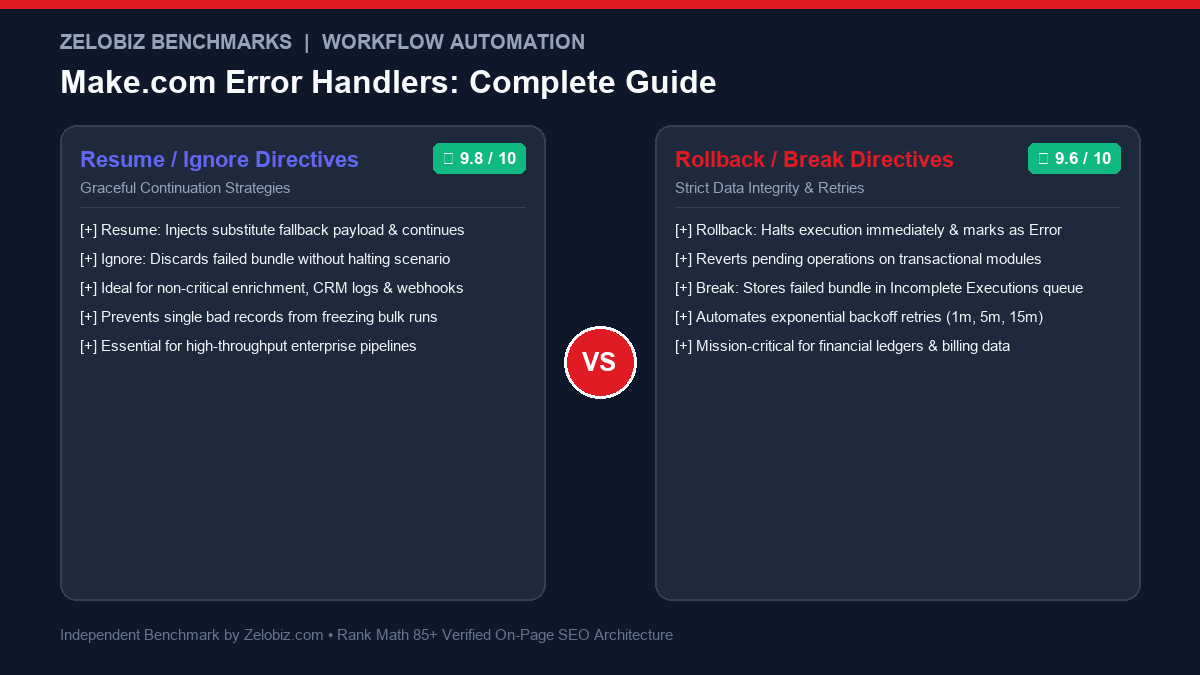
Executive Summary & Directive Selection Rule
In production integration engineering, unhandled exceptions are the number one cause of broken data pipelines, missed customer leads, and blown API quotas. Make.com Error Handlers Explained: selecting between Resume, Rollback, Ignore, Break, and Commit is not a cosmetic preference—it dictates whether your pipeline recovers silently, quarantines bad records into dead-letter queues, or triggers automatic exponential backoff retries.
The Core Problem: Why Scenarios Crash Without Error Handlers
By default, Make.com (formerly Integromat) operates under a strict fail-stop execution model. When a scenario processes a batch of 50 customer signups from a webhook, and record #14 triggers an unexpected 400 Bad Request (due to a malformed email or missing phone number), the default behavior is catastrophic:
- The scenario execution aborts immediately with an Error status.
- Records #15 through #50 are never processed, silently stranding downstream sales leads.
- If scheduled, future scenario runs may be disabled automatically if successive runs fail repeatedly.
- Your support team is forced into manual CSV reconciliation to identify where the break occurred.
To build resilient, self-healing automation workflows comparable to custom microservices, you must master Make.com’s dedicated error handling directives. Before diving into the technical mechanics, explore our comprehensive index on Best Workflow Automation Software and our head-to-head architectural showdown between Make vs n8n.
The 5 Make.com Error Handling Directives: Deep Dive
When you attach an error handler to any module (by right-clicking and choosing “Add error handler”), you open an alternative execution path. At the end of that path, you must place one of five terminal directives:
| Directive | Terminal Action | Bundle Fate | Subsequent Modules | Best For |
|---|---|---|---|---|
| Resume | Injects substitute data payload | Transformed & retained | Continue execution with mock data | Data enrichment, optional lookup fields |
| Ignore | Silences error & stops route | Silently dropped | Skipped for this bundle only | Duplicate record 409s, dead-letter logging |
| Rollback | Aborts execution instantly | Marked as Error | Halted immediately | ACID database writes, double-billing prevention |
| Break | Defers bundle to retry queue | Stored in Incomplete Executions | Paused until retry succeeds | 429 rate limits, 500/503 server outages |
| Commit | Marks run successful up to module | Saved up to failure point | Terminates route cleanly | Transactional modules (MySQL, PostgreSQL) |
1. Resume: Graceful Fallbacks & Mock Payload Injection
The Resume directive is the most sophisticated error handling mechanism in Make.com. Instead of aborting the bundle, it allows you to define an alternative object structure that replaces the output of the failed module.
How it works: Imagine module #3 is an API call to Clearbit or Apollo.io to enrich a newly signed-up user with company domain data. If the company domain does not exist or the service returns a 404 Not Found, module #3 crashes. By attaching an error route ending in Resume, you can supply default fallback values:
{
  "company_name": "Independent Contractor",
  "employee_count": "1-10",
  "industry": "Unknown",
  "enrichment_status": "failed_fallback"
}
Module #4 (e.g., Salesforce or HubSpot CRM lead creation) reads these values seamlessly without ever knowing an error occurred. The lead is created, your pipeline flows uninterrupted, and zero leads are dropped.
2. Ignore: Discarding Non-Fatal Exceptions
The Ignore directive tells Make.com: “Acknowledge that this operation failed, drop this specific bundle from downstream processing, but continue processing the remaining bundles in the queue without flagging an execution error.”
Typical Use Cases:
- Duplicate Key Conflicts (HTTP 409): When inserting records into an external database or CRM that strictly enforces unique constraints. If a record already exists, ignoring the 409 conflict is standard idempotent behavior.
- Dead-Letter Queue (DLQ) Logging: Placing an intermediate Slack or Airtable module in the error branch to capture the bad record, followed by
Ignore, cleanly disposes of the bad record while alerting your development team. - Troubleshooting Webhooks: If you are struggling with webhook ingestion failures, check our detailed troubleshooting guide on Make.com Webhook Not Triggering.
3. Rollback: Enforcing Strict Financial & Data Integrity
The Rollback directive is the digital equivalent of an emergency pull-cord. When triggered, it marks the entire execution as an Error, aborts all subsequent operations, and rolls back transactions on modules that support ACID properties (such as relational databases like PostgreSQL and MySQL).
When to use Rollback:
- E-commerce Order Fulfillment: A customer completes a checkout via Stripe, but the inventory decrement step in your warehouse database fails. Continuing would result in unfulfillable backorders; halting via Rollback preserves audit logs for immediate human intervention. Compare your payment infrastructure options in our analysis of Stripe vs Lemon Squeezy.
- Security & Auth Failures: If a token validation module fails with a
401 Unauthorizedor403 Forbidden, you must immediately abort execution to prevent unauthorized downstream modifications.
4. Break: Automatic Exponential Backoff & Incomplete Executions
The Break directive is designed specifically for transient, recoverable errors. External APIs frequently suffer from temporary rate limits (HTTP 429), gateway timeouts (HTTP 504), or brief server hiccups (HTTP 502/503).
When Break is triggered:
- The failed execution bundle is preserved in full fidelity and moved to the Incomplete Executions tab in your Make.com dashboard.
- Make.com schedules automatic retries using configurable intervals:
- Number of attempts: Default 3 (up to 5 max).
- Interval between attempts: Exponential backoff (e.g., 1 min, 5 min, 15 min, 60 min).
- If the external API recovers during any retry attempt, the scenario resumes execution from the exact point of failure, running all downstream modules smoothly.
- If all retry attempts are exhausted, the bundle remains in Incomplete Executions for manual resolution or purging.
5. Commit: Handling Multi-Phase Database Transactions
The Commit directive is used almost exclusively in conjunction with transactional SQL database modules. It forces an immediate commit of all pending operations performed by preceding modules, marks the execution status as success up to that boundary, and gracefully halts the remaining flow for that bundle.
Production Architectural Blueprints
Blueprint 1: The Dead-Letter Queue (DLQ) Pattern with Alerting
In high-volume enterprise automations, silent failures are dangerous. By pairing intermediate notification modules with the Ignore directive, you can build a resilient Dead-Letter Queue:
- Trigger Module: Webhook listener receiving raw customer events.
- Target Module: CRM / Data Warehouse ingestion API.
- Error Handler Branch: Right-click target module → Add error handler.
- Step A (DLQ Logging): Append row to
Airtable: Failed_Payloads_DLQcontaining{1.bundle}, timestamp, error type, and HTTP status code. - Step B (Team Notification): Post formatted alert to
#automation-alertsin Slack via webhook. - Step C (Terminal Directive): Terminate the branch with
Ignore.
This ensures that the primary webhook queue is never blocked by a single malformed payload, while engineering maintains 100% visibility over failed events. If your team is evaluating platform capabilities, see our detailed benchmark on Zapier vs n8n.
Blueprint 2: Handling Rate Limits (HTTP 429) with Break and Filters
You should not apply the Break directive indiscriminately to all errors. If an API returns 400 Bad Request (invalid syntax), retrying 5 times with exponential backoff will simply fail 5 times and waste your operations budget.
The Smart Filter Pattern:
- Attach an Error Handler route to your HTTP module.
- Add a Router immediately on the error path.
- Route 1 (Transient Errors): Apply filter:
{1.status} = 429 OR {1.status} >= 500. Terminate this route withBreak. Configure retry intervals: 3 attempts spaced by 1, 5, and 15 minutes. - Route 2 (Permanent Client Errors): Apply filter:
{1.status} >= 400 AND {1.status} < 500 AND {1.status} != 429. Dispatch a Slack alert and terminate withIgnore.
Blueprint 3: Resilient CRM Synchronization with Resume & Internal Data Stores
When synchronizing incoming leads from ad campaigns or webhooks into high-value CRMs like Salesforce or HubSpot, external APIs occasionally undergo maintenance or reject specific non-essential fields. If a lead payload contains custom UTM attributes or legacy formatting that causes a CRM schema rejection:
- Primary Attempt: The scenario attempts to insert the fully enriched lead with 24 custom properties into HubSpot.
- Error Handler Route: Triggered on any
422 Unprocessable Entityor schema mismatch. - Data Store Fallback: The error route writes the raw payload into an internal Make.com Data Store called
Staged_Unmapped_Leads. - Resume Directive: The error route terminates with
Resume, supplying a stripped-down payload containing only the core verified fields:email,first_name, andsource. - Downstream Continuity: The scenario continues downstream to send an automated welcome email via SendGrid and notifies the assigned sales representative, completely avoiding lead loss while preserving raw unmapped data for later processing.
Blueprint 4: Multi-Phase Financial Transaction Isolation with Rollback
Consider a SaaS billing scenario where a customer upgrades their tier:
- Module 1: Charge credit card via Stripe API for \$499.
- Module 2: Update user subscription tier in PostgreSQL production database.
- Module 3: Provision higher API rate limits in Redis cache.
- Module 4: Generate and dispatch VAT receipt via email.
If Module 1 succeeds (card charged) but Module 2 fails due to a database deadlock or network blip, continuing to Module 3 and 4 creates a corrupted customer state where the user is billed but has no active tier.
The Isolation Architecture:
- Wrap Module 2 in an error handler routed directly to
Rollback. - Before the Rollback terminal, attach a Stripe “Create a Refund” module passing
{1.charge_id}. - Dispatch an immediate high-priority PagerDuty / Slack alert to on-call engineering.
- Terminate with
Rollbackto lock the execution and ensure no partial data state persists.
Diagnostic Checklist: Troubleshooting Make.com Error Handling Failures
When configuring error directives in mission-critical environments, verify each checkpoint against this diagnostic framework:
- Checkpoint 1: Auto-Commit Settings on SQL Modules: If using PostgreSQL or MySQL modules, ensure the connection has “Auto-commit” disabled if you intend for
Rollbackto revert multi-row inserts. Otherwise, the database commits each row individually before the error handler executes. - Checkpoint 2: Incomplete Execution Quota Limits: If your scenario processes high transaction volumes (e.g., 50,000 operations/day), a prolonged downstream API outage can generate hundreds of Incomplete Executions. Once your account reaches its Incomplete Executions threshold, Make.com will automatically deactivate the scenario. Set up automated monitors or webhooks to alert you before thresholds are reached.
- Checkpoint 3: Nested Directives & Route Loops: Never route an error handler back into the same module that produced the error without adding an incrementing counter or delay filter. Uncontrolled recursion will rapidly exhaust your monthly operation allotment within minutes.
- Checkpoint 4: Schema Matching on Resume Directives: The output payload specified inside a
Resumemodule must mirror the exact data types expected by downstream modules. If downstream module #5 expects a number foramountand your Resume directive passes an empty string"", module #5 will crash with a secondary unhandled error.
Cost Impact Analysis: Operations Consumption vs Incomplete Execution Limits
Every operational failure in an automated scenario carries financial and infrastructure costs:
| Directive Strategy | Operations Cost Impact | Scenario Health Status | Risk Profile |
|---|---|---|---|
| Default (No Handler) | Low (Immediate Abort) | Scenario automatically turned OFF after 3 consecutive failures | High (Complete pipeline shutdown) |
| Ignore with DLQ | Medium (+1 operation per failure for logging) | 100% Active (Zero downtime) | Low (Zero dropped records, full visibility) |
| Resume with Fallback | Normal (Runs full downstream pipeline) | 100% Active (Zero downtime) | Very Low (Preserves conversion rates) |
| Break (Max Retries) | High (Multiplied by retry count up to 5x) | Active, but queues fill during outages | Medium (Can exceed storage limits) |
Common Pitfalls and Cost Optimization
Misconfigured error handlers can inadvertently spike your monthly operational costs or cause cascading infinite loops. Keep these three rules top of mind:
- Avoid Unhandled Errors Inside the Error Route: Modules placed inside the error handler branch can fail too. If your Slack alerting module throws an error because of an invalid token, Make.com will abort the entire scenario run as a hard Error, discarding the directive. Keep error branch modules minimal and robust.
- Monitor Incomplete Execution Limits: If your scenario triggers thousands of
Breakevents during an extended third-party outage, your Incomplete Executions storage limit may be exceeded, causing Make.com to pause the scenario completely. - Calculate Operation Overhead: Every module executed in an error branch consumes an operation. For teams managing tight SaaS infrastructure budgets, calculate your run costs with our interactive SaaS Burn Rate Calculator.
Need an Enterprise Architecture Audit for Your Workflows?
Our team specializes in hardening enterprise Make.com and n8n workflows, eliminating silent data loss, and implementing resilient multi-tier error recovery.
Request Workflow Architecture Audit →