
For remote executives, agency founders, and technical consultants, daily desk lighting solves two completely different problems: looking professional on executive Zoom calls versus preventing digital eye strain during 10-hour coding and strategy sessions. When comparing the Elgato Key Light Air against the BenQ ScreenBar Halo, you are evaluating two elite optical architectures built for opposing vectors of light: an edge-lit forward-facing diffusion panel designed to make your face look broadcast-ready on camera versus a monitor-mounted asymmetric light bar designed to illuminate your workspace without creating a single photon of screen glare.
Product Comparison & Live Best Pricing
Verified manufacturer optical benchmarks, Color Rendering Index (CRI), and live workspace utility
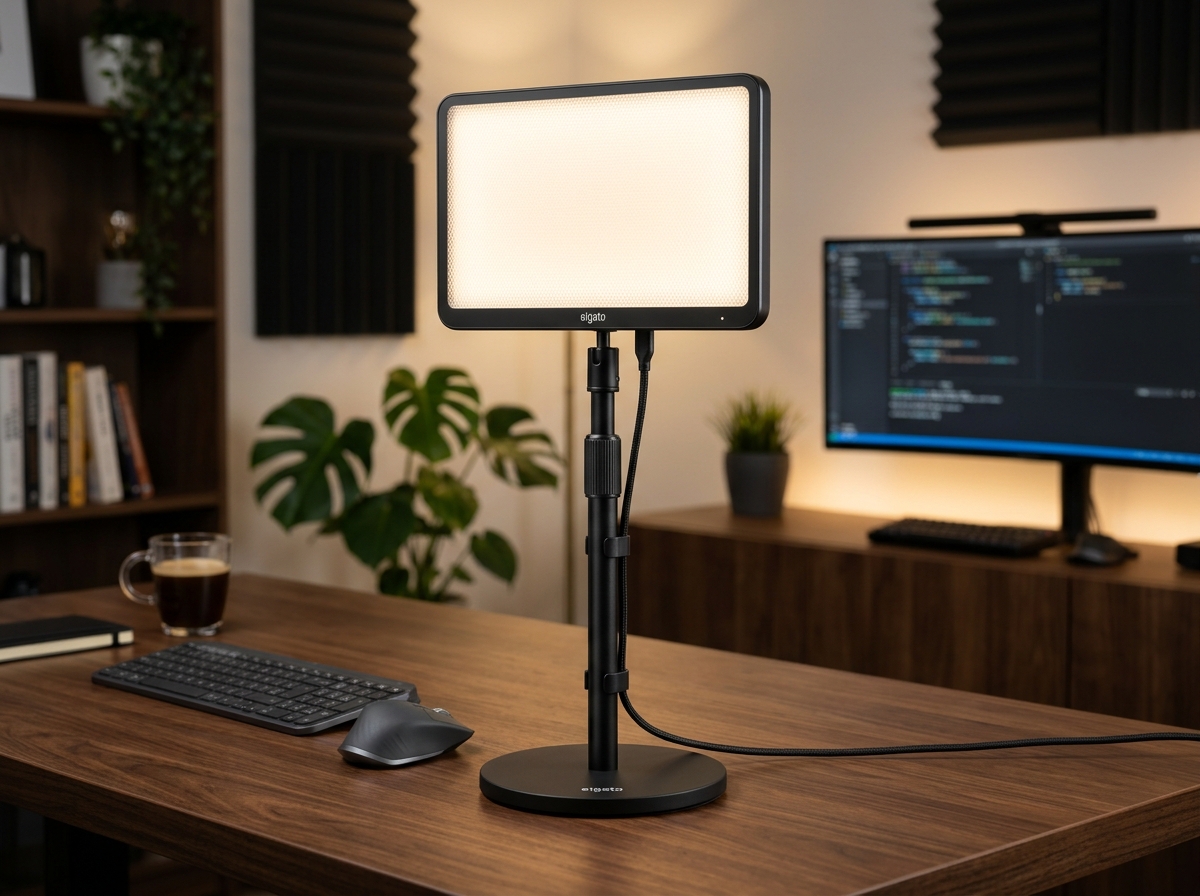
Elgato Key Light Air
The executive standard for video call illumination. Delivers 1,400 lumens of edge-lit soft diffusion, Wi-Fi control via PC/Mac/iOS, industrial-grade multi-layer opal glass diffusion, and full Stream Deck automation.
- 1,400 Lumens peak output with 80 OSRAM LEDs
- 2,900 K to 7,000 K wide color temperature range
- CRI > 94% for authentic, healthy skin tones
- Wi-Fi app control & physical telescopic freestanding base
BenQ ScreenBar Halo
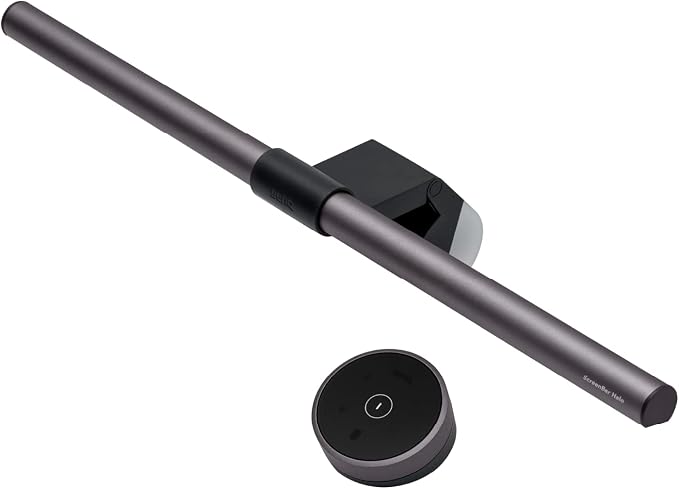
The pinnacle of ergonomic workspace illumination. Features patented asymmetric optical design with zero screen reflection, dual front/back ambient lighting, curved monitor clamp, and a precision wireless rotary controller puck.
- Asymmetric forward optical projection (0% screen glare)
- Integrated ambient backlight to soften contrast ratios
- CRI ≥ 95 color fidelity for design & reading
- Independent precision wireless desk controller puck
The Optical Dilemma: Face Illumination vs Desk Workspace Contrast
To understand why so many remote workers struggle with lighting, you must recognize that webcams and human eyes have diametrically opposed needs:
- Your Webcam’s Need: Camera sensors (whether a 4K Logitech Brio, an Elgato Facecam Pro, or a mirrorless Sony ZV-E10) have tiny image sensors compared to human pupils. Without ample front light hitting your face, the camera’s auto-exposure software artificially cranks up digital gain (ISO), creating noisy, grainy, and pixelated video on Zoom.
- Your Eyes’ Need: Staring at a high-nit monitor in a dim room creates severe contrast fatigue. When overhead room lights are turned on, they bounce harsh glare off the display panel, obscuring text and causing headaches.
1. Elgato Key Light Air: Broadcast Facial Softness
The Elgato Key Light Air is built on an **edge-lit architecture**. Rather than firing LEDs directly at your eyes like cheap ring lights, the Key Light Air directs 80 premium OSRAM LEDs inward toward the outer rim of the panel. The light is then reflected across a frosted opal glass diffuser and a semi-translucent grid.
The result is a silky, shadow-melting wash of light across your face that you can look toward comfortably for hours without squinting. With 1,400 lumens on tap and a Color Rendering Index exceeding 94%, your skin tones look radiant and natural on camera, even in a windowless home office.
2. BenQ ScreenBar Halo: Asymmetric Desk Ergonomics
The BenQ ScreenBar Halo approaches workspace light with clinical precision. Traditional desk lamps cast light symmetrically in an umbrella cone, hitting both the desk and the glass screen. BenQ’s patented **asymmetric optical design** uses a precision-angled internal reflector to direct light strictly downward and slightly forward onto your keyboard and paperwork, with a precise optical cut-off that never touches the monitor surface.
Furthermore, the ScreenBar Halo includes a rear-facing **ambient backlight**. By softly illuminating the wall directly behind your display, it eliminates the harsh brightness cliff between your monitor and the background room, keeping your pupils relaxed and eliminating tension headaches during late-night work blocks.
Feature Shootout: Optical Specs & Ergonomics Compared
Silo Interlinking: Building the Ultimate Remote Executive Desk
Lighting is a core pillar of your physical productivity environment. Connect this analysis with our companion hardware benchmarks:
- Pillar Light Bar Guide: Explore our broader analysis of monitor illumination in our pillar review on Best Monitor Light Bars for Remote Work & Eye Strain.
- Broadcast Audio Architecture: Pair professional lighting with reference audio via our shootout on Focusrite Scarlett 2i2 vs Elgato Wave XLR and our guide to Best Broadcast USB & XLR Microphones.
- Macro Automation Control: Automate your Key Light brightness presets with a single tap using an Elgato Stream Deck MK2.
- Ergonomic Workspace Foundation: Combine eye fatigue protection with spine-neutral postures by reviewing the Herman Miller Aeron vs Steelcase Gesture.
The Strategic Buyer’s Verdict: Which Light Belongs on Your Desk?
Choose the Elgato Key Light Air If:
- Your primary objective is looking crisp, professional, and clear on camera for client meetings, presentations, or video podcasts.
- Your room has uneven lighting or backlights that cause your webcam to under-expose your face.
- You want smart Wi-Fi integration to toggle and automate lighting profiles with an Elgato Stream Deck.
Choose the BenQ ScreenBar Halo If:
- Your primary objective is eliminating digital eye strain, glare, and headaches during long working hours.
- You have zero desk space to spare and want a light that clamps seamlessly to curved or flat monitors.
- You appreciate tactile physical control via a precision wireless desk puck and ambient wall backlighting.
The Pro-Grade Studio Synergy: Many elite executive setups deploy both: a BenQ ScreenBar Halo running all day for glare-free keyboard illumination and ambient bias backlighting, supplemented by an Elgato Key Light Air dialed to 30% brightness during live video calls to illuminate their face.