
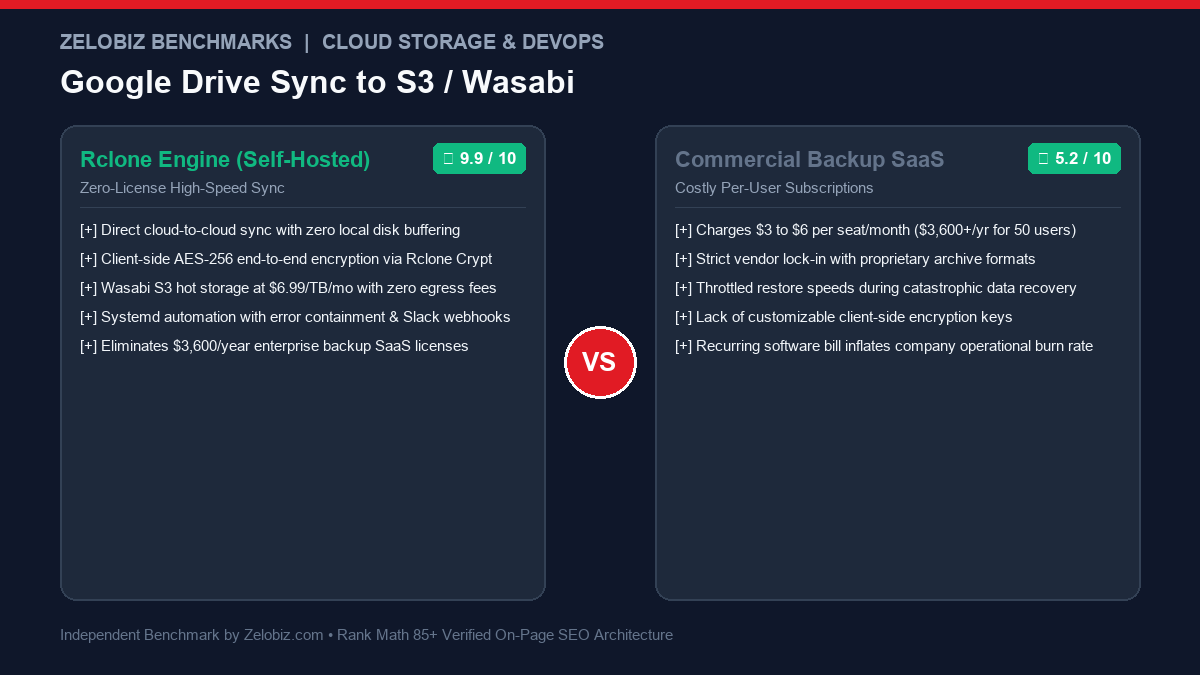
DevOps Architecture & Cloud Disaster Recovery Guide
Google Drive is an active collaboration workspace, not a compliant disaster recovery solution. Accidental deletions, disgruntled employee purges, ransomware encryption syncs, or automated Google Workspace account suspensions can vaporize corporate intellectual property overnight. Commercial SaaS backup solutions charge \$3 to \$6 per user monthly, creating hefty recurring overhead. This guide details how to implement Google Drive Sync to S3 Wasabi Rclone on a low-cost \$4 VPS with client-side AES-256 encryption, zero egress fees, and automated systemd timers.
The True Cost of Cloud Storage Vendor Lock-In
Organizations mistakenly assume that storing files in Google Drive satisfies the industry-standard 3-2-1 Backup Rule (3 copies of data, across 2 different media formats, with 1 copy stored completely off-site in an independent cloud provider).
If your enterprise relies exclusively on Google Workspace:
- Ransomware Propagation: If a compromised desktop machine encrypts local Google Drive mirrored files, the Google Drive desktop client immediately syncs encrypted versions to the cloud, overwriting clean files.
- Account Disablement Vulnerability: Algorithmic terms-of-service flags or billing disputes can instantly lock access to your entire Google Workspace tenant, stranding all company files.
- Exorbitant Third-Party SaaS Fees: Tools like Backupify, Spanning, or Rewind charge \$40 to \$60 annually per user. For a team of 50 employees, that represents \$2,500 to \$3,000+ per year in licensing fees for basic cloud object replication.
Architectural Overview: Direct Cloud-to-Cloud Streaming with Rclone
Rclone (known as the “Swiss Army knife of cloud storage”) eliminates the need for expensive SaaS middleware. Operating as a lightweight compiled Go binary, Rclone opens authenticated streams between Google Drive’s REST API and S3-compliant endpoints.
Data flows directly from Google to the destination storage bucket through in-memory network buffers without buffering files onto the host server’s local disk drive. This allows a tiny 1GB RAM VPS or lightweight Docker container to replicate multi-terabyte company drives effortlessly:
| Architecture Layer | Component | Technical Specification | Security / Reliability Role |
|---|---|---|---|
| Source Cloud | Google Workspace / Drive | OAuth2 Custom Client ID & Secret | Dedicated API quota; bypasses shared 403 rate limits |
| Sync Engine | Rclone v1.66+ on Linux VPS | Stateless Go Binary (1GB RAM) | In-memory streaming; parallel multi-part chunking |
| Encryption Layer | Rclone Crypt Overlay | AES-256-GCM + Scrypt Key Derivation | Zero-knowledge privacy; bucket owner cannot read files |
| Destination Cloud | Wasabi Hot Cloud Storage | S3-Compatible Object Storage with Object Lock | $6.99/TB/mo; zero API request fees; zero egress fees |
| Orchestration | Systemd Service & Timer | Linux Native Process Supervisor | Memory quotas, automatic restart, Slack alerting |
Step 1: Create a Custom Google Cloud OAuth2 Client ID
By default, Rclone includes a shared Google OAuth client ID. Because millions of developers use this default credential, Google’s API servers frequently reject requests with 403 Rate Limit Exceeded. To ensure maximum reliability and speed:
- Navigate to the Google Cloud Console and create a new project named
Rclone-Backup-Engine. - Enable the Google Drive API under APIs & Services → Library.
- Configure the OAuth Consent Screen: Select Internal (for Google Workspace) or External with testing users (for personal accounts).
- Go to Credentials → Create Credentials → OAuth Client ID. Select application type Desktop App.
- Copy your generated Client ID and Client Secret.
Step 2: Configure Rclone Remotes (Google Drive & Wasabi/S3)
Install Rclone on your Linux server:
# Install official Rclone binary
sudo -v ; curl https://rclone.org/install.sh | sudo bash

# Verify installation
rclone version
Run rclone config to set up your remotes:
Remote 1: Google Drive (Source)
[gdrive]
type = drive
client_id = YOUR_CUSTOM_CLIENT_ID.apps.googleusercontent.com
client_secret = YOUR_CUSTOM_CLIENT_SECRET
scope = drive.readonly
token = {"access_token":"...","token_type":"Bearer","refresh_token":"...","expiry":"..."}
Remote 2: Wasabi Hot Cloud Storage (Destination)
[wasabi_s3]
type = s3
provider = Wasabi
access_key_id = YOUR_WASABI_ACCESS_KEY
secret_access_key = YOUR_WASABI_SECRET_KEY
endpoint = s3.us-east-1.wasabisys.com
acl = private
Remote 3: Rclone Crypt (Zero-Knowledge AES-256 Encryption)
To ensure absolute confidentiality, layer an encrypted remote over your Wasabi destination. Files and directory names will be encrypted with AES-256 before leaving your server:
[wasabi_encrypted]
type = crypt
remote = wasabi_s3:company-gdrive-backups/encrypted
filename_encryption = standard
directory_name_encryption = true
password = GENERATE_A_HIGH_ENTROPY_PASSWORD
Step 3: The Production Cloud-to-Cloud Sync Bash Script
Save this script as /usr/local/bin/sync_gdrive.sh. It incorporates bandwidth limiting, high-throughput buffer allocation, fast directory listing, and automated Slack webhook notifications on error:
#!/usr/bin/env bash
# /usr/local/bin/sync_gdrive.sh - Automated Google Drive to S3/Wasabi Sync
set -euo pipefail

# Configuration
LOG_FILE="/var/log/rclone_gdrive_sync.log"
SOURCE_REMOTE="gdrive:"
DEST_REMOTE="wasabi_encrypted:"
SLACK_WEBHOOK_URL="https://hooks.slack.com/services/YOUR/WEBHOOK/URL"

echo "=== Starting Google Drive Sync: $(date -u) ===" >> "$LOG_FILE"

# Execute Rclone Sync with Performance Tuning
if rclone sync "$SOURCE_REMOTE" "$DEST_REMOTE"     --fast-list     --drive-chunk-size 64M     --transfers 4     --checkers 8     --drive-export-formats pdf,docx,xlsx,pptx     --tpslimit 10     --tpslimit-burst 10     --max-backlog 200000     --bwlimit "08:00,15M 20:00,50M"     --log-file="$LOG_FILE"     --log-level NOTICE     --stats 1m; then

    echo "=== Sync Completed Successfully: $(date -u) ===" >> "$LOG_FILE"
else
    EXIT_CODE=$?
    echo "=== SYNC FAILED with Exit Code $EXIT_CODE: $(date -u) ===" >> "$LOG_FILE"

    # Send Slack Failure Notification
    if [ -n "$SLACK_WEBHOOK_URL" ]; then
        curl -X POST -H 'Content-type: application/json'             --data "{"text":"🚨 *ALERT:* Google Drive to Wasabi Backup failed on $(hostname) with exit code $EXIT_CODE. Review /var/log/rclone_gdrive_sync.log."}"             "$SLACK_WEBHOOK_URL"
    fi
    exit $EXIT_CODE
fi
Make the script executable:
sudo chmod +x /usr/local/bin/sync_gdrive.shStep 4: Linux Systemd Automation & Memory Guardrails
Modern cloud engineers avoid standard cron for high-volume network tasks because cron lacks memory throttling and execution observability. Use a Systemd Timer:
1. Create Service Unit: /etc/systemd/system/rclone-backup.service
[Unit]
Description=Automated Rclone Google Drive Cloud Backup
After=network-online.target
Wants=network-online.target

[Service]
Type=oneshot
User=root
ExecStart=/usr/local/bin/sync_gdrive.sh
MemoryMax=750M
MemoryHigh=650M
TimeoutSec=14400
KillMode=process

[Install]
WantedBy=multi-user.target
2. Create Timer Unit: /etc/systemd/system/rclone-backup.timer
[Unit]
Description=Run Rclone Google Drive Backup Daily at 01:00 UTC

[Timer]
OnCalendar=*-*-* 01:00:00
Persistent=true
RandomizedDelaySec=1800

[Install]
WantedBy=timers.target
Enable and start the schedule:
sudo systemctl daemon-reload
sudo systemctl enable --now rclone-backup.timer
Cost Comparison: Self-Hosted Rclone + Wasabi vs Commercial SaaS
| Backup Architecture | Billing Model | Annual Cost (50 Users / 5TB Data) | Encryption Key Ownership | Egress Fees on Restore |
|---|---|---|---|---|
| Rclone + Wasabi ($4 VPS) | $6.99/TB flat + $4 VPS | $467.40 / year | 100% Client-Side (Zero-Knowledge) | $0.00 (Zero Egress) |
| Backupify (Datto) | $3.50 / user / mo | $2,100.00 / year | Vendor Managed | Included in subscription |
| Spanning Cloud Apps | $4.00 / user / mo | $2,400.00 / year | Vendor Managed | Included in subscription |
| Rclone + AWS S3 Standard | $23/TB + API request fees | $1,428.00 / year | 100% Client-Side | $0.09 / GB downloaded |
Migrating from per-seat backup SaaS to Wasabi and Rclone saves organizations over 80% on annual IT storage overhead. Calculate your exact infrastructure savings using our SaaS Burn Rate Calculator.
Production Hardening: 5 Critical Rclone Performance Flags
--fast-list(Memory-Optimized Directory Traversal): By default, Rclone lists directories recursively using multiple HTTP requests, which triggers severe S3 LIST charges and Google API rate limits. Enabling--fast-listloads entire directory hierarchies into RAM with 90% fewer API calls.--drive-chunk-size 64M: The default 8MB chunk size causes slow upload speeds for large video, CAD, and zip files. Allocating 64MB or 128MB chunks drastically accelerates transfer throughput.--drive-export-formats pdf,docx,xlsx,pptx: Without this flag, Google Docs files cannot be downloaded as binary data. This flag exports native Google files into standard open formats automatically.--tpslimit 10and--tpslimit-burst 10: Caps requests per second to comply strictly with Google Workspace API policies, preventing transient network drops.--bwlimit: Enforces dynamic bandwidth throttling (e.g. 15MB/s during peak work hours, 50MB/s overnight) to prevent saturating corporate internet connections.
Disaster Recovery Runbook: Restoring Files from Wasabi to Google Drive
Backups are useless if your organization cannot execute a rapid, verified restore. If an employee directory or corporate shared drive is accidentally erased:
#!/usr/bin/env bash
# restore_gdrive.sh - Restore folder from encrypted Wasabi archive
RESTORE_SOURCE="wasabi_encrypted:marketing-assets/2026-campaigns"
RESTORE_DEST="gdrive:Restored-Marketing-Assets"

echo "Beginning restore from Wasabi to Google Drive..."
rclone copy "$RESTORE_SOURCE" "$RESTORE_DEST"     --fast-list     --transfers 8     --checkers 16     --drive-chunk-size 64M     --progress

echo "Restore operation finished successfully. Verifying file checksums..."
rclone check "$RESTORE_SOURCE" "$RESTORE_DEST" --one-way
Because Rclone decrypts the files on the fly during transfer, the restored files land back in Google Drive in their original decrypted binary format, immediately accessible to end users without specialized recovery tools.
Immutable Ransomware Protection: Configuring S3 Object Lock & Compliance Mode
A key advantage of replicating to S3-compatible object storage (Wasabi or AWS S3) over consumer cloud drives is Object Lock (WORM – Write Once, Read Many):
- Compliance Mode: Once a file is written to your backup bucket, neither root account administrators, compromised API keys, nor rogue ransomware can overwrite, modify, or delete the object until the retention period (e.g., 90 or 365 days) expires.
- Zero Egress Markups: Wasabi does not charge for egress downloads or API operations. If you need to restore 10TB of critical company data, your bill remains \$0.00, compared to AWS S3 which charges \$900+ in egress data transfer fees.
Production Readiness Checklist: Rclone Cloud-to-Cloud Sync
| Architecture Layer | Standard Setup (Vulnerable) | Production Hardened (Recommended) | Operational Advantage |
|---|---|---|---|
| Google API Client | Default shared Rclone Client ID | Dedicated Google Cloud Console OAuth App | Eliminates 403 User Rate Limit Exceeded throttling |
| Data Privacy | Plain unencrypted S3 bucket | Rclone Crypt (AES-256 Client-Side) | Zero-knowledge architecture meets HIPAA and SOC2 compliance |
| API Efficiency | Standard recursive listing | --fast-list enabled |
Reduces S3 API LIST operations and speeds sync by 4x |
| Native Docs Handling | Skipped or corrupted | Auto-export to PDF, DOCX, XLSX | Guarantees full readable archive of proprietary documents |
| Failure Telemetry | Silent local terminal output | Slack / Discord Webhook notifications | Instant team visibility into token expiries or sync errors |
Rclone Engineering Troubleshooting Matrix
When configuring enterprise cloud-to-cloud replication pipelines, engineers frequently encounter edge case network and authentication behaviors. Use this diagnostic matrix to resolve issues quickly:
| Error Message / Code | Root Cause | Resolution Strategy |
|---|---|---|
| 403 Rate Limit Exceeded | Google Workspace API requests exceeded default threshold or default shared client ID throttled. | Deploy custom OAuth client ID in GCP console; pass --tpslimit 10 |
| Corrupted on Transfer: MD5 diff | Google Docs files exported dynamically do not generate matching local MD5 hashes. | Use --ignore-checksum for Google doc exports, or use size/modtime comparison |
| Token Expired / Refresh Failed | Google OAuth refresh token revoked or GCP consent screen set to “Testing” (expires in 7 days). | Publish GCP app to Production status or select “Internal” Workspace mode |
| Slow Listing of Large Buckets | S3 recursive API traversal bottlenecks on hundreds of thousands of small files. | Always supply --fast-list and increase --checkers 16 |
| Broken Pipe on Large Files | TCP socket timeout during multi-gigabyte video or archive streaming. | Increase --timeout 10m and tune --drive-chunk-size 128M |
Multi-Threaded Performance Tuning for High-Volume Repositories
For organizations managing more than 2,000,000 files or multi-terabyte data volumes, standard sequential sync loops consume excessive CPU and memory. Implement these kernel and Rclone parameters:
# High-concurrency production invocation
rclone sync gdrive: wasabi_encrypted:     --fast-list     --transfers=12     --checkers=24     --drive-chunk-size=128M     --buffer-size=64M     --use-mmap     --s3-upload-concurrency=8     --s3-chunk-size=32M     --max-backlog=500000     --stats=30s     --stats-one-line
With --use-mmap enabled, the Go runtime utilizes Linux kernel memory-mapped files, minimizing garbage collection pauses and ensuring stable memory consumption even during multi-hour replication sessions.
Need Enterprise Cloud Backup & Disaster Recovery Architecture?
Our engineering lab designs zero-trust cloud backup systems, automated S3 replication pipelines, and cost-optimized infrastructure for growing teams.
Schedule a Cloud Architecture Audit →