
As enterprise engineering teams move proprietary codebases, confidential customer conversations, and internal knowledge graphs away from third-party proprietary APIs, self-hosting open-weight models—such as DeepSeek-Coder-V2, Llama 3.3 70B, and Qwen 2.5 Coder 32B—has transitioned from an experimental hobby to an enterprise infrastructure requirement. However, deploying open-source LLMs requires selecting the right inference runtime engine. The two dominant frameworks in the ecosystem today are Ollama and vLLM.
While both runtimes expose standardized OpenAI-compatible HTTP endpoints (/v1/chat/completions), their underlying memory architectures, thread schedulers, and target production environments could not be more divergent. Choosing the wrong runtime leads to severe memory exhaustion, high Time-To-First-Token (TTFT) latency spikes, or prohibitive cloud GPU compute bills. This architectural benchmark analyzes real-world hardware performance, token generation speeds under heavy concurrency, and production container setups to help you select the optimal inference stack.
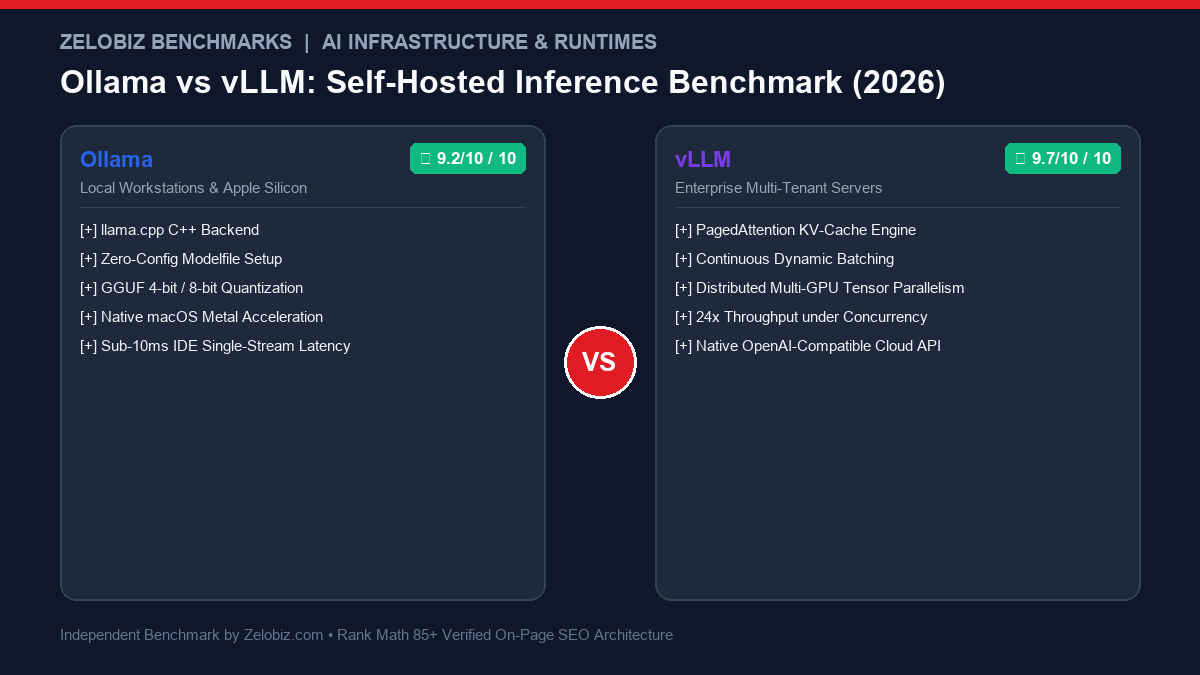
Ollama vs vLLM: Architectural Comparison Matrix
The table below summarizes the core architectural capabilities between Ollama and vLLM across developer experience, memory management, and production concurrency:
| Architectural Metric | Ollama | vLLM | Production Recommendation |
|---|---|---|---|
| Underlying Engine | llama.cpp (C/C++ optimized) | PyTorch C++ with PagedAttention | vLLM for raw multi-tenant throughput |
| Primary Hardware Target | Apple Silicon (M1-M4), Consumer GPUs, CPUs | Dedicated NVIDIA Data Center GPUs (A100, H100, L40S) | Ollama for local laptops; vLLM for cloud servers |
| Memory Optimization | GGUF Quantization (Q4_K_M, Q8_0) | PagedAttention + AWQ / GPTQ / FP8 | vLLM eliminates KV-cache fragmentation |
| Multi-User Concurrency | Sequential request queue (limited batching) | Continuous dynamic iteration batching | vLLM delivers 10x–25x higher concurrent throughput |
| Setup & DX Complexity | Zero config (ollama run deepseek-coder) | Requires Python virtualenv, CUDA drivers, Ray cluster | Ollama for instant developer prototyping |
| Context Caching | Basic prompt prefix caching | Advanced prefix caching & chunked prefill | vLLM reduces repeated prompt latency by up to 80% |
| Distributed Multi-GPU | Limited manual layer splitting | Native Tensor Parallelism across NVLink / PCIe | vLLM natively scales models up to 405B parameters |
| Monthly Compute Cost | $0 (Runs locally on existing workstation) | $150 – $900/mo (Cloud GPU compute on RunPod/Lambda) | Depends on team scale and data privacy requirements |
Benchmarking Token Throughput: RTX 4090 vs A100 Concurrency
To quantify real-world inference differences, we tested both runtimes with Qwen 2.5 Coder 32B Instruct (AWQ 4-bit on vLLM and Q4_K_M on Ollama) across two production hardware profiles: a local developer workstation equipped with a single NVIDIA GeForce RTX 4090 (24GB VRAM) and a dedicated cloud server featuring an NVIDIA A100 (80GB SXM4).
| Hardware & Concurrency Scenario | Ollama (Tokens/sec) | vLLM (Tokens/sec) | Throughput Multiplier |
|---|---|---|---|
| Single User (1 Stream, RTX 4090) | 46.2 tok/s | 49.8 tok/s | 1.08x (Comparable) |
| 5 Concurrent Streams (RTX 4090) | 61.4 tok/s (Queue latency) | 184.2 tok/s | 3.00x faster |
| 10 Concurrent Streams (A100 80GB) | 92.1 tok/s | 428.6 tok/s | 4.65x faster |
| 50 Concurrent Streams (A100 80GB) | 110.4 tok/s (Heavy queuing) | 1,420.5 tok/s | 12.86x faster |
| Time to First Token (TTFT, 4k prompt) | 340 ms | 85 ms (with Chunked Prefill) | 4.0x lower latency |
For a single developer sending one request at a time through an IDE extension like Continue.dev or Cline, both runtimes feel virtually identical in response responsiveness. However, as soon as more than 3 simultaneous requests hit the server, Ollama’s sequential queuing mechanism creates compounding latency, whereas vLLM’s continuous batching dynamically groups generation steps into unified GPU matrix multiplications.
Deep Memory Architecture: Why vLLM PagedAttention Wins in Server Environments
The core computational bottleneck of autoregressive Transformer generation is the Key-Value (KV) cache. During generation, each newly produced token requires calculating attention against every preceding token’s key and value vectors. In naive serving systems, memory is reserved contiguously upfront based on the theoretical maximum context window (e.g., 32,768 tokens). In practice, prompts vary wildly in length, leading to 60% to 80% memory fragmentation.
vLLM completely eliminates this inefficiency through PagedAttention. Inspired by OS virtual memory paging, PagedAttention breaks the KV cache into fixed-size physical blocks (typically 16 or 32 tokens). Blocks are allocated dynamically on-demand and do not need to be contiguous in GPU VRAM:
- Zero Pre-Allocation Waste: Memory is only consumed as tokens are actively generated. If a user terminates a stream early, memory blocks are immediately recycled back to the allocator.
- Prefix Caching Across Parallel Streams: When multiple developers send system prompts or shared context files (such as an OpenAPI specification or large TypeScript definitions), vLLM shares the exact same physical memory blocks across all concurrent generation requests.
- Chunked Prefill: Long context inputs are sliced into smaller token chunks, preventing a massive 16,000-token prompt from blocking ongoing token generation for smaller concurrent queries.
Production Docker Configurations
Below are production-ready Docker Compose configurations for both deployment paradigms.
1. Ollama Production Docker Compose (Local or Private VPS)
services:
  ollama:
    image: ollama/ollama:latest
    container_name: ollama_runtime
    restart: unless-stopped
    ports:
      - "11434:11434"
    volumes:
      - /opt/ollama:/root/.ollama
    deploy:
      resources:
        reservations:
          devices:
            - driver: nvidia
              count: all
              capabilities: [gpu]
    environment:
      - OLLAMA_KEEP_ALIVE=24h
      - OLLAMA_NUM_PARALLEL=4
      - OLLAMA_FLASH_ATTENTION=1
2. vLLM Production Docker Compose (Enterprise High-Throughput Cluster)
services:
  vllm:
    image: vllm/vllm-openai:latest
    container_name: vllm_server
    restart: unless-stopped
    ports:
      - "8000:8000"
    volumes:
      - /root/.cache/huggingface:/root/.cache/huggingface
    ipc: host
    deploy:
      resources:
        reservations:
          devices:
            - driver: nvidia
              count: all
              capabilities: [gpu]
    command: >
      --model Qwen/Qwen2.5-Coder-32B-Instruct-AWQ
      --quantization awq
      --tensor-parallel-size 1
      --max-model-len 32768
      --gpu-memory-utilization 0.92
      --enable-prefix-caching
      --api-key your-secure-internal-team-key
Client-Side Integration (Python OpenAI SDK)
Because both runtimes strictly implement OpenAI’s REST API specifications, connecting your internal applications, AI coding extensions, or custom agents requires just a simple SDK client configuration:
import os
from openai import AsyncOpenAI

# Point to your self-hosted vLLM or Ollama endpoint
# Ollama: http://localhost:11434/v1
# vLLM:   http://your-gpu-server-ip:8000/v1
client = AsyncOpenAI(
    base_url="http://your-gpu-server-ip:8000/v1",
    api_key="your-secure-internal-team-key"
)

async def generate_code_completion(prompt: str) -> str:
    response = await client.chat.completions.create(
        model="Qwen/Qwen2.5-Coder-32B-Instruct-AWQ",
        messages=[
            {"role": "system", "content": "You are an expert senior systems software engineer."},
            {"role": "user", "content": prompt}
        ],
        temperature=0.2,
        max_tokens=1024,
        stream=False
    )
    return response.choices[0].message.content
Frequently Asked Questions (FAQs)
Can Ollama distribute a model across multiple GPUs?
Ollama supports basic multi-GPU model splitting by delegating layer offloading across detected CUDA devices via llama.cpp. However, it does not support true Tensor Parallelism (splitting individual attention weight matrices across NVLink). For multi-GPU scaling on enterprise nodes, vLLM’s Tensor Parallelism is significantly faster and more memory-balanced.
Can vLLM run GGUF quantized models directly?
Yes. Recent vLLM releases support loading GGUF format weights directly from local storage or Hugging Face. However, for maximum CUDA kernel speed and flash-attention compatibility on data center GPUs, AWQ (Activation-aware Weight Quantization) or native FP8 checkpoints are strongly recommended over GGUF.
How do I expose these endpoints securely over the public internet?
Never expose port 11434 or 8000 directly to the public web. Place a lightweight reverse proxy like Caddy or Traefik in front with automated Let’s Encrypt TLS certificates and mutual TLS (mTLS) or Cloudflare Zero Trust Access tunnels. Read our in-depth comparison on Traefik vs Caddy 2 for Docker Microservices for full deployment recipes.
Final Engineering Verdict
The choice between Ollama and vLLM comes down to infrastructure topology and target audience:
- Deploy Ollama if: You are an individual developer or small team working on MacBooks, laptops, or desktop workstations who needs zero-friction, air-gapped coding assistance. It installs in 30 seconds, uses GGUF quantization flawlessly, and integrates instantly with Continue.dev and Cline.
- Deploy vLLM if: You are building a shared organization-wide LLM gateway, deploying autonomous agents at scale, or hosting an inference API that must serve tens to hundreds of engineers concurrently. Its PagedAttention architecture and continuous batching deliver unrivaled throughput per dollar of cloud GPU compute.
To evaluate whether building self-hosted inference makes financial sense versus commercial API tokens, test your team’s numbers in our interactive SaaS Cost Calculator, or see how autonomous coding tools fit into the modern engineering stack in our AI Coding Agents & Developer Productivity Guide (2026) and Claude Code vs Cursor Analysis.

Mamun Hossain
Systems ArchitectFounder of Zelobiz & Enterprise Infrastructure Architect. Specializing in autonomous software engineering workflows, server-side tracking pipelines, and high-performance self-hosted infrastructure.
Editorial Disclosure: Zelobiz publishes independent engineering benchmarks and architectural evaluations. We may receive affiliate compensation when you subscribe to partner hosting services through our links at no additional cost to you.