
Disclosure: Zelobiz may earn a commission if you buy through an AppSumo link on this page, at no extra cost to you. This review is based on PandaHR’s public product pages, its AppSumo listing, and published comparisons with other small-business HR tools, not on a paid trial or hands-on use with a live team.
Most HR software is priced per employee per month, which is a reasonable model for a company that already has a headcount and a budget line for it, and a frustrating one for a founder running a five-person team who just needs somewhere to store contracts and track vacation days. PandaHR’s pitch on AppSumo was a one-time payment instead of that recurring per-seat bill. This review covers what PandaHR actually does, what the AppSumo tiers included, and whether it holds up against the more established small-business HR tools people usually compare it to.
What PandaHR actually is
PandaHR is HR management software built around the day-to-day admin that eats a founder’s time: onboarding new hires, offboarding departing ones, tracking time off requests and approvals, storing employee documents, and keeping basic records like roles, allowances, and contact information in one place. It also includes employee surveys and feedback tools, which is a feature you do not always see bundled into HR software at this price point.
It is not payroll software, and it does not claim to be. That distinction matters because a lot of the bigger names people compare it to, Gusto, Rippling, Deel, bundle payroll directly into their HR platform. PandaHR is closer in scope to BambooHR or TalentHR: a system of record and workflow tool for HR processes, not a payroll engine.
Current AppSumo deal status
As of this review, PandaHR’s AppSumo listing shows Sold out, with the banner “This deal is unavailable (a bummer, we know).” It is not purchasable through AppSumo right now. The tier structure that was on offer looked like this:
| Plan | Team size | What’s included |
|---|---|---|
| Plan 1 | Up to 5 users | Onboarding, offboarding, time off, document storage, surveys, audit logs |
| Plan 2 | Up to 15 users | Everything in Plan 1, plus integrations |
| Plan 3 | Up to 30 users | Everything in Plan 2, at a higher user ceiling |
AppSumo’s listing does not currently show the dollar price for any of the three tiers, since sold-out listings on the platform typically hide historical pricing. All three plans came with the standard 60-day refund window, though as with several other partner-managed listings we checked for this piece, AppSumo notes this one is not covered by its own “We Got Your Back” guarantee, meaning the vetting and support commitment behind the guarantee does not apply here.
Key features
- Centralized employee records: roles, contact details, allowances, and status in one dashboard
- Onboarding workflows with document collection and task checklists for new hires
- Offboarding workflows to handle access removal and exit documentation
- Time off requests and approvals with allowance tracking
- Audit logs for HR record changes
- Employee surveys and feedback collection
- Multi-location team management from a single hub
- Third-party integrations, available on Plan 2 and above
Pros and cons
Pros
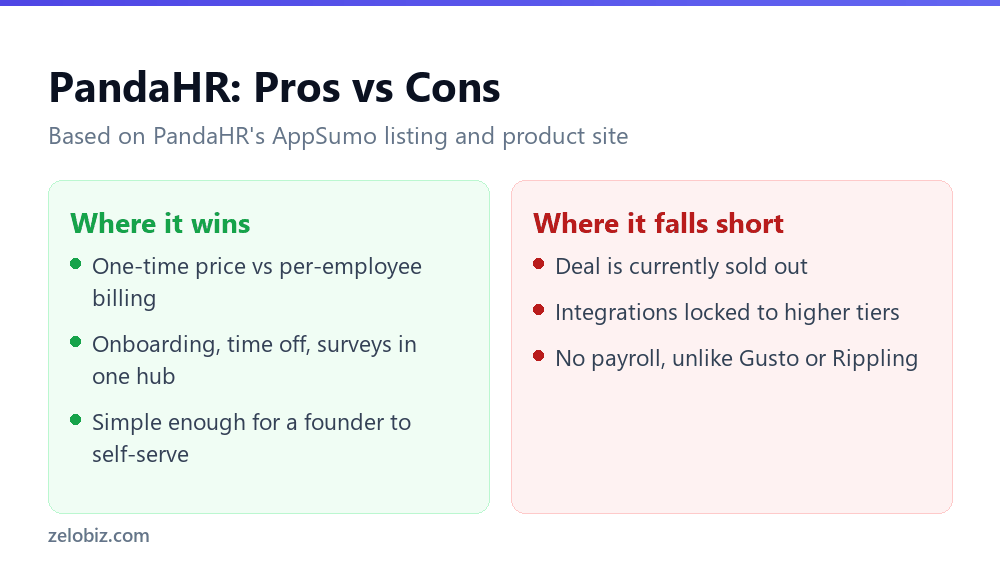
- A one-time payment avoids the per-employee monthly billing that makes HR software expensive as a team grows
- Covers the HR tasks a small team actually deals with weekly: time off, onboarding, document storage, without the enterprise complexity of larger platforms
- Surveys and feedback tools are a genuine extra most budget HR tools skip
- Simple enough that a founder or office manager can run it without dedicated HR staff
Cons
- The AppSumo deal is currently sold out
- No payroll processing, so it has to sit alongside a separate payroll tool
- Integrations are locked out of the entry-level tier, which limits how well it connects to the rest of a team’s software stack for smaller buyers
- Lifetime plans cap out at 30 users on the top tier, so a growing company will eventually outgrow it and need to migrate HR records elsewhere
- As a smaller, partner-managed listing, it lacks the years of enterprise deployment history that BambooHR or Gusto can point to
Getting a team set up
The general workflow for a tool like this is consistent across the category: create the account, import or manually add employee records, set up onboarding and offboarding checklists once, and let time-off requests and approvals run through the system going forward instead of over email or Slack. For a team of five to fifteen people, that setup is realistically an afternoon of work, most of it spent entering existing employee data rather than learning the software itself. The audit log feature is worth turning on early rather than after something needs tracing, since it only captures changes made while it is active.
One practical point worth flagging for anyone considering this for a distributed or remote team: PandaHR’s own marketing describes multi-location team management, which suggests it is built with more than one office or country in mind. What is not clear from public material is how it handles country-specific compliance requirements, which matter a great deal for time off policy and documentation if your team spans multiple countries. That is a question worth putting directly to PandaHR rather than assuming it is handled, since compliance gaps in HR software are the kind of problem that surfaces only when it is expensive to fix.
Doing the math on a one-time HR tool
The appeal of a lifetime HR deal is the same as any other lifetime SaaS deal: a fixed cost now instead of a bill that scales with headcount. Where this matters more for HR software specifically is that headcount is usually growing, not flat, for any business that is doing well. A per-employee HR subscription gets more expensive exactly when a company can least afford new fixed costs, during a hiring push. A lifetime deal with a hard user cap sidesteps that, at the cost of eventually hitting a wall and having to migrate if the company outgrows the top tier’s 30-user ceiling. Whether that trade is worth it mostly depends on how confident you are about staying under that ceiling for the next several years, which is a judgment call specific to your own growth plans rather than something a review can answer for you.
How PandaHR compares to the alternatives
BambooHR is the name most small businesses already know in this category, and it has the integration library and support infrastructure to show for its longer track record. It is also billed per employee per month, with reported pricing in the rough range of $12 to $22 per employee monthly depending on plan and company size, a cost that scales linearly with headcount in a way a one-time PandaHR purchase does not. For a 25-person team, that puts BambooHR’s likely annual cost well into the thousands, versus a single fixed payment for PandaHR’s top tier.
Gusto and Rippling both fold payroll into the platform, which PandaHR does not attempt. If payroll is the main problem you are trying to solve, PandaHR is the wrong tool regardless of price, since you would still need a separate payroll provider alongside it. TalentHR is probably the closest match in spirit: an affordable, small-team-focused HR platform without payroll, though TalentHR runs on its own subscription pricing rather than a lifetime model. Homebase is another point of comparison for hourly or shift-based teams specifically, with a free plan covering basic scheduling and time tracking and paid plans priced per location rather than per employee, a structure that suits retail or hospitality businesses better than PandaHR’s per-user tiers do.
None of these comparisons make PandaHR the wrong choice, they just clarify what kind of buyer it suits. If you are choosing HR software purely to get onboarding and time-off tracking off spreadsheets for a small, salaried team, PandaHR’s lifetime pricing is a real advantage over any of the subscription options above. If payroll, shift scheduling, or multi-country compliance are part of what you need solved, none of PandaHR’s tiers get you there, and one of the alternatives above is worth pricing out instead.
A note on employee data
Any tool storing employee records, contracts, personal contact details, and time-off history is handling sensitive data by definition, and that is worth taking seriously regardless of price. PandaHR’s public marketing does not go into detail about data residency, encryption standards, or compliance certifications the way larger HR platforms typically do on a dedicated security page. That absence does not mean PandaHR is doing anything wrong, plenty of smaller SaaS companies simply have not built out that documentation yet, but it does mean a buyer handling EU employee data under GDPR, or US employee data under state-specific privacy laws, should ask PandaHR directly about its data handling practices before migrating real employee records into it, rather than assuming compliance because the feature list mentions audit logs.
Who this is actually for
PandaHR fits a small business or startup, realistically under 30 people given the top tier’s cap, that wants HR admin off spreadsheets and email threads without paying an ongoing per-seat fee for a tool it barely uses beyond onboarding and time off tracking. It is a poor fit for a company that needs payroll built in, or one that expects to grow well past 30 employees and would rather standardize on a platform it will not have to migrate away from in a year or two.
What a founder should weigh before switching from spreadsheets
A lot of small teams put off HR software entirely and run onboarding checklists and time-off tracking out of a shared spreadsheet and a Slack channel. That works until it does not, usually around the point where a second person needs access to the same records, or a departing employee’s offboarding checklist gets missed because nobody owns it clearly. The real value PandaHR offers over that setup is not any single feature, it is having one place where onboarding, time off, and documents live with an audit trail behind them. Whether that is worth paying for versus sticking with spreadsheets a while longer depends on team size and how much time is currently being lost to the manual version. For most teams past five or six employees, the manual approach starts costing more in dropped tasks and lost documents than a basic HR tool would cost outright.
What to check before buying, if the deal returns
Because PandaHR gates integrations behind Plan 2, it is worth listing out exactly which tools you need it to connect to (Slack, Google Workspace, a specific payroll provider) before assuming the entry-level tier covers your needs. It is also worth asking directly what happens to your employee records and documents if you eventually outgrow the 30-user ceiling on Plan 3, since a lifetime deal with a hard cap does not automatically include a smooth path to a higher tier once one exists. Neither of these questions is answered clearly in PandaHR’s public marketing, so they are worth confirming with the company directly rather than assuming.
Frequently asked questions
Is the PandaHR AppSumo deal still available?
No. As of this review, the listing shows as sold out, with no current pricing displayed for any tier.
Does PandaHR include payroll?
No. PandaHR handles HR administration such as onboarding, time off, and document storage, but not payroll processing. You would need a separate payroll tool alongside it.
What is the maximum team size PandaHR supports?
The highest AppSumo tier, Plan 3, supported up to 30 users. Beyond that, you would need to look at a different platform built for larger teams.
Is PandaHR covered by AppSumo’s “We Got Your Back” guarantee?
No. AppSumo’s listing specifies this deal is managed by the PandaHR team directly and is not covered by that particular guarantee, though the standard 60-day refund window still applied while the deal was live.
Does PandaHR handle multi-country compliance for remote teams?
PandaHR’s marketing mentions multi-location team management, but its public material does not detail country-specific compliance handling. If you employ people across multiple countries, confirm this directly with PandaHR before relying on it for compliance-sensitive records.
Verdict
PandaHR is a reasonable, no-frills HR admin tool for a small team that does not want to pay per employee for basic onboarding, time off tracking, and document storage. It is not trying to be BambooHR or Gusto, and it should not be judged against tools with payroll and years of enterprise integrations built in. The honest limitation is the user cap on every tier and the integrations gate on the entry plan, both of which are worth checking carefully against your actual team size and toolset before buying anything. Right now the deal is sold out, so the practical step is watching for it to return rather than acting on outdated, pre-shutdown pricing you might find elsewhere online.