
The list of AI tools worth paying for is shorter than the marketing suggests, and the decision turns on your own habits rather than on features. Every vendor’s comparison table makes the paid tier look obviously better. Almost none of them tell you the two things that actually decide it.
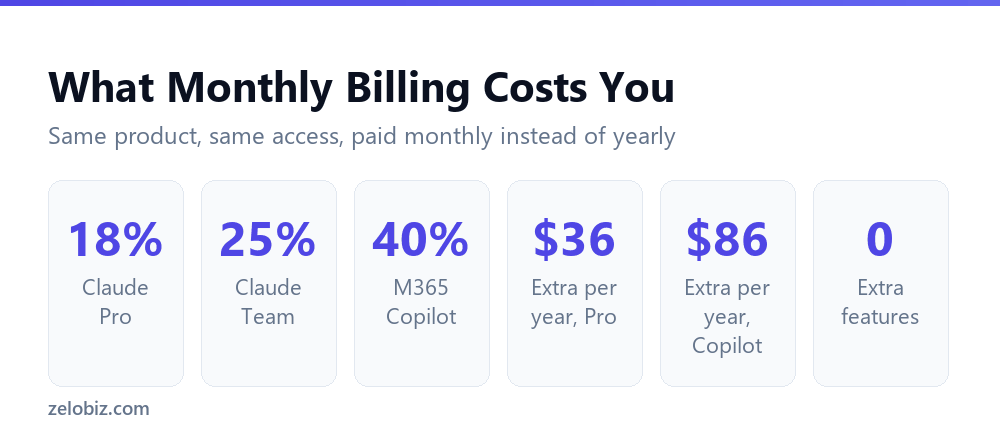
The first is that free tiers do not all limit the same thing. The second is that paying monthly instead of yearly costs between 18 and 40 percent more for identical access, depending on the vendor.
Short answer: Pay when you hit a limit mid-task repeatedly, or when you need AI inside software you already use. Stay free if you use it a few times a week for drafting. And if you do pay, pay annually where the option exists: Claude Pro is $17 a month on annual versus $20 monthly, and Microsoft 365 Copilot is $18 versus $25.20. Figures verified 30 August 2026.
The Annual Versus Monthly Gap
Start here, because it applies whichever tool you choose and it is the easiest money you will save all year.
Every vendor that publishes both an annual and a monthly rate charges materially more for the monthly one. You get exactly the same product. The difference is only that you have not committed.
Microsoft’s is the widest gap. Choosing monthly billing on Copilot costs 40 percent more, which is $86.40 per person per year. On a team of eight that is $691 annually for flexibility you may never use.
Claude’s gap is smaller but still real. Pro at $17 on annual against $20 monthly is 18 percent, or $36 a year.
💡 Pro tip: There is one good reason to accept the monthly premium: you genuinely do not know whether you will still want the tool in three months. Treat the extra as the price of a trial, then switch to annual once you are sure. Paying monthly for two years is just an expensive habit.
One caveat worth stating on Microsoft specifically. Its $18 rate is promotional, reduced from $21, running through 31 December 2026 and applying to the first year only. The annual saving is real; the $18 figure is not permanent.
Free Tiers Limit Two Very Different Things
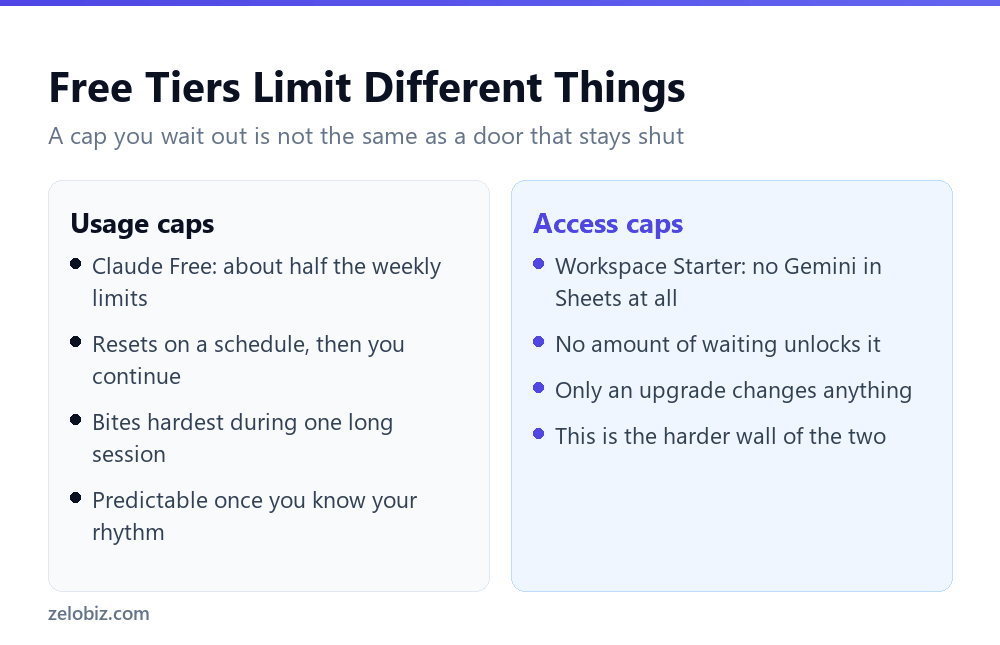
This is the distinction that decides whether a free tier works for you, and it is almost never made explicit.
A usage cap, which you can wait out
Claude’s free plan is the clearest example. It gives access to the model range and roughly half the weekly limits of the paid tier. You get chat across web, mobile and desktop, web search, memory, code generation and file creation.
When you hit that ceiling you stop until it resets. Annoying during a long session, irrelevant if you use it in short bursts across the week. Nothing is permanently out of reach.
An access cap, which you cannot
Google Workspace Business Starter is the opposite case. It has no Gemini in Google Sheets or Google Slides at all. Not a smaller allowance. None.
Waiting changes nothing. Only an upgrade to Business Standard does, and even then the allowance is capped at 100 uses a month in each app. That cap does not rise on Business Plus either; it stays at 100 until you reach an Enterprise edition, where it becomes 500.
⚠️ Watch out: This is the trap in “Gemini is included with Workspace”. It is included, but the entry plan excludes the two apps most people want it in, and the next two plans up share the same monthly cap despite a large price difference between them.
When Paying Is Actually Justified
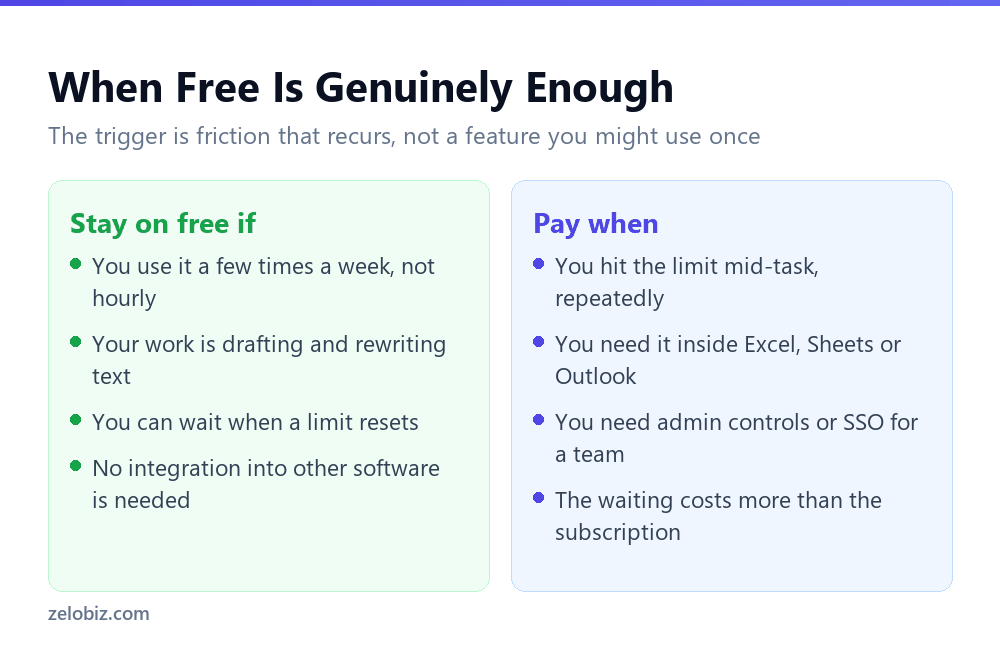
Feature lists are a poor guide because you will not use most of the features. Three signals are better.
- You hit the limit mid-task, more than once. Not once out of curiosity. Repeatedly, in the middle of real work. That is friction with a recurring cost, and it is the clearest justification there is.
- You need it inside software you already use. Copying between a chat window and a spreadsheet works, but it is slow and error-prone at volume. In-app AI is the main thing a subscription buys that a free chat tier cannot.
- You need team controls. Admin management, SSO, and a guarantee that your content is not used for model training are team-plan features. If you are handling client data, this is a compliance question rather than a convenience one.
If none of those apply, the free tier is probably enough, and the honest advice is to stay on it until one of them does.
In-App AI Is the Expensive Category
The subscriptions that cost most are the ones that put AI inside your existing software, and they are priced per person rather than per company.
Look at the arithmetic before assuming in-app is worth it. Copilot at $18 plus a base plan is comparable to Workspace Business Standard at $12.60 plus a $17 general assistant, and the second combination gives you a far more capable assistant with a worse workflow.
Which is better depends entirely on whether your bottleneck is the quality of the output or the copying back and forth. Most people assume it is quality. For routine spreadsheet and email work, it is usually the copying.
📊 Note: If you are on Microsoft and considering Copilot, price the bundles against the add-on before you buy. Business Standard with Copilot at $23.50 includes the base plan, which can work out cheaper than paying for a base plan and the $18 add-on separately.
What a Subscription Does Not Fix
Upgrading solves a specific problem: running out of capacity, or working in a separate window when you want to work in your own file. It does not solve the three things people most often hope it will.
It does not remove the checking
Paid tiers do not come with a guarantee of correctness. Anything that becomes a number in a spreadsheet, a figure in a client email or a clause in a document still needs reading before it goes out.
That review time is the real cost of using AI for work, and it is identical on the free and paid tiers. Any calculation of time saved that leaves it out is wrong.
It does not make a vague request specific
Most disappointing output comes from an unclear ask rather than a weak model. If you are getting generic results on a free tier, you will usually get generic results on a paid one.
Test that before spending. Take the request that disappointed you, add the context you left out, and try again on the tier you already have. If the second attempt is much better, the model was never the constraint.
It does not consolidate your tools
Paying for a writing tool, an assistant and an in-app subscription that overlap is common and expensive. Three subscriptions at roughly $20 is $720 a year for capabilities that substantially duplicate each other.
Before adding a fourth, list what each of the current three is genuinely used for in a normal week. The honest answer is often that one of them covers most of it.
⚠️ Watch out: Beware the lifetime deal bought to avoid a subscription, then left unused beside the subscription you kept paying for anyway. A one-off payment is only cheaper if the tool actually replaces something.
What We Could Not Verify
Every figure above was taken from the vendor’s own pricing page rather than from other articles, because AI pricing changes often and secondary sources go stale quietly.
One gap is worth flagging. OpenAI’s pricing pages block automated access, so we could not confirm current ChatGPT tiers from a primary source and have not printed figures for them. Check openai.com directly rather than trusting a number in any article, including this one.
The same applies to Google’s AI Expanded Access add-on. Google does not publish a fixed price for it; the amount depends on your currency and subscription term and appears in your admin console. Any specific dollar figure you see quoted for it elsewhere is a guess.
Common Questions
Is it cheaper to pay for AI tools annually or monthly?
Annually, in every case checked. Claude Pro is $17 a month on annual against $20 billed monthly. Microsoft 365 Copilot Business is $18 against $25.20. That is a saving of $36 and $86.40 per user per year respectively, for identical access.
Is the free version of Claude enough?
For many people, yes. The free plan includes the model range and roughly half the weekly limits of the paid tier, with web search, memory, code generation and file creation. If you use it in short bursts a few times a week rather than for hours at a stretch, you may never reach the ceiling.
Does Google Workspace include AI in Sheets for free?
Not on every plan. Business Starter has no Gemini in Sheets or Slides at all. Business Standard and Business Plus both include it at 100 uses per month, and Enterprise editions raise that to 500. There is no free access on the entry plan.
Why is Microsoft 365 Copilot more expensive than it looks?
Three reasons. The $18 rate requires annual billing, monthly is $25.20. The $18 is promotional, reduced from $21, running through 31 December 2026 and covering the first year only. And the add-on requires a qualifying Microsoft 365 base plan on top.
What should make me upgrade from a free AI tier?
Hitting the usage limit in the middle of real work, more than once. Needing AI inside software you already use rather than in a separate window. Or needing team administration, single sign-on and a guarantee your content is not used for training.
Is in-app AI worth more than a general assistant?
It depends on your bottleneck. If output quality is the problem, a strong general assistant at $17 to $20 is usually better value. If the problem is copying data back and forth between a chat window and a spreadsheet, in-app AI solves the thing that actually costs you time.
How much does ChatGPT cost?
We could not verify OpenAI’s current pricing from a primary source, because its pricing pages block automated access. Rather than repeat figures from other articles that may be out of date, we suggest checking openai.com directly.
How often does AI pricing change?
Often enough that any article quoting prices should carry a date. Microsoft’s current business rate is explicitly promotional with an end date of 31 December 2026, and Google has restructured how Gemini is bundled more than once. Always confirm before you buy.
The Short Version
- →Pay annually wherever the option exists. Monthly billing costs 18 to 40 percent more.
- →Claude Pro is $17 a month on annual, $20 billed monthly.
- →Microsoft 365 Copilot is $18 annual or $25.20 monthly, plus a required base plan.
- →The $18 Copilot rate is promotional through 31 December 2026 and covers year one only.
- →Workspace Business Starter has no Gemini in Sheets. Standard and Plus cap it at 100 a month.
- →Upgrade when you hit limits mid-task repeatedly, not because a feature list looks better.
The pattern across all of it is that the advertised price is the best case. Annual billing, first year, promotional window, base plan already paid for. None of those conditions are hidden, but none of them are in the headline number either.
All prices and limits were checked against vendor pricing pages on 30 August 2026. OpenAI figures are omitted because its pricing pages could not be reached automatically. Verify current terms before purchasing.