
Deciding what to automate first in a small business is a task-selection problem, not a tool-selection problem. Most guides answer the second question because it is easier to write, then leave you to guess at the first.
Guessing is where the money goes. An automation built for the wrong task gets abandoned within a month, and the time spent building it is gone whether or not anyone admits it.
Short answer: Automate the dullest thing you do most often, where being wrong is cheap and the process has not changed recently. In practice that is usually moving data between two systems, sending date-triggered reminders, or filing and routing incoming work. Automate decisions last, and anything that reaches a client unreviewed, never.
The Question Most People Start With Is the Wrong One
The usual starting point is which platform to use. Zapier, Make, n8n, a built-in feature, an AI agent. It feels like the practical question and it is genuinely interesting, which is why it gets asked first.
But the tool barely matters at this stage. All the mainstream platforms will handle a first automation competently. What decides whether the automation is still running in six months is whether you picked a task worth automating.
Score the Candidates Before You Build Anything
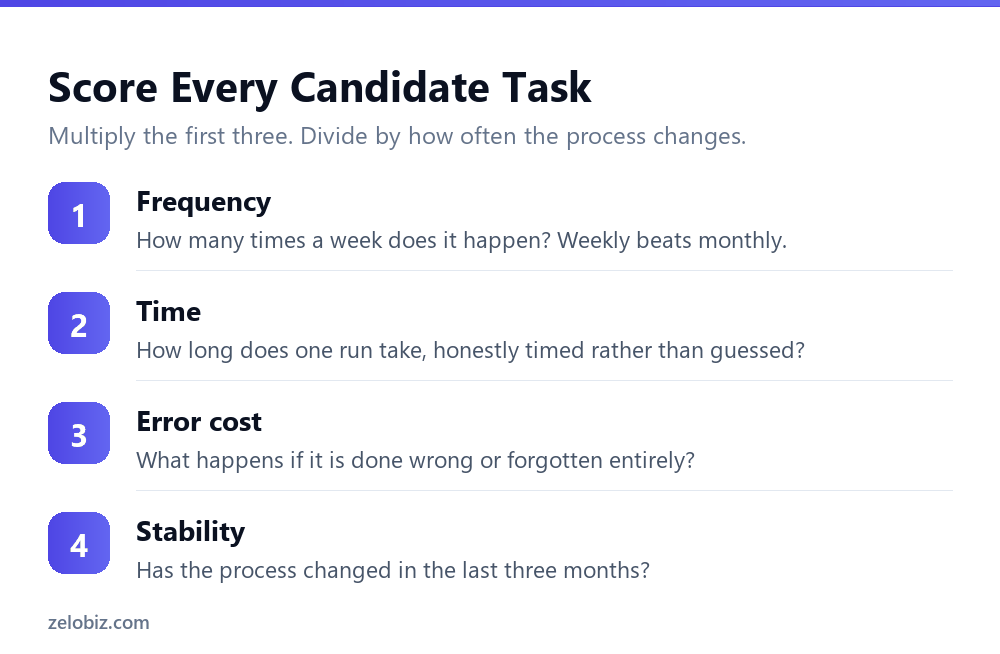
Write down every repetitive task you can think of, then score each one on four things. This takes twenty minutes and it is the highest-value twenty minutes in the whole project.
Frequency
How often does it actually happen? Daily and weekly tasks are worth automating. Monthly ones are marginal. Anything quarterly is almost never worth it, because you will have forgotten how the automation works by the time it runs again.
Time per run
Time it once rather than estimating. People routinely overestimate tasks they dislike and underestimate ones they are used to. A job you were sure took fifteen minutes often takes four.
Cost of getting it wrong
This one runs in the opposite direction to intuition. You want to start with tasks where an error is cheap and visible, not tasks where an error is expensive. Expensive errors are exactly what you do not want a new, untested automation touching.
Stability
Has this process changed in the last three months? If it has, it will change again, and every change means rebuilding. Automate the settled parts of your business, not the parts you are still working out.
Multiply frequency by time by error visibility, then discount heavily for instability. The task at the top of that list is your first automation. It will be boring. That is the correct result.
The Four Things Worth Automating First
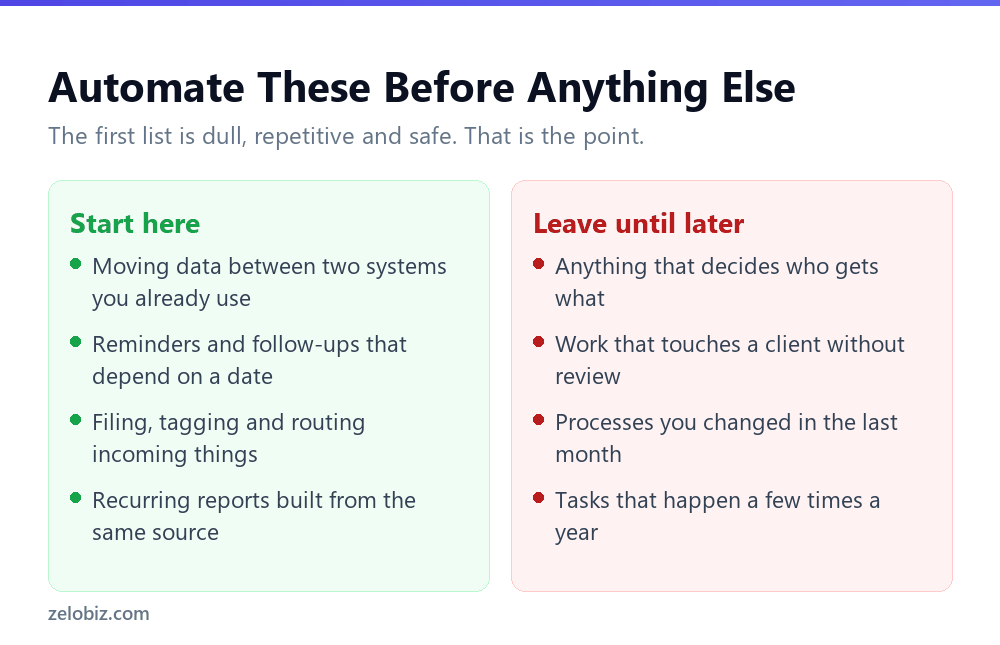
Across most small businesses the same four candidates come out on top, because they score well on every factor at once.
Notice what these have in common. None of them make a decision. Each one moves, sorts or reminds. That is deliberate, and it is the difference between automation that keeps running and automation that quietly gets switched off.
💡 Pro tip: If you want a single recommendation to start with: automate the reminder you most often forget to send. It is quick to build, the benefit is immediate, and when it misfires the consequence is one slightly early email rather than a bad decision.
What Not to Automate Yet
The exclusions matter as much as the list. Four categories cause most of the abandoned projects.
- Anything that decides. Who gets the discount, which lead is worth calling, whether a refund is approved. Automate the gathering of information for those decisions, not the decision itself.
- Anything that reaches a client unreviewed. A misfired internal notification is embarrassing for an hour. A misfired client email is a relationship problem, and you cannot recall it once it has landed.
- Anything you changed recently. If the process is still evolving, automating it just means rebuilding it. Let it settle for a couple of months first.
- Anything rare. A task that runs three times a year will never repay the build time, and you will not remember how it works when it next fires.
⚠️ Watch out: Be especially careful with anything touching money or contracts. Automated invoice reminders are fine because the consequence of an error is a slightly awkward email. Automated payments, credit decisions or contract issuance are not first projects.
Why Most Automations Get Quietly Abandoned
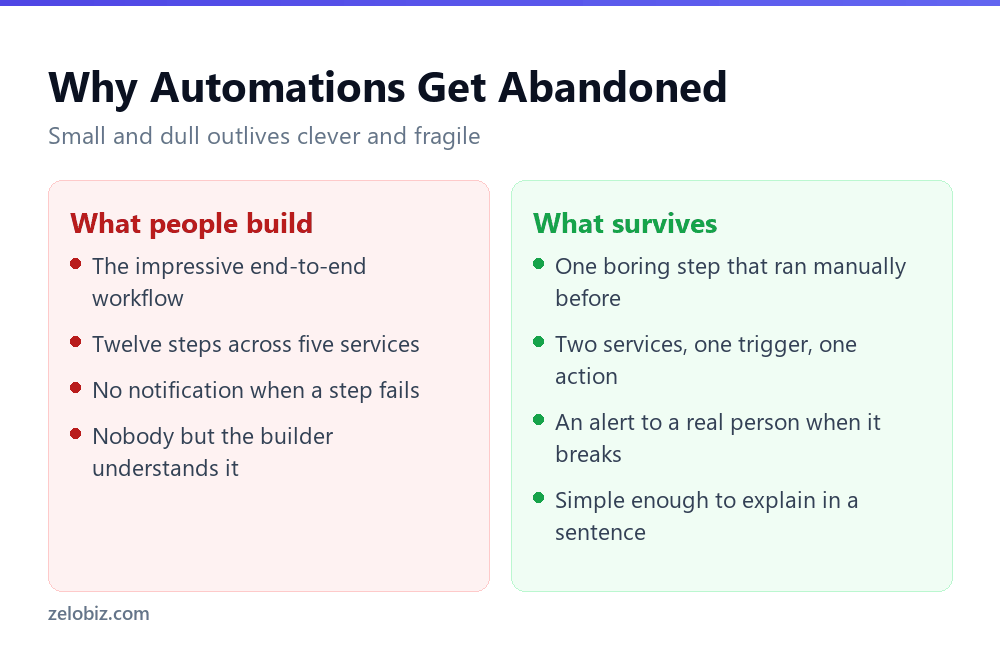
The failure pattern is consistent enough to predict. Someone builds an ambitious multi-step workflow, it works for a fortnight, then a service changes something small and it stops. Nobody notices for a week. By the time they do, everyone has gone back to doing it manually.
Two things prevent that, and neither is technical sophistication.
Build one step, not twelve
A single trigger and a single action between two services you already use is far more durable than a chain across five. Chains fail at their weakest link, and every additional service is another link and another set of changes outside your control.
Make failure visible
Every automation needs to tell a specific person when it breaks. Not a log nobody reads. A message somewhere that person actually looks, naming what failed.
Silent failure is the real risk with automation. A task you do manually and forget is obvious. A task an automation stopped doing three weeks ago is invisible until something downstream goes wrong.
📊 Note: Write down what each automation does, in one sentence, somewhere findable. If the only person who understands it leaves or forgets, an automation nobody can explain gets switched off the first time it misbehaves.
Where AI Belongs in This, and Where It Does Not
Every task listed so far is deterministic. A trigger fires, something moves, a message sends. None of it needs a model, and using one would make it less reliable rather than more.
That is worth saying plainly, because the current advice is to reach for an AI agent first. For the tasks that belong at the start of an automation list, a plain rule wins on every measure that matters.
The pattern is straightforward. If the input has a predictable structure, a rule handles it and will keep handling it identically forever. If the input is unstructured text that a person would have to read and interpret, that is where AI earns its place.
Most first automations sit firmly in the first column. That is not a limitation, it is the reason they work. A rule that runs the same way ten thousand times is exactly what you want moving your data around.
⚠️ Watch out: A rule that misfires does so predictably, and you can fix it once. A model that misfires does so occasionally and differently each time, which is far harder to notice and much harder to debug. Reserve that risk for tasks that genuinely need judgement.
A Sensible Order of Operations
If you are starting from nothing, this sequence avoids most of the common waste.
Step four saves more money than any other. A great deal of what small businesses pay automation platforms to do is already possible in software they own. Outlook rules, spreadsheet triggers and scheduling built into the tools you have will handle a surprising share of a first automation list.
Common Questions
What should a small business automate first?
The dullest task you do most often, where an error is cheap and visible and the process has not changed recently. In practice that is usually moving data between two systems, sending date-triggered reminders, or filing and routing incoming work.
Should I automate my client emails?
Not without review. Internal notifications are safe to automate because a misfire is embarrassing for an hour. Client-facing messages are not, because you cannot recall them. Automate the drafting and the trigger, keep a human on the send.
Which automation platform should I choose first?
For a first project it matters far less than people expect, because all the mainstream platforms handle simple workflows well. Check what your existing software already does before paying for anything new, because a meaningful share of first automations need no extra tool at all.
How do I know if a task is worth automating?
Score it on four things: how often it happens, how long one run takes when honestly timed, how costly an error would be, and whether the process has changed recently. Frequent, quick-to-verify, stable tasks are worth it. Rare or evolving ones are not.
Why do automations stop working?
Usually because a connected service changed something small, and nothing told anyone. The two protections are keeping each automation short, ideally one trigger and one action, and making sure a named person is alerted when it fails.
Should I automate a task that only happens monthly?
It is marginal. Monthly tasks are worth automating only if each run takes a long time or forgetting is expensive. Anything less frequent than monthly rarely repays the build time, and you will have forgotten how it works before it runs again.
Is an AI agent better than a normal automation?
For the tasks in this article, no. Moving, sorting and reminding are deterministic jobs, and a deterministic rule does them more reliably than something that reasons about them. AI earns its place when the task needs judgement about unstructured content, which is not where you should start.
The Short Version
- →Pick the task before you pick the tool. Task selection decides whether it survives.
- →Score candidates on frequency, time per run, cost of error, and stability.
- →Start with moving data, date-triggered reminders, filing and routing, recurring reports.
- →Do not automate decisions, unreviewed client contact, recent processes, or rare tasks.
- →Build one step rather than twelve, and alert a real person when it breaks.
- →Check what your existing software already does before paying for a new platform.
The best first automation is almost always underwhelming to describe. It moves one thing from one place to another, on a schedule, and tells someone if it fails. That is what still runs a year later.