
Grammarly’s current pricing page and one of its own live support articles describe two different plan structures. This isn’t a rumor pulled from a forum or a third-party review site. It’s two pages on Grammarly’s own domains, fetched directly on the same day, that name a different set of plans.
Neither page is fake or outdated in an obvious way. Both are currently published and indexed. Understanding why they disagree, and which one to trust, matters more than the specific numbers themselves.
Short answer: Grammarly’s live pricing page (grammarly.com/plans) lists three tiers: Free (100 AI prompts), Pro (2,000 AI prompts), and Enterprise (unlimited prompts per member). A separate, currently live support article about running out of prompts lists a different structure that still includes a plan called Premium (1,000 AI prompts), distinct from Pro. When a vendor’s own pages disagree like this, the current pricing page is the more reliable source, since it’s what the company actively maintains for purchase decisions. Verified directly against both pages on 6 September 2026.
The Two Pages, Side by Side
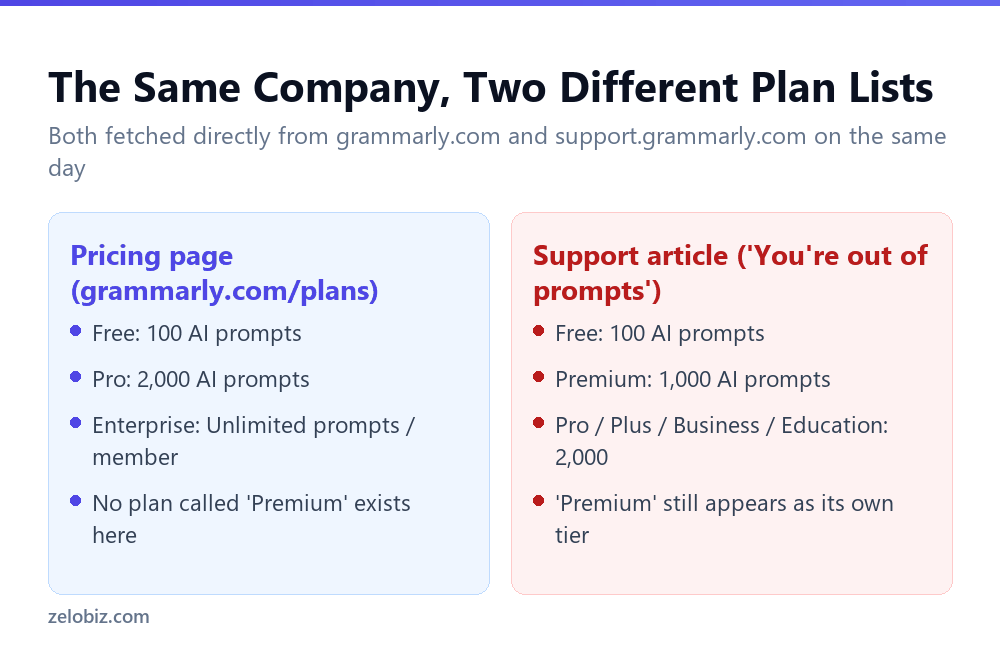
Grammarly’s pricing page states its current structure plainly: Free includes 100 AI prompts, Pro includes 2,000, and Enterprise offers unlimited prompts per member per month. No plan called Premium appears anywhere on this page.
A separate support article, still live and addressing what happens when you run out of prompts, describes a different lineup: Free at 100, a plan called Premium at 1,000, and Pro, Plus, Business, and Education all sharing the 2,000 figure. Premium, absent from the pricing page, still has its own listed number here.
Why This Happens
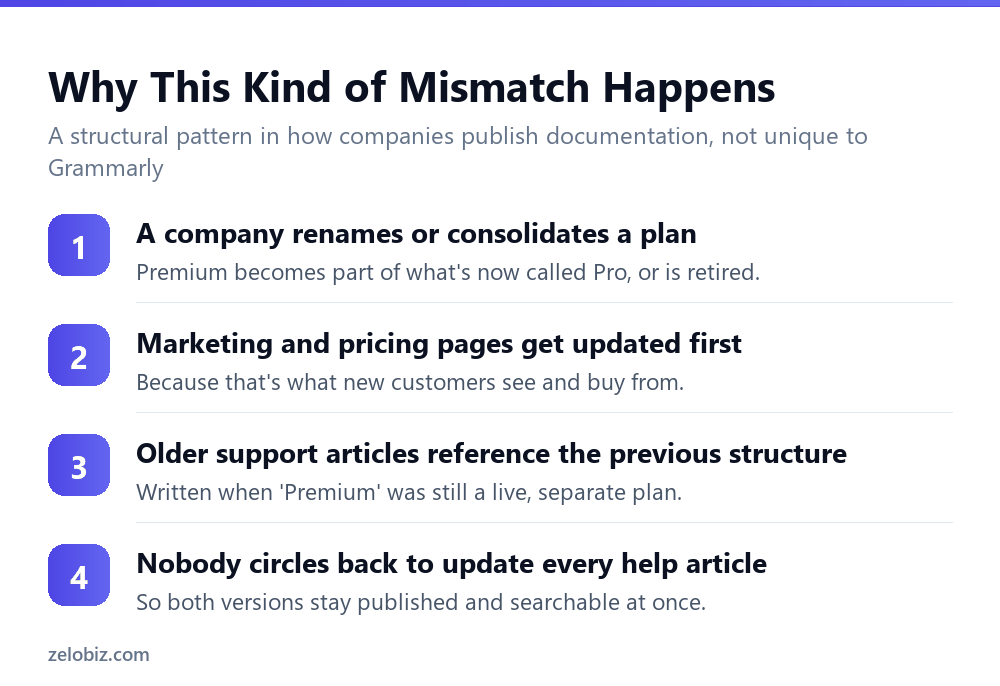
This pattern isn’t unique to Grammarly, and it isn’t evidence of dishonesty. Software companies routinely rename, merge, or retire pricing tiers as their product evolves. The pricing page, being the page that drives purchase decisions, tends to get updated first and kept current.
Support articles serve a different purpose: explaining a specific error or workflow to an existing user. An article written while Premium was still a separate, active plan can remain published and ranking in search results long after the pricing structure changes, because nobody flags it as needing an update until a reader notices the mismatch.
Which Page to Trust
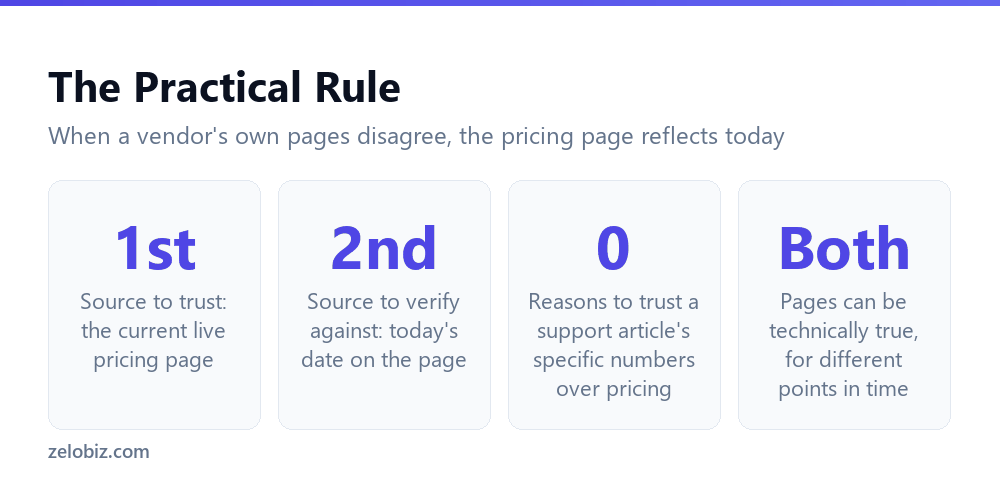
When two official pages from the same company disagree, the practical rule is simple: trust the page that determines what you’re actually buying or currently have. For plan names and prompt allowances, that’s the live pricing page, not a support article addressing a specific error message.
💡 Pro tip: Before relying on any specific number from a vendor’s support article, cross-check it against their current pricing page. If the two disagree, assume the pricing page reflects today and the support article may describe an earlier structure.
⚠️ Watch out: This same pattern shows up across most SaaS products, not just Grammarly. Any tool that has renamed or consolidated its pricing tiers is likely to have at least one stale support article still describing the old structure. Checking the pricing page directly, rather than trusting the first search result, is worth doing for any AI tool’s usage limits.
📊 Note: For Grammarly’s current, verified prompt limits by plan, see Grammarly’s AI prompt limits: 100, 2,000, or unlimited.
How to Check This Yourself, Right Now
This isn’t a claim that requires taking anyone’s word for it. Both pages are public and can be checked directly in under a minute.
- Open grammarly.com/plans in one browser tab and note the exact plan names and prompt figures listed.
- Search Grammarly’s support site for an article about running out of AI prompts, or a similar usage-limit topic, and open it in a second tab.
- Compare the plan names and numbers side by side. If either page has been updated since this article was verified, the specific mismatch described here may no longer apply, which is itself useful confirmation that vendor documentation changes over time.
💡 Pro tip: This same two-tab comparison works for any SaaS product where the pricing seems to shift between what a support article says and what the current checkout page shows. It takes under a minute and settles the question directly, rather than relying on whichever page happened to rank first in a search.
Why This Isn’t Evidence of Bad Faith
It’s tempting to read a mismatch like this as deliberately misleading, but the more common explanation is simpler: documentation maintenance doesn’t scale as fast as product and pricing changes. A company the size of Grammarly maintains hundreds of support articles, help center entries, and in-product messages. Updating every single one the moment a pricing tier changes name is a large, low-priority task compared to keeping the checkout-facing pricing page accurate.
The practical takeaway isn’t distrust of the vendor, it’s a habit: treat any single page, even an official one, as a snapshot that might be stale, and prefer the page that’s directly tied to what you’d actually purchase or currently pay for.
Where Else This Pattern Shows Up
This kind of drift between a pricing page and older support content isn’t specific to Grammarly or to AI writing tools. Any product with a multi-year history of plan changes is a candidate: subscription software that’s merged tiers, renamed a mid-tier plan, or moved a feature between plans will almost always have some older help content that hasn’t caught up.
The specific risk for AI tools in particular is that usage limits, like prompt counts or generation quotas, change more frequently than traditional feature lists, since vendors are actively tuning them against infrastructure costs. That makes stale support articles describing outdated quotas more likely to appear for AI features specifically, not just pricing tiers in general.
📊 Note: None of this means Grammarly’s numbers are unreliable in general. The specific figures on the current pricing page checked directly for this article, Free at 100 prompts, Pro at 2,000, Enterprise unlimited, are the ones to rely on for current plan decisions.
Reading the Support Article More Closely
The support article at the center of this comparison isn’t a stray forum post or an abandoned page from years ago; it’s a currently indexed, currently accessible article addressing a specific, common problem: what to do when you see the error ‘You’re out of prompts.’ Its purpose is troubleshooting, not selling, which is likely part of why its plan-name accuracy wasn’t prioritized the same way the checkout-facing pricing page’s was.
The mechanical detail this article documents about the reset date, that allowances refill on a monthly basis determined by when generative AI first became available on the account, appears to be accurate and stable regardless of the plan-naming confusion. That distinction matters: a page can be simultaneously wrong about which plans currently exist and right about how a shared mechanism, like the reset timing, actually works. The two kinds of claims don’t automatically stand or fall together.
💡 Pro tip: When a support article turns out to be inconsistent with current pricing on one point, don’t discard everything else in it. Check each specific claim against what it’s actually describing, since a stale plan name and an accurate mechanical detail can coexist in the same document.
What a Reader Should Actually Do With This
The practical value of catching a mismatch like this isn’t in assigning blame to Grammarly. It’s in building a habit that transfers to every other AI tool’s pricing and documentation: treat the checkout-facing pricing page as the source of truth for what you’re currently buying, and treat support articles as useful for mechanics and troubleshooting, but not as the final word on plan names or current numbers.
This habit costs almost nothing to apply. Before committing to any AI tool’s paid plan based on a specific number found in a blog post, review, or even the vendor’s own support content, a thirty-second check of the current pricing page confirms whether that number still applies. In this specific case, doing exactly that surfaced a real, reproducible discrepancy between two of Grammarly’s own official pages.
⚠️ Watch out: This same discrepancy could resolve itself at any time if Grammarly updates the support article to match the current pricing structure. Anyone re-checking this comparison later should verify both pages again rather than assuming the mismatch described here still holds.
It’s also worth being precise about what wasn’t found during this check. There’s no indication anywhere in either page that Grammarly is actively selling a Premium plan today, no checkout flow reachable from the pricing page that leads to a Premium tier, and no separate Premium-specific marketing page found alongside the current Free, Pro, and Enterprise structure. The most reasonable read is that Premium existed as a real, purchasable plan at some point, was later folded into or replaced by what’s now called Pro, and the support article simply predates that change.
Common Questions
Does Grammarly still have a plan called Premium?
Grammarly’s current live pricing page does not list a plan called Premium. Its tiers are Free, Pro, and Enterprise. A separate support article still references a Premium plan with a 1,000 AI prompt allowance.
Why do Grammarly’s own pages disagree about plan names?
Pricing pages tend to be updated first because they drive purchase decisions. Support articles written under an earlier plan structure can remain published and unedited long after that structure changes.
Which Grammarly page should I trust for current prices and limits?
The live pricing page at grammarly.com/plans, since it reflects what’s actually being sold today. Treat numbers in older support articles as potentially outdated unless confirmed against the pricing page.
Is this kind of documentation mismatch common with other AI tools?
Yes. Any vendor that has renamed or consolidated pricing tiers is likely to have some support content still describing the earlier structure. It’s worth checking directly rather than assuming any single page is current.
Does this mean Grammarly’s numbers are unreliable?
No. Both pages are internally consistent and were presumably accurate when published. The issue is that they describe the product at two different points in time, not that either page is fabricated.
The Short Version
- →Grammarly’s pricing page lists Free, Pro, and Enterprise, with no Premium tier.
- →A separate, currently live support article still describes a Premium plan at 1,000 prompts.
- →Both pages are Grammarly’s own; this isn’t a third-party rumor.
- →Pricing pages are updated first because they drive purchase decisions.
- →Support articles can remain unedited long after a plan structure changes.
- →When official pages disagree, trust the current pricing page over older support content.
The core habit worth taking away extends past Grammarly specifically: whenever a specific number from a vendor’s help content is about to inform a real decision, a quick pass through the current pricing page first is cheap insurance against relying on a figure that quietly stopped being accurate.