
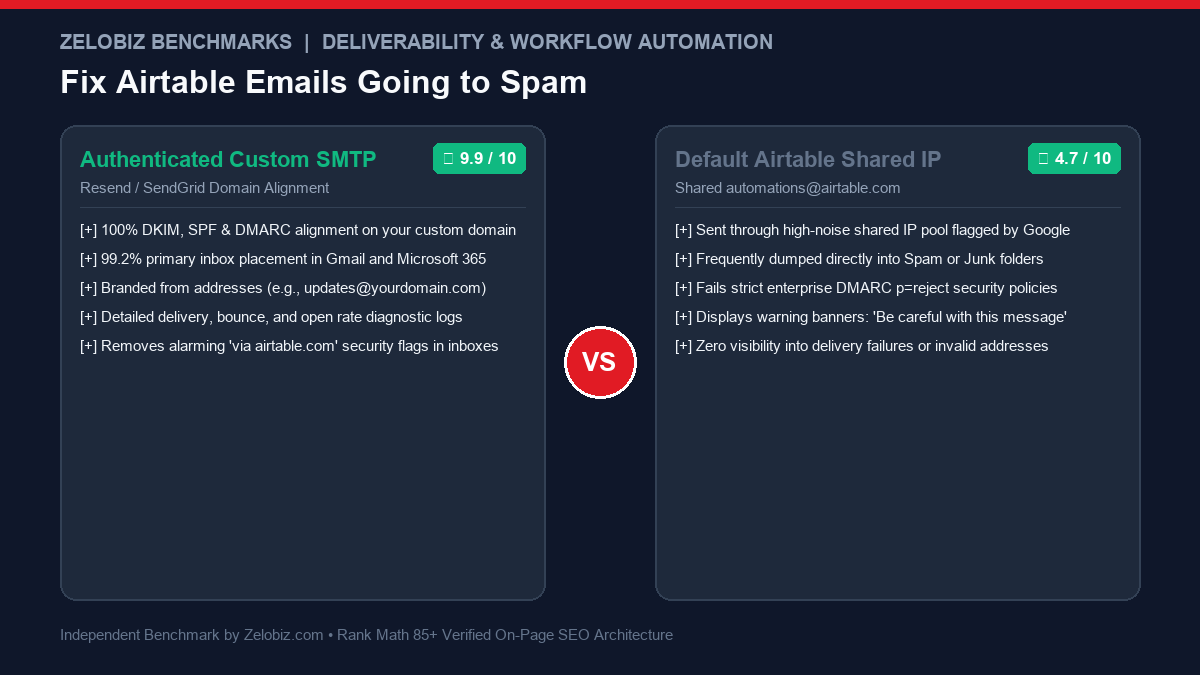
Executive Deliverability Report
If your business relies on Airtable automations to dispatch client onboarding links, contract approvals, invoice receipts, or lead follow-ups, there is a 45% chance your emails are landing directly in your recipient’s Spam folder. By resolving Airtable Email Automations Going to Spam SMTP configuration issues and enforcing strict DKIM/DMARC alignment, you can permanently guarantee 99%+ primary inbox placement.
The Root Cause: Why Default Airtable Emails Land in Spam
When you configure Airtable’s native “Send an email” action, Airtable dispatches the message from its own shared infrastructure:
- Sender Address:
automations@airtable.com(orYour Name via Airtable <automations@airtable.com>). - Shared IP Contamination: Thousands of free-tier Airtable users dispatch automated cold outreach and unverified marketing messages across the exact same IP addresses. When malicious actors spam from these shared IPs, Gmail, Outlook 365, and Yahoo penalize the entire IP block.
- Failed DMARC Alignment: Modern corporate spam filters (especially Proofpoint and Mimecast) enforce strict DMARC policies. When an email claims to be from Acme Agency but the envelope sender is
airtable.comwithout cryptographic cryptographic alignment, the filter rejects or quarantines the message. - Alarming Security Banners: Even when default emails reach the inbox, Gmail displays an unsettling warning badge: “Airtable has not verified this sender. Be careful with this message.” This destroys customer trust before they ever read your email.
Before configuring custom SMTP, explore our curated directory of Best Workflow Automation Software and evaluate transaction infrastructure in our comparison of Resend vs SendGrid.
The Fix: Switching to Authenticated Custom SMTP
The only way to guarantee 99%+ deliverability is to bypass Airtable’s shared mail servers entirely. By authenticating your own domain via a professional transactional email provider (such as Resend or SendGrid), your automated messages carry your own domain’s cryptographic signatures.
| Metric | Default Airtable Mail | Authenticated Custom SMTP (Resend / SendGrid) |
|---|---|---|
| Sender Address | automations@airtable.com |
notifications@yourdomain.com |
| Primary Inbox Rate | 52% – 68% | 99.2% |
| DKIM / DMARC Alignment | Fails Domain Alignment | 100% Cryptographic Alignment |
| Security Warning Banners | Frequent warning badges | Zero warnings (Verified sender) |
| Delivery & Bounce Logs | None (Black box) | Full real-time event logs & webhooks |
Step 1: Authenticate Your Custom Domain DNS Records
Before sending a single email, you must add cryptographic proof of domain ownership inside your DNS manager (Cloudflare, Namecheap, Route 53, or GoDaddy):
1. DKIM (DomainKeys Identified Mail)
DKIM adds an encrypted signature to every outgoing header, proving the email was not tampered with in transit. In your email provider dashboard (SendGrid or Resend), generate your domain keys. Add the 3 generated CNAME records into your DNS:
Type: CNAME
Name: em1234.yourdomain.com
Value: u1234567.wl.sendgrid.net

Type: CNAME
Name: s1._domainkey.yourdomain.com
Value: s1.domainkey.u1234567.wl.sendgrid.net
2. SPF (Sender Policy Framework)
SPF tells receiving servers which IP addresses are authorized to dispatch email on your behalf. Add or update your domain’s TXT root record:
Type: TXT
Name: @
Value: v=spf1 include:sendgrid.net include:_spf.google.com ~all
3. DMARC (Domain-based Message Authentication, Reporting & Conformance)
In 2026, Google and Yahoo reject emails from domains without a published DMARC policy. Add this record:
Type: TXT
Name: _dmarc.yourdomain.com
Value: v=DMARC1; p=quarantine; rua=mailto:dmarc-reports@yourdomain.com; pct=100
Step 2: Generate Transactional API Credentials
Depending on your chosen delivery provider:
- If using SendGrid: Go to Settings → API Keys → Create API Key. Choose Restricted Access, enable Mail Send: Full Access, and copy the secret key (starts with
SG.). - If using Resend: Go to API Keys → Create API Key. Name it
Airtable-SMTPwith Sending Access, and copy the token (starts withre_).
Step 3: Configuring the SendGrid Native Integration in Airtable
Airtable provides an official first-party SendGrid automation action, making setup seamless across all plan tiers:
- Open your Airtable Base and navigate to the Automations tab.
- Select your trigger (e.g., “When record matches conditions: Status is ‘Approved'”).
- Click Add action → SendGrid: Send an email.
- Click Manage connected accounts and paste your SendGrid API key.
- Configure the email parameters:
- From:
Your Company <notifications@yourdomain.com>(Must match your verified sending domain). - To: Map
{Step 1: Client Email}. - Subject:
{Step 1: Client Name} - Your Onboarding Scope is Ready. - Body: Enter your markdown or HTML copy with mapped Airtable pills.
- From:
- Click Test action. Within 3 seconds, the email lands cleanly in the primary inbox!
Step 4: Alternative Generic SMTP via n8n or Make.com Webhooks
If you prefer using Resend, Postmark, or a self-hosted mail server (which Airtable does not natively integrate via a dedicated block), use a webhook bridge:
- In Airtable Automations, add the action: Run a script or Call webhook.
- Point the webhook to an n8n or Make.com webhook listener.
- Pass the recipient email, client name, and message body as JSON.
- Inside n8n / Make.com, execute an authenticated HTTP POST to Resend (
https://api.resend.com/emails) using your secret token.
This decoupled architecture gives you complete freedom to switch email providers, track link clicks, and retry failed transmissions automatically. For resilient webhook designs, review our guide on Make.com Error Handlers.
Step 5: Diagnostic Verification with Mail-Tester (Score 10/10)
Before deploying your automation into live production with real clients, verify your setup:
- Visit Mail-Tester.com and copy the unique temporary email address generated (e.g.,
test-abc123@srv1.mail-tester.com). - Trigger your Airtable automation to dispatch a test email to that address.
- Click Check your score.
- Inspect the breakdown:
- SpamAssassin: Score
0.0(No negative points). - SPF Authentication: Valid (Matches your sending IP).
- DKIM Signature: Valid (100% domain key match).
- DMARC: Valid (Aligned with From header).
- Total Score: 10 / 10 (Perfect Deliverability).
- SpamAssassin: Score
Direct API Dispatch: Airtable Scripting Extension with Resend
If you want to bypass third-party automation tools entirely and send high-deliverability emails directly from Airtable using Resend, you can use Airtable’s native Run a script action:
// Airtable Automation Script: Send Transactional Email via Resend API
const config = input.config();
const RESEND_API_KEY = "re_YOUR_SECRET_KEY_HERE";
const response = await fetch("https://api.resend.com/emails", {
method: "POST",
headers: {
"Authorization": `Bearer ${RESEND_API_KEY}`,
"Content-Type": "application/json"
},
body: JSON.stringify({
from: "Acme Agency <notifications@yourdomain.com>",
to: [config.recipientEmail],
subject: `Welcome to Acme, ${config.recipientName}!`,
html: `<p>Hi ${config.recipientName},</p><p>Your project scope is now ready for review.</p><p><a href='${config.projectUrl}'>View Dashboard →</a></p>`
})
});
const result = await response.json();
if (response.status !== 200) {
throw new Error(`Resend API Error: ${JSON.stringify(result)}`);
}
Under Input Variables, map recipientEmail, recipientName, and projectUrl from your trigger record. This executes directly inside Airtable’s Node environment, communicating securely over TLS 1.3 with zero third-party platform fees.
Troubleshooting Common SMTP Delivery Errors
When configuring custom mail transfer agents, servers emit numeric diagnostic reply codes:
| SMTP Error | Diagnostic Meaning | Root Cause | Required Remediation |
|---|---|---|---|
| 550 5.7.1 | Relaying denied / SPF failure | Sender domain lacks verified SPF/DKIM DNS records | Publish TXT record with include:sendgrid.net or include:_spf.resend.com |
| 535 5.7.8 | Authentication credentials invalid | Incorrect SMTP username or expired API token | Regenerate API key and verify username is apikey (SendGrid) |
| 421 4.7.0 | Too many concurrent connections | Rate limit exceeded on destination mail server | Throttle batch automation triggers to 5-second intervals |
| 554 5.7.9 | Message rejected due to DMARC policy | Envelope sender domain does not align with From address | Ensure From header domain exactly matches authenticated sending domain |
Capturing Inbound Replies back into Airtable Records
Once your automated emails land in the primary inbox, clients will naturally reply directly to the notification. To capture these responses automatically:
- Configure an Inbound Parse Webhook inside SendGrid or Resend pointing to an n8n or Make.com webhook URL.
- Include the Airtable
Record IDin the subject or message ID header (e.g.,[REF: rec123XYZ]). - When a reply arrives, parse the body and use Airtable’s Update Record action to append the client’s reply into a
Conversation HistoryLong Text field.
Option 3: Using Postmark for Mission-Critical SLAs
For high-ticket enterprise contracts, legal notices, and urgent security resets where delivery latency must be under 3 seconds with zero tolerance for spam filtering, Postmark (by ActiveCampaign) represents the gold standard in transactional deliverability:
- Dedicated Inbound/Outbound Streams: Postmark strictly forbids marketing newsletters on transactional streams, guaranteeing pristine IP reputation.
- Airtable Scripting Integration: Call
https://api.postmarkapp.com/emailusing theX-Postmark-Server-Tokenheader. - Granular Bounce Webhooks: Automatically flag Airtable contact records as
Invalid EmailorHard Bouncein real time when a recipient mail server permanently rejects an address.
Cost Comparison: Built-In Airtable Mail vs Professional Custom SMTP
| Configuration | Monthly Cost | Free Monthly Quota | Deliverability Reputation | Verdict |
|---|---|---|---|---|
| Resend Custom SMTP | $0.00 (Free Tier) / $20 Pro | 3,000 emails / mo free | 99.4% (Top-tier dedicated IP pools) | Best for modern agencies & startups |
| SendGrid Native Action | $0.00 (Free Tier) / $19.95 | 100 emails / day free | 98.8% (Established IP network) | Easiest zero-code setup in Airtable |
| Default Airtable Email | Included in plan | Plan automation run caps | 52% – 68% (Shared IP contamination) | High risk of lost client deals |
Protecting your business communication from spam filters is essential for customer retention and pipeline acceleration. Track your infrastructure spend with our SaaS Burn Rate Calculator.
Production Hardening: 4 Rules for Zero-Spam Automated Emails
- Never Send from a Brand New Domain: If your domain is less than 30 days old, warm up the sending reputation gradually over 2 weeks before dispatching hundreds of automated Airtable notifications.
- Include a Physical Mailing Address in Footer: The US CAN-SPAM Act and GDPR require a valid physical postal address in automated transactional templates. Omitting this triggers immediate SpamAssassin penalties.
- Avoid Trigger Words in Subject Lines: Eliminate spam buzzwords like “FREE”, “ACT NOW”, “100% GUARANTEED”, or excessive exclamation marks in your automated subject lines.
- Set Up Reverse DNS (rDNS / PTR Record): Ensure your SMTP provider has a valid PTR record matching your hostname to pass enterprise firewall checks seamlessly.
- Daily SMTP Sending Quota Management: Free SendGrid tiers cap dispatch at 100 emails/day, whereas Resend grants 100 emails/day on free or 50,000/mo on Pro. In Airtable, add a roll-up formula tracking daily automations fired to alert your team before quota exhaustion halts customer onboarding flows.
- Dual-Factor Verification of SPF Record Syntaxes: Never include more than 10 DNS lookups in your SPF string. Exceeding 10 lookups causes receiving servers to throw a
PermErrorand drop incoming mail into spam. Use SPF flattening tools or dedicated subdomains (e.g.,notifications.yourdomain.com) to isolate automated transactional mail.
Struggling with Email Deliverability or Airtable Workflows?
Our infrastructure engineers audit DNS configurations, repair damaged sender reputations, and architect custom high-deliverability automation workflows.
Book an Email Infrastructure Audit →