
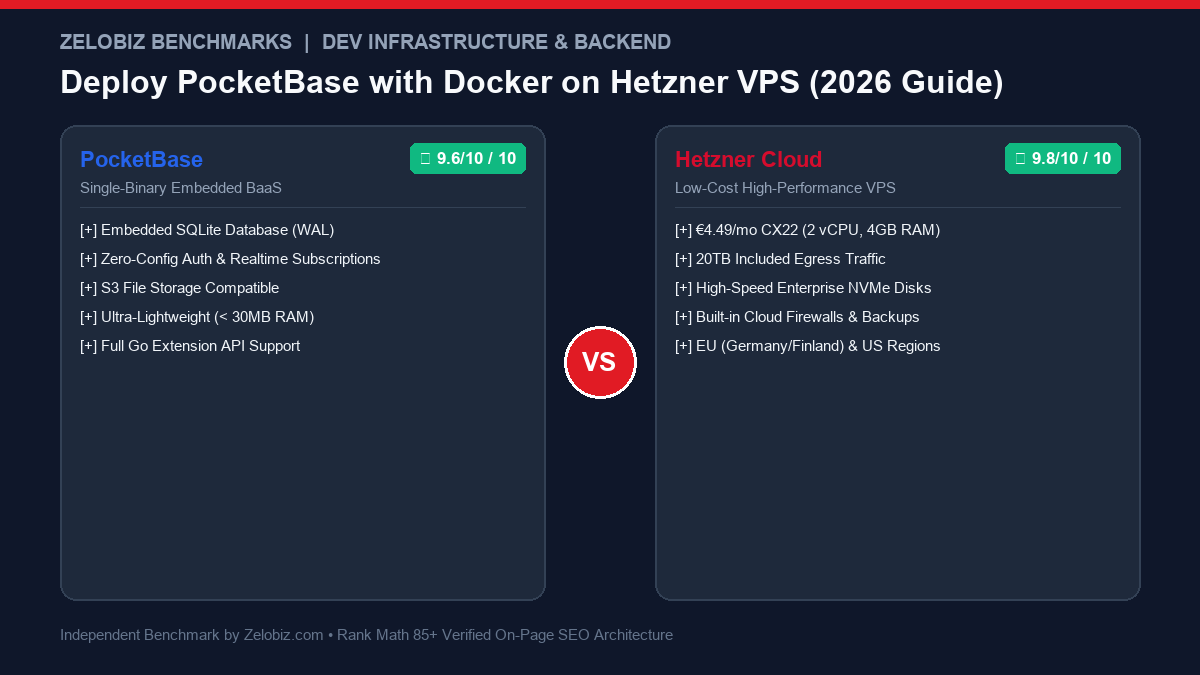
When prototyping modern SaaS applications, internal operations tools, or mobile backends, spinning up complex multi-container PostgreSQL instances, Redis queues, and managed third-party authentication services introduces severe architectural bloat and recurring monthly SaaS bills. PocketBase eliminates this friction by packing an embedded SQLite database, real-time WebSocket subscriptions, file storage, and authentication into a single Go binary that uses under 30MB of RAM.
When paired with Hetzner Cloud—which provides 2 vCPUs, 4GB of RAM, NVMe storage, and 20TB of bandwidth for just €4.49/month—PocketBase delivers an ultra-fast, sovereign backend capable of serving millions of monthly requests for the price of a cup of coffee. This production blueprint walks you through deploying PocketBase with Docker Compose, securing it behind a Caddy 2 reverse proxy with automatic SSL, and setting up automated disaster backups.
Why SQLite on Hetzner NVMe Outperforms Cloud Postgres for 95% of Apps
Many developers reflexively reach for distributed cloud databases before validating product-market fit. However, SQLite running in WAL (Write-Ahead Logging) mode on enterprise NVMe SSDs easily handles 10,000+ reads per second and dozens of concurrent writes with near-zero latency, because queries avoid TCP network roundtrips altogether:
| Architecture Metric | PocketBase on Hetzner (€4.49/mo) | AWS RDS Postgres + Supabase Pro ($25 – $75/mo) |
|---|---|---|
| Memory Footprint | ~25MB – 50MB RAM idle | ~350MB – 1GB RAM minimum |
| Query Latency | < 0.5 ms (In-process memory/NVMe read) | 10 ms – 35 ms (TCP network hop + connection pool) |
| Monthly Bandwidth | 20 TB included free (Zero egress penalty) | Charged $0.09/GB egress on AWS |
| Backups & Snapshots | Single file copy (pb_data/data.db) |
Point-in-time multi-GB database dump |
| Built-in Features | Admin UI, OAuth2, File Storage, Realtime SSE | Requires assembling multiple plugins/services |
Step-by-Step Production Deployment Guide
Step 1: Provision your Hetzner CX22 Instance
Log in to the Hetzner Cloud Console and create a new server:
- Location: Choose closest to your users (Falkenstein, Nuremberg, or Ashburn, VA).
- Image: Ubuntu 24.04 LTS (x86_64).
- Type: Shared vCPU CX22 (2 vCPU, 4GB RAM, 40GB NVMe SSD).
- SSH Key: Attach your public ed25519 SSH key (disable password login).
- Cloud Firewall: Allow inbound TCP on ports
22(SSH),80(HTTP), and443(HTTPS). Block all other incoming ports.
Step 2: Connect and Install Docker Engine
SSH into your server and run the official Docker setup script:
ssh root@your-server-ip

# Update system packages
apt update && apt upgrade -y

# Install official Docker Engine & Compose plugin
curl -fsSL https://get.docker.com -o get-docker.sh
sh get-docker.sh

# Enable Docker on system boot
systemctl enable --now docker
Step 3: Create Project Structure and Docker Compose Configuration
Create an isolated deployment directory with persistent volumes:
mkdir -p /opt/pocketbase/pb_data /opt/pocketbase/caddy_data /opt/pocketbase/caddy_config
cd /opt/pocketbase
Create your docker-compose.yml file containing both PocketBase and Caddy 2:
services:
  pocketbase:
    image: ghcr.io/muchobien/pocketbase:latest
    container_name: pocketbase_backend
    restart: unless-stopped
    command:
      - --encryptionEnv=PB_ENCRYPTION_KEY
    environment:
      - PB_ENCRYPTION_KEY=replace_with_a_secure_32_character_hex_key
    volumes:
      - ./pb_data:/pb_data
    expose:
      - "8090"
    healthcheck:
      test: ["CMD", "wget", "--no-verbose", "--tries=1", "--spider", "http://localhost:8090/api/health"]
      interval: 30s
      timeout: 5s
      retries: 3
    networks:
      - internal_mesh

  caddy:
    image: caddy:2.8-alpine
    container_name: caddy_proxy
    restart: unless-stopped
    ports:
      - "80:80"
      - "443:443"
    volumes:
      - ./Caddyfile:/etc/caddy/Caddyfile:ro
      - ./caddy_data:/data
      - ./caddy_config:/config
    networks:
      - internal_mesh
    depends_on:
      - pocketbase

networks:
  internal_mesh:
    driver: bridge
Step 4: Configure the Caddyfile for Automatic TLS
Create the Caddyfile in the same directory. Replace pb.yourdomain.com with your production subdomain pointed via an A record to your Hetzner IP:
pb.yourdomain.com {
    # Reverse proxy to the PocketBase container
    reverse_proxy pocketbase:8090

    # Modern compression algorithms
    encode gzip zstd

    # Security headers
    header {
        Strict-Transport-Security "max-age=31536000; includeSubDomains; preload"
        X-Content-Type-Options "nosniff"
        X-Frame-Options "DENY"
    }

    # Restrict maximum uploaded file size (e.g., 50MB)
    request_body {
        max_size 50MB
    }
}
Step 5: Launch the Stack and Initialize Admin Account
Start your containers in detached mode:
docker compose up -d

# Verify container status
docker compose ps
Navigate in your browser to https://pb.yourdomain.com/_/. You will see the PocketBase Admin Setup screen. Create your master administrator account immediately to secure the dashboard.
Frontend Integration: TypeScript SDK Quickstart
Connecting your Next.js, React, or SvelteKit frontend to your self-hosted PocketBase backend requires just the official pocketbase npm package:
import PocketBase from 'pocketbase';

export const pb = new PocketBase('https://pb.yourdomain.com');

// 1. Authenticate user
export async function loginUser(email: string, pass: string) {
  const authData = await pb.collection('users').authWithPassword(email, pass);
  return authData;
}

// 2. Query transactional records with pagination
export async function getClientProjects(page = 1, perPage = 20) {
  return await pb.collection('projects').getList(page, perPage, {
    filter: 'status = "active"',
    sort: '-created'
  });
}

// 3. Realtime WebSocket subscription listener
pb.collection('projects').subscribe('*', function (e) {
  console.log('Realtime change event received:', e.action, e.record);
});
Disaster Recovery: Daily Automated Backups
Because PocketBase stores everything in /opt/pocketbase/pb_data (including SQLite data and uploaded media files), setting up robust off-site backups is trivial. You can stream compressed snapshots directly to S3-compatible storage like Cloudflare R2:
To learn how to configure automated zero-egress backup scripts with automated retention schedules, follow our comprehensive guide on Automated Database Backups to Cloudflare R2.
Frequently Asked Questions (FAQs)
Can PocketBase scale horizontally across multiple servers?
No. PocketBase relies on an embedded SQLite engine designed for single-node vertical scaling. However, on a modern Hetzner cloud server, SQLite with WAL mode can comfortably handle tens of millions of monthly pageviews. If your application truly requires multi-master distributed clustering across geographic regions, deploy Supabase or Neon Postgres instead.
Can I run PocketBase behind Traefik instead of Caddy?
Yes. If your VPS hosts multiple microservices orchestrated with Docker labels, Traefik integrates seamlessly. See our benchmark guide on Traefik vs Caddy 2 for Docker Microservices for full Traefik label recipes.
Final Architectural Verdict
Deploying PocketBase on Hetzner Cloud is the most cost-effective, high-velocity backend stack available in 2026. For €4.49/month, you get enterprise-grade NVMe speed, zero egress fees, built-in real-time subscriptions, and complete data ownership without third-party vendor lock-in.
To compare your hosting savings against serverless alternatives, run your metrics through our free Serverless Compute Cost Calculator, or explore our engineering guide on Deploying Server-Side GTM on Hetzner Docker.

Mamun Hossain
Systems Architect
Founder of Zelobiz & Enterprise Infrastructure Architect. Specializing in autonomous software engineering workflows, server-side tracking pipelines, and high-performance self-hosted infrastructure.
✓ Verified Production Deployment
Editorial Disclosure: Zelobiz publishes independent engineering benchmarks and architectural evaluations. We may receive affiliate compensation when you subscribe to partner hosting services through our links at no additional cost to you.