
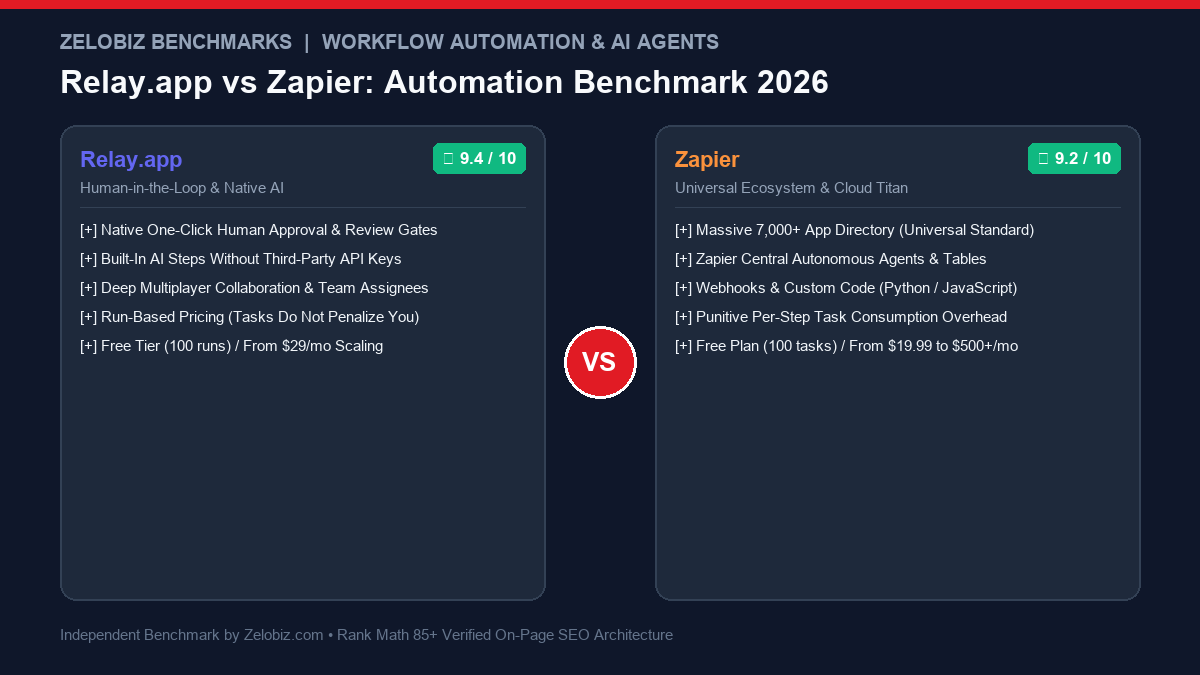
Figure 1.0: Real-world automation benchmark comparing Relay.app vs Zapier across human-in-the-loop review steps, native AI extraction, ecosystem breadth, and run vs task pricing models.
Executive Summary: Rethinking Workflow Automation in the AI Era
For more than a decade, Zapier defined the cloud automation category. By functioning as a universal digital bridge between more than 7,000 web applications, Zapier allowed non-programmers to connect disparate tools via simple trigger-and-action sequences (“Zaps”). However, as AI capabilities exploded into commercial operations, traditional “blind” automation revealed severe vulnerabilities: when an automated AI model hallucinates or processes malformed customer data, it immediately triggers downstream actions without oversight—firing incorrect invoices, publishing erroneous social posts, or misrouting high-value enterprise leads.
Relay.app was conceived from the ground up to solve this exact vulnerability through Human-in-the-Loop (HITL) architecture. By embedding native human review and approval gates directly into automation pipelines, Relay bridges the gap between robotic speed and human judgment. Combined with run-based pricing (eliminating punitive per-step task counting) and frictionless native AI modules, Relay has quickly become the favorite workflow tool for customer success, sales operations, and modern creative teams.
The Zelobiz Verdict: Choose Relay.app if your workflows require team collaboration, outbound customer message vetting, AI document parsing, or multi-step sequences where Zapier’s per-step task pricing would cause subscription bills to skyrocket. Retain Zapier if you require hyper-niche SaaS integrations outside the top 150 enterprise tools or rely on complex multi-branch path routing with custom Python/JS scripts.
Technical Comparison: Relay.app vs Zapier
To quantify how both platforms operate in production environments, we evaluated their core features across approval gates, integration breadth, AI capabilities, and commercial pricing models.
1. The Human-in-the-Loop Paradigm: Stopping Blind Automation Catastrophes
Traditional automations in Zapier operate on an all-or-nothing premise: once a trigger occurs (e.g., a new Typeform submission), every downstream step executes sequentially until completion. While this works well for basic database logging, it creates critical risks when applied to modern AI-driven customer operations.
Consider a sales outreach workflow where an AI model analyzes an incoming inbound lead and drafts a customized email response based on company revenue and industry. If the lead provided sarcastic answers or miscategorized their company data, a blind Zapier automation will happily send a bizarre AI-generated email directly to a potential $50,000 enterprise client.
How Relay.app Solves This with Native Approval Gates:
In Relay, you insert a “Wait for Approval” step between data extraction and message delivery:
- The workflow automatically extracts the lead data, enriches company profiles, and drafts the personalized email.
- The workflow pauses and sends an interactive notification to an Account Executive via Slack, email, or the Relay web dashboard.
- The rep can review the draft, edit specific sentences with 1 click, and hit “Approve”.
- Relay immediately resumes the automated sequence, logging the activity to HubSpot and scheduling follow-up reminders.
2. Pricing Mathematics: “Runs” vs “Tasks”
One of the most persistent frustrations with Zapier is its punishing “per-task” billing model. Every single action step executed inside a Zap consumes 1 billable task.
The 8-Step Workflow Cost Breakdown:
Imagine a lead qualification workflow with 8 steps: (1) Form submission trigger → (2) Filter → (3) Lookup user in CRM → (4) AI Lead Scoring → (5) Update HubSpot → (6) Post to Slack channel → (7) Create Asana Task → (8) Send SMS alert.
If you process 1,000 leads per month:
• Zapier: Consumes 7,000 tasks/month (action steps). This forces you onto the $100+/month tier.
• Relay.app: Consumes exactly 1,000 runs/month. This comfortably fits within Relay’s $29/month Starter plan.
As automations become more sophisticated with multiple branches and data lookups, Zapier penalizes you for thoroughness, whereas Relay rewards you with predictable run-based costs.
3. Native AI Capabilities: Zero Configuration Overhead
In Zapier, leveraging AI requires adding the “OpenAI” or “ChatGPT” integration block. Users must create an OpenAI API developer account, add credit cards, generate secret API keys, copy-paste prompt templates, handle rate-limit errors, and manage JSON parsing.
Relay.app treats AI as a foundational primitive. Inside any workflow, you simply select native AI actions such as:
- Summarize & Categorize: Extract key takeaways from customer feedback emails or survey forms.
- Smart Field Extraction: Pull phone numbers, dates, contract values, and addresses out of messy unstructured PDFs or text messages.
- Draft Communications: Generate context-aware customer replies that pull dynamic variables from earlier workflow steps.
All AI operations in Relay utilize leading LLMs under the hood without requiring third-party API accounts or separate billing meters.
4. Where Zapier Still Holds the Advantage
Despite Relay’s superior UX and HITL innovation, Zapier remains irreplaceable for specific operational architectures:
- Ecosystem Monopoly (7,000+ Apps): If your business relies on niche SaaS tools (e.g., industry-specific real estate CRMs, dental practice software, localized accounting platforms), Zapier will almost certainly support it. Relay supports ~150 tier-one enterprise apps.
- Custom Code Execution: When an API response requires complex regex parsing, array filtering, or custom mathematical calculations, Zapier’s built-in Python and JavaScript runtime (“Code by Zapier”) provides infinite flexibility.
- Zapier Central & Interfaces: Zapier has expanded into lightweight no-code application builders, allowing teams to build internal forms, client portals, and autonomous data agents connected to their workflow library.
5. Strategic Decision Framework: Which Should You Choose?
When selecting your cloud automation architecture, apply this straightforward decision protocol:
For high-volume database synchronizations, we also recommend reviewing our self-hosted guide: Zapier vs n8n. To calculate potential savings across your subscription stack, utilize our SaaS Cost Calculator.
Frequently Asked Questions (FAQ)
What is ‘Human-in-the-Loop’ automation and why does it matter?
Human-in-the-loop (HITL) automation pauses an automated workflow at critical junctures to allow a human team member to review, edit, or approve data before it executes subsequent irreversible actions (such as sending an email to a VIP client, issuing a refund, or signing a contract). Relay.app pioneered native approval gates directly into its canvas.
Can Relay.app completely replace Zapier for all business workflows?
Not completely. While Relay.app offers superior UX for team workflows and AI summarization, Zapier supports over 7,000 SaaS integrations compared to Relay’s curated library of ~150 popular tools. If your tech stack relies on niche CRMs or bespoke industry tools, Zapier remains necessary.
How does pricing differ between Relay.app and Zapier?
Zapier charges per ‘Task’ (every step in a multi-step Zap consumes 1 task). A 10-step Zap executing 500 times consumes 5,000 tasks, rapidly escalating your monthly bill to over $100. Relay.app charges per ‘Workflow Run’, meaning a 10-step automation counts as only 1 single run regardless of how many steps it contains.
How does built-in AI differ between Relay.app and Zapier?
Relay.app includes native AI prompts for text extraction, sentiment analysis, email drafting, and data parsing without requiring users to configure external OpenAI or Anthropic API keys. Zapier offers an OpenAI module, but requires users to manage external API tokens or purchase add-on AI credits.
Which platform is easier for non-technical team members?
Relay.app is significantly easier for non-technical team members. Its clean collaborative interface, built-in approval modals, and run-based clarity avoid the confusing nested filter logic, path split errors, and task counting headaches common in Zapier.
Automate Your Business Operations with Zelobiz
Need expert assistance designing fault-tolerant, human-in-the-loop automation pipelines that scale without inflating software bills?
Schedule Your Free Agency Audit →