
Selecting the backend architecture for your web application, internal admin portal, or automated webhook ingestion pipeline is the single most consequential technical decision an engineering team makes. A poor architectural choice either traps your business inside proprietary vendor ecosystems with runaway pay-per-read invoices, or bogs down developers in relentless database migrations when relational data integrity breaks down.
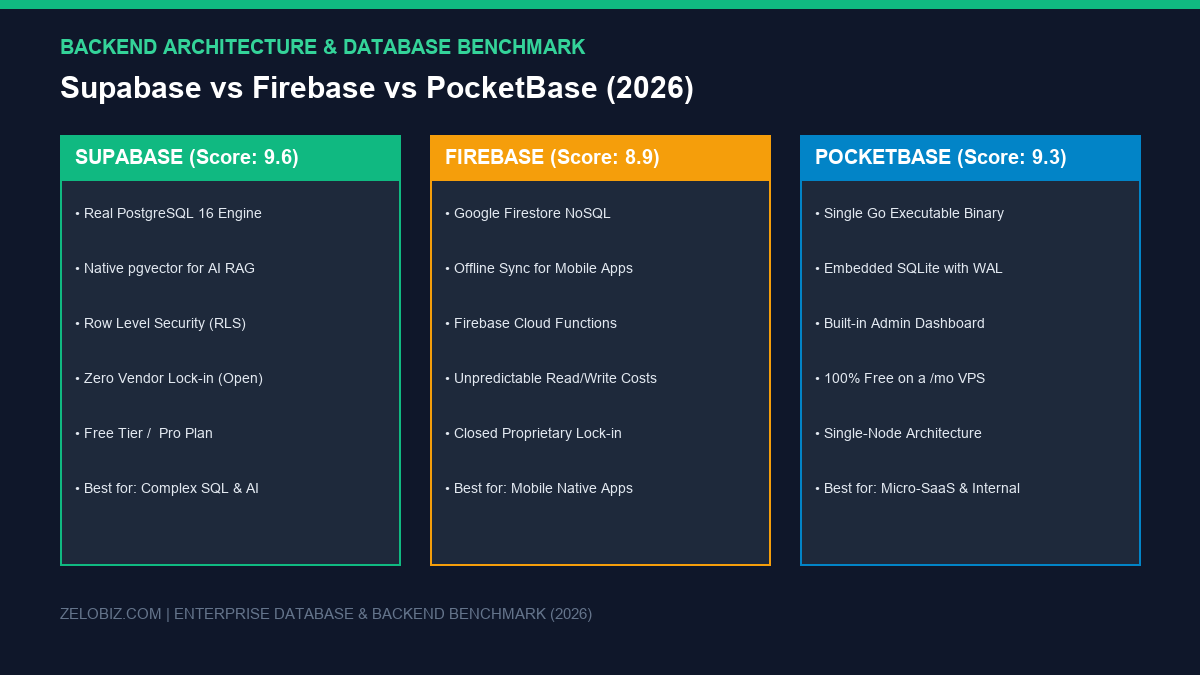
In 2026, the Backend-as-a-Service (BaaS) ecosystem has matured around three distinct architectural philosophies: Supabase (the open-source relational PostgreSQL leader), Google Firebase (the proprietary cloud NoSQL giant), and PocketBase (the revolutionary single-binary embedded SQLite engine).
In this technical benchmark, we evaluate Supabase vs Firebase vs PocketBase across database topology, AI vector capabilities (pgvector), real-time latency, self-hosting flexibility, and 3-year total cost of ownership (TCO).
For the overarching system architecture connecting Linux compute, database persistence, and automated failover, read our master blueprint on Self-Hosted Business Infrastructure (2026): Ditching Cloud SaaS Fees Without Downtime.
Executive Summary: Core Architectural Comparison
The foundational distinction among these three platforms lies in their underlying data storage engines and hosting topologies:
| Evaluation Metric | Supabase | Google Firebase | PocketBase |
|---|---|---|---|
| Database Architecture | Relational PostgreSQL 16 with Row Level Security (RLS) | NoSQL Document Store (Cloud Firestore) | Embedded SQLite with Write-Ahead Logging (WAL) |
| Query Language | Standard SQL, PostgREST API, GraphQL | Proprietary Firestore SDK query syntax | Simple REST API / PocketBase SDK with filter strings |
| AI Vector Embeddings | Native pgvector (HNSW & IVFFlat indexing) | Firestore Vector Search (Extension required) | Custom SQLite vector extensions (Manual compilation) |
| Self-Hosting Capability | 100% Open Source (Official Docker Compose stack) | Proprietary Google Cloud only (No self-hosting) | Single Go Binary (Zero external dependencies) |
| Real-Time Subscriptions | PostgreSQL WAL change streams via WebSockets | Native Firestore snapshot listeners | Server-Sent Events (SSE) subscriptions |
| Pricing Model | Free tier | $25/mo Pro plan (Fixed compute tiers) | Pay-as-you-go per document read, write, and delete | 100% Free (Runs on any $4/mo Linux VPS) |
| Optimal Use Case | B2B SaaS, complex relational data, AI RAG pipelines | Cross-platform native mobile apps (iOS/Android Flutter) | Internal dashboards, micro-SaaS, webhook log buffering |
1. Supabase: The Relational PostgreSQL Powerhouse
Supabase positioned itself as the “open-source Firebase alternative,” but under the hood, it is fundamentally superior for business applications because it gives you a full, unconstrained PostgreSQL database. Unlike NoSQL document trees where relational constraints must be maintained manually in application code, Supabase enforces foreign keys, unique constraints, and schema validations at the engine level.
Key Architectural Advantages of Supabase:
- Row Level Security (RLS): Directly inside PostgreSQL, you write fine-grained security policies (e.g.,
auth.uid() = user_id) that control data access without writing complex API middleware. - The
pgvectorAI Advantage: In 2026, nearly every modern SaaS features an AI chatbot or retrieval-augmented generation (RAG) pipeline. Supabase allows you to store and query high-dimensional vector embeddings right alongside structured relational tables in a single SQL query, eliminating the need for a separate vector database like Pinecone. - Zero Vendor Lock-In: If you ever outgrow Supabase’s managed cloud, you can export your standard PostgreSQL dump (using standard
pg_dump) and migrate seamlessly to AWS RDS, Google Cloud SQL, or a self-hosted Hetzner Linux server. Learn how to secure your database backups in our guide on automating PostgreSQL backups to AWS S3.
2. Google Firebase: The Mobile-First NoSQL Veteran
Google Firebase pioneered the BaaS market. For developers building consumer-facing native mobile applications in Flutter or React Native, Firebase remains a formidable platform, primarily due to its offline data synchronization and battle-tested push notification infrastructure (Firebase Cloud Messaging).
The Critical Limitations of Firebase:
- No Relational SQL Joins: Because Firestore is a NoSQL document database, performing complex queries across multiple collections (e.g., matching customers to orders, invoices, and shipment tracking IDs) requires multiple read operations or extensive data denormalization.
- Unpredictable Invoicing (The Infinite Read Loop): Firebase charges per document read, write, and delete. If a developer accidentally introduces a recursive
useEffecthook or an unoptimized real-time listener in a React frontend, an application can execute 1,000,000 reads in hours, producing catastrophic four-figure cloud bills. - Complete Proprietary Lock-In: You cannot export a Firestore database into an open-source self-hosted runtime. Once you build on Firebase, your codebase is permanently coupled to Google Cloud infrastructure.
3. PocketBase: The Single-Binary Embedded SQLite Miracle
For independent developers, micro-SaaS founders, and automation engineers, PocketBase has emerged as the most elegant backend tool of the decade. Written in Go, PocketBase compiles the database, authentication, file storage, and administrative interface into a single standalone binary file under 40MB.
Why Engineering Teams Love PocketBase:
- Zero Infrastructure Maintenance: You do not need to configure PostgreSQL connections, connection pools, or multi-container networking. You simply run
./pocketbase serveon any Linux server, and your backend is live with automated SSL via Let’s Encrypt. - Incredible Resource Efficiency: Because it is powered by embedded SQLite with Write-Ahead Logging (WAL), PocketBase consumes under 50MB of RAM at idle. A dirt-cheap $4/month VPS (like a Hetzner CX22) can effortlessly handle thousands of concurrent requests with sub-10ms response times. See our performance analysis on deploying automation infrastructure on a €4.50 Hetzner VPS.
- Built-in Admin Dashboard: PocketBase ships with an intuitive visual UI for creating collections, managing API rules, uploading files to local disk or S3 buckets, and managing user roles out of the box.
The Trade-Off: PocketBase is designed for vertical scaling on a single node. While a modern single server can handle millions of hits per day, PocketBase cannot be horizontally partitioned or clustered across multiple global availability zones like Supabase or Firebase.
4. Best Backend for Workflow Automations (n8n & Webhooks)
If you build business workflows in n8n, Make.com, or custom Python scripts, your backend database acts as the central state machine. Here is how each platform handles automation ingestion:
- Supabase for Enterprise Workflows: With native PostgreSQL support, you can connect n8n directly to Supabase using standard SQL nodes. This allows executing atomic transactions, stored procedures, and complex data transformations across multiple business systems simultaneously. Ensure your database remains healthy with our guide on automated PostgreSQL monitoring and webhook alerts.
- PocketBase for Micro-Services & Webhook Buffering: If you need a lightweight endpoint to catch high-frequency webhook events (like Stripe notifications, form fills, or IoT sensors) before processing them, PocketBase is unbeatable. You can deploy it in 60 seconds on a tiny VPS and forward events cleanly via REST without burning paid cloud database quotas.
- Firebase for Automations: Generally not recommended for heavy automation workloads due to pay-per-write pricing and lack of relational joins.
5. Financial TCO: 3-Year Cost Modeling
| Scale Scenario | Supabase (Managed) | Google Firebase (Blaze) | PocketBase (Self-Hosted) |
|---|---|---|---|
| Early Stage / MVP (< 10k users) | $0 / month (Generous Free tier) | $0 – $15 / month (Usage based) | ~$4.50 / month (Hetzner VPS) |
| Scaling Business (50k MAU, AI RAG) | $25 / month (Pro plan fixed) | $65 – $180 / month (Variable reads) | ~$4.50 – $8.90 / month |
| High-Volume Enterprise (500k MAU) | $25/mo + compute ($100–$250/mo) | $350 – $1,200+ / month | ~$20 / month (Dedicated VPS) |
| 3-Year Total Cost (Scaling App) | ~$900 total | $2,500 – $6,000+ | ~$165 total |
To audit software fees across your entire developer and marketing tech stack, calculate your potential runway savings using our interactive SaaS Cost & Lifetime Savings Calculator.
Final Decision Framework: Which Backend Should You Choose?
Deploy your database backend based on this proven architectural rubric:
Choose Supabase If:
- You are building B2B SaaS, e-commerce, or enterprise applications requiring strict relational data integrity (SQL).
- You are implementing AI search or RAG workflows using native
pgvectorembeddings. - You want predictable, flat-rate monthly pricing with zero vendor lock-in and complete self-hosting options.
Choose PocketBase If:
- You need an instant, self-contained backend for an internal dashboard, MVP, or micro-SaaS in 5 minutes.
- You want to run on a dirt-cheap $4/month VPS with zero Docker networking or database connection pools.
- Your application is vertically scalable on a single server and requires a simple, clean administrative UI.
To explore more automated production systems and self-hosted developer blueprints, browse our complete Automation Hub or explore how to run high-volume headless tasks on a budget with our teardown on building a headless web scraper on a $4 VPS.

Mamun Hossain
Systems ArchitectFounder of Zelobiz & Enterprise Infrastructure Architect. Specializing in first-party server-side tracking (sGTM, Meta CAPI), multi-touch ad attribution pipelines, and automated business workflows.