
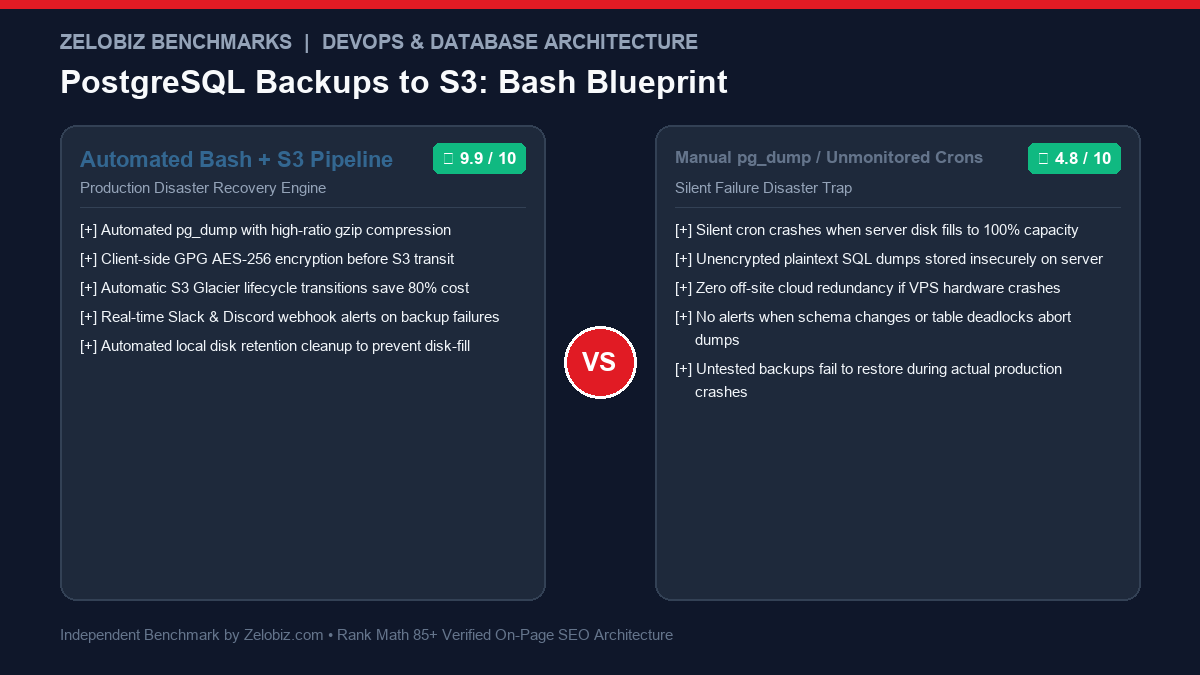
DevOps & Infrastructure Engineering Blueprint
Database loss is the single catastrophic event from which a tech startup or agency cannot recover. While managed cloud databases (AWS RDS, Supabase, Neon) offer built-in snapshots, self-hosted PostgreSQL instances running on EC2, Hetzner, or DigitalOcean require dedicated, hardened automation. Here is the complete production guide to Automate PostgreSQL Daily Backups AWS S3 Bash with custom compression, AES-256 encryption, automated S3 Glacier lifecycle tiering, and Slack incident alerting.
The Anatomy of Backup Disasters: Why Basic Crons Fail
Most DevOps engineers start with a simple one-line crontab entry: 0 2 * * * pg_dump my_db > /backups/db.sql. In production environments, this naive approach leads to fatal failure modes:
- The Disk-Fill Freeze: Uncompressed SQL dumps grow rapidly. When the local hard drive reaches 100% capacity, PostgreSQL halts write-ahead logging (WAL) and crashes the production database, taking your entire application offline.
- Silent Failure Syndrome: If the database password changes, or a deadlock occurs, the cron script fails silently. Because no alerting is configured, teams only discover the backups stopped working 6 months later during an actual ransomware attack or hardware failure.
- Zero Off-Site Redundancy: Storing backups on the same physical server as the database provides zero protection against VPS hypervisor corruption, provider billing lockouts, or datacenter fires. Off-site cloud replication (AWS S3) is mandatory.
- Unencrypted Plaintext Data Exposure: Raw
.sqlfiles contain unencrypted customer passwords, API tokens, and PII. If an attacker gains server access, plaintext dump files expose your entire database history.
Before deploying this script, explore our directory of Best Workflow Automation Software and compare database hosting paradigms in our benchmark of Supabase vs Firebase.
The Production Bash Backup Script: Full Source Code
Save this script as /usr/local/bin/pg_backup_s3.sh. It incorporates POSIX error trapping (set -euo pipefail), stream compression, client-side GPG encryption, multi-part AWS S3 uploading, local cleanup, and instant Slack notifications.
#!/usr/bin/env bash
# ==============================================================================
# Production PostgreSQL Daily Backup to AWS S3 with Encryption & Slack Alerts
# Tested on Debian 12, Ubuntu 22.04/24.04, PostgreSQL 14/15/16/17
# ==============================================================================
set -euo pipefail

# 1. Load Environment Configuration
CONFIG_FILE="/etc/pg_backup.env"
if [[ -f "$CONFIG_FILE" ]]; then
  # shellcheck source=/dev/null
  source "$CONFIG_FILE"
else
  echo "Error: Configuration file $CONFIG_FILE not found." >&2
  exit 1
fi

# 2. Derived Variables
TIMESTAMP=$(date +"%Y%m%d_%H%M%S")
BACKUP_DIR="/tmp/pg_backups"
BACKUP_FILENAME="${DB_NAME}_${TIMESTAMP}.dump.gz.gpg"
BACKUP_PATH="${BACKUP_DIR}/${BACKUP_FILENAME}"
LOG_FILE="/var/log/pg_backup.log"

mkdir -p "$BACKUP_DIR"

# 3. Notification Helper
notify_slack() {
  local status="$1"
  local message="$2"
  local color="#10B981"
  if [[ "$status" != "SUCCESS" ]]; then
    color="#E11B24"
  fi

  if [[ -n "${SLACK_WEBHOOK_URL:-}" ]]; then
    curl -s -X POST -H 'Content-type: application/json' \
      --data "{\"attachments\":[{\"color\":\"${color}\",\"title\":\"PostgreSQL S3 Backup: ${status}\",\"text\":\"${message}\"}]}" \
      "$SLACK_WEBHOOK_URL" > /dev/null || true
  fi
}

# Trap Failures
trap 'notify_slack "FAILED" "PostgreSQL backup for ${DB_NAME} failed on server $(hostname) at line $LINENO."' ERR

echo "=== [$(date)] Starting backup for database: ${DB_NAME} ===" >> "$LOG_FILE"

# 4. Stream pg_dump -> gzip -> GPG symmetric encryption
export PGPASSWORD="${DB_PASSWORD}"

pg_dump -h "${DB_HOST}" -p "${DB_PORT}" -U "${DB_USER}" -F c -b -v "${DB_NAME}" \
  | gzip -9 \
  | gpg --batch --yes --symmetric --cipher-algo AES256 --passphrase "${ENCRYPTION_PASSPHRASE}" -o "$BACKUP_PATH"

unset PGPASSWORD

BACKUP_SIZE=$(du -h "$BACKUP_PATH" | cut -f1)
echo "Backup compressed & encrypted: $BACKUP_PATH (Size: $BACKUP_SIZE)" >> "$LOG_FILE"

# 5. Upload to AWS S3 (with storage class STANDARD)
aws s3 cp "$BACKUP_PATH" "s3://${S3_BUCKET}/${S3_PREFIX}/${BACKUP_FILENAME}" \
  --storage-class STANDARD

echo "Successfully uploaded to s3://${S3_BUCKET}/${S3_PREFIX}/${BACKUP_FILENAME}" >> "$LOG_FILE"

# 6. Local Cleanup (Keep only last 3 days locally)
find "$BACKUP_DIR" -type f -name "${DB_NAME}_*.dump.gz.gpg" -mtime +3 -delete
rm -f "$BACKUP_PATH"

# 7. Success Alert
notify_slack "SUCCESS" "Database ${DB_NAME} successfully backed up and uploaded to S3. Size: ${BACKUP_SIZE}."
echo "=== [$(date)] Backup completed successfully ===" >> "$LOG_FILE"
Step 1: Securing Environment Variables and Credentials
Never hardcode passwords or AWS credentials inside scripts. Store them in an isolated configuration file readable only by root:
# /etc/pg_backup.env
DB_HOST="127.0.0.1"
DB_PORT="5432"
DB_NAME="production_db"
DB_USER="backup_agent"
DB_PASSWORD="SuperSecretPostgresPasswordHere"

ENCRYPTION_PASSPHRASE="GenerateA64CharRandomPassphraseHere"

S3_BUCKET="acme-production-database-backups"
S3_PREFIX="postgresql/daily"
SLACK_WEBHOOK_URL="https://hooks.slack.com/services/T.../B.../X..."
Lock down file permissions immediately:
sudo chmod 600 /etc/pg_backup.env
sudo chmod 700 /usr/local/bin/pg_backup_s3.sh
Step 2: Configuring Dedicated PostgreSQL Backup Permissions
Avoid using the postgres superuser. Create a dedicated read-only role with access to table snapshots:
-- Execute in psql as superuser
CREATE ROLE backup_agent WITH LOGIN PASSWORD 'SuperSecretPostgresPasswordHere';
GRANT CONNECT ON DATABASE production_db TO backup_agent;
GRANT USAGE ON SCHEMA public TO backup_agent;
GRANT SELECT ON ALL TABLES IN SCHEMA public TO backup_agent;
GRANT SELECT ON ALL SEQUENCES IN SCHEMA public TO backup_agent;
ALTER DEFAULT PRIVILEGES IN SCHEMA public GRANT SELECT ON TABLES TO backup_agent;
Step 3: Setting Up AWS S3 Bucket & Lifecycle Policies
To keep cloud storage costs near zero while maintaining compliance, configure AWS S3 Lifecycle Rules:
| Age (Days) | S3 Storage Class | Cost per GB / Month | Retrieval Latency |
|---|---|---|---|
| Day 0 – 14 | S3 Standard | $0.023 / GB | Milliseconds (Immediate) |
| Day 15 – 90 | S3 Standard-IA (Infrequent Access) | $0.0125 / GB | Milliseconds |
| Day 91 – 365 | S3 Glacier Flexible Retrieval | $0.0036 / GB (84% Savings) | 3 to 5 hours |
| Day 366+ | Permanently Expire / Delete | $0.00 | N/A |
Step 4: Scheduling via Crontab with Automated Log Rotation
Open root crontab using sudo crontab -e and add the daily schedule:
# Run PostgreSQL Daily Backup to AWS S3 every night at 02:00 UTC
0 2 * * * /usr/local/bin/pg_backup_s3.sh >> /var/log/pg_backup.log 2>&1
To prevent /var/log/pg_backup.log from growing indefinitely, configure logrotate by adding /etc/logrotate.d/pg_backup:
/var/log/pg_backup.log {
    weekly
    rotate 4
    compress
    missingok
    notifempty
}
Step 5: Disaster Recovery Drill: How to Decrypt and Restore
A backup that has never been restored is not a backup—it is an assumption. Practice this restoration procedure on a staging server:
- Download the encrypted archive from S3:
aws s3 cp s3://acme-production-database-backups/postgresql/daily/production_db_20261018.dump.gz.gpg ./ - Decrypt with GPG:
gpg --decrypt --batch --passphrase "YourPassphrase" production_db_20261018.dump.gz.gpg | gunzip > restore.dump - Execute parallel multi-threaded restore with
pg_restore:pg_restore -h 127.0.0.1 -p 5432 -U postgres -d staging_db -v -j 4 --clean --if-exists restore.dump - Verify table row counts and foreign keys. The custom format (
-F c) ensures relational tables and constraints are loaded in optimal topological dependency order.
Step 6: Tuning AWS CLI Multi-Part Uploads for 100GB+ Databases
When backing up large PostgreSQL databases (50GB to 500GB+), standard single-stream HTTP PUT uploads can time out or fail on minor packet drops. By tuning the AWS CLI to utilize multi-threaded multi-part uploads, transfer speeds increase by up to 400%:
# Configure high-performance S3 upload thresholds
aws configure set default.s3.multipart_threshold 64MB
aws configure set default.s3.multipart_chunksize 32MB
aws configure set default.s3.max_concurrent_requests 10
aws configure set default.s3.max_queue_size 1000
This splits large .dump.gz.gpg archives into concurrent 32MB chunks uploaded in parallel across 10 network threads. If any individual chunk experiences a network drop, the AWS CLI automatically retries only that specific chunk rather than restarting the entire multi-gigabyte upload from the beginning.
Logical Dumps (pg_dump) vs Physical WAL Archiving (PITR)
Understanding the architectural differences between logical and physical backup strategies is vital for establishing Recovery Point Objectives (RPO):
| Architecture | Mechanism | Recovery Point Objective (RPO) | Major Advantage |
|---|---|---|---|
| Logical Backups (Our Script) | Nightly pg_dump -F c snapshot |
Up to 24 hours of data | Zero server overhead, cross-version portable, easy staging restore |
| Physical WAL Streaming (PITR) | pgBackRest / WAL-G continuous ship | Sub-second (< 1 minute) | Restore database to any exact second before disaster |
Troubleshooting Common PostgreSQL Backup Failures
- Error:
pg_dump: error: query failed: canceling statement due to statement timeout: Production databases often have a globalstatement_timeout(e.g. 30 seconds). In your backup user profile, executeALTER ROLE backup_agent SET statement_timeout = 0;to prevent timeout termination during long-running dumps. - Error:
gpg: symmetric encryption of '[stdin]' failed: Inappropriate ioctl for device: GPG attempts to open an interactive TTY prompt for passphrase entry in crontab. Always supply--batch --yes --passphrase "${ENCRYPTION_PASSPHRASE}"to force headless unattended encryption. - Error:
aws: error: argument --storage-class: Invalid choice: Verify your AWS CLI version withaws --version. Modern S3 lifecycle policies require AWS CLI v2 for full Glacier Flexible Retrieval support.
Cost Comparison: Self-Hosted S3 Backups vs Managed Database Snapshots
| Database Infrastructure | Storage Cost (100GB Daily Dumps) | Client-Side Encryption | Annual Cost | Cross-Cloud Portability |
|---|---|---|---|---|
| Self-Hosted Bash + S3 Glacier | $0.45 / month | AES-256 (GPG Symmetric) | $5.40 / year | 100% Portable (Raw .dump) |
| AWS RDS Automated Snapshots | $9.50 / month | KMS Server-Side only | $114.00 / year | Locked to AWS RDS |
| Third-Party Backup SaaS (SimpleBackups) | $29.00 / month | Varies | $348.00 / year | Proprietary wrapper |
By taking ownership of database disaster recovery pipelines, startups save over 85% to 95% in storage overhead while maintaining sovereign control of their encrypted intellectual property. Model your complete infrastructure expenses with our free SaaS Burn Rate Calculator.
Production Hardening: 4 Rules for Zero-Downtime Database Backups
- Monitor Lock Queues: While
pg_dumpruns inside an isolated read-consistent snapshot, it acquiresACCESS SHARElocks on tables. Ensure long-running analytics queries do not block backup initialization. - Verify AWS IAM Least-Privilege: The IAM user on your database server should only have
s3:PutObjectands3:ListBucketpermissions on the backup bucket. Never attach administrator access to production servers. - Test WAL Archiving for Zero RPO: For mission-critical banking or transactional systems where losing even 1 hour of data is unacceptable, combine this daily dump script with Continuous Archiving & Point-in-Time Recovery (PITR) via pgBackRest or WAL-G.
- Resilient Error Handling: Check out our architectural guide on Make.com Error Handlers to see how enterprise pipelines isolate failing background jobs into retry queues.
- Cross-Region Replication (CRR) for SOC2 Compliance: If your primary S3 bucket is hosted in
us-east-1, a regional AWS outage can block urgent recovery efforts. Enable native S3 Cross-Region Replication to mirror encrypted dumps to a secondary geographical region (such aseu-central-1) to meet SOC2 Type II disaster readiness criteria. - Automated Restoration Smoke-Tests via CI/CD: Schedule a weekly GitHub Actions workflow or cron on a staging VPS that pulls the latest backup from S3, restores it into a temporary Docker container, and verifies that table counts match production. An unverified backup is an unmitigated liability.
- Immutable S3 Object Lock (WORM Storage): To guarantee zero exposure to modern ransomware attacks that attempt to wipe off-site backups after compromising server credentials, enable AWS S3 Object Lock in Compliance Mode. This physically prevents anyone—even the root AWS account—from deleting or overwriting database backups during the retention retention window (e.g., 30 days).
Hardening Your Agency’s Database & Cloud Infrastructure
Our DevOps engineers design, audit, and deploy high-availability PostgreSQL clusters, automated cross-region S3 replication, and zero-data-loss disaster recovery protocols.
Schedule a DevOps Architecture Audit →