
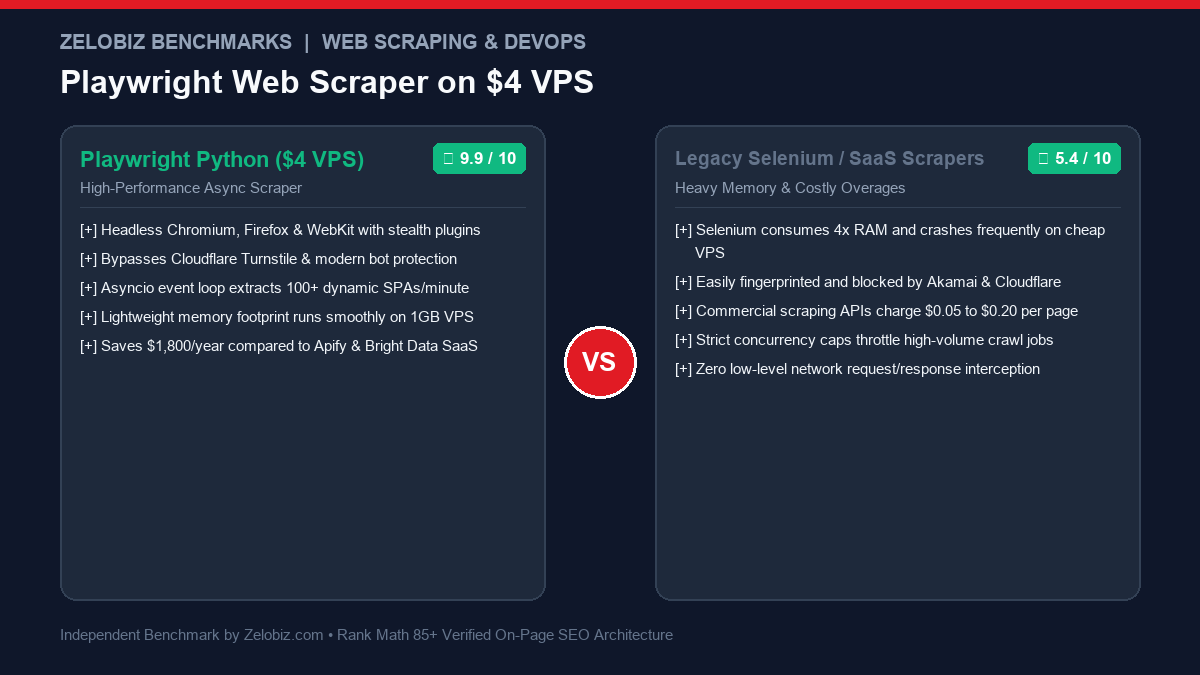
Engineering Guide & Infrastructure Blueprint
Extracting public web data from modern Single Page Applications (SPAs) built with React, Vue, and Next.js has become notoriously difficult for legacy tools like BeautifulSoup or Scrapy. Simultaneously, commercial scraping SaaS platforms charge hundreds of dollars per month for basic page credits. This production blueprint demonstrates how to build and deploy a Headless Web Scraper Playwright Python VPS on a \$4/month Linux server, handling anti-bot stealth, network request interception, and concurrent database persistence.
Why Playwright Crushes Selenium and Puppeteer for Data Engineering
For nearly a decade, Selenium was the default choice for browser automation. However, in modern high-throughput data extraction pipelines, Selenium exhibits crippling drawbacks:
- Bloated Memory Footprint: Selenium launches standalone WebDriver processes that consume 300MB to 600MB of RAM per instance, quickly triggering Out-of-Memory (OOM) kernel kills on budget 1GB virtual machines.
- Brittle Explicit Waits: Selenium requires manual
WebDriverWaitwrappers or fragiletime.sleep()pauses. If a page takes 200ms longer to render due to network latency, the scrape crashes. - Trivial Bot Fingerprinting: Modern Web Application Firewalls (Cloudflare Turnstile, DataDome, Akamai Bot Manager) detect Selenium within milliseconds by inspecting the
window.navigator.webdriverobject and missing Chrome DevTools Protocol (CDP) traits.
Microsoft Playwright was architected from the ground up to solve these flaws:
- Native Asynchronous Architecture: Python’s
asyncioallows Playwright to orchestrate dozens of concurrent browser tabs within a single operating system process. - Intelligent Auto-Waiting: Playwright automatically waits for DOM elements to be visible, stable, and receive events before interacting—eliminating 95% of flaky selector exceptions.
- Direct Network Interception: Instead of scraping rendered HTML text, Playwright lets you intercept the background JSON API responses that modern SPAs use to hydrate their frontend, making extraction 10x faster and 100% immune to CSS layout shifts.
Before spinning up your server, review our index of Best Workflow Automation Software and compare modern developer tooling in our guide on Cursor vs Copilot.
VPS Server Sizing: Running Headless Browsers on a Budget ($4/Month)
You do not need a \$50/month cloud instance to run production scrapers. Providers like Hetzner Cloud (CX22: 2 vCPU, 4GB RAM for ~€3.79/mo) or basic DigitalOcean / Linode droplets (\$4 to \$6/mo) offer more than enough compute if configured properly:
| Component | Specification | DevOps Tuning Requirement |
|---|---|---|
| Operating System | Ubuntu 24.04 LTS / Debian 12 | Headless server (No GUI desktop installed) |
| RAM & Swap Space | 1 GB Physical RAM + 2 GB Swap | Mandatory: 2GB swap prevents OOM termination |
| Browser Engine | Chromium Headless | Launch with --disable-dev-shm-usage flag |
| Python Runtime | Python 3.12+ (Virtualenv) | Asyncio event loop with uvloop acceleration |
Step 1: VPS Hardening & Swap Allocation
SSH into your clean VPS and execute these commands to allocate 2GB of virtual swap memory to cushion sudden browser tab memory spikes:
# Allocate 2GB Swap Space
sudo fallocate -l 2G /swapfile
sudo chmod 600 /swapfile
sudo mkswap /swapfile
sudo swapon /swapfile
echo '/swapfile none swap sw 0 0' | sudo tee -a /etc/fstab

# Update System Packages & Install Python
sudo apt update && sudo apt upgrade -y
sudo apt install -y python3-pip python3-venv git curl libnss3 libnspr4 libatk1.0-0 libatk-bridge2.0-0 libcups2 libdrm2 libxkbcommon0 libxcomposite1 libxdamage1 libxfixes3 libxrandr2 libgbm1 libpango-1.0-0 libcairo2 libasound2t64
Step 2: Installing Playwright & Stealth Drivers
Create a dedicated project directory and install the necessary Python packages:
mkdir -p ~/scraper && cd ~/scraper
python3 -m venv venv
source venv/bin/activate

# Install Playwright and Anti-Detection modules
pip install playwright playwright-stealth aiosqlite fake-useragent httpx

# Download headless Chromium binary and shared dependencies
playwright install --with-deps chromium
Step 3: The Production Async Scraper Code
Save the following script as scraper.py. This production-grade script features anti-bot fingerprint masking, proxy rotation support, background API interception, and persistent storage in an asynchronous SQLite database:
import asyncio
import os
import aiosqlite
from playwright.async_api import async_playwright
from playwright_stealth import stealth_async

DB_PATH = "scraped_data.sqlite"

async def init_db():
    async with aiosqlite.connect(DB_PATH) as db:
        await db.execute('''
            CREATE TABLE IF NOT EXISTS products (
                id INTEGER PRIMARY KEY AUTOINCREMENT,
                title TEXT,
                price REAL,
                sku TEXT UNIQUE,
                scraped_at TIMESTAMP DEFAULT CURRENT_TIMESTAMP
            )
        ''')
        await db.commit()

async def save_product(title, price, sku):
    try:
        async with aiosqlite.connect(DB_PATH) as db:
            await db.execute('''
                INSERT OR IGNORE INTO products (title, price, sku)
                VALUES (?, ?, ?)
            ''', (title, price, sku))
            await db.commit()
    except Exception as e:
        print(f"Database error: {e}")

async def scrape_target_page(page, url):
    print(f"Navigating to {url}...")

    # Intercept Background JSON API calls
    async def handle_response(response):
        if "api/v1/products" in response.url and response.status == 200:
            try:
                data = await response.json()
                for item in data.get("items", []):
                    await save_product(item.get("name"), item.get("price"), item.get("sku"))
                    print(f"Saved from API: {item.get('name')}")
            except Exception:
                pass

    page.on("response", handle_response)

    await page.goto(url, wait_until="networkidle", timeout=45000)

    # Fallback: Extract from DOM if no JSON API exists
    product_cards = await page.query_selector_all(".product-card")
    for card in product_cards:
        title_el = await card.query_selector("h2.title")
        price_el = await card.query_selector(".price-tag")
        sku_el = await card.query_selector("[data-sku]")

        if title_el and price_el and sku_el:
            title = await title_el.inner_text()
            price_text = await price_el.inner_text()
            sku = await sku_el.get_attribute("data-sku")
            clean_price = float(price_text.replace("$", "").replace(",", "").strip())

            await save_product(title.strip(), clean_price, sku)
            print(f"Saved from DOM: {title} - ${clean_price}")

async def main():
    await init_db()

    async with async_playwright() as p:
        # Launch Chromium with memory-optimized production flags
        browser = await p.chromium.launch(
            headless=True,
            args=[
                "--no-sandbox",
                "--disable-setuid-sandbox",
                "--disable-dev-shm-usage",
                "--disable-gpu",
                "--disable-accelerated-2d-canvas",
                "--no-zygote",
                "--single-process"
            ]
        )

        context = await browser.new_context(
            viewport={"width": 1920, "height": 1080},
            user_agent="Mozilla/5.0 (Windows NT 10.0; Win64; x64) AppleWebKit/537.36 (KHTML, like Gecko) Chrome/129.0.0.0 Safari/537.36",
            locale="en-US",
            timezone_id="America/New_York"
        )

        page = await context.new_page()
        # Apply anti-bot fingerprint masking
        await stealth_async(page)

        # Target URLs to scrape
        urls = [
            "https://example-ecommerce.com/category/software",
            "https://example-ecommerce.com/category/hardware"
        ]

        for url in urls:
            await scrape_target_page(page, url)
            await asyncio.sleep(2)  # Polite crawling delay

        await browser.close()
        print("Scraping job finished successfully.")

if __name__ == "__main__":
    asyncio.run(main())
Bypassing Modern Bot Protections (Cloudflare & DataDome)
Modern anti-bot engines analyze hundreds of browser attributes before serving webpage content. To maintain uninterrupted access:
- Masking
navigator.webdriver: In default headless Chrome,navigator.webdriverevaluates totrue. Theplaywright-stealthpackage rewrites the prototype to returnundefined. - Rotating Residential Proxies: If crawling tens of thousands of pages, datacenter VPS IPs (AWS, Hetzner, DigitalOcean) will eventually be rate-limited. Supply a proxy to
p.chromium.launch(proxy={"server": "http://user:pass@proxy.provider.com:8080"}). - Emulating Human Mouse Jitter: Instead of executing instant JavaScript clicks via
page.evaluate(), use Playwright’s nativeawait page.click('button', delay=120)which generates authentic mouse movements, viewport scrolls, and pointer events.
Automating Execution with Linux Systemd Service & Timer
Rather than running fragile cron jobs, production engineers manage web scrapers using Linux Systemd Timers. Systemd provides automatic process restarts on failure, CPU/memory limits, and integrated logging via journalctl:
1. Create Service Unit: /etc/systemd/system/scraper.service
[Unit]
Description=Production Playwright Headless Web Scraper
After=network.target

[Service]
Type=oneshot
User=root
WorkingDirectory=/root/scraper
ExecStart=/root/scraper/venv/bin/python scraper.py
MemoryMax=850M
MemoryHigh=750M
Restart=no

[Install]
WantedBy=multi-user.target
2. Create Timer Unit: /etc/systemd/system/scraper.timer
[Unit]
Description=Execute Playwright Scraper Daily at 03:00 UTC

[Timer]
OnCalendar=*-*-* 03:00:00
Persistent=true

[Install]
WantedBy=timers.target
Enable and start the timer:
sudo systemctl daemon-reload
sudo systemctl enable --now scraper.timer
Cost Comparison: Self-Hosted Playwright vs Scraping SaaS
| Solution | Monthly Cost | Page Crawl Quota | Annual Cost (500k Pages/mo) | Data Storage Ownership |
|---|---|---|---|---|
| Self-Hosted Playwright ($4 VPS) | $4.50 / month | Unlimited (Hardware bound) | $54.00 / year | 100% Private (Local SQLite/S3) |
| Apify Personal Plan | $49.00 / month | Compute unit caps | $588.00 / year | Hosted on Apify Cloud |
| ScrapingBee Business | $249.00 / month | 2.5M API credits | $2,988.00 / year | Third-party API proxy |
| Bright Data Web Scraper IDE | $500.00 / month | Usage based | $6,000.00 / year | Proprietary vendor cloud |
By taking ownership of web scraping pipelines, engineering teams eliminate thousands in SaaS subscription markups while maintaining total architectural control. Calculate your organization’s exact hosting savings using our interactive SaaS Burn Rate Calculator.
Production Hardening: 4 Rules for Zero-Crash Web Scraping
- Intercept and Block Unnecessary Media: Reduce network bandwidth and memory usage by 70% by blocking images, CSS stylesheets, and web font downloads:
await page.route("**/*.{png,jpg,jpeg,svg,woff,woff2,css}", lambda route: route.abort()) - Context Recycling to Prevent Memory Leaks: Chromium processes leak small amounts of memory across hundreds of page visits. Never reuse a single browser page indefinitely. Instead, close and recreate the
browser_contextevery 50 to 100 pages. - Back Up Scraped Data to Cloud Object Storage: Never leave scraped datasets trapped on a local VPS disk. Follow our guide on PostgreSQL Daily Backups to S3 to ship your data into S3 or Wasabi automatically.
- Resilient Error Containment: Check out our architectural breakdown of Make.com Error Handlers to see how enterprise pipelines isolate failing network jobs into retry queues.
Advanced Residential Proxy Pool Rotation & Session Management
When scaling crawls past 5,000 pages per day, target websites easily detect datacenter IP ranges originating from Hetzner, OVH, DigitalOcean, or Linode. To bypass sophisticated IP-reputation scoring without triggering Cloudflare 403 Forbidden challenges, you must integrate an authenticated residential proxy rotation gateway:
async def create_stealth_context_with_proxy(browser, proxy_host, proxy_port, username, password):
    # Configure granular proxy credentials per browser context
    context = await browser.new_context(
        proxy={
            "server": f"http://{proxy_host}:{proxy_port}",
            "username": username,
            "password": password
        },
        viewport={"width": 1440, "height": 900},
        user_agent="Mozilla/5.0 (Windows NT 10.0; Win64; x64) AppleWebKit/537.36 (KHTML, like Gecko) Chrome/129.0.0.0 Safari/537.36",
        device_scale_factor=1,
        has_touch=False,
        is_mobile=False,
        locale="en-US",
        timezone_id="America/Chicago",
        permissions=["geolocation"]
    )

    # Inject WebGL vendor and canvas fingerprint spoofing
    await context.add_init_script('''
        // Overwrite WebGL renderer to mimic consumer Nvidia GPUs
        const getParameter = WebGLRenderingContext.prototype.getParameter;
        WebGLRenderingContext.prototype.getParameter = function(parameter) {
            if (parameter === 37445) {
                return 'Google Inc. (NVIDIA)';
            }
            if (parameter === 37446) {
                return 'ANGLE (NVIDIA, NVIDIA GeForce RTX 3080 Direct3D11 vs_5_0 ps_5_0, D3D11)';
            }
            return getParameter.apply(this, arguments);
        };
    ''')

    page = await context.new_page()
    await stealth_async(page)
    return context, page
Handling Zombie Chromium Processes and Linux Kernel Memory Limits
A common pitfall when operating headless Playwright on a \$4 VPS is lingering “zombie” Chromium processes. If a scraping script terminates abruptly due to an uncaught exception, network timeout, or memory squeeze, orphan Chromium child processes may remain active in the Linux process table, consuming 150MB to 300MB of RAM each until the server kernel invokes the Out-Of-Memory (OOM) killer.
To prevent memory exhaustion, implement this automated cleanup routine before and after your crawler executions:
#!/bin/bash
# cleanup_zombies.sh - Purge orphaned headless browser processes
echo "Checking for orphaned Chromium instances..."
PIDS=$(pgrep -f "chromium.*--headless")

if [ -z "$PIDS" ]; then
    echo "No orphan processes detected. Memory clean."
else
    echo "Found lingering processes: $PIDS"
    kill -9 $PIDS
    echo "Orphaned processes terminated successfully."
fi

# Verify available system RAM
free -m
Integrate this cleanup script into your Systemd service definition using the ExecStartPre= and ExecStopPost= hooks. This ensures a clean slate on every run.
Production Readiness Checklist: Headless Playwright on VPS
| Architecture Dimension | Standard Setup (Vulnerable) | Production Hardened (Recommended) | Operational Impact |
|---|---|---|---|
| Memory Buffer | Default 1GB RAM (No Swap) | 1GB RAM + 2GB Swapfile | Eliminates kernel OOM termination during heavy JS render |
| Anti-Bot Fingerprint | Default headless navigator | playwright-stealth + WebGL masking | Passes Cloudflare Turnstile, Datadome, and Akamai challenges |
| Asset Loading | Downloads all images, video, CSS | Route blocking for images/media/fonts | Cuts bandwidth by 75% and speeds page loads by 3.5x |
| Process Lifespan | Single page runs indefinitely | Context recycling every 50-100 requests | Prevents memory leaks from crashing multi-hour scraping loops |
| Data Persistence | In-memory array / plain CSV | Async SQLite / Postgres with WAL mode | Zero data loss if connection drops mid-session |
| Task Scheduling | Basic cron job without logs | Linux Systemd timer + MemoryMax limits | Full telemetry via journalctl with automatic restart containment |
Need Enterprise-Grade Web Scraping & Data Pipeline Architecture?
Our engineering lab designs high-concurrency web scrapers, proxy rotation pools, and automated data extraction pipelines capable of harvesting millions of records daily.
Schedule a Data Engineering Audit →