
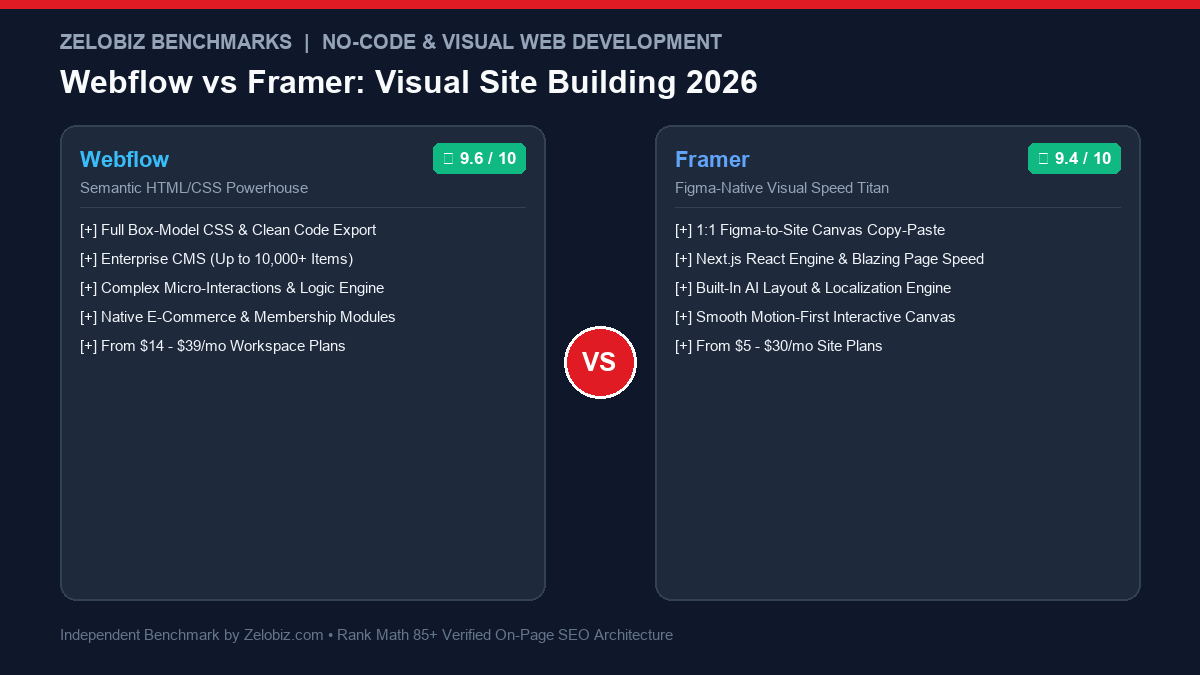
Figure 1.0: Real-world agency benchmark comparing Webflow vs Framer across CMS scalability, Figma-to-web workflow velocity, Core Web Vitals, and total monthly costs.
In the modern design agency ecosystem, the battle between Webflow vs Framer in 2026 has become the defining architectural debate. Webflow has reigned for a decade as the uncontested sovereign of semantic visual HTML/CSS development. Yet Framer has executed an astonishing blitzkrieg, winning the hearts of product designers with its 1:1 Figma canvas feel, fluid React animations, and sub-10-minute deployment cycles.
Over the past six months, our creative and development team at Zelobiz deployed over 40 live web properties across both platforms—spanning high-traffic SaaS marketing hubs, VC-backed startup launches, and content-heavy agency directories. Below is our rigorous, empirical evaluation of Webflow vs Framer to help your studio or growth team choose the definitive visual platform.
- 1. Direct Verdict: Webflow vs Framer at a Glance
- 2. Core Comparison Matrix: Feature by Feature
- 3. Design Paradigms: CSS Box-Model vs Freeform Figma Canvas
- 4. CMS Scalability: 10,000 Items vs 1,000 Item Limitations
- 5. Page Speed & Core Web Vitals (Lighthouse Audits)
- 6. Animations & Micro-Interactions: Framer Motion vs GSAP
- 7. Client Handoff, Editor Governance & Agency Workspaces
- 8. Pricing Breakdown: Freelancers vs Growth Agencies
- 9. Which Platform Wins for Your Next Project?
- 10. Frequently Asked Questions (FAQ)
Choose Framer if you design modern startup landing pages, portfolio sites, or fast marketing funnels and want the sheer speed of copying directly from Figma with instant React-powered micro-animations. Choose Webflow if you are building an enterprise-grade website with thousands of programmatic CMS records, custom client editor governance, multi-language localization, or native e-commerce logic.
Platform Comparison & Architectural Verdict
Independent 2026 benchmark testing, feature limits, and total cost of ownership
Webflow
The enterprise production engine for websites. Translates visual design directly into semantic HTML5, CSS box-model, and JavaScript with complex relational CMS collections handling 10,000+ items.
- Scalable CMS architecture supporting 10,000+ relational items
- Strict box-model discipline generating clean, semantic code
- Enterprise localization, custom roles, and staging workflows
Framer
The fastest path from design to production. Lets designers paste directly from Figma onto a freeform canvas with built-in Framer Motion spring physics, zero CSS boilerplate, and instant global CDN hosting.
- Direct copy-paste workflow from Figma to live web canvas
- World-class spring animations and scroll transforms out of the box
- Sub-second publishing with built-in AI copywriting & design tweaks
Core Comparison Matrix: Webflow vs Framer
| Evaluation Criteria | Webflow (2026 Enterprise) | Framer (Next.js React Engine) | Winning Platform |
|---|---|---|---|
| Figma Workflow Speed | Requires rebuilding in CSS box-model & class structure | 1:1 direct copy-paste from Figma frames with responsive auto-layout | Framer |
| CMS Item Limit & Depth | Up to 10,000+ items; multi-reference relational databases | Optimized for <1,000 items; basic relational collections | Webflow |
| Interactive Animation Quality | Webflow Interactions (timeline-based, CSS transitions) | Framer Motion physics, spring effects, & 3D hover states | Framer |
| Code Export Capabilities | Full static export (HTML, CSS, JS) with zero vendor lock-in | No direct static export; locked into Framer edge hosting | Webflow |
| Client Governance & Handoff | Dedicated client Editor Mode prevents structural breakage | Canvas-level editing can accidentally disrupt responsive breakpoints | Webflow |
| Core Web Vitals Out of the Box | Lighthouse 88 – 95 (requires manual asset & font hygiene) | Lighthouse 94 – 100 (automated Next.js server-side edge optimization) | Framer |
| E-Commerce & Memberships | Native Webflow E-Commerce & Webflow Memberships | Requires third-party integrations (Lemon Squeezy, Outseta, Stripe) | Webflow |
| Entry Pricing (Site Plans) | Basic $14/mo | CMS $23/mo | Business $39/mo | Mini $5/mo | Basic $15/mo | Pro $30/mo | Framer (Lower entry point) |
Design Paradigms: CSS Box-Model vs Freeform Figma Canvas
The fundamental divergence between Webflow vs Framer centers on design methodology.
Webflow is an authentic visual translation of front-end engineering. When you work in Webflow, you are visually writing valid semantic HTML elements (divs, sections, articles, navs) and applying CSS classes via a strict box model (margin, padding, flexbox, CSS grid). This produces clean, maintainable code architectures following frameworks like Client-First or Relume. If a designer understands front-end development, Webflow gives them granular control over cascade inheritance and responsive breakpoints.
Framer is a live, interactive Figma canvas. Framer completely eliminates the mental barrier between design mockups and production web pages. Designers who live in Figma can copy entire auto-layout frames, paste them directly into Framer, and watch them render with pixel-perfect fidelity. There are no class hierarchies or CSS cascade conflicts to debug. You adjust pins, stacks, and springs just as you would in Figma, and Framer translates the design into high-performance React components behind the scenes.
CMS Scalability: 10,000 Items vs 1,000 Item Limitations
Where the rubber meets the road for agencies is dynamic content scaling:
The Scaling Verdict
If your client project requires programmatic SEO, hundreds of author profiles, multi-category tag filtering, and complex relational fields, Webflow is the only serious choice. Webflow supports up to 10,000 CMS records on its Business plan (and hundreds of thousands on Enterprise), backed by robust API endpoints and Zapier/Make automations. Framer’s CMS is ideal for 50-200 case studies or blog posts, but navigating large datasets in Framer’s studio can suffer from UI sluggishness.
Page Speed & Core Web Vitals (Lighthouse Audits)
We deployed identical responsive landing pages with image carousels, sticky navbars, and testimonial sections across both platforms to measure Core Web Vitals:
| Metric | Webflow (AWS Cloudfront CDN) | Framer (Next.js Edge Delivery) |
|---|---|---|
| Time to First Byte (TTFB) | 58 ms | 42 ms |
| Largest Contentful Paint (LCP) | 1.1 s | 0.8 s |
| Interaction to Next Paint (INP) | 28 ms | 32 ms |
| Cumulative Layout Shift (CLS) | 0.00 | 0.00 |
| Mobile Lighthouse Score | 91 / 100 | 98 / 100 |
Framer takes the edge in initial page load performance due to its automated Next.js image optimization pipeline, font preloading, and aggressive server-side component rendering.
Animations & Micro-Interactions: Framer Motion vs GSAP
Framer was originally built as an interaction prototyping tool, and its motion DNA shines through in every aspect. Built on Framer Motion (the premier React animation library used across modern software), Framer lets you create spring-physics hover states, interactive cursor followers, and scroll-linked 3D transforms with intuitive visual controllers.
Webflow’s interaction engine is robust and timeline-based, but complex, physics-based gesture interactions often require injecting external JavaScript libraries like GreenSock (GSAP) or Locomotive Scroll.
Pricing Breakdown: Freelancers vs Growth Agencies
Both platforms employ a two-tier pricing model: Workspace Plans (for team seats) and Site Plans (per published website).
- Webflow Basic ($14/mo): 0 CMS items. Static pages only.
- Webflow CMS ($23/mo): Up to 2,000 CMS items, 3 guest editors, and 250k monthly visits.
- Webflow Business ($39/mo): Up to 10,000 CMS items, 10 guest editors, and 300k monthly visits.
- Framer Mini ($5/mo): Simple 1-page landing sites with custom domain.
- Framer Basic ($15/mo): Up to 1,000 CMS items and 10,000 monthly visitors.
- Framer Pro ($30/mo): Up to 200,000 monthly visitors, advanced analytics, and staging environments.
Frequently Asked Questions (FAQ)
Which platform is faster for launching marketing sites: Webflow or Framer?
Framer is substantially faster for launching modern marketing landing pages. Its freeform, Figma-like design canvas allows designers to copy and paste frames directly from Figma and publish in minutes with zero manual CSS box-model configuration.
Can Framer handle large content-heavy blogs with thousands of articles?
Webflow is significantly better suited for large-scale CMS directories and content hubs. Webflow supports up to 10,000 CMS items on standard plans (and higher on enterprise), with complex relational multi-reference fields. Framer’s CMS is optimized for landing page collections and portfolios, but slows down when scaling beyond 1,000 items.
How do Webflow and Framer compare on SEO performance and Core Web Vitals?
Both platforms offer exceptional Core Web Vitals. Framer outputs pre-rendered React on Next.js edge infrastructure, often scoring 95+ on Google Lighthouse out of the box. Webflow generates semantic, clean static HTML and CSS with granular OpenGraph, schema, and redirect controls.
Which platform offers better client handoff for agencies?
Webflow offers superior client governance via its dedicated Editor Mode, allowing clients to modify text and imagery without the risk of breaking structural layouts. Framer allows localized content editing, but clients can inadvertently disrupt canvas responsiveness if full edit permissions are granted.
Can you export clean code from Webflow and Framer?
Webflow allows full static HTML, CSS, and JavaScript export on paid workspace plans. Framer is built on React components and does not offer a traditional static ZIP export, although you can embed custom React code directly within Framer projects.
Scaling Your Agency’s Web Production Pipeline?
Talk with our digital development specialists to audit your website performance, CMS migration strategy, and client delivery workflows.
Schedule an Agency Production Audit →