
Copilot in Excel is the feature people most often pay for and least often manage to use on the first attempt. That is not usually a licensing mistake. It is that Microsoft documents several conditions which have to be true before it will edit anything, and none of them are obvious from the purchase page.
This covers what it needs, what it costs including the part that is easy to miss, and where it actually saves time once running.
Short answer: Copilot in Excel needs Calculation Options set to Automatic, a supported file format, and a qualifying licence. If your SharePoint site requires mandatory check-out, it will not work on Windows or Mac at all, though Excel for the web still does. The licence is $18 per user per month paid yearly or $25.20 billed monthly, on top of a base plan. Verified against Microsoft’s documentation on 30 August 2026.
Why Copilot in Excel Does Nothing
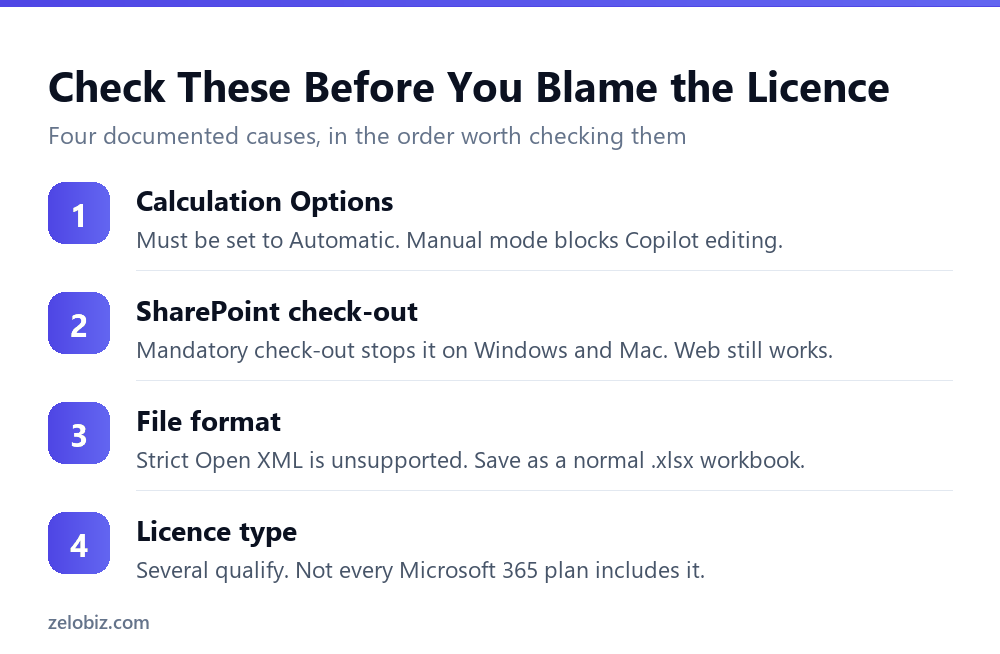
Work through these in order. The first one accounts for most cases and takes ten seconds to check.
Calculation Options must be Automatic
Microsoft states that Copilot editing is only supported when Calculation Options are set to Automatic. You will find it under the Formulas tab.
This catches experienced users more than beginners, which is the irony of it. Anyone working on a large model has probably switched calculation to Manual to stop the workbook recalculating on every keystroke. That is good practice, and it silently disables Copilot editing.
SharePoint mandatory check-out blocks it entirely
If your organisation requires check-out before editing on a SharePoint site, Copilot in Excel will not work on Windows or Mac for any file from that site. This is a documented limitation, not a bug, and no amount of licence troubleshooting will fix it.
Excel for the web still works in that situation, which is the practical workaround. If your organisation has that policy, test in the browser before assuming the purchase failed.
A file that is merely checked out by a colleague produces an unsupported file state error instead. Checking it back in, then closing and reopening the file, clears that.
The file format has to be supported
Strict Open XML Spreadsheet is not supported. Saving as a standard Excel Workbook in .xlsx format resolves it. Rare, but it fails quietly when it happens.
⚠️ Watch out: You will read almost everywhere that AutoSave must be switched on for Copilot in Excel to work. Microsoft’s own FAQ does not say that. It documents the Calculation Options requirement, the SharePoint check-out limitation and the file format constraint. We are reporting the documentation rather than the folklore, and if AutoSave were the answer it would be the easiest fix on this page.
Which Licences Actually Include It
Copilot in Excel is not a single product. Microsoft lists several licence types that qualify, and they are not equivalent.
The distinction that matters in practice is between having standard access to Copilot in Excel and holding the paid add-on. The add-on brings priority access. A plan without it may still show Copilot while behaving differently under load.
What It Costs, Including the Part People Miss
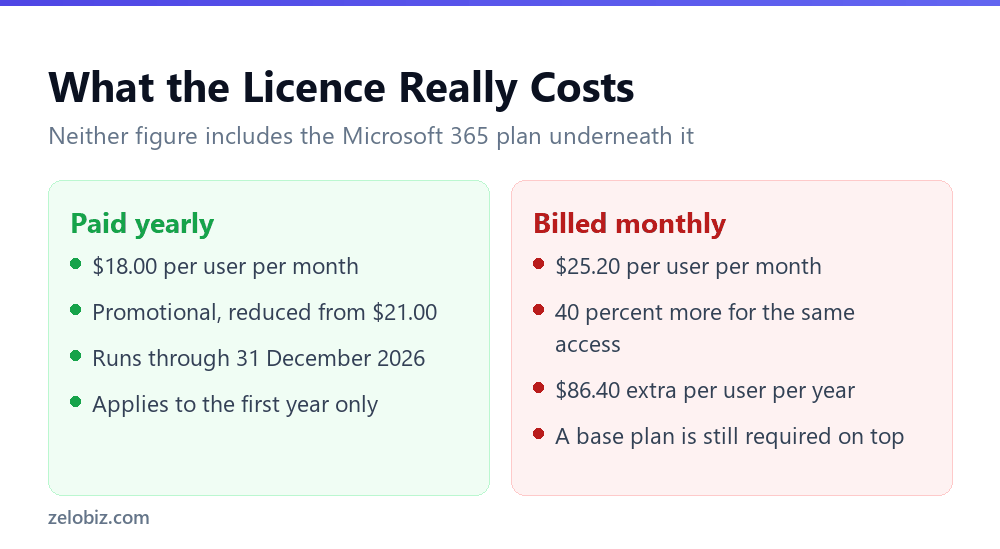
The published business price is $18 per user per month. Three conditions sit behind that number.
Paying monthly costs $86.40 more per person each year for identical access. The $18 rate is promotional and covers the first year only. And the standalone add-on requires a qualifying Microsoft 365 plan underneath, so it is never the whole bill.
💡 Pro tip: Price the bundles before the add-on. Business Standard with Copilot at $23.50 includes the base plan. If you were buying Business Standard anyway, that single line often costs less than the plan plus the $18 add-on bought separately.
Where It Actually Saves Time
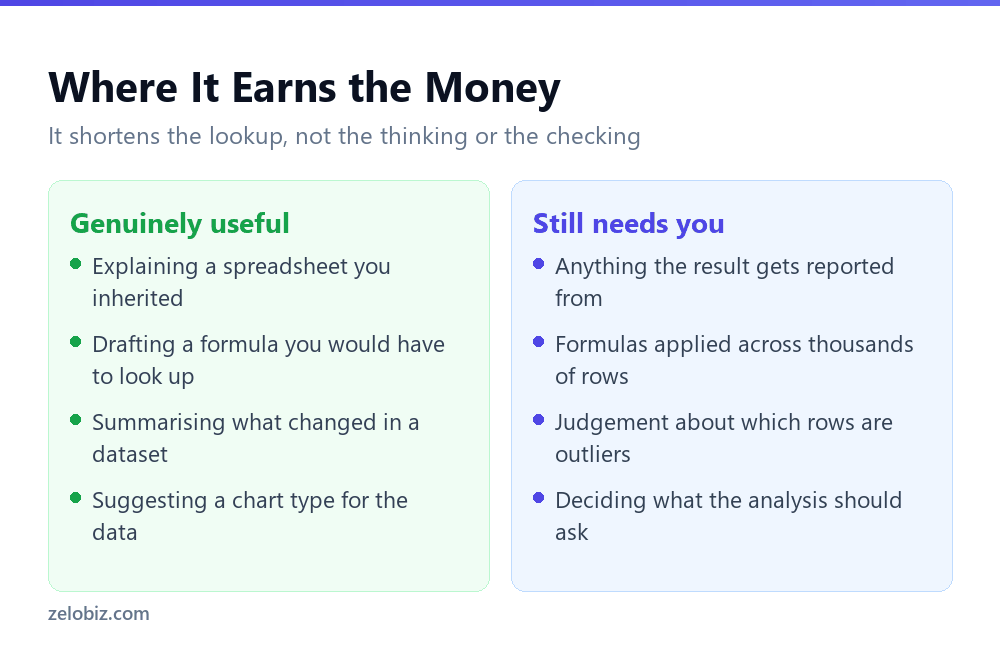
Once it is running, the honest assessment is that Copilot shortens lookup and explanation, not analysis.
Understanding a spreadsheet somebody else built
This is the strongest use case and the least discussed. Asking what a nested formula does, or which cells feed a total, is genuinely faster than tracing precedents by hand. It is also low risk, because you are asking it to describe rather than to change.
Drafting a formula you would otherwise look up
Describing what you want in plain language and getting a formula back saves the search. It does not save the checking, which we cover in our guide to writing Excel formulas with AI.
Where it does not help
Copilot does not decide what question your analysis should answer, and it does not know which rows in your data are wrong. Both of those remain entirely yours, and both take longer than writing the formula did.
Is It Worth Buying?
A short version, since the answer differs sharply by situation.
- Worth it if you live in Excel daily, inherit other people’s workbooks, and your organisation does not enforce mandatory SharePoint check-out.
- Check first if you are on a SharePoint site with check-out policies. Test in Excel for the web before buying, because desktop will not work at all.
- Probably not if you open Excel a few times a month. A general assistant with copy and paste covers occasional use at lower cost.
- Not yet if nobody has checked Calculation Options. Fix that first, because a working trial is a much better basis for the decision.
The Free Alternative, Compared Honestly
Before paying per seat, it is worth being clear about what the free route does and does not cost you. Copying a range into a general assistant and pasting the answer back works, and plenty of people do exactly that.
Two rows there deserve weight. Large ranges are where copy and paste genuinely breaks down, because you end up truncating data and getting answers about a subset without realising it. That is a real failure mode, not an inconvenience.
The confidentiality row cuts both ways. In-app Copilot keeps data inside your Microsoft environment, which most organisations prefer. But copy and paste gives you explicit control over exactly which cells ever leave the file, which some situations need.
📊 Note: If your work involves client data, that row is a policy question rather than a preference. Decide it before choosing a method, not after somebody has pasted a customer list into a chat window.
A First-Week Test Worth Running
The licence question is easier to answer with evidence than with a feature list. This takes about an hour spread across a week.
Pick the three spreadsheet jobs you repeat most. Not the interesting ones, the routine ones. The weekly summary, the monthly reconciliation, the report someone always asks for on a Friday.
Do each one twice. Once your usual way, timed honestly. Once with Copilot, timed the same way, and crucially including the time spent verifying what it produced.
That verification time is where the decision is actually made. People consistently record the generation step and forget the checking step, which is the one that does not get faster. If Copilot saves eight minutes of writing and adds six minutes of checking, the honest saving is two minutes rather than eight.
💡 Pro tip: Run the test on a real workbook rather than a clean sample. Copilot performs noticeably differently on a tidy demonstration sheet than on the merged cells, inconsistent dates and stray blank rows of a spreadsheet that has been in use for three years.
Common Questions
Why is Copilot not working in Excel?
The most common documented reason is that Calculation Options are not set to Automatic, because Copilot editing is only supported in Automatic mode. Other documented causes are a SharePoint site with mandatory check-out, which blocks it on Windows and Mac, and an unsupported file format such as Strict Open XML.
Does Copilot in Excel need AutoSave turned on?
Microsoft’s Copilot in Excel FAQ does not list AutoSave as a requirement. It documents the Calculation Options setting, SharePoint check-out limitations and file format constraints. The AutoSave claim is widely repeated but is not in the official documentation.
How much does Copilot in Excel cost?
Microsoft 365 Copilot Business is $18 per user per month paid yearly, a promotional rate reduced from $21 running through 31 December 2026 and applying to the first year only, or $25.20 billed monthly. A qualifying Microsoft 365 base plan is required in addition.
Can I use Copilot in Excel with a personal Microsoft account?
Yes, with the right plan. Microsoft lists Microsoft 365 Personal or Family with an AI credits plan, and Microsoft 365 Premium, among the eligible licences alongside the commercial Copilot subscriptions.
Why does Copilot work in Excel on the web but not on my desktop?
This is the signature of a SharePoint site that requires mandatory check-out for editing. Microsoft documents that Copilot in Excel will not work on Windows or Mac for files from such a site, while Excel for the web continues to function.
Should I keep a backup before letting Copilot edit a workbook?
It is sensible practice with any tool that writes into your file. Work on a copy for the first few sessions until you have a feel for what it changes. This costs nothing and removes the main anxiety people have about letting it edit at all.
Does Copilot in Excel work on a shared workbook others are editing?
A file checked out by someone else produces an unsupported file state error. The fix is for that person to check it back in, then close and reopen the file. This is separate from the mandatory check-out policy issue, which blocks Copilot on desktop regardless of who has the file open.
Is Copilot in Excel worth it for occasional use?
Usually not. The licence is priced per user per month regardless of how often you open Excel. For a few sessions a month, pasting data into a general assistant costs less, though it is slower and more error-prone at volume.
The Short Version
- →Set Calculation Options to Automatic before anything else. It blocks Copilot editing.
- →Mandatory SharePoint check-out stops Copilot in Excel on Windows and Mac entirely.
- →Excel for the web still works when the desktop app will not.
- →Microsoft does not list AutoSave as a requirement, despite how often that is repeated.
- →$18 per user per month is annual, promotional, first year only, and excludes the base plan.
- →It shortens looking things up. It does not shorten checking the answer.
Requirements and pricing checked against Microsoft’s own documentation on 30 August 2026. Verify before purchasing, as terms change.