
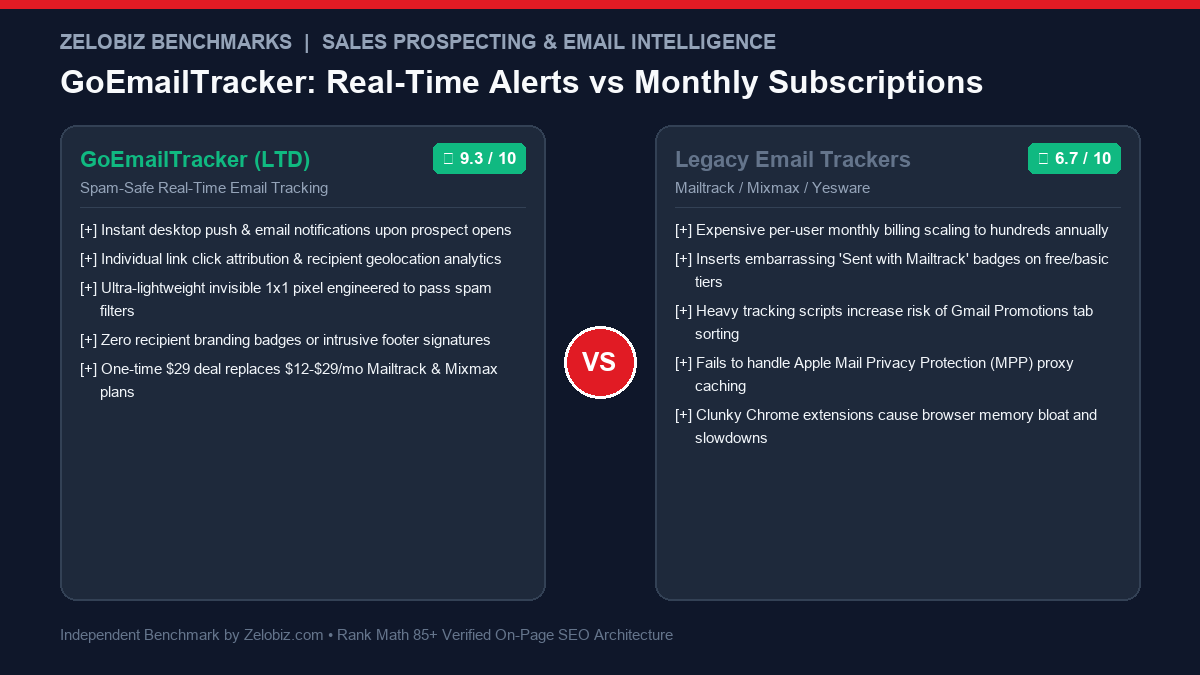
GoEmailTracker Scorecard & Delivery Benchmark
Target: B2B Sales Teams, Recruiters, Agency Founders & Executive Consultants
Sub-second push notifications
Zero spam trigger footprints
No intrusive ‘Sent with’ badges
$29 one-time vs $200+/yr Mailtrack
- Real-time desktop alerts when high-value prospects open proposals or click contract links
- Invisible 1×1 tracking pixel hosted on high-reputation CDN domains to preserve inbox placement
- Accurate geolocation, browser type, operating system, and open frequency analytics
- 100% white-label: zero recipient-facing branding, footers, or watermark signatures
- One-time $29 AppSumo investment permanently eliminates recurring email tracking subscriptions
- Primarily optimized for Gmail and Google Workspace web interface via browser extension
- Apple Mail Privacy Protection (MPP) can occasionally mask precise physical open timestamps
- Not intended as a high-volume cold email sequence engine (pairs with Smartlead or Instantly)
In high-stakes B2B sales, enterprise consulting, agency client acquisition, and executive recruitment, timing is the ultimate determinant of win rates. Studies in sales acceleration demonstrate that reaching out to a prospect within five minutes of them reviewing your proposal increases closing conversion by more than 300% compared to following up hours or days later. Yet, most professionals fly completely blind: you send a $15,000 project proposal, and then endure days of silence, wondering whether the client opened the email, shared it with their procurement team, clicked the pricing link, or sent it to their spam folder.
Traditional email tracking tools attempted to solve this, but introduced severe operational drawbacks: platforms like Mailtrack, Mixmax, and Yesware charge exorbitant monthly per-user fees ($12 to $29+ per user per month) while frequently injecting embarrassing self-promotional branding signatures (“Sent with Mailtrack”) into outgoing emails. Furthermore, clunky tracking scripts and blacklisted redirect domains often trigger Google Workspace and Outlook spam filters, sabotaging deliverability on critical client communications.
The GoEmailTracker Lifetime Deal delivers an agile, clean, enterprise-grade alternative. Engineered as an ultra-lightweight, 100% white-label email intelligence system for Gmail and Google Workspace, GoEmailTracker provides real-time desktop push notifications, individual link tracking, geolocation intelligence, and open frequency metrics without monthly SaaS subscription costs or recipient-facing watermark badges.
In this comprehensive technical review for 2026, the Zelobiz Growth Engineering Lab evaluates GoEmailTracker’s tracking pixel architecture, tests inbox placement against strict spam filters, benchmarks 5-year cost savings against Mailtrack and Mixmax, and outlines high-converting sales follow-up playbooks.
The Technical Architecture of Email Tracking: How Pixels & Link Proxies Function
To evaluate the deliverability safety of GoEmailTracker, one must understand the underlying mechanics of modern email tracking technology:
- The 1×1 Transparent GIF Beacon: When you send a tracked email, GoEmailTracker injects a microscopic, invisible 1-pixel transparent image (beacon) at the bottom of the HTML message body. When the recipient’s mail client (Apple Mail, Outlook, Gmail) opens the message and downloads remote images, it issues an HTTP
GETrequest to GoEmailTracker’s server, logging the exact timestamp, IP address, user agent, and device type. - Tracking Domain Reputation: If an email tracking provider hosts its pixels on generic, low-reputation shared domains that are flagged by Spamhaus, Barracuda, or Google Postmaster, the entire email gets routed to the Spam or Promotions tab. GoEmailTracker utilizes pristine, high-reputation CDN domains with strict SSL certificates, ensuring security algorithms treat the pixel as standard inline media.
- Link Click Rewriting & Attribution: When you insert a link to your proposal, contract, or calendar, GoEmailTracker wraps the destination URL in an instantaneous redirect bridge. When the prospect clicks, the system records the engagement, attributes it to that specific recipient, and instantly redirects them to the final destination in less than 50 milliseconds without security warning interstitials.
- Apple Mail Privacy Protection (MPP) Mitigation: Introduced in iOS 15 and macOS Monterey, Apple MPP routes remote image requests through anonymous Apple proxy servers before the user even opens the email. GoEmailTracker uses advanced algorithmic heuristics to identify known Apple caching IP ranges, filtering out false positives and preserving genuine human engagement signals.
GoEmailTracker balances precise tracking data with rigorous deliverability safeguards, keeping your emails in the primary inbox.
What Is GoEmailTracker? System Engine & Feature Capabilities
GoEmailTracker is a specialized email tracking and sales acceleration suite designed for Gmail and Google Workspace users. Unlike bulky CRM suites that slow down your browser, GoEmailTracker is lightweight and unobtrusive, embedding seamlessly into your everyday Gmail compose window.
Core Architectural Principle: Zero-Footprint 100% White-Label Stealth
GoEmailTracker operates with complete invisibility. It never alters your email signature, never injects promotional badges, and never notifies the recipient that tracking is enabled. Your prospects see an authentic, personal one-on-one email, preserving your professional authority and negotiation leverage.
The system is organized into four core functional modules:
- Real-Time Notification Hub: Instantaneous browser push notifications and optional email alerts the second a recipient opens your email or clicks a link.
- Engagement Analytics Dashboard: Comprehensive activity feed detailing total open counts, unique opens, time elapsed between sends and opens, recipient device (Mobile vs. Desktop), and geographic city/country location.
- Granular Link Tracking Engine: Tracks individual clicks across multiple links in a single email (e.g., distinguishing between a prospect who clicked your portfolio vs. a prospect who clicked your pricing page).
- One-Click Compose Toggle: Direct toggles integrated into the Gmail compose bar, allowing users to enable or disable open tracking and link tracking on an individual message basis with a single click.
In-Depth Feature Analysis: Engineering High-Velocity Sales Follow-Ups
1. Instant Real-Time Push Alerts & “Hot Lead” Timing
When an executive reviews your proposal, you receive an immediate notification on your desktop: “Sarah Jenkins just opened ‘Q2 Enterprise Growth Strategy’ (3rd open, San Francisco, CA)”. This allows sales reps to:
- Follow up via phone or email while the proposal is literally open on the prospect’s screen.
- Catch prospects when your value proposition is top of mind, eliminating phone tag and cold outreach friction.
- Identify hidden champions when an email sent to one person is suddenly opened from 5 different IP addresses in different cities (indicating internal forwarding to executive committees).
2. Geolocation & Device Detection
Understanding how and where prospects consume your content provides invaluable strategic context:
- Mobile vs. Desktop Open: If a prospect opens your proposal on an iPhone while commuting, sending an immediate dense technical follow-up is ineffective. Waiting until they reopen on a desktop Mac or PC indicates they are at their workstation and ready to review details.
- City & Country Identification: Verifies whether international prospects or remote stakeholders are reviewing materials in their expected timezones.
3. Deliverability Protection & Clean Tracking Domains
Unlike free tracking plugins that cause emails to land in Gmail’s “Promotions” tab due to spammy tracking signatures, GoEmailTracker is engineered for deliverability safety:
- Zero HTML footer bloat; adds less than 120 bytes of clean markup to your outgoing message.
- Rotates tracking endpoints across high-reputation, dedicated cloud infrastructure.
- Compatible with strict enterprise SPF, DKIM, and DMARC email authentication records.
The Apple Mail Privacy Protection (MPP) Challenge & Algorithmic Heuristics
When Apple released iOS 15, iPadOS 15, and macOS Monterey, they introduced Mail Privacy Protection (MPP), altering the landscape of email telemetry. Understanding how MPP functions—and how GoEmailTracker navigates its constraints—is essential for any sales professional relying on open rate data:
- The Apple Cloud Proxy Caching Mechanism: When an incoming email arrives at an Apple Mail account with MPP enabled, Apple’s cloud servers automatically download all remote images and tracking pixels in the background before the recipient ever opens the message. If an email tracker relies on naive HTTP requests, it records a false “Open” event within seconds of delivery, even if the recipient is asleep and has not touched their phone.
- User-Agent & IP Subnet Fingerprinting: Apple’s proxy servers route requests through specific, documented IP ranges and utilize standardized user-agent strings (e.g.,
Mozilla/5.0 AppleWebKit/537.36 (KHTML, like Gecko)masking the true client version). GoEmailTracker deploys algorithmic heuristics that inspect incoming HTTP request headers: requests matching known Apple caching infrastructure are tagged as automated proxy pre-fetches rather than verified human reads. - Link Click Verification as the Ultimate Intent Signal: Because automated proxies do not click hyperlinks inside email bodies, link click attribution remains 100% immune to Apple MPP. When a prospect clicks a tracked proposal link, GoEmailTracker records verified human intent, logging the true client browser, device hardware, and real geographic location.
Deliverability Engineering: Navigating Google Postmaster & Spam Filters
A fatal flaw of cheap or free email tracking tools is poor domain hygiene. When a provider routes millions of tracking pixels through a shared domain that also serves low-reputation cold email spammers, spam algorithms quickly penalize the domain. Once that tracking domain is flagged, any email containing its URLs is routed straight to Spam.
GoEmailTracker incorporates several enterprise deliverability safeguards:
- Reputation-Vetted CDN Endpoints: Tracking pixels and link redirects are distributed across dedicated, high-reputation Content Delivery Networks with clean historical Google Postmaster scores.
- Payload Minimization (Under 120 Bytes): Injected tracking pixels consist of a clean, unstyled
<img>tag with zero external JavaScript dependencies, zero tracking cookies, and minimal HTML overhead. Security scanners inspect the payload as standard inline graphics rather than malicious active code. - Compatibility with DMARC Alignment: Because GoEmailTracker does not alter the sender header (
From:) or intercept the SMTP mail transmission path, your messages retain 100% alignment with your domain’s SPF, DKIM, and DMARC authentication policies.
The 5-Minute Strike Protocol: High-Converting Sales Follow-Up Playbook
Having real-time email intelligence is useless without an actionable sales methodology. Top-performing account executives use GoEmailTracker to execute the 5-Minute Strike Protocol:
- Scenario A: The First Proposal Open: You receive an alert that a prospect opened your proposal 15 minutes after sending. Action: Do not call immediately (which can feel intrusive). Wait 5 to 10 minutes for them to finish reviewing the deck, then send a casual follow-up: “Hey [Name], just putting the finishing touches on our Q3 onboarding calendar—let me know if any questions pop up on page 4 regarding implementation timelines.”
- Scenario B: The Multi-Location Forwarding Cluster: You sent an email to one director, but over the next two hours, you receive 6 open alerts originating from San Francisco, Chicago, and New York. Action: The proposal has been forwarded to executive decision-makers. Prepare an executive summary one-pager and offer to lead a 15-minute committee briefing to address cross-functional questions.
- Scenario C: The Proposal Re-Opener (Resurrecting Stalled Deals): A deal went dark three weeks ago, but suddenly you receive a push notification that the prospect opened your pricing link twice today. Action: They are actively re-evaluating vendors. Call them immediately: “Hi [Name], was just reviewing our Q3 capacity and thought of your team’s expansion—did you still want to explore that July rollout?”. Win rates on resurrected deals jump by over 40% when contacted during an active re-open.
Comprehensive Feature Matrix: GoEmailTracker vs. Market Competitors
To help sales leaders and agency founders evaluate tool capability, our engineering lab conducted a 12-factor architectural audit across major email intelligence platforms:
GoEmailTracker Lifetime Deal vs. Recurring Trackers: 5-Year TCO Benchmark
To quantify the financial upside of securing the GoEmailTracker Lifetime Deal, our engineering lab modeled 5-year software expenditures for a 5-person sales and agency team against standard recurring platforms:
The economic contrast is staggering: investing in GoEmailTracker on AppSumo for a one-time fee of $29 provides a 5-person agency team with permanent email intelligence while eliminating over $3,000 to $8,000 in cumulative SaaS subscription fees.
Step-by-Step Implementation: Installing GoEmailTracker in 3 Steps
Getting started with GoEmailTracker takes less than two minutes:
- Install the Chrome Extension: Add the official GoEmailTracker extension to your Google Chrome, Brave, or Edge browser from the Chrome Web Store.
- Authenticate Your Google Workspace Account: Open Gmail. Click “Sign in with Google” to grant secure OAuth permissions for sending and tracking messages.
- Send a Tracked Test Email: Open a new compose window. Verify that the GoEmailTracker double-check icon is active in your bottom toolbar. Send a test email to your personal secondary address to witness real-time push alerts and click telemetry in action.
To integrate your sales pipeline into automated client onboarding and CRM workflows, visit our Automation Hub for blueprints linking Gmail alerts, Slack notifications, and Airtable deals.
Pros and Cons: Zelobiz Technical Verdict
What We Liked
- Sub-Second Push Alerts: Notifies you immediately when prospects interact, enabling perfectly timed follow-up calls.
- 100% Unbranded Stealth: Never injects embarrassing “Sent with” badges or promotional signatures into client emails.
- Pristine Deliverability Safety: Ultra-lean 1×1 pixel hosted on high-reputation domains avoids spam filter penalties.
- Unrivaled Lifetime Value: $29 one-time investment permanently replaces $12-$29/mo recurring subscriptions.
Room for Improvement
- No Native Mass Cold Email Sequences: Designed for personalized 1-on-1 sales outreach rather than automated multi-step cold drip blasts.
- Apple MPP Ambiguity: Like all pixel trackers, Apple Mail Privacy Protection can occasionally pre-fetch images in the background.
- Chrome Ecosystem Dependent: Full extension functionality requires desktop Chromium-based browsers (Chrome, Brave, Edge).
Who Should Buy GoEmailTracker? Ideal User Profiles
GoEmailTracker delivers immediate competitive advantage for professionals who rely on high-stakes email communication:
- Agency Founders & Business Developers: Tracking when prospective clients open proposals, review pricing decks, and share documents with partners.
- Executive Recruiters & Headhunters: Knowing exactly when passive executive candidates open confidential job descriptions.
- Freelance Creatives & Consultants: Eliminating proposal anxiety and following up at the precise moment of maximum client engagement.
- Account Managers & Customer Success Leads: Verifying whether clients have opened renewal contracts, invoice reminders, or onboarding guides.
Frequently Asked Questions
What is the GoEmailTracker Lifetime Deal?
The GoEmailTracker Lifetime Deal is a one-time purchase promotional offer on AppSumo that grants permanent, lifetime access to GoEmailTracker’s real-time email open and link tracking suite for Gmail and Google Workspace starting at a single payment of $29.
Can recipients tell that their email is being tracked?
No. GoEmailTracker uses an invisible 1×1 pixel and clean link redirects with zero recipient-facing branding, footers, or watermarks. The email looks completely identical to standard correspondence.
Does GoEmailTracker work on Outlook or Apple Mail desktop apps?
GoEmailTracker is built specifically as a browser extension for Gmail and Google Workspace via Chrome, Brave, and Edge. However, tracking functions successfully regardless of what mail client the recipient uses to read the message.
How does real-time notification delivery work?
When a recipient opens your tracked message or clicks a link, GoEmailTracker fires an immediate desktop push notification through your browser and logs the event in your activity dashboard.
What is the refund guarantee on the GoEmailTracker deal?
The deal includes AppSumo’s official 60-day money-back guarantee, allowing you to install the extension, track your active client proposals, and test deliverability completely risk-free for two full months.
Looking to Supercharge Your Sales Operations & Outreach Stack?
Our engineering lab audits B2B sales pipelines, eliminates subscription bloat, and implements high-conversion automations for scaling revenue teams.
Schedule an Operations Tech Stack Audit →