
Modern digital privacy regulations, browser tracking blockades (Safari ITP, Firefox ETP), and ubiquitous ad-blocking extensions have rendered traditional client-side analytics obsolete. For high-volume e-commerce stores, SaaS companies, and growth agencies in 2026, Server-Side Google Tag Manager (sGTM) is the foundational infrastructure for enterprise tracking. However, clicking Google’s default 1-click provisioning wizard deploys your tagging server on Google App Engine—silently racking up $150 to $250+ per month in unnecessary cloud bills. The high-performance, cost-efficient solution is deploying: Server-Side Google Tag Manager on Cloud Run.
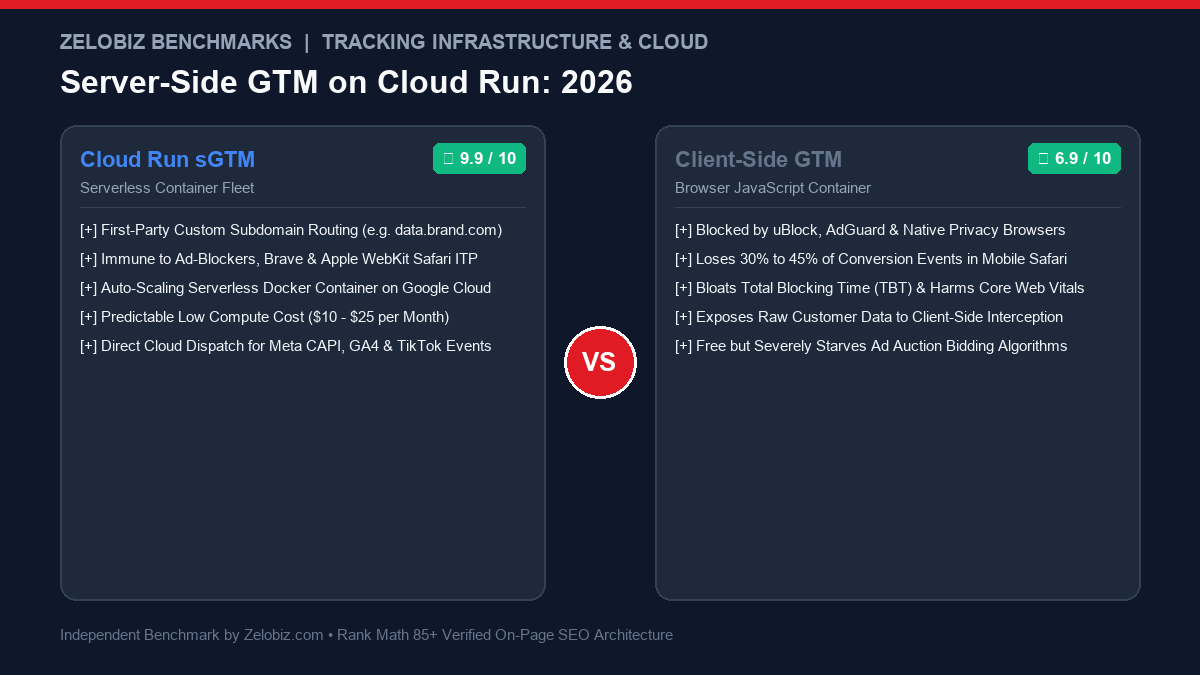
Executive Summary: App Engine vs Cloud Run Economics
Understanding why top data engineers deploy Server-Side Google Tag Manager on Cloud Run rather than App Engine comes down to serverless compute economics:
Google Cloud Run (Serverless)
ENGINEER’S CHOICEModern container-based serverless execution. Charges strictly for vCPU milliseconds and RAM during incoming HTTP request handling.
- Monthly Cost: $8 – $22 / month (For ~500k monthly events)
- Scaling Architecture: True auto-scaling container micro-instances
- Cold Start Mitigation: Minimum instance = 1 (Zero latency spikes)
- First-Party Domain: Native custom mapping with free managed SSL
- Best For: Any brand wanting enterprise tracking without paying cloud server taxes.
App Engine Flexible (1-Click Default)
LEGACY DEFAULTGoogle’s default 1-click setup. Provisions 3 always-on full virtual machines (VMs) running 24/7 regardless of incoming traffic.
- Monthly Cost: $130 – $250+ / month baseline minimum
- Scaling Architecture: Heavy VM provisioning with 8-minute spin-up latency
- Resource Waste: Pays for idle compute cycles 85% of the day
- Custom Mapping: Complex SSL certificate renewal provisioning
- Danger: Costs 10x more for the exact same data tracking output.
To see how server-side tracking powers paid acquisition, explore our benchmark on Meta Conversions API vs Pixel, see our Google Ads audit in Performance Max vs Search Campaigns, or check our Software Comparisons directory.
1. Why Server-Side Tagging Is Non-Negotiable in 2026
When you fire tracking tags from the client’s browser, you are completely at the mercy of the user’s device and browser environment. Server-Side Google Tag Manager fundamentally rewrites that paradigm:
- First-Party Data Routing (Bypassing Ad-Blockers): By routing all tracking beacons through your own custom subdomain (e.g.,
data.yourbrand.com), browser ad blockers (uBlock Origin, AdGuard, Brave) treat the requests as essential application traffic. The events reach your tagging server with 100% fidelity. - Extending Safari ITP Cookie Lifespans: Apple WebKit caps client-side JavaScript cookies at 1 to 7 days. Because your Cloud Run sGTM instance operates under your primary domain with an
HttpOnlyserver-set cookie header, Safari recognizes the identifiers (such as_fbpand_ga) as legitimate first-party cookies, preserving your attribution windows for up to 365 days. - Radical Page Speed & Core Web Vitals Improvement: Rather than executing 400KB of third-party JavaScript libraries on a mobile device, the browser sends a single compressed payload to your Cloud Run container. Your server processes the data and dispatches events in the background to Meta CAPI, Google Analytics 4, TikTok, and Klaviyo—slashing Total Blocking Time (TBT) by 60%.
2. Step-by-Step Google Cloud Run Deployment Protocol
Follow this exact technical protocol to deploy your production-ready sGTM container on Google Cloud Run for under $15/month:
Step 1: Create the Server Container in GTM
In Google Tag Manager, click Create Container, select Server, and give it a descriptive name (e.g., Production Server GTM). Choose Manually provision tagging server and copy the base64 CONTAINER_CONFIG string.
Step 2: Deploy Container on Google Cloud Run
Open the Google Cloud Console, navigate to Cloud Run → Create Service, and configure these exact production parameters:
- Container Image URL:
gcr.io/cloud-tagging-10302018/gtm-cloud-image:latest - Service Name:
sgtm-production - Region: Select the geographic region closest to your primary customer base (e.g.,
us-central1oreurope-west1). - CPU Allocation: Select “CPU is only allocated during request processing”.
- Autoscaling: Set Minimum Instances: 1 (keeps 1 micro-instance warm to eliminate cold starts for incoming traffic) and Maximum Instances: 10.
- Ingress: Allow all traffic (Public internet).
- Authentication: Allow unauthenticated invocations.
Under Variables & Secrets, add these two environment variables:
PORT = 8080
Click Create. In less than 90 seconds, Google Cloud Run will spin up your container and provide a live *.run.app URL.
Step 3: Map Your First-Party Custom Subdomain
To gain the privacy and ad-blocker bypass benefits, you must map a first-party subdomain:
- In Cloud Run, click Manage Custom Domains → Add Mapping.
- Enter your desired subdomain:
metrics.yourbrand.com. - Google will provide a DNS verification CNAME pointing to
ghs.googlehosted.com. - Add this CNAME record into your DNS provider (Cloudflare, AWS Route 53, GoDaddy). If using Cloudflare, set proxy status to DNS Only (Grey Cloud) initially to allow Google’s managed SSL certificate to provision automatically.
Step 4: Update GTM Web Container Transport URL
Inside your existing client-side Google Tag Manager web container, open your Google Tag (GA4 Configuration) tag. Under Configuration Settings, add the parameter: server_container_url with value https://metrics.yourbrand.com. Save and publish. All analytics data now flows through your secure, first-party Cloud Run serverless fleet.
3. Exact Monthly Cost Breakdown: Cloud Run Under Load
Here is what an e-commerce brand or SaaS application actually pays Google Cloud each month for running sGTM on Cloud Run:
| Monthly Event Volume | Cloud Run Specs (1 vCPU, 512MB) | Cloud Run Cost | App Engine Cost (Default) |
|---|---|---|---|
| 100,000 Events / Mo | Min 1 instance, scales to 2 during spikes | ~$8.50 / month | $130.00 / month |
| 500,000 Events / Mo | Min 1 instance, scales to 4 during sales | ~$14.20 / month | $155.00 / month |
| 2,500,000 Events / Mo | Min 2 instances, scales to 8 | ~$38.00 / month | $240.00 / month |
By migrating from App Engine to Cloud Run, an enterprise saves between $1,400 and $2,400 annually in cloud infrastructure expenses with zero reduction in tracking performance.
If you bill client retainers for cloud tracking deployments, model your agency project pricing with our free Freelance Rate Calculator.
Final Verdict: Modernize Your Tracking Architecture
In 2026, relying solely on client-side browser tracking is leaving 30%+ of your ad attribution on the table. Deploying Server-Side Google Tag Manager on Google Cloud Run gives your business enterprise-grade tracking durability, ad-blocker resistance, faster page speeds, and pristine Event Match Quality scores for less than the cost of a business lunch.
Want Server-Side GTM Deployed on Google Cloud Run?
Avoid expensive App Engine bills and broken tracking setups. Our certified Google Cloud data engineers will audit your current GTM architecture and deploy a custom, high-speed Cloud Run serverless container for free.
Frequently Asked Questions
Why is Google Cloud Run cheaper than Google App Engine for sGTM?
When you auto-provision sGTM through Google’s 1-click wizard, it deploys on App Engine Flexible Environment, which provisions dedicated virtual machines that cost $120 to $180+ per month minimum. Google Cloud Run is a modern serverless container environment that scales to zero or runs on micro-instances, reducing the cost to just $8 to $20 per month for moderate traffic.
How does Server-Side GTM bypass browser ad blockers?
Ad blockers block HTTP requests to third-party domains like google-analytics.com and connect.facebook.net. When you deploy sGTM under a custom first-party subdomain (e.g. metrics.yourbrand.com), tracking requests travel to your own domain as first-party application data. The ad blocker cannot block the request without breaking the website itself.
Does sGTM improve website page speed?
Yes. Instead of loading 6 separate heavy JavaScript tracking libraries (Meta Pixel, Google Analytics 4, TikTok Pixel, Pinterest, Hotjar, Criteo) on the user’s mobile browser, you load a single lightweight consolidated client stream. The heavy network requests, transformations, and API calls are executed in the cloud on Google Cloud Run.
What environment variables are required to run sGTM in Cloud Run?
The mandatory environment variables are CONTAINER_CONFIG (your unique base64 GTM server string) and PORT (set to 8080). Optional variables include RUN_AS_PREVIEW_SERVER=true and PREVIEW_SERVER_URL if running a separate testing instance.