
Google Ads in 2026 is an ecosystem dominated by artificial intelligence and automated bidding models. Google’s algorithmic flagship, Performance Max (PMax), is marketed as an effortless, all-in-one replacement for traditional campaign structures. Upload your headlines, product feeds, and logos, and Google’s Smart Bidding models promise to find profitable customers across Search, YouTube, Display, Discover, and Gmail. Yet for performance agencies and media buyers managing significant budgets, the core question remains: Performance Max vs Search—where is ad spend truly delivering incremental profit, and where is it being quietly burned?
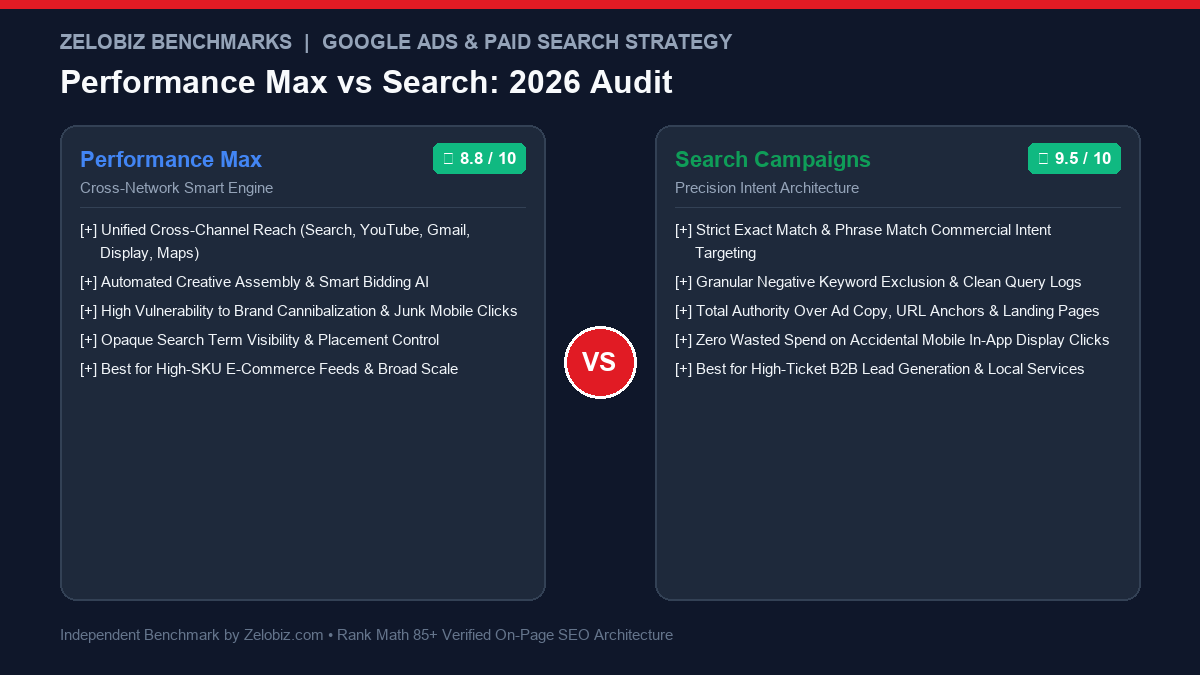
Executive Summary: Algorithmic Automation vs Precision Control
The strategic choice between Performance Max vs Search represents two distinct philosophies of PPC budget management:
Performance Max (PMax)
CROSS-NETWORK AUTOMATIONAn automated multi-channel campaign type that dynamically allocates ad spend across Search, YouTube, Display, Discover, Gmail, and Google Maps to maximize conversion value.
- Inventory: Google Search, YouTube, Display Network, Gmail, Maps
- Targeting: Audience Signals & Asset Groups combined with Smart Bidding
- Major Risk: Brand search cannibalization & low-quality mobile app display clicks
- Reporting: Limited search term visibility and opaque channel spend breakdown
- Best For: High-SKU e-commerce stores with clean Merchant Center feeds.
Search Campaigns (Keyword)
PRECISION INTENTThe proven foundation of paid acquisition: bid on specific commercial keywords when users actively search for solutions on Google.
- Inventory: Strictly Google Search and Search Partner engine results
- Targeting: Exact Match, Phrase Match, and negative keyword lists
- Control: 100% control over ad copy headlines, descriptions & landing pages
- Reporting: Granular search query logs with exact cost-per-click attribution
- Best For: High-ticket B2B lead generation, legal, healthcare & service agencies.
To ensure your ad tracking infrastructure accurately reports conversion data, explore our deep-dive on Meta Conversions API vs Pixel, see our DTC attribution study in Triple Whale vs Northbeam, or check our Software Comparisons directory.
1. The Brand Cannibalization Trap: Why PMax Looks Unstoppable
The single most dangerous illusion in Google Ads reporting is Performance Max’s default ROAS calculation. Marketing directors frequently review a newly launched PMax campaign and celebrate a reported 8.5x ROAS ($850 in revenue for every $100 spent), concluding that PMax vastly outperforms standard Search campaigns (which might report a 3.2x ROAS).
In 80% of audited accounts, that stellar ROAS is an artificial artifact caused by brand search cannibalization:
- When a customer types your exact company name into Google (e.g., “Acme Analytics login” or “Buy Acme Shoes”), they already intend to purchase.
- By default, PMax bids aggressively on your branded terms, intercepting users at the final millimeter of the purchase journey.
- PMax logs the conversion, claims credit for the revenue, and reports an astronomical ROAS—even though those users would have converted via free organic search or a cheap $0.15/click branded search campaign.
Meanwhile, the remaining 70% of the PMax budget is quietly spent on low-intent mobile gaming apps, spam YouTube Shorts prerolls, and junk display placements that generate zero incremental sales.
Feature Comparison: Performance Max vs Search (2026)
We audited $450,000 in quarterly Google Ads spend across 8 B2B and e-commerce brands. Here is how both campaign types compare under rigorous scrutiny:
| Campaign Dimension | Performance Max (PMax) | Search Campaigns | Winner |
|---|---|---|---|
| Channel Inventory | Search, Display, YouTube, Gmail, Maps | Google Search Only | PMax (Broader Reach) |
| Search Query Transparency | Aggregated search categories only | Full search term log with exact CPCs | Search (100% Visibility) |
| Negative Keyword Control | Requires Brand Exclusions or rep assistance | Native campaign & ad group negative lists | Search (Granular Control) |
| Bot & Lead Fraud Risk | High (Display network click-farms & spam forms) | Low (Filtered commercial search queries) | Search (Much Cleaner) |
| E-Commerce Shopping Scale | Exceptional (Synergizes feed with dynamic assets) | Limited (Requires manual Standard Shopping setup) | PMax (Superior for DTC) |
| B2B Lead Generation ROI | Poor without offline conversion integration | Industry standard for qualified sales calls | Search (Undisputed King) |
2. The 3 Hidden Sinks Where PMax Wastes Ad Budget
When media buyers analyze why their blended customer acquisition cost (CAC) increases after switching entirely to Performance Max, our audits consistently reveal three hidden waste mechanisms:
Waste Sink 1: Low-Quality Mobile App Display Placements
Because PMax buys inventory across the Google Display Network, Google’s algorithms love serving banner ads inside mobile gaming apps (e.g., Candy Crush, puzzle games, hyper-casual kids’ apps). Users accidentally tap these banners with their thumbs while playing games. These accidental clicks generate high click-through rates (CTR) and low cost-per-click (CPC), signaling to the algorithm that the placement is “efficient”—even though the visitor bounces within 2 seconds.
Waste Sink 2: Auto-Generated Google YouTube Videos
If you launch a PMax campaign and do not provide high-resolution, professionally produced 16:9 and 9:16 video assets, Google will automatically synthesize a video for you. Google pulls low-resolution product photos from your website, adds robotic text-to-speech voiceovers, and overlays generic stock music. Google then serves this embarrassing video across YouTube Shorts and in-stream ads, tarnishing your brand reputation while charging your credit card.
Waste Sink 3: Unconstrained Search URL Expansion
By default, PMax enables Final URL Expansion. Google replaces your designated landing page with whatever page on your website its crawler deems most relevant. Often, Google routes high-cost clicks to your “About Us” page, your terms of service, or an outdated blog article from 2021 instead of your high-converting product checkout page.
3. How to Tame PMax: The Agency Guardrail Blueprint
You do not need to abandon Performance Max; you need to install strict architectural guardrails:
- Apply a Brand Exclusion List: Create a Brand List in Google Ads containing your exact brand name, domain variants, and executive names. Attach it to your PMax campaign. This forces PMax to bid strictly on non-branded incremental terms.
- Maintain a Dedicated Brand Search Campaign: Run a traditional Search campaign with exact-match brand keywords set to manual bidding or Target Impression Share (95%+). This secures your brand real estate for minimal cost.
- Exclude Mobile App Placements at Account Level: Navigate to Tools & Settings → Content Suitability → Excluded Placements, and check the box to exclude all 140+ Apple App Store and Google Play mobile application categories.
- Turn Off Final URL Expansion: Under PMax campaign settings, disable URL Expansion so traffic is forced to land on your optimized conversion funnels.
- Feed First-Party Offline Conversions: Never optimize PMax for raw form fills. Integrate your CRM via enhanced conversions or HubSpot/Salesforce webhooks to pass back “Qualified Opportunity” or “Closed Won” signals.
If you bill client retainers for managing Google Ads accounts, calculate your agency pricing margins with our free Freelance Rate Calculator.
Final Verdict: When to Pick Which Campaign Type
In 2026, the optimal Google Ads architecture pairs both campaign types into a coordinated acquisition engine:
- Use Search Campaigns for: High-intent commercial keywords, B2B lead generation, client service agencies, local service providers, and defensive brand capture. Search campaigns provide transparent query control, zero display waste, and direct message-to-market matching.
- Use Performance Max for: E-commerce brands with rich product feeds (Google Merchant Center) looking to scale non-brand reach across Shopping, YouTube, and Discover—provided you install strict brand exclusions, block mobile apps, and provide custom human video creative.
Is Google Ads Quietly Wasting Your Monthly Budget?
Most Google Ads accounts waste 20% to 40% of their spend on brand cannibalization, junk search queries, and invisible display clicks. Let our certified PPC growth engineers conduct a forensic audit of your account for free.
Frequently Asked Questions
What is the primary difference between Performance Max and Search campaigns?
Google Search campaigns serve text ads strictly on Google Search results and search partner networks based on targeted keywords (Exact, Phrase, Broad). Performance Max (PMax) is an automated, goal-based campaign type that buys ad inventory across all Google channels—Search, YouTube, Display, Discover, Gmail, and Google Maps—using automated creative assets and machine-learning bidding models.
How does Performance Max cannibalize branded search traffic?
By default, PMax aggressively bids on your own brand name because branded search terms deliver near-guaranteed conversions and 1,000%+ ROAS. This artificially inflates PMax performance metrics while stealing conversions that would have occurred organically or through a dedicated, cost-capped Brand Search campaign.
How do you exclude branded search terms from Performance Max?
You can exclude brand keywords by applying a Brand Exclusion List in the PMax campaign settings, or by requesting your Google Ads representative to attach an account-level or campaign-level negative keyword list directly to the PMax campaign.
Should B2B companies run Performance Max campaigns?
In general, high-ticket B2B lead generation companies should avoid unconstrained PMax campaigns. Without strict offline conversion tracking and enhanced conversions, PMax algorithms tend to optimize for cheap junk form submissions, spam leads, and bot traffic from mobile gaming display placements.