
In modern digital advertising, the most valuable transactions rarely happen inside a single browser session. For B2B software companies, medical clinics, legal practices, real estate developers, and high-ticket service agencies, the real revenue closes days, weeks, or even months after the initial ad click. If you only track the initial website form fill, Meta’s automated algorithms will relentlessly optimize for cheap, unqualified leads. To scale profitable ad spend in 2026, performance marketers must master: how to upload offline conversions to Meta Ads.
Executive Summary: Why Offline Data Closes the Revenue Loop
When you close the loop between your CRM and Meta Ads Manager, you transform how the ad auction treats your business:
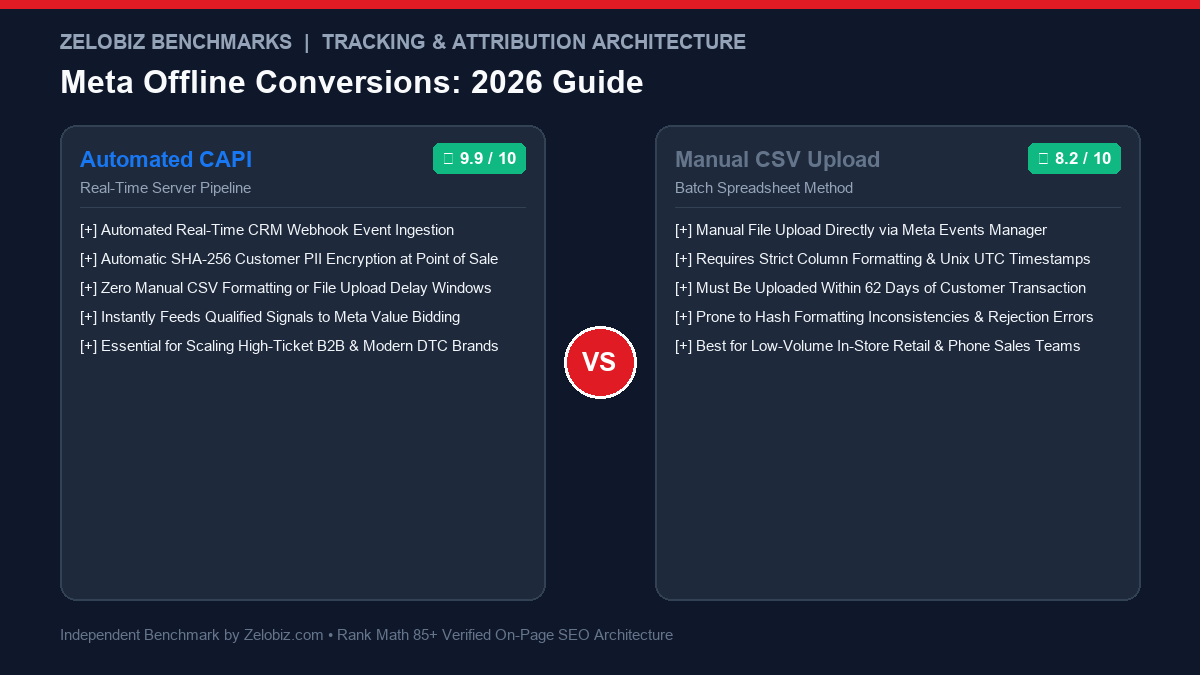
Automated CAPI Pipeline
ENTERPRISE GOLD STANDARDDirect server-to-server webhook integration triggering instantly whenever a lead status advances in HubSpot, Salesforce, or Stripe.
- Latency: Real-time (sub-second dispatch)
- Automation: 100% hands-free via Make.com, n8n, or custom API
- Algorithm Impact: Trains Meta Smart Bidding on actual closed dollars
- Data Quality: Consistent 8.5 – 9.5 Event Match Quality
- Best For: High-growth B2B SaaS, e-commerce phone orders, and scaling agencies.
Manual CSV Upload
ACCESSIBLE BATCH METHODExporting customer purchase records from a local POS or spreadsheet and manually uploading to Meta Events Manager on a scheduled cadence.
- Latency: Batch weekly or monthly (up to 62-day limit)
- Automation: Manual spreadsheet cleaning and column mapping
- Risk: High human error rate in timestamp and phone formatting
- Cost: Free (no developer or middleware required)
- Best For: Local retail stores, boutique consulting firms, and phone sales teams.
To ensure your ad tracking infrastructure accurately reports conversion data, explore our deep-dive on Meta Conversions API vs Pixel, see our 30-day targeting study in Meta Advantage+ Audience vs Manual Targeting, or check our Software Comparisons directory.
1. The Exact Meta Offline CSV Template Requirements
When uploading offline conversions manually, Meta’s ingestion engine is notoriously unforgiving. A single mislabeled column header or invalid date string will cause the entire batch to fail. Below is the exact standardized CSV schema required by Meta Events Manager:
| Column Name | Accepted Format | Example Value | Required? |
|---|---|---|---|
| Lowercase, no spaces (or SHA-256) | john.doe@gmail.com | Critical Match Key | |
| phone | E.164 standard with country code | +14155552671 | Critical Match Key |
| fn / ln | First name / Last name (lowercase) | john / doe | Recommended |
| zip / ct / st | 5-digit ZIP, lowercase city, 2-letter state | 94103, san francisco, ca | Recommended |
| event_name | Standard Meta event string | Purchase (or Lead, Schedule) | Mandatory |
| event_time | Unix UTC timestamp or ISO 8601 | 1715000000 | Mandatory |
| value | Numeric decimal transaction amount | 450.00 | Mandatory for ROAS |
| currency | 3-letter ISO currency code | USD (or EUR, GBP) | Mandatory |
2. Step-by-Step Manual Upload Protocol
To upload your formatted CSV directly into Meta Events Manager:
- Access Meta Events Manager: Navigate to your Meta Business Manager and click into Events Manager. Select your primary Pixel / Dataset ID.
- Select Upload Events: In the upper-right corner, click Manage Integrations → Upload Events (or navigate to the “Offline Events” tab).
- Drag and Drop Your File: Upload your
.csvfile. Meta will automatically scan the first 10 rows to detect your column headers. - Review Column Mapping & Hash Verification: Meta will prompt you to map your CSV columns to official Meta parameters. If you did not pre-hash your emails and phone numbers, leave the “Data is already hashed” box unchecked; Meta’s client-side browser interface will automatically compute SHA-256 hashes before transmitting the file over SSL.
- Review Match Quality Preview: Meta will display a preview score estimating how many rows contain valid match keys. Click Upload & Process.
Within 12 to 24 hours, Meta will match these offline purchase transactions against ad impression records, attributing closed revenue back to the specific campaigns, ad sets, and creative hooks that originated the buyers.
3. Automating Offline Uploads via Conversions API (CAPI)
While manual CSV uploads are viable for low-volume shops, high-growth agencies automate this pipeline entirely. Whenever a lead closes in your CRM (HubSpot, Salesforce, Pipedrive) or an invoice pays on Stripe, an automated scenario inside Make.com or n8n formats the payload and transmits it immediately via Meta CAPI:
{
  "data": [
    {
      "event_name": "Purchase",
      "event_time": 1715000000,
      "action_source": "system_generated",
      "user_data": {
        "em": ["f660ab912ec121d1b1e928a0bb4bc61b15f5ad44d5efdc4e1c92a25e99b8e44a"],
        "ph": ["254aa248acb47dd654ca3ea53f48c2c26d641d23d7e2e93a1ec56258df7674c4"],
        "client_ip_address": "192.168.1.1",
        "client_user_agent": "Mozilla/5.0..."
      },
      "custom_data": {
        "currency": "USD",
        "value": 1250.00,
        "content_type": "product",
        "order_id": "DEAL_89412"
      }
    }
  ]
}
By passing "action_source": "system_generated", Meta recognizes that this event originated from backend business systems rather than an active website browser, prioritizing the record for Value-Based Lookalike optimization.
If you bill client retainers for CRM automation and revenue tracking, calculate your agency billing targets using our free Freelance Rate Calculator.
Final Verdict: Unlock True ROAS with Offline Signals
Uploading offline conversions is the single greatest competitive advantage an agency or high-ticket business can deploy against competitors who rely solely on shallow browser pixels:
- Eliminates Lead Fraud: Tells Meta’s machine learning models exactly which leads had legitimate credit cards, filtering out bots and spam submissions.
- Powers Value-Based Bidding: Enables Meta’s algorithm to bid higher on high-net-worth buyers who close large contracts rather than penny-pinchers who only purchase entry-level trials.
- Unlocks High-Fidelity Lookalikes: Generates Value-Based Lookalike Audiences derived from verified paying customers rather than top-of-funnel website visitors.
Ready to Connect Your CRM to Meta Ads Manager?
Stop letting Meta optimize for low-quality leads. Let our technical tracking engineers audit your CRM, build automated offline CAPI webhooks, and configure Value-Based Lookalike optimization for free.
Frequently Asked Questions
Why are offline conversions essential for B2B and lead gen?
When you generate leads online via Meta Instant Forms or landing pages, Meta’s pixel only tracks the initial form fill. If 80% of those leads are spam or unqualified, the algorithm continues optimizing for low-quality submissions. Uploading offline conversions (e.g., ‘Closed Won Deal’ or ‘Qualified Sales Call’) feeds true revenue data back to Meta, training Smart Bidding to find paying buyers rather than tire-kickers.
What is the maximum time window for uploading offline conversions?
Meta allows offline conversions to be uploaded up to 62 days after the transaction occurred. However, uploading data within 24 to 48 hours is strongly recommended because Meta’s ad auction algorithms rely on fresh signals to make real-time bidding adjustments.
Does Meta require customer data to be hashed before upload?
Yes. All personal customer identifiers (email, phone, first name, last name, address) must be hashed using the SHA-256 cryptographic algorithm. If you upload plain text via the Events Manager web interface, Meta’s browser tool can auto-hash the data locally before transmission; if using the CAPI endpoint, you must pre-hash the strings on your server.
Can you automate offline conversion uploads from HubSpot or Salesforce?
Yes. Instead of manual weekly CSV uploads, high-scale revenue teams use automated webhooks via Make.com, n8n, or Zapier to listen for ‘Deal Stage Changed to Closed Won’ events in their CRM and automatically fire a CAPI Purchase event directly to Meta with full customer match keys.