
Disclosure: Zelobiz may earn a commission if you buy through an AppSumo link on this page, at no extra cost to you. This review is based on TidyCal’s AppSumo listing, its product site, and published comparisons with Calendly, not on a paid subscription or running it as our own scheduling tool.

TidyCal is probably the most well-known AppSumo lifetime deal in the scheduling category, and unlike several other tools covered in this review series, it’s still live and still one of the cheapest ways to get a Calendly-style booking page without a recurring bill. This review covers what TidyCal actually includes at its current AppSumo pricing, where it’s genuinely thinner than Calendly, and who it makes sense for.
What TidyCal actually is
TidyCal is an online meeting scheduler: connect a calendar, set availability, share a booking link, and let people reserve time without an email back-and-forth. It supports the standard integrations most scheduling tools need, Google Calendar, Office 365, and iCal, along with unlimited bookings and monthly meeting volume regardless of tier. Payments through Stripe or PayPal are supported for anyone charging for consultations or paid appointments directly through the booking flow.
Where TidyCal differs from a lot of the newer tools in this category is simplicity. It doesn’t try to compete on branding depth or advanced automation, it competes on being a straightforward, reliable booking tool at a genuinely low one-time price.
Current AppSumo deal status
As of this review, TidyCal’s AppSumo listing is live and purchasable, with two tiers:
| Plan | Price | Details |
|---|---|---|
| Individual Plan | $29 lifetime (reduced from $144) | 10 integrated calendars, basic integrations, unlimited bookings, custom branding, paid bookings via Stripe/PayPal |
| Agency Plan | $79 lifetime (reduced from $240) | Everything in Individual, plus advanced integrations including Zoom and Teams, and 4 team members |
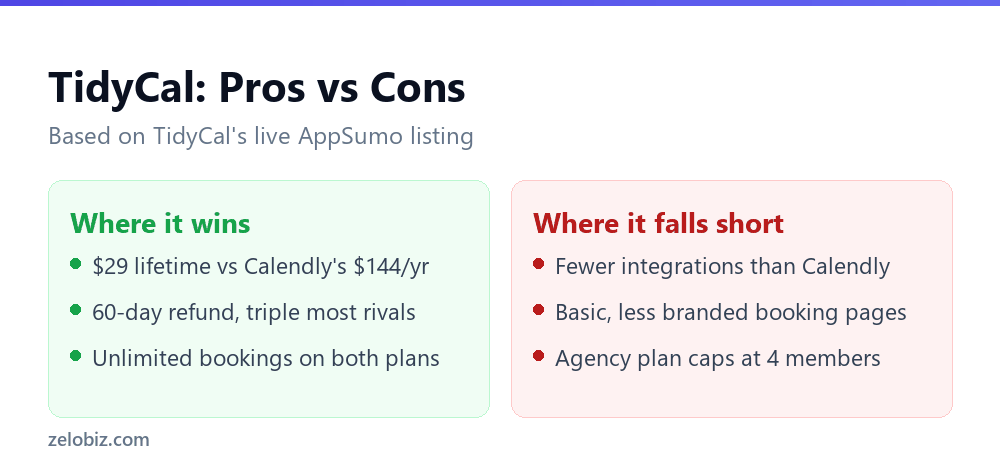
Both plans include lifetime access to all future Lifetime Plan updates and a 60-day refund window, which TidyCal’s own marketing describes as triple the length of many competitors’ refund policies. The $29 entry price against Calendly’s roughly $144-a-year comparison the product uses in its own marketing is the core of TidyCal’s pitch: a single small purchase instead of an annual bill that repeats indefinitely.
Key features
- Calendar integration with Google Calendar, Office 365, and iCal
- Unlimited bookings on both tiers, with no monthly volume cap
- Custom branding on booking pages
- Stripe and PayPal integration for paid bookings and consultations
- Zoom and Microsoft Teams integration on the Agency plan
- Team member access (up to 4) on the Agency plan for small teams sharing scheduling
Setting up TidyCal in practice
Setup follows the same pattern as any scheduling tool in this category: sign up, connect a calendar, set your availability windows, and share the generated booking link. TidyCal keeps this whole process deliberately simple and quick, there’s no elaborate onboarding flow or multi-step configuration wizard to work through first, which is consistent with its positioning as the no-frills option in this space. For someone who has never used a scheduling tool before, that simplicity is an advantage: fewer settings to get wrong, fewer places to get stuck. For someone coming from a more feature-rich tool like Calendly, it can feel like a step down in configurability, since options like custom event types, buffer time rules, and advanced routing logic are either more limited or absent compared to what a mature competitor offers.
Paid bookings through Stripe or PayPal are worth setting up correctly from day one if you plan to charge for consultations, since testing a payment flow after real bookings are already coming in is a worse time to discover a configuration issue. TidyCal’s documentation covers the connection process for both, and it is a reasonable practice to run a test booking with a real (small) payment before publicizing the booking link widely.
Real-world use cases
A freelance consultant is the clearest fit: a single booking link handles discovery calls, paid consultations through Stripe, and client check-ins, all without the consultant manually managing a calendar back-and-forth. A small coaching or service business benefits similarly, particularly if calls happen over Zoom or Teams and the Agency plan’s integration covers that directly. A small internal team, up to the Agency plan’s four-member cap, can centralize meeting scheduling across a handful of people who each need their own calendar connected, without paying a per-seat fee that scales as the team happens to grow.
Where TidyCal is a weaker fit is a business that wants scheduling tied into a broader marketing or sales stack, automatically triggering a CRM update, a Slack notification, or an email sequence when someone books. That kind of automation depth is where Calendly’s larger integration library and TidyCal’s simpler feature set diverge the most clearly.
The economics of a $29 lifetime scheduling tool
It’s worth being explicit about just how favorable TidyCal’s math is compared to a subscription. Calendly’s cited comparison figure of roughly $144 a year means a TidyCal Individual plan pays for itself against that alternative in under three months, and every month after that is pure savings for as long as TidyCal remains useful for your needs. Even the $79 Agency plan clears that same $144 annual comparison inside its first seven months. That is a meaningfully faster payback period than most of the other lifetime deals covered in this review series, where higher price points or narrower use cases stretch the break-even point out much further. The obvious caveat is the same one that applies to every lifetime deal: the math only holds if TidyCal keeps functioning and keeps being maintained, which is a reasonable bet given how long it has already been operating as one of AppSumo’s most recognizable scheduling deals, but never a certainty with any smaller software company.
Pros and cons
Pros
- One of the lowest entry prices in the entire scheduling category, at $29 for lifetime access
- 60-day refund window, longer than most competing tools’ policies
- Unlimited bookings on both tiers removes a common limitation of budget scheduling tools
- Zoom and Teams integration on the Agency plan closes a gap that some pricier competitors in this review series, including Zcal, don’t cover at all
Cons
- Branding and page customization are more basic than Calendly’s or Zcal’s more polished booking page builders
- The Agency plan’s 4-member cap is tight for anything beyond a very small team
- Fewer native integrations overall than Calendly, which has spent years building out a large third-party app ecosystem
- As a budget-focused tool, it lacks some of the advanced automation and workflow features found in more expensive competitors
How TidyCal compares to Calendly and Zcal
Calendly remains the category leader with the deepest integration library, connecting to Slack, CRMs, and dozens of other business tools, but it runs on a recurring subscription that adds up over years of use, roughly $144 annually by TidyCal’s own comparison figure for a comparable plan. For a business that leans heavily on those integrations, Calendly’s ongoing cost is easier to justify. For a business that just needs reliable booking without the extras, TidyCal’s $29 one-time cost is hard to beat on pure economics.
Zcal, also covered in this review series, sits in between on price (its lifetime tiers ran $59 to $219 while its deal was live) and offers more polished, branded booking pages than TidyCal’s more basic interface. Zcal’s deal is currently sold out, though, while TidyCal’s remains live and purchasable, which matters if you need a working solution today rather than waiting for a listing to potentially return.
Who this is actually for
TidyCal fits a freelancer, solo consultant, or small team that wants dependable scheduling at the lowest possible cost and doesn’t need deep third-party integrations or heavily branded booking pages. The Agency plan’s Zoom and Teams integration extends that fit to a small team running client calls through those platforms specifically. It’s a weaker fit for a business that already depends on Calendly’s broader integration ecosystem, or one that wants scheduling pages with more visual customization than TidyCal’s simpler interface offers.
How support and updates have held up
A lifetime deal is only as good as the company’s continued willingness to maintain it, and TidyCal’s continued presence on AppSumo’s active listings years after its original launch is a reasonable data point in its favor. That said, public information on the specific cadence of feature updates or support response times is thinner than what’s available for a large, venture-backed competitor like Calendly, which publishes a visible product changelog and maintains dedicated support staff. Anyone with a specific support need is better served testing that responsiveness directly with a real question before committing a business’s entire scheduling workflow to it, rather than assuming support quality purely from the product’s continued availability on the marketplace.
What TidyCal deliberately leaves out
Understanding what TidyCal doesn’t try to do is as useful as knowing what it does. There’s no built-in CRM, no marketing automation, no advanced analytics dashboard on booking behavior, and no AI-driven scheduling assistant, all features that have become common additions in pricier scheduling tools chasing a broader “meeting productivity platform” positioning. TidyCal has stayed close to its original, narrower job: let someone book a slot on a calendar easily. That restraint is arguably a feature rather than a gap for the buyer who specifically wants a lightweight tool and doesn’t want to pay for, configure, or maintain capabilities they won’t use. It’s a real gap for a buyer who was hoping a scheduling tool would also handle broader customer relationship tracking.
Choosing between the two plans
The decision mostly comes down to two things: do you need Zoom or Teams integration, and do more than one person need scheduling access. A solo operator using in-person meetings or a different video platform gets full value from the $29 Individual plan and gains nothing from the $79 Agency tier. A small team of two to four people that runs client calls through Zoom or Teams should go straight to the Agency plan, since the Individual plan doesn’t include either integration at any price.
A quick note on longevity
TidyCal has been a well-known fixture of AppSumo’s lifetime deal roundups for long enough that it carries a different risk profile than some of the newer, less-established products covered elsewhere in this review series. That track record isn’t a guarantee against the same kind of shutdown risk that affected other tools in this cluster, no lifetime software deal is fully immune to that, but a longer operating history with a large existing base of lifetime customers is a reasonable, if imperfect, signal of relative stability compared to a company launching its first AppSumo deal. It’s still worth keeping a basic export of your booking configuration and event types somewhere outside the platform, the same sensible precaution worth taking with any single tool a business comes to depend on daily.
Frequently asked questions
Is the TidyCal AppSumo deal still available?
Yes, as of this review both the $29 Individual and $79 Agency lifetime plans are live and purchasable.
Does TidyCal integrate with Zoom?
Zoom and Microsoft Teams integration is available on the Agency plan. The Individual plan does not include it.
How does TidyCal’s refund policy compare to competitors?
TidyCal offers a 60-day refund window, which its own marketing describes as roughly triple the length of many competing tools’ refund policies.
Is TidyCal a good fit for a small agency?
The Agency plan supports up to 4 team members, which suits a small team but is tight for anything larger. A bigger agency would need to weigh whether TidyCal’s feature set still fits at that scale.
Does TidyCal include CRM or marketing automation features?
No. TidyCal is focused narrowly on scheduling and booking, without built-in CRM, marketing automation, or advanced analytics. Buyers wanting those features would need a separate tool alongside it.
Verdict
TidyCal is one of the more straightforwardly good deals covered in this review series: it’s cheap, it’s live, it does the core job of scheduling reliably, and its refund window gives buyers real room to test it risk-free. It won’t match Calendly’s integration depth or Zcal’s branding polish, and it shouldn’t be judged against either on those specific fronts. For anyone who just needs a working booking link without an ongoing subscription, and doesn’t need deep CRM or automation integrations tied to it, the $29 Individual plan is close to a no-brainer at that price, and the $79 Agency plan is a fair upgrade for a small team that specifically needs Zoom or Teams built in.