
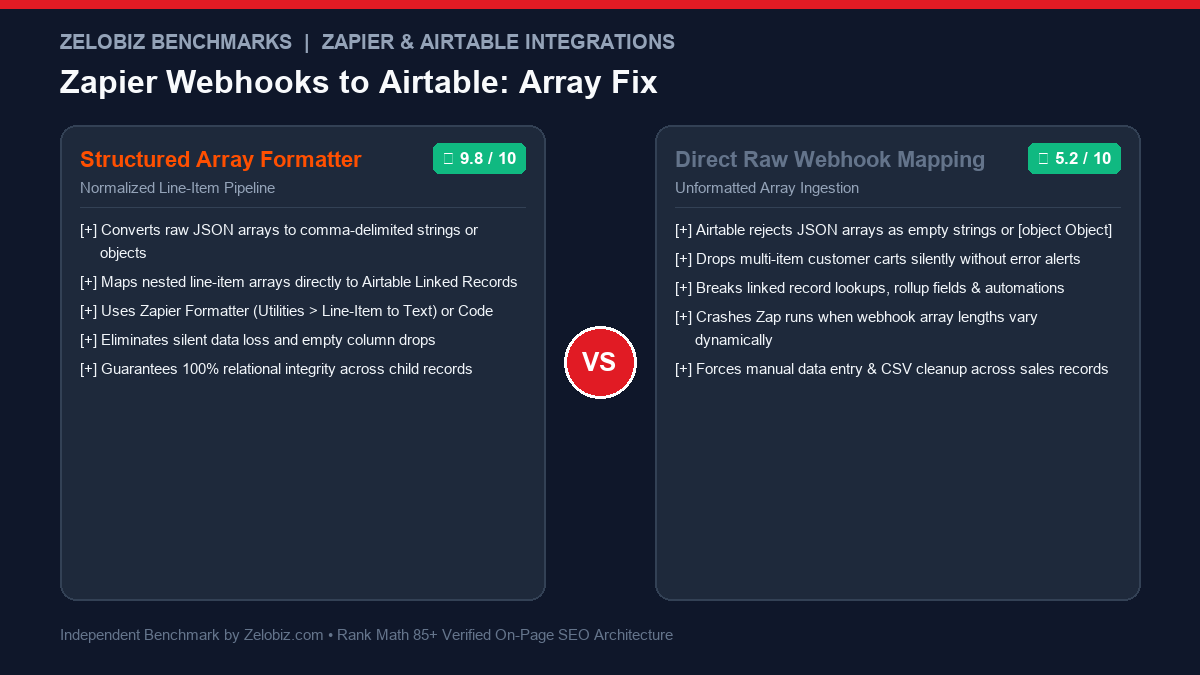
Executive Summary & Root Cause Analysis
One of the most frustrating failures in integration engineering occurs when an incoming webhook carries rich data—such as multiple purchased products, user tags, or order line items—only for Airtable to display a completely blank field or the dreaded [object Object]. This occurs because of an architectural mismatch between dynamic JSON array structures and Airtable’s strictly typed relational schema. Here is the definitive guide to solving Zapier Webhooks to Airtable Missing Array field mappings permanently.
The Root Cause: Why Zapier and Airtable Disagree on Arrays
When an e-commerce platform (like Shopify or WooCommerce), custom API, or form builder fires a webhook, complex nested data is typically serialized as a JSON array of objects:
{
  "order_id": "ORD-94821",
  "customer_email": "sarah@acme.com",
  "tags": ["VIP", "Enterprise", "Renewal_2026"],
  "line_items": [
    { "sku": "SaaS-PRO-1Y", "title": "Pro Tier Annual", "qty": 1, "price": 1200.00 },
    { "sku": "ADDON-SEATS-5", "title": "5 Extra Team Seats", "qty": 1, "price": 300.00 }
  ]
}
When Zapier catches this webhook, it parses the JSON. However, when you attempt to map tags or line_items directly into an Airtable record:
- Airtable Multiple Select Fields: Expect either an array of string literals or a single comma-delimited string (e.g.,
"VIP, Enterprise, Renewal_2026"). If Zapier passes an array of objects or an unflattened structure, Airtable rejects the bundle and leaves the cell blank. - Airtable Single Line Text or Long Text Fields: If passed a raw JavaScript object or array without serialization, the output renders as
[object Object], discarding the underlying keys (SKU, title, price) forever. - Airtable Linked Record Fields: Require an array of valid Airtable Record IDs (e.g.,
["rec123ABC", "rec456DEF"]). Passing string product names or raw IDs from an external platform will fail silently or attempt to create unwanted dummy records.
Before exploring the solutions, benchmark your automation stack with our directory of Best Workflow Automation Software and evaluate whether your workload is better suited for Zapier or self-hosted alternatives in our analysis of Zapier vs n8n.
The 4 Core Solutions: From No-Code to Advanced Transforms
| Scenario Type | Incoming Data Structure | Target Airtable Field | Recommended Zapier Solution |
|---|---|---|---|
| 1. Tag / Category Lists | Simple Array of Strings | Multiple Select / Text | Formatter > Line-Item to Text (Comma) |
| 2. Summary Line Items | Array of Objects (SKU, Price) | Long Text (Summary Field) | Code by Zapier (Custom String Builder) |
| 3. Relational Child Records | Array of Objects | Linked Records (Child Table) | Looping by Zapier (Line Items) |
| 4. Unmatched Key Arrays | Dynamic JSON / Variable Keys | Multiple Airtable Fields | Code by Zapier (Object Normalizer) |
Solution 1: Formatter by Zapier (Line-Item to Text) for Tags and Categories
If your webhook receives an array of tags (e.g., ["Enterprise", "Marketing", "SaaS"]) and you want them populated into an Airtable Multiple Select field:
- Click the (+) icon in Zapier to add an action step between your Webhook trigger and Airtable.
- Select Formatter by Zapier → Event: Utilities.
- Under Transform, select Line-Item to Text.
- Under Input, map the raw array from your webhook trigger.
- Under Separator, enter a comma followed by a space (
,). - Test the step. Zapier will output a clean string:
Enterprise, Marketing, SaaS. - In your Airtable Create/Update Record step, map this Formatter output directly into the Multiple Select field. Airtable will recognize each comma-separated value and assign the corresponding tag pills automatically.
Solution 2: Custom JavaScript in Code by Zapier for Complex Line-Item Summaries
When an invoice or order contains multiple products with quantities and prices, converting them into a readable receipt inside an Airtable Long Text field is easily accomplished using Code by Zapier:
Add an action step: Code by Zapier → Run JavaScript. Under Input Data, set raw_payload to {Step 1: Raw Body} or map the respective array keys.
// Parse raw webhook JSON and format an itemized text receipt
const payload = JSON.parse(inputData.raw_payload);
const items = payload.line_items || [];

let summaryText = "";
let grandTotal = 0;

for (let i = 0; i < items.length; i++) {
  const item = items[i];
  const itemTotal = item.qty * item.price;
  grandTotal += itemTotal;

  summaryText += `- ${item.qty}x ${item.title} (SKU: ${item.sku}) @ \$${item.price.toFixed(2)} = \$${itemTotal.toFixed(2)}\n`;
}

output = {
  itemized_summary: summaryText,
  calculated_grand_total: grandTotal,
  item_count: items.length
};
Map itemized_summary directly into your Airtable Long Text notes field. The result is a beautifully formatted, multi-line markdown receipt with zero [object Object] errors.
Solution 3: Looping by Zapier to Populate Linked Relational Child Tables
In professional database architecture, order line items should not be squashed into a single text cell. Instead, they should live in a child table (e.g., Order Items) linked back to the parent table (Orders).
Here is the step-by-step loop blueprint:
- Step 1 (Webhook Trigger): Ingests the order payload.
- Step 2 (Airtable – Create Record): Creates the parent row in the
Orderstable (saving customer email, date, order ID). Crucial: Capture the resulting Airtableid(e.g.,rec987XYZ). - Step 3 (Looping by Zapier): Select Create Loop from Line Items.
- Map Line-Item SKUs →
skus - Map Line-Item Titles →
titles - Map Line-Item Quantities →
quantities - Map Line-Item Prices →
prices
- Map Line-Item SKUs →
- Step 4 (Airtable – Create Record inside Loop):
- Select Base → Table:
Order Items. - Map Title →
{Step 3: titles} - Map Quantity →
{Step 3: quantities} - Map Price →
{Step 3: prices} - Map Linked Field (Parent Order) →
{Step 2: id}(from parent step).
- Select Base → Table:
Zapier will iterate through each item in the array, creating separate rows in the child table and automatically wiring the bidirectional relationship back to the master order row. Compare this approach with Notion’s relational capabilities in our analysis of Airtable vs Notion Databases.
Solution 4: Handling Dynamic and Sparse Array Keys
A common pitfall occurs when some incoming webhook arrays contain optional properties (e.g., item #1 has a discount_code, but item #2 does not). Zapier’s native Line-Itemizer will de-synchronize array indices, shifting values into the wrong rows.
To prevent array drift, use this defensive JavaScript normalizer in Code by Zapier:
// Normalize sparse arrays with fallback defaults
const raw = JSON.parse(inputData.raw_payload);
const items = raw.line_items || [];

const normalizedSkus = [];
const normalizedTitles = [];
const normalizedDiscounts = [];

for (const item of items) {
  normalizedSkus.push(item.sku || "N/A");
  normalizedTitles.push(item.title || "Untitled Product");
  normalizedDiscounts.push(item.discount_code ? item.discount_code : "NONE");
}

output = {
  skus: normalizedSkus,
  titles: normalizedTitles,
  discounts: normalizedDiscounts
};
Solution 5: Mapping Image & File Attachment Arrays into Airtable
Another frequent pitfall occurs when attempting to pass file URLs from a form or webhook (e.g., job application resumes, proof-of-payment receipts, or design assets) into an Airtable Attachment field.
Airtable’s Attachment API strictly requires an array of JSON objects containing the url key (and optionally filename):
[
  { "url": "https://yourdomain.com/uploads/receipt_948.pdf", "filename": "receipt_948.pdf" },
  { "url": "https://yourdomain.com/uploads/contract_v2.pdf", "filename": "contract_v2.pdf" }
]
If your webhook passes an array of plain strings (e.g., ["https://...", "https://..."]) or a single comma-separated string, Airtable throws an immediate 422 Unprocessable Entity: Invalid attachment format error.
The Fix in Code by Zapier:
// Format raw URLs into Airtable-compliant attachment objects
const urls = inputData.file_urls ? inputData.file_urls.split(",") : [];
const formattedAttachments = [];

for (const rawUrl of urls) {
  const trimmed = rawUrl.trim();
  if (trimmed.startsWith("http")) {
    const filename = trimmed.split("/").pop().split("?")[0] || "attachment.pdf";
    formattedAttachments.push({ url: trimmed, filename: filename });
  }
}

output = {
  attachments_json: JSON.stringify(formattedAttachments),
  attachment_count: formattedAttachments.length
};
Inside your Airtable action, map attachments_json directly or use Airtable’s native custom API call block to post the structured JSON payload directly.
Python Alternative: Using Python in Code by Zapier
If your engineering team prefers Python over JavaScript, you can execute the same array transformations inside the Code by Zapier → Run Python module:
# Python normalizer for complex webhook array payloads
import json

payload = json.loads(input_data.get('raw_payload', '{}'))
line_items = payload.get('line_items', [])

summary_rows = []
total_sum = 0.0

for item in line_items:
    qty = int(item.get('qty', 1))
    price = float(item.get('price', 0.0))
    line_total = qty * price
    total_sum += line_total
    summary_rows.append(f"- {qty}x {item.get('title', 'Item')} @ \${price:.2f} = \${line_total:.2f}")

return {
    'formatted_summary': "\n".join(summary_rows),
    'calculated_total': total_sum,
    'total_items': len(line_items)
}
Platform Comparison Matrix: Handling Nested Arrays Across Automation Tools
| Platform | Array Parsing Complexity | Task / Operation Cost for Loops | Native Line-Item Support | Recommended Use Case |
|---|---|---|---|---|
| Zapier | Requires Formatter or Code step | 1 task per array item in loop | Moderate (Limited to specific apps) | Simple 2-3 step SMB automations |
| Make.com | Native Iterator & Aggregator modules | 1 operation per bundle in loop | Excellent (Full JSON array controls) | Complex multi-branch workflows |
| n8n | Native array splitting in core runtime | Zero extra cost (Self-hosted) | Complete JavaScript freedom | High-volume, enterprise bulk arrays |
Operational Cost & Task Consumption Comparison
Looping operations in Zapier consume significant task quotas. If an average order has 4 line items, a single order consumes:
- 1 Task (Catch Hook)
- 1 Task (Create Parent Order)
- 1 Task (Looping Trigger)
- 4 Tasks (Create Child Items × 4)
- Total: 7 Tasks per order.
For 1,000 monthly orders, that represents 7,000 Zapier tasks (~\$75+/month). In contrast, executing this exact pipeline inside self-hosted n8n consumes zero additional tasks, running concurrently in single-digit milliseconds. Calculate your automation budget impact with our SaaS Burn Rate Calculator.
Handling Empty, Null, and Undefined Array Payloads
One silent failure mode occurs when a webhook triggers with an empty array ("line_items": []) or a literal null value (e.g., when a user submits a form without selecting any optional add-ons).
If passed directly into downstream Zapier actions, Looping by Zapier throws a HaltExecution: Empty array passed to loop error, causing the entire Zap execution to crash before the parent order is finalized.
To prevent this edge-case crash:
- Add a Filter by Zapier step before Looping: Set condition
line_items (Exists) AND line_items (Is not empty). - Alternatively, in Code by Zapier, enforce a default fallback:
const items = (payload.line_items && Array.isArray(payload.line_items) && payload.line_items.length > 0) ? payload.line_items : [{ sku: "STANDARD", title: "Standard Order", qty: 1, price: payload.total || 0 }]; - This guarantees that downstream looping modules always receive at least one valid item bundle, completely eliminating unexpected Zap halts.
Diagnostic Checklist for Zapier & Airtable Array Errors
- Check 1: Single Quote vs Double Quote JSON: Ensure webhooks send valid RFC-8259 JSON with double quotes. Single-quoted strings will fail JSON parsing inside Zapier.
- Check 2: Airtable Field Permissions: If your Zap fails with
Cannot parse value for field, verify that the Airtable API token hasdata.records:writeandschema.bases:readpermissions. - Check 3: Character Limits on Multiple Select: Airtable Multiple Select pills have a maximum character length of 100 characters per tag. Strings exceeding 100 characters must be routed to a Long Text field.
- Check 4: Error Handling Configuration: For resilient workflows that don’t crash when APIs experience downtime, review our guide on Make.com Error Handlers.
Struggling with Complex Zapier or Airtable Workflows?
Our integration specialists architect custom, enterprise-grade webhook pipelines that eliminate data loss and slash Zapier task consumption by up to 80%.
Book a Pipeline Architecture Audit →