
Gemini in Google Sheets is included with paid Workspace plans, which is true and incomplete in a way that costs people money. It is metered, the entry plan has no access at all, and the more expensive Business plan does not give you any more of it.
Those three facts are in Google’s own edition comparison for administrators, and almost never in the articles that answer this question.
Short answer: Business Starter has no Gemini in Sheets whatsoever. Business Standard is the cheapest plan that includes it, and Google meters Sheets by feature rather than as a single pool. Building and editing spreadsheets allows 100 uses a month, the AI function allows 5,000, and creating a canvas allows 30. Business Plus costs more and has the same 100-a-month cap. Only Enterprise editions raise it, to 500. Verified against Google’s admin documentation on 30 August 2026.
The Allowance by Edition
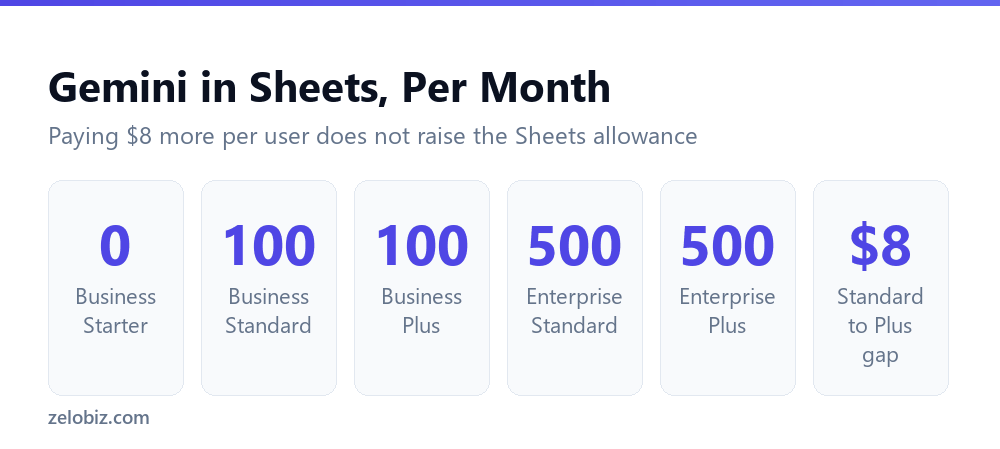
Two things in that table are worth stopping on, and both contradict how the feature is usually described.
Business Starter Gets Nothing
The entry plan has no Gemini in Sheets or Slides at all. Not a reduced allowance. None.
This matters because Workspace marketing says Gemini is included, and on Starter it is included in Gmail while being entirely absent from the two apps most people had in mind when they read that sentence.
The practical consequence is that the useful upgrade for most small teams is Starter to Standard, which is roughly six dollars per user per month. That is the step between no access and an allowance.
Business Plus Does Not Give You More
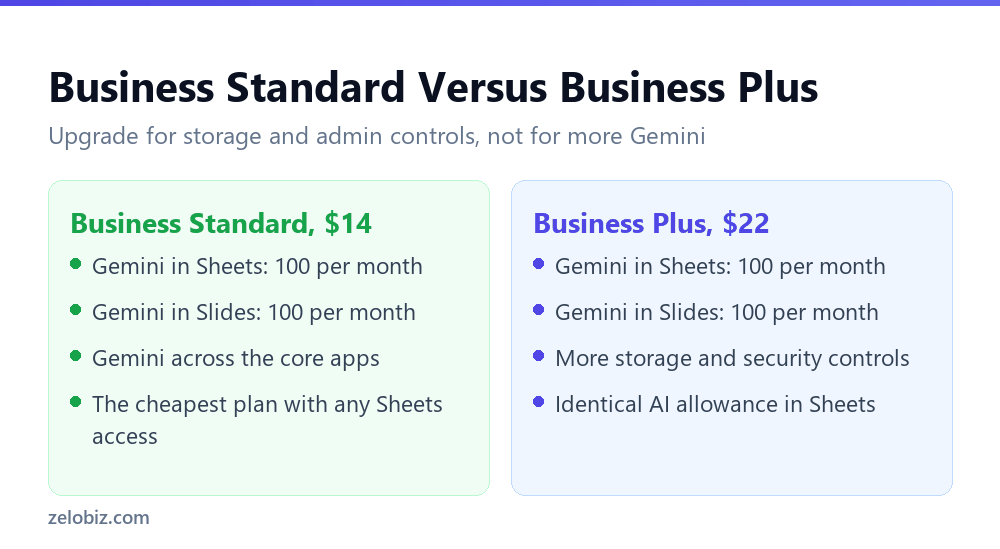
This is the finding worth acting on. Business Plus costs $22 against Business Standard at $14, and every Sheets allowance is identical between them, including the 100 a month for building and editing spreadsheets.
There are real reasons to choose Business Plus. More storage, stronger security and compliance controls, enhanced meeting features. If you need those, the upgrade is justified on its own terms.
But if someone is considering Business Plus because the team keeps hitting the Gemini limit in Sheets, that upgrade will not help. The next increase is at Enterprise, which is a considerably larger step and priced by sales conversation rather than a public figure.
⚠️ Watch out: Check this before approving an upgrade on AI grounds. Eight dollars per user per month across a team of fifteen is $1,440 a year, and it buys exactly the same number of Gemini requests in Sheets that you already have.
What Actually Uses Your Hundred
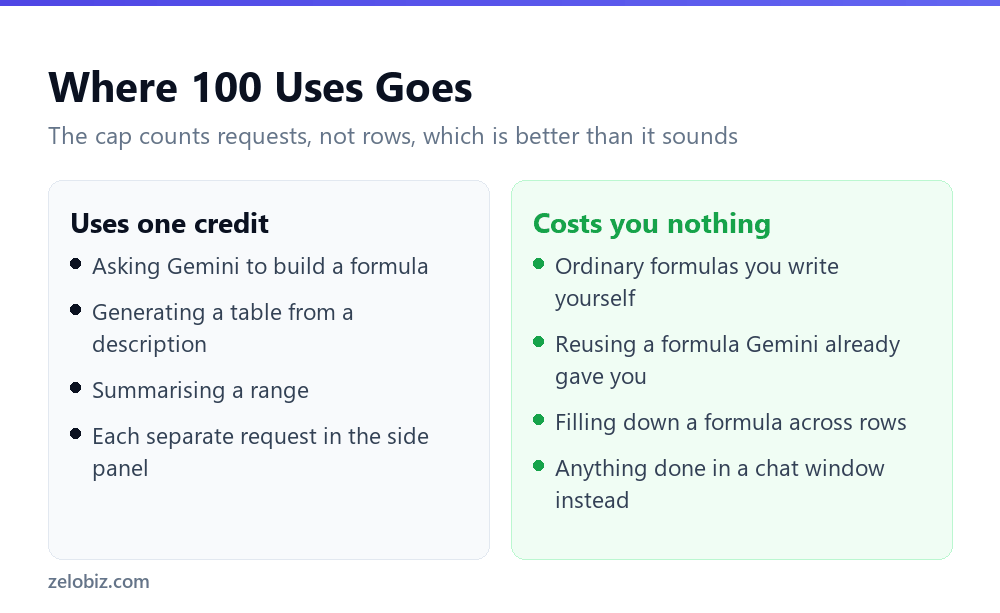
The cap counts requests rather than rows, which is more generous than it first sounds.
Asking Gemini to write a formula is one use. Applying that formula to forty thousand rows is free, because the formula is an ordinary Google Sheets formula once it exists. The AI was involved in producing it, not in running it.
That distinction changes how you should think about the limit. A hundred requests a month is genuinely a lot if you are using Gemini to help you build things, and very little if you are trying to use it as a per-row processor.
If you are building
Writing formulas, generating starter tables, getting a range explained. A hundred is plenty for most people, and many will not come close.
If you are processing
Classifying every row, summarising every entry, generating text per record. A hundred disappears immediately, and this is the wrong tool for it. The Apps Script and API route handles per-row work at roughly a cent per thousand rows with no monthly cap.
💡 Pro tip: Before upgrading anything, spend two weeks deliberately using your existing allowance. Running out quickly tells you the plan is wrong for your usage. Barely denting it tells you an upgrade would have been wasted, and that is the more common outcome.
What Gemini in Sheets Is Actually Good At
Worth knowing before you spend any of the hundred, because the allowance rewards some uses far better than others.
Building a formula you would otherwise look up
One request produces a formula you then use indefinitely at no further cost. This is the highest-value way to spend a credit, because the output keeps working long after the request is finished.
Generating a starting structure
Describing a tracker or a table and getting a first version built is a good use of one request. You will rearrange it, but starting from something beats starting from an empty grid.
Explaining a range you did not build
Same value as elsewhere in spreadsheets: asking what something does is read-only, fast, and cheap at one request.
What wastes the allowance
Anything you will need to repeat per row. Asking it to categorise one cell is a request. Doing that four hundred times is four hundred requests against a hundred-request allowance, and it will stop working a quarter of the way through the job.
Which Plan by Situation
Bringing the pricing and the allowance together, because the right answer varies more than the marketing suggests.
- On Starter, curious about AI. Upgrade to Business Standard. It is roughly six dollars per user and it is the only step that turns no access into access.
- On Standard, occasionally hitting the cap. Stay. Move the per-row work to the API route and keep Gemini for building things. Upgrading to Plus changes nothing.
- On Standard, constantly hitting the cap. You are using it as a per-row processor. That is a tooling mismatch rather than a plan problem, and no Workspace tier fixes it economically.
- On Plus already. You have what Standard has in Sheets. Fine, provided you are there for the storage and security rather than the AI.
- Genuinely need 500 a month. That is an Enterprise conversation, and worth pricing against simply using the API for the bulk work instead.
📊 Note: The recurring answer across most of these is that heavy per-row work does not belong in the Workspace allowance at all. A metered in-app assistant and a per-token API are priced for different jobs, and trying to use one for the other is what makes people feel the limits are unreasonable.
The Add-On, and Why We Are Not Quoting a Price
Google sells an AI Expanded Access add-on for higher limits, available on Business Standard, Business Plus, Enterprise Standard and Enterprise Plus.
Google does not publish a fixed price for it. Their documentation states the cost depends on your local currency and the length of your subscription, and directs administrators to the admin console for the figure that applies to them.
You will find specific dollar amounts quoted for it in other articles. Treat them carefully, because the vendor explicitly declines to publish one. Check your own admin console instead.
📊 Note: This is a good habit generally with Workspace pricing. Promotional rates, currency and term all move the number, so the figure in your console is the only one that describes what you would actually pay.
Common Questions
Which Google Workspace plan do I need for Gemini in Sheets?
Business Standard is the cheapest plan that includes it. The allowances are set per feature: 100 a month for building and editing spreadsheets, 5,000 for the AI function, and 30 for creating a canvas. Business Starter has no access to Gemini in Sheets or Slides at all. Business Plus has the same 100-per-month allowance as Standard, and only Enterprise editions raise it to 500.
Is Gemini free with Google Workspace?
It is included in paid plans at no extra charge, but it is metered in Sheets and Slides. Included does not mean unlimited, and on the Business Starter plan it does not include those two apps at all.
Does Business Plus give me more Gemini than Business Standard?
Not in Sheets or Slides. Both allow the same per-feature figures, including 100 a month for building and editing spreadsheets. Business Plus offers more storage and stronger security and compliance controls, but upgrading from Standard to Plus does not increase your AI allowance in those apps.
What counts as one Gemini use in Sheets?
One request. Asking it to write a formula, generate a table or summarise a range each use one. Applying the resulting formula across thousands of rows costs nothing extra, because at that point it is an ordinary spreadsheet formula.
What if 100 spreadsheet builds a month is not enough?
It depends what you are doing. If you are building things, 100 is usually plenty. If you are processing every row of a dataset, Gemini in Sheets is the wrong tool and the API route via Apps Script handles that far more cheaply with no monthly cap.
How much is the AI Expanded Access add-on?
Google does not publish a fixed price. Their documentation says it varies by local currency and subscription duration, and points administrators to the admin console. Specific figures quoted elsewhere should be treated with caution.
Does the Gemini allowance reset every month?
Google states the limits as a per-month figure, so the allowance is monthly rather than a one-off. If you exhaust it, access returns at the start of the next monthly period rather than requiring an upgrade.
Is the allowance per user or shared across the organisation?
Per user. Google states that limits apply to each user and are not shared, so extra seats do not create a pool a heavy user can draw down. Allowances reset at 12 AM Pacific on the first day of each month, and a prompt counts only if it succeeds and returns a response. That distinction matters a great deal when sizing a plan for a team, so confirm it in your own admin console rather than assuming either reading.
Why can I not see Gemini in my Google Sheets?
The most likely reason is that you are on Business Starter, which has no Gemini access in Sheets. It is not a rollout delay or a settings problem, and only an upgrade to Business Standard or above changes it.
The Short Version
- →Business Starter has no Gemini in Sheets or Slides at all.
- →Business Standard is the cheapest plan with access, capped at 100 spreadsheet builds a month.
- →Business Plus costs $8 more per user and has identical Sheets allowances.
- →Only Enterprise editions raise the allowance, to 500 a month.
- →The cap counts requests, not rows. Applying a generated formula is free.
- →Google does not publish a price for the AI Expanded Access add-on. Check your console.
The pattern here is the same one that runs through most AI pricing. Included is true, and it describes the best case rather than the terms. Knowing which tier you are on and what it actually allows is worth more than any feature comparison.
It is also worth checking again in a few months. Google has restructured how Gemini is bundled into Workspace more than once, moving it from a paid add-on into the base plans and adjusting what each edition includes. The allowances above are correct today and are not a permanent feature of the product.
That is the argument for building habits rather than buying tiers. A team that uses Gemini for building formulas and the API for per-row work is insulated from those changes, because neither job depends on a particular edition staying generous.
Allowances and pricing checked against Google’s Workspace pricing page and admin edition comparison on 30 August 2026.