
Copilot+ PC requirements get marketed as a single upgrade decision, buy the newer hardware, get the AI PC. What Microsoft’s own specifications actually describe is narrower and more specific: a short list of features gated behind a particular chip capability, sitting on top of a Copilot app that already works on ordinary Windows 11 hardware.
This covers exactly where the hardware bar sits, what’s actually locked behind it versus what runs everywhere already, and the one feature, Recall, that asks for more than the base Copilot+ requirement even after you’ve bought the qualifying hardware.
Short answer: A Copilot+ PC needs a processor with an NPU capable of 40 or more trillion operations per second, 16 GB of DDR5 or LPDDR5 RAM, and 256 GB of SSD or UFS storage, on top of standard Windows 11 minimums. That hardware unlocks a specific set of on-device AI features including Recall, Paint Cocreator and Windows Studio Effects. The base Copilot app, including chat and cloud image creation, already runs on any Windows 11 PC and needs none of this. Verified against Microsoft’s own specifications on 4 September 2026.
Two Different Hardware Bars
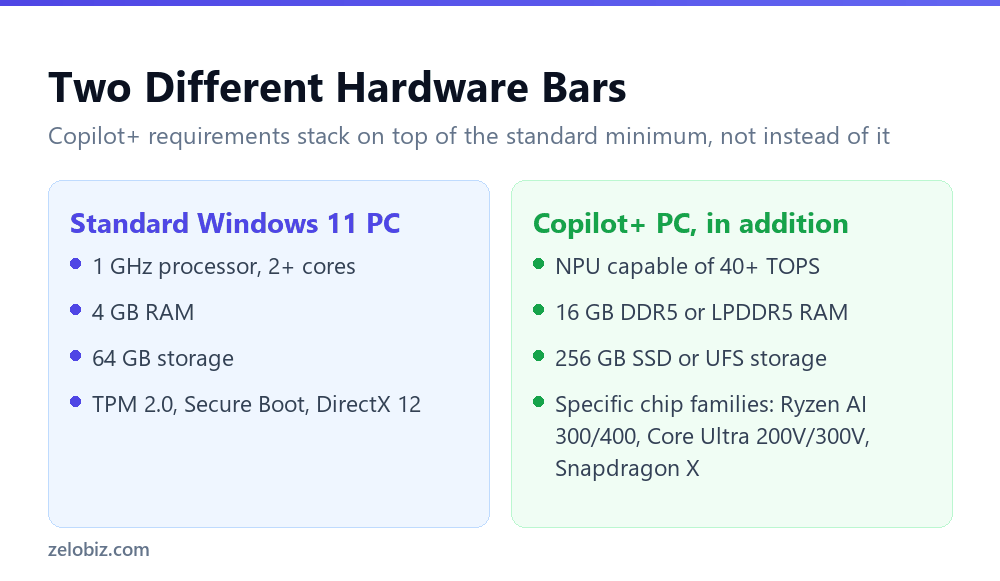
Microsoft’s Copilot+ requirements sit explicitly on top of, not instead of, the standard Windows 11 minimum. A device has to clear both bars, not just the higher one.
The standard Windows 11 minimum: a 1 GHz processor with two or more cores, 4 GB of RAM, 64 GB of storage, UEFI with Secure Boot, TPM 2.0, DirectX 12 compatible graphics, and a display of at least 720p. Most Windows 11 PCs sold today clear this easily.
The Copilot+ addition: a compatible processor or system on a chip with an NPU capable of performing 40 or more trillion operations per second, 16 GB of DDR5 or LPDDR5 RAM, and 256 GB of SSD or UFS storage. Microsoft names specific supported chip families: AMD Ryzen AI 300 and 400 series, Intel Core Ultra 200V and 300V series, and Snapdragon X series.
What’s Actually Locked Behind the NPU
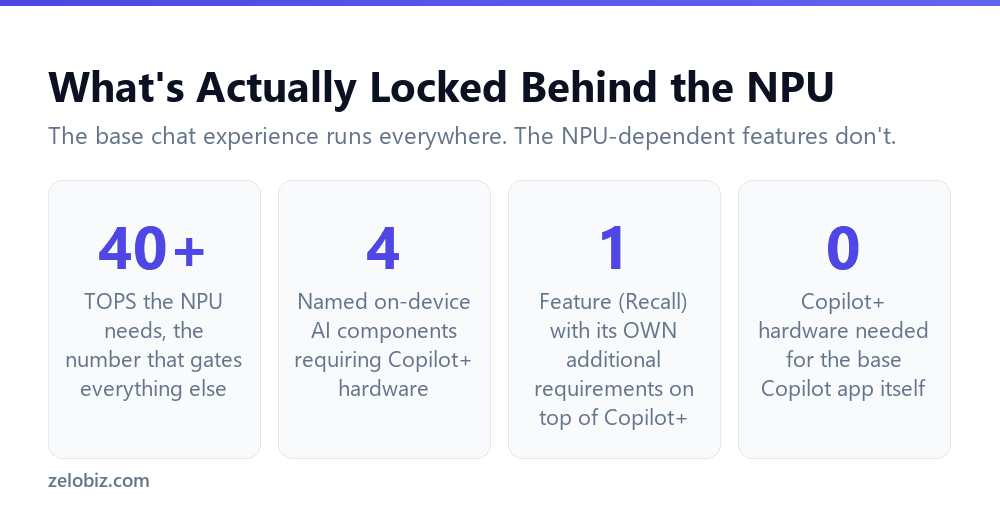
This is the part worth being precise about before spending on new hardware. The feature gated behind Copilot+ status is not Copilot itself.
The base Copilot app for Windows, supporting chat, image creation, longer conversations, voice interactions, file search, screenshot capability, web content viewing, and Windows Settings support, installs by default on new Windows 11 PCs generally and needs none of the Copilot+ hardware bar to run.
What actually requires Copilot+ hardware is a shorter, more specific list: Recall, Paint Cocreator, and Windows Studio Effects, along with a set of on-device AI components, Image Creation, Image Processing, Image Transform, and the Phi Silica models, all described by Microsoft as running on supported Copilot+ hardware specifically, using the device’s own NPU rather than sending the work to the cloud.
💡 Pro tip: Before buying Copilot+ hardware specifically for the AI features, check whether the specific feature you want, most often Recall, is the actual draw. If it’s general Copilot chat and assistance you’re after, that already runs on hardware you may already own.
Recall Wants More Than the Base Copilot+ Bar
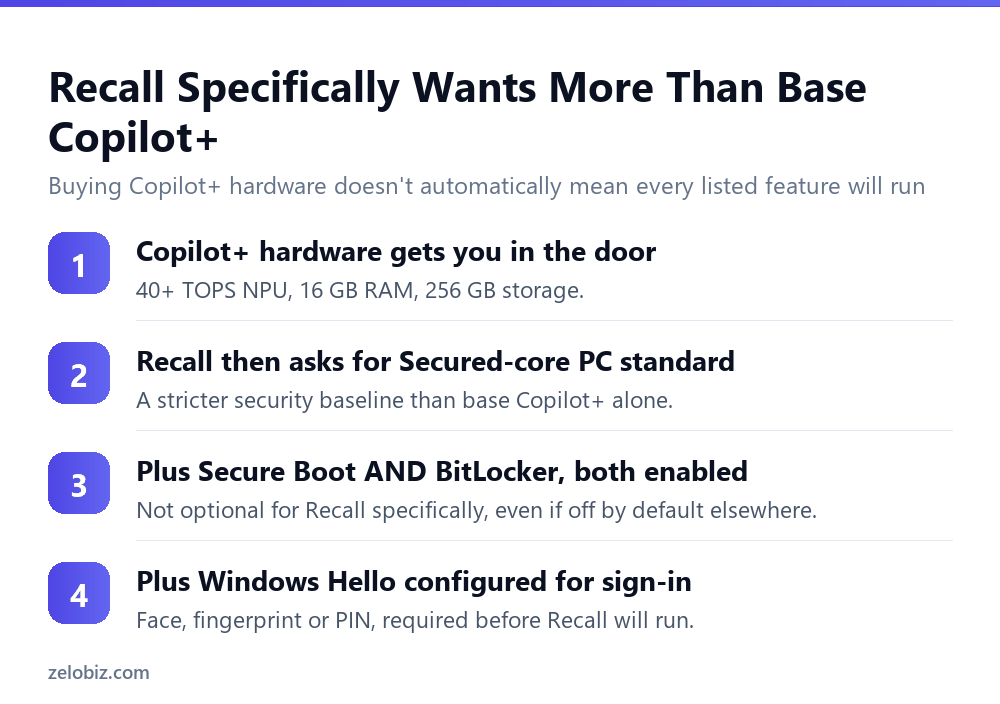
Buying qualifying Copilot+ hardware is necessary for Recall and not automatically sufficient. Recall specifically layers extra requirements on top of the base hardware bar, all related to security configuration rather than raw processing power.
The device needs to meet the Secured-core PC standard. Secure Boot and BitLocker, or Device Encryption, both need to be enabled rather than simply available. Windows Hello, meaning face, fingerprint, or PIN sign-in, needs to be configured rather than left on a password. And the device needs the April 2025 Windows non-security preview update or later installed.
⚠️ Watch out: A device meeting the Copilot+ hardware minimum does not automatically mean Recall will run. If Secure Boot, BitLocker, or Windows Hello aren’t actively configured, Recall’s additional requirements aren’t met even though the NPU, RAM, and storage all qualify. Check the security configuration specifically, not just the chip specification sheet.
📊 Note: This layering is worth expecting from other Copilot+ features too as Microsoft continues developing them. The base hardware requirement is a floor for what’s possible on that device, not a guarantee that every feature described as Copilot+ exclusive will work with zero further configuration.
Why Microsoft Set the Bar Where It Did
The 40+ TOPS threshold isn’t an arbitrary marketing number. It reflects what’s actually needed to run the on-device AI models, including the Phi Silica family, entirely locally, at a speed that feels responsive rather than sluggish, without offloading the work to a cloud server.
That local processing is also the reason features like Recall are gated this way specifically rather than being made available everywhere with a slower fallback. Recall’s entire privacy model, covered in detail in our companion article, depends on processing happening on the device rather than being sent anywhere else. Without a capable enough NPU, that local-only promise either can’t be kept or the feature becomes impractically slow to actually use.
Seen this way, the hardware requirement isn’t gatekeeping for its own sake. It’s a direct consequence of a design choice, local processing over cloud processing, that shapes the whole feature set built on top of it.
Checking a Specific Machine Against the Bar
Rather than relying on a marketing label, four checks confirm whether a specific machine, new or already owned, actually clears the Copilot+ requirement.
Confirm the chip family, not just the chip’s age or price tier
A recent, expensive laptop can still lack a qualifying NPU if its chip falls outside the named families. Check the specific processor model against AMD Ryzen AI 300 and 400 series, Intel Core Ultra 200V and 300V series, or Snapdragon X series, rather than assuming a premium price point implies Copilot+ status.
Check RAM and storage as separate line items
16 GB of RAM and 256 GB of storage are common enough that they’re easy to assume are already met on a reasonably specced machine, but a budget configuration of an otherwise qualifying chip can still fall short on either figure independently.
For Recall specifically, check the security configuration separately from the hardware
Secure Boot, BitLocker or Device Encryption, and Windows Hello are settings, not specifications. A machine can have entirely qualifying hardware and still not have these three things actively turned on, which is worth checking in Settings rather than inferring from the spec sheet.
Deciding Whether the Upgrade Is Worth It
The decision comes down to a fairly narrow question once the marketing is set aside: do you specifically want one of the small number of NPU-dependent features, enough to justify buying hardware with a 40+ TOPS NPU, 16 GB of RAM, and 256 GB of storage as a baseline.
- You want Recall specifically. Budget for the hardware and the security configuration it separately requires, not just the chip.
- You want general Copilot chat and assistance. Check whether your current Windows 11 PC already supports it before buying anything new.
- You’re buying new hardware anyway. The Copilot+ tier is a reasonable default to look for, since it costs little extra to future-proof against features Microsoft continues rolling out to that hardware class.
- You’re on older Windows 11 hardware that works fine otherwise. None of the everyday Copilot features require replacing it.
For what Recall itself actually does once the hardware and security requirements are met, including the privacy protections built in, see Windows Recall: what actually gets filtered out. If your new device has the dedicated Copilot key some Copilot+ machines ship with, the Copilot key: what it replaced and how to get it back covers the one keyboard quirk worth knowing about before you get used to it.
One final practical note: hardware shopping for Copilot+ specifically only makes sense as a deliberate purchase decision, not as something to assume you already have. Checking the actual chip model against the named families takes a few minutes and settles the question with certainty, rather than relying on how new or expensive a device feels.
Common Questions
What NPU speed does a Copilot+ PC need?
40 or more trillion operations per second, described as TOPS. This is the specific chip capability that defines whether a device qualifies as a Copilot+ PC.
How much RAM and storage does a Copilot+ PC require?
16 GB of DDR5 or LPDDR5 RAM and 256 GB of SSD or UFS storage, in addition to meeting the standard Windows 11 minimum specifications.
Do I need Copilot+ hardware to use Copilot on Windows at all?
No. The base Copilot app, including chat, cloud-based image creation, file search and screenshot tools, installs by default on new Windows 11 PCs generally and doesn’t require Copilot+ hardware.
Which features actually require Copilot+ hardware?
Recall, Paint Cocreator, Windows Studio Effects, and a set of on-device AI components including image processing tools and the Phi Silica models, all of which run locally using the device’s NPU.
Does meeting the Copilot+ hardware bar guarantee Recall will work?
Not by itself. Recall separately requires meeting the Secured-core PC standard, having Secure Boot and BitLocker or Device Encryption enabled, Windows Hello configured for sign-in, and a specific minimum Windows update installed.
Which chip families qualify for Copilot+ status?
Microsoft names AMD Ryzen AI 300 and 400 series, Intel Core Ultra 200V and 300V series, and Snapdragon X series as supported chip families.
Should I buy Copilot+ hardware just for general Copilot chat?
Not necessarily. If general chat and assistance is all you need, check whether your current Windows 11 PC already supports the base Copilot app before spending on Copilot+ specific hardware.
None of this is likely to stay fixed for long. Microsoft continues expanding what runs on Copilot+ hardware, and the specific list of NPU-gated features described here should be treated as a snapshot rather than a permanent boundary. What’s unlikely to change is the underlying logic: features requiring genuinely local, private processing will keep needing hardware capable of doing that work fast enough to be useful, and that’s the question worth asking about any future feature added to the list, not just the ones that exist today.
The Short Version
- →Copilot+ requires a 40+ TOPS NPU, 16 GB RAM, and 256 GB storage, on top of standard Windows 11.
- →The base Copilot app already runs on ordinary Windows 11 hardware.
- →Only a specific list, led by Recall, Paint Cocreator and Studio Effects, needs the NPU tier.
- →Recall adds its own requirements: Secured-core standard, Secure Boot, BitLocker, Windows Hello.
- →Meeting the hardware bar doesn’t guarantee every Copilot+ feature works with zero setup.
- →Buy Copilot+ hardware for a specific feature you want, not for Copilot access generally.