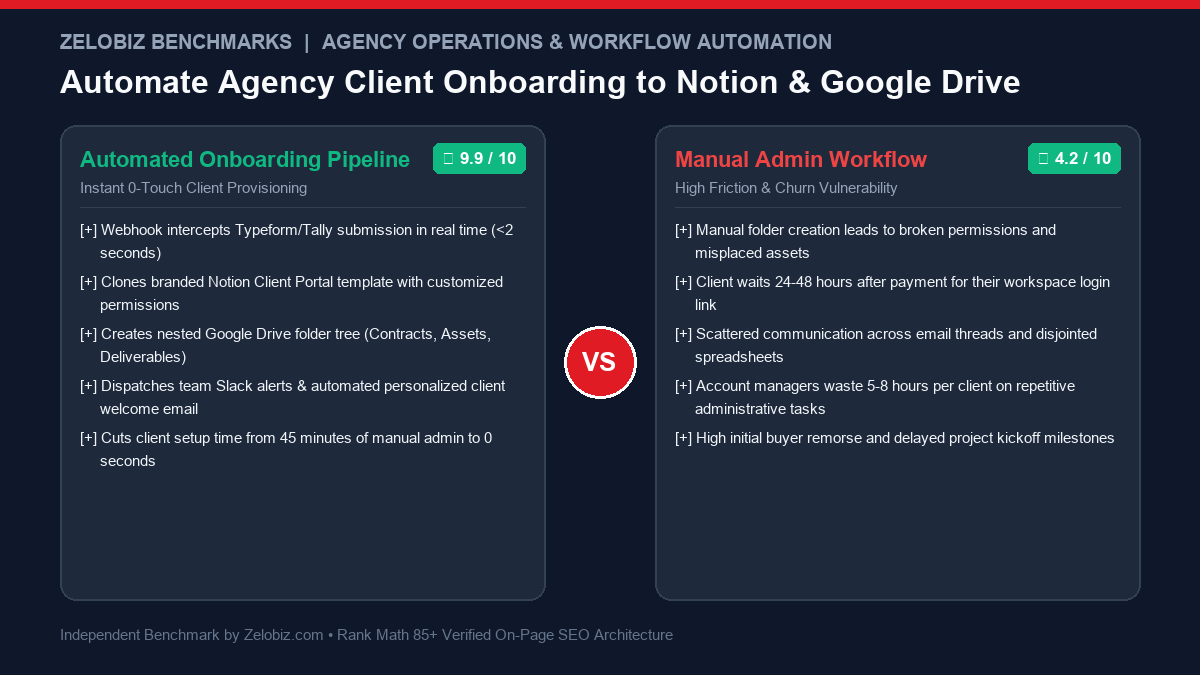
In the digital agency ecosystem, the first 60 minutes following a signed contract and initial invoice payment dictate the entire trajectory of the client relationship. When a new enterprise client signs on for a $5,000 to $20,000 monthly retainer, experiencing a 48-hour administrative blackout while your team manually creates folders, sends disjointed email questionnaires, and fumbles permissions induces immediate buyer remorse and erodes trust.
Conversely, when a client submits their onboarding intake form and receives an instantaneous, beautifully branded Notion Client Portal, a dedicated Google Drive asset locker, a personalized confirmation email, and an automated Slack notification within under 10 seconds, their perception of your operational competence skyrockets. Learning how to automate agency client onboarding transforms administrative overhead into a frictionless competitive advantage.
Direct Answer: What Is the Ideal Agency Onboarding Automation Stack?
A best-in-class automated agency client onboarding architecture connects five specialized operational layers via an orchestration engine (such as Make.com, n8n, or Zapier):
1. Intake Form (Tally or Typeform): Captures client corporate details, brand assets, target audience personas, and logins.
2. Cloud Storage Generation (Google Drive API): Provisions a standardized root folder with nested subdirectories (01_Contracts, 02_Brand_Assets, 03_Deliverables).
3. Client Collaboration Portal (Notion API): Clones a master dashboard template, populates custom project deadlines, and creates a private guest access link.
4. Team Communication (Slack API): Provisions a dedicated #client-name channel and alerts account managers with submission data.
5. Automated Welcome Dispatch (Postmark / Gmail): Emails the client their portal link, asset upload instructions, and calendar booking link for their strategy kickoff call.
The Anatomy of the Automated Onboarding Pipeline
To replace 45 minutes of manual administrative tasks with zero-touch automation, we design an event-driven webhook pipeline. When the client completes their onboarding questionnaire, the automation engine executes five synchronized modules in parallel.
Module 1: Webhook Ingestion & Payload Sanitization
Modern form builders like Tally.so or Typeform allow custom webhook dispatches upon form submission. The webhook transmits a JSON payload containing:
client_company_name: e.g., "Apex Logistics"primary_contact_name: e.g., "Sarah Jenkins"primary_contact_email: e.g., "sarah@apexlogistics.com"service_tier: e.g., "Paid Media Management + Creative Studio"brand_assets_linkor direct file upload attachments.
Module 2: Automated Google Drive Folder Hierarchy Generation
Scattered client files across email threads and chat messages cause catastrophic version control issues. The automation engine calls the Google Drive REST API (v3) to construct a standardized directory structure inside your agency’s shared drive:
[Shared Drive] / Clients / Apex Logistics (Client ID: #1042)
  ├── 01_Agreements & Invoices
  ├── 02_Brand Guidelines & Raw Assets
  ├── 03_Creative Briefs & Copy Approvals
  ├── 04_Production Deliverables (Final Exports)
  └── 05_Monthly Performance Reporting
The automation engine updates the folder permissions, granting the client’s email address role: writer or role: commenter permissions, and captures the root folder URL for inclusion in the Notion portal.
Module 3: Notion Client Portal Provisioning via Notion API
Rather than sending static PDFs, elite agencies provide an interactive Notion Client Portal. The automation engine interacts with the Notion API (https://api.notion.com/v1/pages):
- Queries your master Client Portal Template Page.
- Creates a new page inside your master Clients Database, inheriting all pre-built child databases:
- Project Roadmap: Gantt chart / Timeline view filtered by
Client == Apex Logistics. - Asset Approval Locker: Kanban board for creative review and sign-off.
- KPI Scorecard: Embedded live Looker Studio or Google Sheet dashboard.
- Resource Links: Dynamically populated with the Google Drive link generated in Module 2.
- Project Roadmap: Gantt chart / Timeline view filtered by
- Captures the unique Notion page URL (
https://notion.so/agency/apex-logistics-...) for delivery.
Module 4: Slack Channel Creation & Team Alert Dispatch
To align your internal delivery team immediately, the orchestration engine calls Slack’s conversations.create and chat.postMessage endpoints:
- Creates a private channel named
#client-apex-logistics. - Invites the assigned Account Manager, Creative Director, and Media Buyer automatically.
- Pins a rich formatted message containing client intake answers, the Notion portal URL, and the Google Drive asset directory.
Module 5: Personalized Automated Welcome Email
Finally, using an SMTP service or Google Workspace API, an automated welcome email is dispatched to the client:
Subject: Welcome to the Agency, Sarah! Your Apex Logistics Portal is Ready 🚀
Hi Sarah,
Thank you for completing your onboarding questionnaire. Our team has already provisioned your dedicated project ecosystem:
- Your Notion Client Portal: Click here to access your live roadmap and KPIs
- Your Google Drive Asset Locker: Click here to upload your raw brand assets
Your kickoff strategy call is scheduled for this Thursday. In the meantime, our creative team is already reviewing your intake notes.
Production-Ready Make.com / Python Architecture Blueprint
Below is a production-grade Python script illustrating how to orchestrate the Notion page creation and Google Drive folder provisioning programmatically via standard REST APIs.
Automated Client Provisioning Engine (onboarding_sentinel.py)
import os
import requests

NOTION_API_KEY = os.getenv("NOTION_API_KEY")
NOTION_CLIENTS_DB_ID = os.getenv("NOTION_CLIENTS_DB_ID")
GDRIVE_API_TOKEN = os.getenv("GDRIVE_API_TOKEN")
SLACK_WEBHOOK_URL = os.getenv("SLACK_WEBHOOK_URL")

def create_gdrive_folder(client_name, parent_folder_id):
    headers = {"Authorization": f"Bearer {GDRIVE_API_TOKEN}", "Content-Type": "application/json"}
    payload = {
        "name": f"{client_name} - Client Workspace",
        "mimeType": "application/vnd.google-apps.folder",
        "parents": [parent_folder_id]
    }
    r = requests.post("https://www.googleapis.com/drive/v3/files", headers=headers, json=payload, timeout=10)
    data = r.json()
    folder_id = data.get("id")
    folder_url = f"https://drive.google.com/drive/folders/{folder_id}"
    return folder_id, folder_url

def create_notion_portal(client_name, client_email, gdrive_url):
    headers = {
        "Authorization": f"Bearer {NOTION_API_KEY}",
        "Content-Type": "application/json",
        "Notion-Version": "2022-06-28"
    }
    payload = {
        "parent": {"database_id": NOTION_CLIENTS_DB_ID},
        "properties": {
            "Client Name": {"title": [{"text": {"content": client_name}}]},
            "Contact Email": {"email": client_email},
            "Status": {"select": {"name": "Onboarding Active"}},
            "Google Drive Folder": {"url": gdrive_url}
        }
    }
    r = requests.post("https://api.notion.com/v1/pages", headers=headers, json=payload, timeout=10)
    data = r.json()
    return data.get("url")

def handle_onboarding_submission(submission_data):
    name = submission_data["company_name"]
    email = submission_data["email"]

    # 1. Provision Drive Folder
    folder_id, folder_url = create_gdrive_folder(name, "0B123_MasterAgencyFolderId")

    # 2. Provision Notion Client Portal
    portal_url = create_notion_portal(name, email, folder_url)

    # 3. Post to Internal Slack Ops
    slack_payload = {
        "text": f"🎉 *New Client Onboarded Automatically!*\n*Client:* {name}\n*Portal:* {portal_url}\n*Drive:* {folder_url}"
    }
    requests.post(SLACK_WEBHOOK_URL, json=slack_payload, timeout=5)

    return {"status": "success", "portal_url": portal_url, "drive_url": folder_url}
Security, Access Control & Client Privacy Isolation
A frequent disaster in agency automations is accidental cross-client data exposure. If a Notion database view is not properly filtered, Client A could potentially view creative concepts, budgets, or strategy briefs belonging to Client B.
Security Architecture Best Practices
- Dedicated Standalone Notion Pages: Never share your master agency workspace. Instead, configure the automation to duplicate a standalone client portal page and invite the client as a Guest exclusively to that page.
- Database Relation Filtering: Inside the client portal, ensure embedded databases (like Task Lists or Creative Approvals) have locked filters:
Client == Current Client, preventing guests from resetting filters to view global records. - Google Shared Drive Scoping: Place client folders inside a dedicated Google Shared Drive rather than an individual employee’s personal "My Drive". This prevents files from disappearing when an employee departs your organization.
Measuring Operational ROI: Time-to-Kickoff (TTK) & Client Retention
Automating your onboarding workflow delivers measurable financial returns across the agency:
- Time-to-Kickoff (TTK) Reduction: Average time from payment to fully prepared kickoff meeting drops from 5.4 business days to under 24 hours.
- Employee Capacity Expansion: Eliminating 45 minutes of manual admin per client allows each Account Manager to manage 15 to 20 active accounts instead of burning out at 8 to 10.
- First-90-Day Churn Reduction: Rapid, polished onboarding establishes immediate professional authority, reducing early client attrition by up to 35%.
To explore more operations automation blueprints and agency scaling frameworks, visit our Automation Hub or book an Operations Tech Stack Audit with our technical operations architects.
Pre-Onboarding Trigger Architecture: Stripe Checkout & Contract Countersigning
A truly zero-touch client onboarding workflow does not begin at the intake form—it begins at the moment of financial commitment. In enterprise agency operations, sending an intake questionnaire manually after an invoice is paid introduces unnecessary latency. By chaining your financial, legal, and operational systems together via webhook signals, the onboarding intake form is triggered the exact millisecond the transaction settles.
The 3-Stage Pre-Onboarding Handshake
- Stripe Invoice Payment Webhook: When a client completes payment for their retainer invoice, Stripe dispatches an
invoice.payment_succeededwebhook event to Make.com. - Automated Agreement Dispatch (PandaDoc / DocuSign): The orchestration engine dynamically generates a Master Services Agreement (MSA) and Statement of Work (SOW) pre-populated with company name, retainer amount, and scope deliverables, dispatching it to the client for electronic countersignature.
- Instant Redirection to Intake Questionnaire: Upon completing the final signature, the e-signature completion redirect URL immediately loads your custom Tally onboarding questionnaire with pre-filled query parameters (
?client_id=1042&email=sarah@apexlogistics.com), eliminating repetitive data entry for the client.
Engineering the 4 Core Notion Client Portal Databases
A client portal is only as valuable as its clarity. To prevent clients from becoming overwhelmed by Notion’s open-ended interface, our automated portal template implements a Four-Database Relational Architecture:
1. Project Milestone Roadmap (Gantt & Timeline View)
Visualizes the entire scope broken down into chronological sprints (e.g., Week 1: Brand Audit & CAPI Setup; Week 2: Creative Batch 1 Production; Week 3: Campaign Launch). Each milestone features a progress bar, assigned agency lead, and linked deliverables.
2. Creative Approval Locker (Interactive Kanban Board)
Eliminates endless email chains with attached video files. Deliverables are organized across four columns: In Production, Client Review Needed, Revisions Requested, and Approved for Launch. Clients can click any card to view Figma frames, Loom walkthroughs, or copy decks and click a single button to sign off.
3. Real-Time Resource & Asset Vault
Houses embedded links to the client’s automated Google Drive directories, Brand Style Guide, Typography files, Media Kit, and approved audience personas. Both agency strategists and client stakeholders share a single source of truth.
4. Executive Meeting Hub & Async Video Notes
Every weekly strategy sync or asynchronous Loom update is recorded as an entry with automated action items, assigned owners, and transcript summaries, creating an unshakeable paper trail throughout the retainer lifecycle.
Automated Kickoff Scheduling via Cal.com / Calendly Routing
Once the Notion portal and Google Drive directories are provisioned, your automation must seamlessly bridge the gap from digital setup to human connection. Rather than sending a generic calendar link, the automation engine dynamically constructs a personalized booking link:
Dynamic Cal.com Booking Link URL Architecture
https://cal.com/agency-operations/kickoff-strategy?name=Sarah%20Jenkins&email=sarah@apexlogistics.com&client_id=1042¬ion_portal=https://notion.so/agency/apex-logisticsWhen the client selects their kickoff meeting time slot, the calendar booking webhook automatically updates the Notion portal status to Kickoff Scheduled, adds the Google Meet link to the internal Slack channel, and creates calendar invitations for all assigned agency team members.
Post-Onboarding 30-Day Automated Milestone Check-Ins
The onboarding journey does not end when the kickoff call concludes. Proactive communication during the first 30 days is the single highest predictor of long-term agency retention. By configuring automated delayed milestone pings, your agency stays top-of-mind without manual effort:
- Day 3 Check-In (Asset Verification): Automated email confirming all required brand assets, fonts, and tracking logins were received and successfully authenticated.
- Day 7 Sprint Review: Automated Slack/Email digest summarizing completed Sprint 1 milestones and previewing upcoming Sprint 2 creative sprints.
- Day 14 Pulse Check (Async CSAT): A 1-click micro-survey ("How has your experience been with our team so far? 1 to 5 Stars"). Any rating below 4 immediately pings the Agency Founder on Slack for immediate personal white-glove intervention.
- Day 30 Performance Retrospective: Automated generation of the first monthly executive performance dashboard in Notion.
Handling Multi-Brand Enterprise Clients: Sub-Account Provisioning Logic
For agencies serving enterprise conglomerates, holding companies, or multi-location franchises, a single client onboarding submission often encompasses multiple distinct sub-brands, regional territories, or subsidiary entities. Handling these complex organizational structures manually leads to broken file permissions and misplaced creative assets.
Multi-Brand Automation Router Architecture
- Parent-Child Notion Database Relations: The intake questionnaire collects a master holding entity alongside an array of sub-brands. The automation engine creates a parent "Account Hub" page linked dynamically to individual "Brand Sub-Portals" via two-way relation properties.
- Granular Google Drive Permission Scoping: A master enterprise drive folder is created with sub-brand directories beneath it. Global leadership is granted domain-level viewing permissions across all child folders, while regional brand managers receive restricted write access strictly to their specific brand’s assets.
- Dynamic Slack User Group Provisioning: The automation provisions dedicated channels for each subsidiary (e.g.,
#client-apex-north,#client-apex-south) and creates corresponding Slack user groups (@apex-team), enabling instant targeted notifications during production sprints.
Automated Approval Loops: Reducing Revision Latency from Days to Hours
Client onboarding sets the stage for ongoing production delivery. One of the greatest operational bottlenecks in digital agencies is waiting for clients to approve creative assets, ad copy, and strategic plans. By embedding automated approval loops directly into your Notion and Slack workflow, revision cycles are slashed by over 70%.
The 3-Step Instant Approval Mechanism
- Status Change Trigger: When an agency creator moves a deliverable card in Notion to
Ready for Review, a Notion database webhook fires instantly. - Interactive Slack Block Kit Message: An automated Slack notification is sent to the client’s shared Slack Connect channel, featuring deliverable previews and two interactive Block Kit buttons:
[Approve Deliverable]and[Request Revisions]. - Instant Status Synchronization: Clicking
[Approve Deliverable]updates the Notion database status toApproved, logs the approval timestamp, and triggers an automated notification to your media buyer that the creative is cleared for launch.
Error Handling & Webhook Reliability: Handling Partial Submissions
In real-world agency operations, webhooks occasionally fail due to network blips, expired Google Drive OAuth tokens, or clients attaching oversized 500MB ZIP files that exceed webhook execution memory limits. Building a resilient onboarding engine requires defensive error-handling architecture:
- Dead Letter Queues (DLQ): If the Notion API or Google Drive API returns an HTTP 5xx error or rate-limit code, the Make.com or n8n router automatically reroutes the raw submission payload into a Dead Letter Queue (such as an AWS SQS queue or a dedicated Airtable fallback table).
- Exponential Backoff Retries: The system attempts three sequential retries with exponential backoff (at 1 minute, 5 minutes, and 15 minutes) before triggering an incident notification.
- Admin Alert Escalation: If all automated retries fail, an urgent alert is dispatched to the agency’s
#devops-alertsSlack channel with the raw JSON payload and an interactive[Manual Re-run]webhook button, ensuring zero client submissions are ever lost in transit.
Frequently Asked Questions: Agency Client Onboarding Automation
Which form builder is best for automated agency onboarding: Tally or Typeform?
Tally.so is currently the agency favorite due to its generous free tier, native Notion-like aesthetic, unlimited file uploads, and seamless webhook integration. Typeform offers slightly more sophisticated conditional logic branching and brand customization, but costs significantly more at scale.
Can I use Airtable or ClickUp instead of Notion for client portals?
Yes. The exact same webhook pipeline can create a client record in Airtable (and generate an Airtable Interface portal) or provision a dedicated Client Folder/List inside ClickUp with custom task templates.
How do we handle large video or creative file uploads during onboarding?
Form upload inputs often have file size limits (e.g., 20MB to 50MB). For agencies requiring raw 4K video footage or Figma exports, configure your onboarding email to supply the direct Google Drive folder upload link, allowing clients to drag and drop gigabytes of assets directly into cloud storage.
What happens if a client submits the onboarding form twice?
Your automation scenario should include an idempotent lookup module. Before creating new Drive folders and Notion pages, query your database for the client’s email address. If an existing record exists, update the submission properties rather than creating duplicate workspace assets.
Do clients need a paid Notion account to access their portal?
No. Clients can be invited as free "Guests" to their specific Notion portal page, giving them full viewing and commenting capabilities without requiring any paid subscription.