
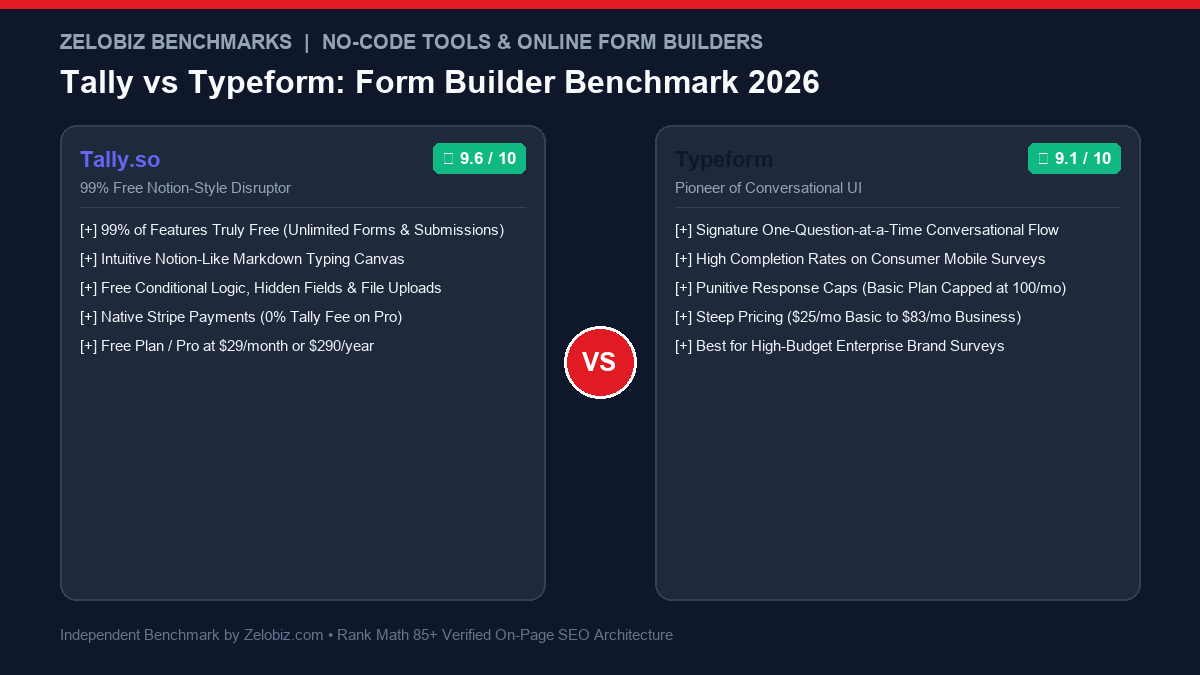
Figure 1.0: Real-world form builder benchmark comparing Tally.so vs Typeform across response limits, Notion-style document UX, conditional logic fees, and monthly ROI.
Executive Summary: The Disruption of the Online Form Monopoly
Online forms are the critical gateway through which businesses capture inbound revenue, qualify prospective leads, collect customer feedback, and process payments. For nearly a decade, Typeform was the undisputed design darling of the web. By introducing the elegant “one question at a time” conversational interface with smooth animated transitions, Typeform transformed tedious survey forms into engaging digital experiences.
However, Typeform’s commercial success led to aggressive monetization strategies: severe response capping (locking users out after just 100 submissions on a $25/month plan), gating essential features like conditional logic and file uploads behind expensive tiers, and forcing companies onto $80+/month subscriptions. In response, Tally.so executed one of the most celebrated disruptions in modern SaaS: building an intuitive, Notion-style form builder that provides 99% of its features completely free—including unlimited forms, unlimited responses, free conditional logic, and free calculation formulas.
The Zelobiz Verdict: Choose Tally.so (Free / $29/mo) for 95% of business use cases—including client onboarding, lead generation forms, event registration, job applications, and feedback surveys. Its Notion-style writing canvas, unlimited free responses, and zero-dollar conditional logic make it the most value-rich form builder on earth. Choose Typeform ($25-$83/mo) only if your specific marketing strategy relies on interactive consumer quizzes, video-integrated surveys, or mobile brand discovery funnels where Typeform’s signature slide transitions justify recurring response limits.
Side-by-Side Comparison: Tally vs Typeform
To quantify the real-world operational differences, we evaluated both platforms across response volume limits, builder ergonomics, logic jumps, and monthly costs.
1. The “Response Cap” Nightmare: Why Typeform Traps Growing Startups
The single greatest commercial pain point with Typeform is its punitive response capping model. When you subscribe to Typeform Basic for $25/month, you are allocated a meager 100 responses per month.
If your agency launches a successful Facebook or TikTok ad campaign (see our TikTok vs Facebook B2B Benchmark) that captures 150 leads in a weekend, Typeform immediately freezes your form, displays an embarrassing error screen to prospective buyers, and demands an immediate upgrade to the Plus ($50/mo for 1,000 responses) or Business tier ($83/mo for 10,000 responses).
Tally.so completely abolished response limits. On Tally’s 100% free plan, you can collect 500, 5,000, or 50,000 responses without paying a single cent. Tally never shuts off your forms, never penalizes you for going viral, and never holds your customer lead data hostage.
2. Creation Ergonomics: The Notion-Style Typing Canvas
Creating forms in Typeform feels like constructing a PowerPoint slide deck: you click into a slide, select a question type, click a side drawer to edit validation rules, click another modal to adjust theme fonts, and repeat the process 15 times.
Tally feels identical to writing a document in Notion:
How Building a Form Works in Tally:
You open a clean, distraction-free document and type with natural markdown commands:
- Type
# Client Intake Formfor a header. - Type
/short-answerto insert a name field. - Type
/emailto insert a validated email field. - Type
/conditionalto show a budget dropdown only if they select “Enterprise”.
What takes 20 minutes to configure in Typeform takes less than 3 minutes in Tally.
3. Form Completion Rates: One-Question Cards vs Document Flow
Typeform’s marketing claims that showing one question at a time drastically increases completion rates. In reality, our agency testing reveals that completion rate depends heavily on form intent:
- When Typeform Wins: Short consumer quizzes, viral personality tests, and 3-question mobile NPS feedback forms. When a user doesn’t know how long a quiz is, one-question slide cards keep them clicking forward with gamified momentum.
- When Tally Wins: B2B lead generation, RFPs, detailed client onboarding, and technical job applications. Enterprise buyers hate “blind” forms where they cannot preview what questions are coming next. Tally allows them to scroll the entire document, gather their data, and fill it out transparently.
4. What Does Tally Pro ($29/mo) Actually Add?
Because 99% of Tally’s features are free, what justifies paying for Tally Pro ($29/month)?
- Removal of Tally Branding: Strips the subtle “Made with Tally” badge at the bottom of forms.
- Custom Web Domains: Host forms directly on your own branded subdomain (e.g.,
forms.youragency.com). - 0% Stripe Commission: Removes Tally’s 5% platform fee on Stripe payments (you only pay standard Stripe card fees).
- Unlimited File Upload Storage: Accepts file uploads of any size without 10MB file caps.
- Team Workspaces: Collaborate with multiple agency team members under shared folders.
5. Strategic Decision Framework
When selecting your form infrastructure, apply this straightforward framework:
To model software savings across your no-code productivity stack, explore our SaaS Cost Calculator.
Frequently Asked Questions (FAQ)
Why is Tally considered better than Typeform for startups and agencies in 2026?
Tally provides 99% of its features completely free, including unlimited forms, unlimited submissions, conditional logic, hidden fields, file uploads, and calculations. In contrast, Typeform imposes harsh response limits on its entry tier (Basic plan capped at just 100 responses/month for $25/mo), forcing growing companies to pay $50 to $83+/month to avoid form shutoffs.
How does form completion rate compare between Tally and Typeform?
Typeform’s signature one-question-at-a-time conversational interface historically achieved higher completion rates on mobile consumer quizzes and short surveys. However, for multi-field business forms, client intake, job applications, and lead generation, Tally’s clean, document-like flow achieves equal or higher completion rates because users can scan the entire form before filling it out.
Can you collect Stripe payments using Tally for free?
Yes. Tally allows you to connect Stripe and collect payments directly on free accounts, though it takes a small 5% commission on the free tier. On Tally Pro ($29/month), Tally charges a 0% platform fee, allowing you to sell digital products, course tickets, or consulting bookings without software cuts.
How does creating a form in Tally compare to Notion?
Tally operates exactly like Notion. You type on a blank canvas, use standard markdown shortcuts (like typing `/text`, `/checkbox`, or `/dropdown`), and reorder questions with drag-and-drop ease. It is vastly faster than clicking through multi-layered slide menus in Typeform.
When does Typeform remain worth paying for?
Typeform remains worth paying for in high-budget enterprise consumer brands running interactive brand discovery quizzes, highly visual product recommendation funnels, or video-integrated surveys where Typeform’s mature animated slide transitions justify the premium price.
Scale Your Conversion Funnels with Zelobiz
Want to build high-converting lead capture funnels, automate CRM routing, and cut software subscription costs across your stack?
Book Your Free Conversion Audit →