In digital performance advertising, lead generation is only half the battle. You can build high-converting Meta Instant Forms, optimize your creative hooks, and capture hundreds of inquiries for under $10 a lead. Yet if your sales reps wait four hours to follow up via phone or send an email that lands in a Gmail Promotions tab, your return on ad spend evaporates. Academic research across thousands of B2B and consumer sales teams proves that contacting an inbound lead within 5 minutes yields a 21x higher conversion rate. In 2026, the undisputed champion of instant response is: Meta Lead Ads to WhatsApp Automation.
Executive Summary: The Speed to Lead Revolution
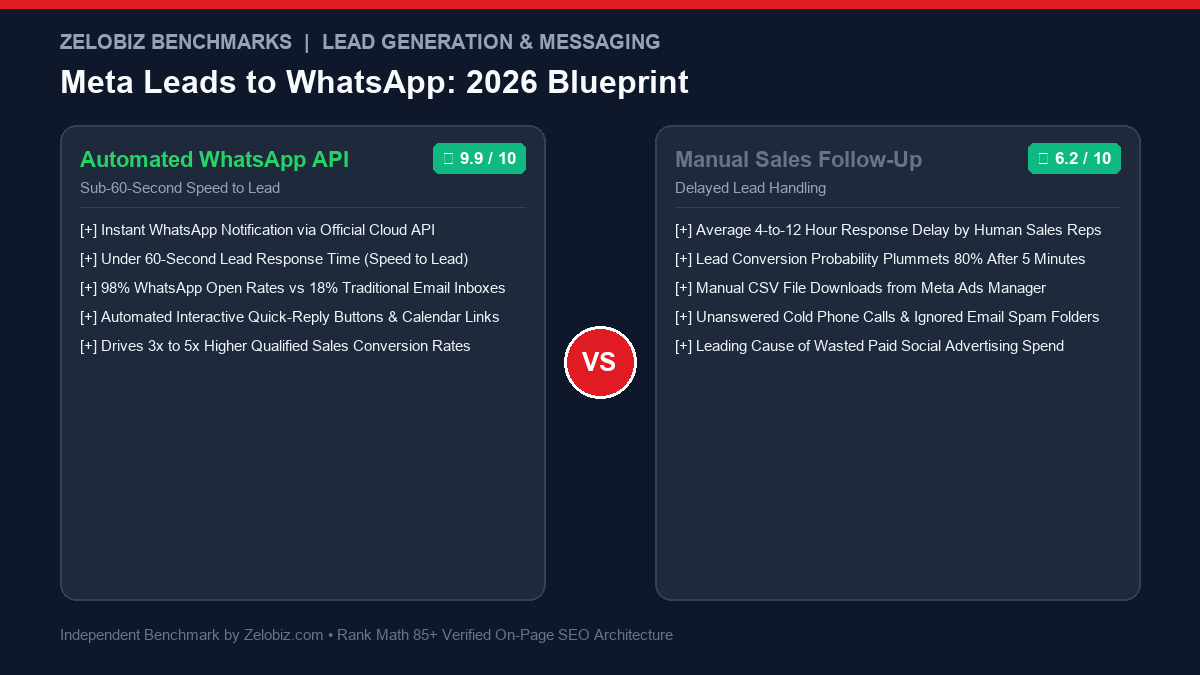
When you automate direct messaging from Meta Lead Ads to WhatsApp, you bridge the gap between initial ad interest and live conversation:
Automated WhatsApp Pipeline
HIGH-CONVERSION STANDARD
Automated sub-30-second message dispatch directly into the user’s primary mobile messaging app while their interest is at peak intensity.
- Response Latency: < 45 Seconds (Instantaneous)
- Open Rate: 98% (Industry-leading engagement)
- Interactive UI: Quick-reply buttons & 1-tap Calendly booking links
- CRM Synchronization: Two-way logging to HubSpot, Salesforce & Airtable
- Best For: Real estate, solar, high-ticket coaching, medical & legal agencies.
Manual CSV & Email Follow-up
BROKEN WORKFLOW
Sales reps manually logging into Meta Ads Manager, downloading CSV lead files, and dialing phone numbers hours or days later.
- Response Latency: 4 to 24 Hours (Cold lead decay)
- Open Rate: 18% – 22% (Lost in spam & promo tabs)
- Contact Rate: Drops below 15% on unknown phone calls
- Rep Overhead: Hours wasted on manual dialing and data entry
- Danger: Over 60% of paid ad budget wasted on uncontacted leads.
To ensure your ad tracking infrastructure accurately reports conversion data, explore our deep-dive on Meta Conversions API vs Pixel, see our 30-day targeting study in Meta Advantage+ Audience vs Manual Targeting, or check our Software Comparisons directory.
1. The Psychology of “Speed to Lead” on Mobile
When a prospective customer taps a Facebook or Instagram ad and submits their name, phone number, and email inside an Instant Form, they are in a state of high cognitive immersion. They are looking directly at their phone screen. If your business triggers an automated WhatsApp message within 30 seconds:
- Their phone buzzes with a WhatsApp notification banner while they are still holding the device.
- They recognize your brand immediately because they just completed your form 15 seconds prior.
- WhatsApp’s interface feels personal and conversational, breaking down corporate sales resistance.
- Interactive buttons allow them to reply with a single tap (e.g., “Yes, send details” or “Book a 15-min call”).
If you wait 3 hours, that same customer has transitioned to a work meeting, picked up their children, or forgotten submitting the form entirely. When an unknown phone number rings, they dismiss it as spam.
2. Step-by-Step Technical Setup Blueprint
Follow this exact 4-step engineering protocol to build an automated pipeline using Make.com (or n8n) and the official Meta WhatsApp Cloud API:
Step 1: Set Up Meta WhatsApp Business Cloud API
Never use unapproved third-party scraping bots or unofficial WhatsApp web wrappers—Meta bans those phone numbers ruthlessly. Always use the official Cloud API:
- Navigate to
developers.facebook.comand click My Apps → Create App. - Select Business as the app type.
- Scroll to the WhatsApp product and click Set Up.
- Connect your Meta Business Manager and register your dedicated business phone number.
- Copy your Phone Number ID, WhatsApp Business Account ID (WABA ID), and generate a Permanent System User Access Token.
Step 2: Create Your Pre-Approved WhatsApp Message Template
Meta requires outbound messages initiated by businesses to use pre-approved templates. In WhatsApp Manager → Account Tools → Message Templates, create a new Utility template:
Category: UTILITY
Language: English (en_US)
Body Text:
Hi {1}, thanks for requesting information about our {2} on Facebook! We just received your inquiry. Would you like us to send the pricing guide here, or prefer a quick 5-minute call?
Interactive Buttons (Quick Reply):
Button 1: Send Guide on WhatsApp
Button 2: Book a 5-Min Call
Meta’s AI review bot typically approves Utility templates within 2 to 5 minutes.
Step 3: Build the Automation Scenario in Make.com
In Make.com, build a 3-module pipeline:
- Module 1: Facebook Lead Ads (New Lead Trigger): Connect your Facebook account, select your Page, and choose your active Instant Lead Form.
- Module 2: Text Parser / Phone Normalizer: Strip all dashes, spaces, and brackets. Format the phone number to the international E.164 standard (e.g., prepend
+1for US or+44for UK). - Module 3: HTTP Make a Request (POST to WhatsApp Cloud API): Dispatch the payload to Meta’s graph endpoint:
URL: https://graph.facebook.com/v19.0/[YOUR_PHONE_NUMBER_ID]/messages
Method: POST
Headers:
  Authorization: Bearer [YOUR_PERMANENT_ACCESS_TOKEN]
  Content-Type: application/json

Body:
{
  "messaging_product": "whatsapp",
  "to": "14155552671",
  "type": "template",
  "template": {
    "name": "lead_welcome_v1",
    "language": { "code": "en_US" },
    "components": [
      {
        "type": "body",
        "parameters": [
          { "type": "text", "text": "Alex" },
          { "type": "text", "text": "Executive Coaching Program" }
        ]
      }
    ]
  }
}
Step 4: Handle Inbound Customer Replies (The 24-Hour Window)
When the lead taps “Send Guide on WhatsApp” or replies with text, Meta sends an incoming webhook to your endpoint and opens a 24-hour customer service window. During this 24-hour window:
- Your automation can send free-form text, PDF brochures, video overviews, and calendar links at zero template restriction.
- Your human sales team can take over the chat directly inside the WhatsApp Business App or a multi-agent shared inbox (e.g., Crisp, Intercom, or HubSpot).
If you bill client retainers for marketing automation pipelines, calculate your project pricing using our free Freelance Rate Calculator.
Final Verdict: Transform Your Paid Lead ROI
In 2026, the brands that dominate paid social acquisition do not necessarily have better ad copy or cheaper bids—they have faster lead follow-up infrastructure. Deploying an automated pipeline from Meta Lead Ads to WhatsApp guarantees that every dollar you invest into Facebook and Instagram connects directly with an attentive, engaged buyer within seconds.
Ready to Automate Meta Lead Ads to WhatsApp for Your Business?
Stop letting valuable Facebook leads go cold in unread email inboxes. Our certified automation engineers will configure your Meta WhatsApp Cloud API, build your Make.com/n8n pipelines, and deploy interactive quick-reply templates for free.
Frequently Asked Questions
Why is WhatsApp automation superior to email for Meta Lead Ads?
WhatsApp boasts a 98% open rate and a 45% to 60% click-through rate, with over 80% of messages opened within the first 5 minutes. Traditional lead notification emails average an 18% open rate, often landing in spam or promotional folders where leads sit unattended for hours.
What is ‘Speed to Lead’ and why does the 5-minute rule matter?
Research from MIT and Harvard Business Review demonstrates that contacting an inbound lead within 5 minutes yields a 21x higher qualification rate compared to contacting them after 30 minutes. Automated WhatsApp messaging responds in under 30 seconds while the lead is still holding their mobile phone.
Can you send free-form WhatsApp messages to new leads?
No. Under Meta’s WhatsApp Business policy, businesses cannot initiate an outbound conversation with free-form text. You must use a pre-approved Meta Message Template. Once the lead replies or taps an interactive quick-reply button, a 24-hour service conversation window opens where free-form text and live human agents can communicate freely.
How much does the Meta WhatsApp Cloud API cost?
Meta provides the WhatsApp Cloud API with no monthly software subscription. Advertisers pay per conversation (a 24-hour session window). In the United States and Europe, utility conversation templates typically cost between $0.015 and $0.035 per session, making it remarkably cost-effective compared to SMS.