
Disclosure: Zelobiz may earn a commission if you buy through an AppSumo link on this page, at no extra cost to you. This review is based on Zcal’s public product pages, its AppSumo listing, and published comparisons with other scheduling tools, not on a paid subscription or hands-on testing of every feature.

Scheduling meetings without a back-and-forth email chain is one of the few genuinely solved problems in software, which means the real question with any scheduling tool is not “does it work” but “why this one over Calendly.” Zcal’s answer is a one-time payment instead of a subscription, plus booking pages that look more like a Typeform than a plain calendar grid. It has been on AppSumo as a lifetime deal, and this review covers what that deal actually included, where Zcal is weaker than the competition, and whether it is still something you can buy.
What Zcal is
Zcal is an online scheduling tool for individuals, freelancers, and small teams. Instead of the usual subscription model that tools like Calendly use, Zcal sells lifetime access through AppSumo, which is the main reason it shows up in “best AppSumo deals” roundups. It connects to Google Calendar and Outlook, lets you build a branded booking page with your own logo and colors, and handles the basics: availability windows, automated reminders, time zone detection, and shareable booking links.
The pitch is straightforward: pay once, keep using it, and skip the monthly fee that adds up over years of scheduling meetings. Whether that math works out depends entirely on how long you stick with the tool and whether its feature set stays sufficient for your needs as your business grows, which is the part most lifetime-deal writeups skip over in favor of just listing features and moving on.
Current AppSumo deal status
As of this review, Zcal’s AppSumo listing shows Sold out!, with an option to get notified if it returns. It is not purchasable right now. When it was live, the listing offered three tiers:
| Tier | Price | User limit |
|---|---|---|
| License Tier 1 | $59 (was $252) | 3 users |
| License Tier 2 | $139 (was $840) | 10 users |
| License Tier 3 | $219 (was $4,200) | 50 users |
All three tiers included the Pro Plan feature set: unlimited links, connected calendars, calendar integrations, team scheduling, round-robin event assignment, and Stripe payment collection for paid bookings. One detail worth flagging: a custom domain (CNAME) and a custom sender email both require a separate Business Plan add-on and are not bundled into the base lifetime tiers, according to the product description on AppSumo. The deal was covered by AppSumo’s own “We Got Your Back” guarantee and a 60-day refund window, which is a stronger backing than several of the other partner-managed deals we checked for this project, most of which explicitly excluded that guarantee.
Key features
- Clean, modern booking page builder with logo, color, and message customization
- Two-way sync with Google Calendar and Outlook to prevent double bookings
- Team scheduling with round-robin assignment across multiple team members
- Automated email reminders for hosts and invitees
- Automatic time zone detection for cross-region meetings
- Shareable booking links that work over email, social, or embedded on a website
- Stripe integration for paid bookings, useful for coaches and consultants charging for calls
Pros and cons
Pros
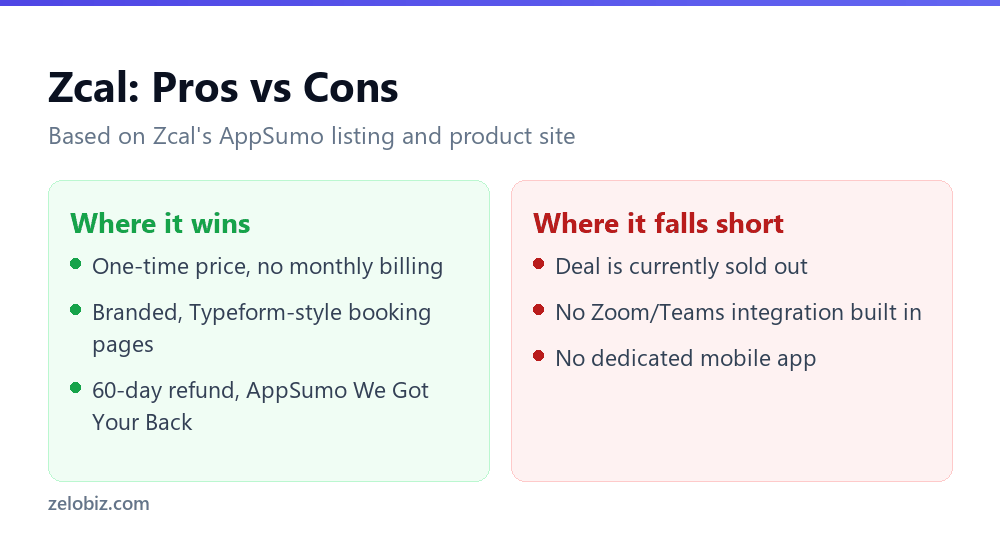
- One-time payment removes recurring scheduling software costs entirely
- Booking pages look noticeably more polished and on-brand than the default Calendly layout
- Team scheduling and round-robin routing are included even on lower tiers, which some competitors gate behind higher-priced plans
- Backed by AppSumo’s We Got Your Back guarantee, not just a vendor-managed refund policy
Cons
- The AppSumo deal is currently sold out
- No native Zoom or Microsoft Teams integration. Meeting links have to be added manually
- No dedicated mobile app as of this writing
- Fewer third-party integrations overall compared to Calendly, which connects to Slack, CRMs, and dozens of other tools
- Custom domain and sender email require a separate paid add-on rather than being included
How Zcal’s branding options compare in daily use
The customization Zcal allows, logo placement, color themes, a welcome message, and short video intros on the booking page, matters more than it might sound like on paper. A booking page is often the first thing a prospective client or new hire sees from a business, ahead of the actual meeting itself, so a page that looks like a generic default scheduling grid can undercut an otherwise polished brand. This is where Zcal’s design leans harder than Calendly’s free and mid-tier plans, which keep most of the branding options behind higher-priced tiers. It is a real point in Zcal’s favor for anyone who cares about how a scheduling link looks to the person on the other end of it.
Zcal versus the alternatives
Calendly is the obvious comparison point since it defined this category. Calendly’s subscription plans cost more over time but come with a much wider integration library, including direct Zoom and Teams connections that Zcal lacks. If your workflow already depends on Slack notifications or CRM syncing when someone books a call, Calendly’s ecosystem is hard to replace. Zcal’s advantage is purely economic: a fixed one-time cost against Calendly’s recurring per-seat pricing.
TidyCal, also an AppSumo staple, sits at a lower price point with a more basic interface and less branding flexibility. It suits a solo freelancer who wants the cheapest possible scheduling link and does not care about a polished booking page. Zcal aims a level above that, closer to what a small agency or consultant-facing business would want to put in front of clients.
Book Like a Boss targets a different audience entirely: coaches, consultants, and service businesses that want a booking page doubling as a mini sales page. Zcal is built more around meeting coordination than selling a service, so the two tools solve adjacent but different problems.
Doing the math on a one-time payment
Calendly’s paid plans run on a monthly or annual per-seat subscription, which is the standard model across this category. Over several years, that recurring cost adds up to well beyond what Zcal’s lifetime tiers charge once. That is the entire argument for a lifetime deal: pay the equivalent of a few months of a competitor’s subscription, then use the tool indefinitely without another invoice. The risk sits on the other side of that trade. If Zcal stops actively developing the product, gets acquired, or shuts down, a lifetime license does not protect you from having to migrate to something else anyway, and you would have to weigh how much that risk is worth against the money saved. AppSumo listings do not come with a guarantee that the underlying company stays in business indefinitely, no vendor’s does, so it is worth treating “lifetime” as “lifetime of the product,” not a personal guarantee.
Choosing between the three tiers comes down to how many people actually need login access, not how many meetings you expect to book. A single consultant or freelancer only needs Tier 1’s 3-user allowance even at high booking volume, since the user count on these plans tracks team seats rather than the number of bookings or booking pages. Tier 2’s jump to 10 users makes sense once you have a small team of coordinators, salespeople, or support staff who each need their own calendar connected. Tier 3’s 50-user ceiling is built for agencies or larger departments, and paying $219 once for that many seats is a meaningfully different proposition than $59 for three, worth confirming your actual headcount against before choosing the higher tier just because it looks like better value on paper.
Setup, in practice
Getting started follows the pattern every scheduling tool uses: create an account, connect a calendar, set availability windows, customize the booking page with a logo and color scheme, then share the link. None of that is unique to Zcal, and none of it should take more than fifteen minutes for someone who has used any scheduling tool before. The part that takes longer is deciding how to structure event types if you run several kinds of meetings (a quick call versus a full consultation, for example), which is true of any tool in this category and not a Zcal-specific limitation.
Real-world use cases
Freelancers and consultants are the most obvious fit. Instead of trading emails to find a slot, a client picks a time directly from a branded page that looks like it belongs to a real business rather than a free trial account. Small businesses use it similarly for both internal team meetings and external client calls, especially once round-robin routing is set up so a booking automatically lands with whichever team member is next in line.
Coaches and educators can use Zcal for one-on-one or group sessions, and the Stripe integration means a paid consultation can be booked and charged in the same flow instead of requiring a separate invoice. Sales and customer support teams get a similar benefit: a prospect books a demo call directly, or a support ticket resolution gets scheduled without someone manually checking a rep’s calendar first.
Where the product still has gaps
No scheduling tool is complete, and a few specific gaps stand out on Zcal’s side rather than vague complaints. Because anyone with the booking link can reserve a slot without a verification step, a public link is open to spam registrations unless you switch to an approval-based booking mode, and it is worth checking whether that option exists before publishing a link widely. The lack of Slack, Zapier, or CRM integrations limits how well Zcal fits into a team that already automates its workflow around other tools. And the absence of a standalone mobile app means checking or adjusting availability on the go requires opening a browser instead of an app, a minor but real friction point for anyone managing bookings from a phone.
Who this is actually for
Zcal fits freelancers, consultants, and small teams who book a steady volume of meetings and want their scheduling page to look intentional rather than generic, without paying a monthly fee indefinitely. It is a weaker fit if your team already lives in Zoom or Teams and wants scheduling to plug directly into those tools, or if you need the breadth of integrations that a mature platform like Calendly has built up over a decade.
Frequently asked questions
Is the Zcal lifetime deal still available on AppSumo?
No, the listing currently shows as sold out. AppSumo offers a notify-me option for when or if it returns.
Can Zcal integrate with Zoom or Microsoft Teams?
Not natively as of this review. Meeting links for those platforms need to be added manually to the booking confirmation.
Does Zcal have a free plan?
Yes, Zcal offers a limited free version. The AppSumo lifetime deal unlocked the Pro Plan feature set referenced in this review.
Is a custom domain included in the lifetime deal?
No. AppSumo’s product description lists custom domain (CNAME) and custom sender email as part of a separate Business Plan add-on, not the base lifetime tiers.
Which Zcal tier should a small team buy?
Tier 2, at $139 for 10 users, fits most small teams best since it includes team scheduling and round-robin routing without paying for the 50-user ceiling of Tier 3, which is really built for agencies.
Verdict
Zcal is a solid, if unglamorous, scheduling tool that earns its spot on AppSumo lifetime-deal lists mainly through the strength of its refund guarantee and the polish of its booking pages, not through a feature set that beats Calendly outright. If you catch the deal while it is live, Tier 2 ($139 for 10 users) is the more sensible pick for a small team over the single-user Tier 1, since team scheduling is one of the tool’s better features and Tier 1’s 3-user cap barely uses it. Right now, though, the practical answer is that you cannot buy it at all, so the more useful move today is joining AppSumo’s notification list and comparing Zcal directly against Calendly’s current pricing before it eventually comes back around.