

To factory reset a laptop running Windows, go to Settings › System › Recovery and click Reset this PC. Choose Keep my files if you’re keeping the machine — it removes apps and settings but leaves your documents. Choose Remove everything if you’re selling or giving it away, and critically, also turn on Clean data in the additional settings. Without that, deleted files can still be recovered.
The setting that actually matters
Most guides walk you through Reset this PC and stop there. If you’re selling the laptop, stopping there is a genuine privacy problem.
Remove everything does what deleting files always does on a computer: it marks the space as available and forgets where things were. The data is still physically present until something else writes over it. Free recovery software will pull back documents, photos and browser data from a drive reset this way.
Buried under Change settings on that screen is a toggle called Clean data. Turn it on and Windows overwrites the drive rather than simply forgetting it. That’s the difference between a laptop that looks empty and one that is.
‘Remove everything’ empties the index. ‘Clean data’ overwrites the drive. Only the second one is safe to sell.
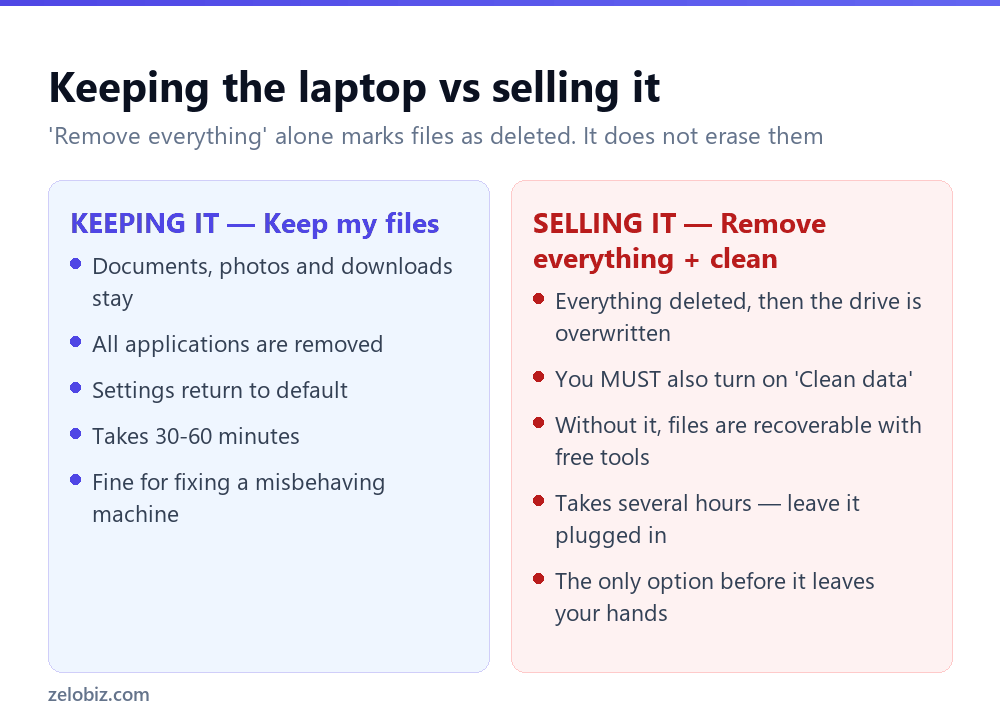
⚠️ Watch out: Clean data takes hours rather than minutes on a large drive. That’s expected — it’s writing over every sector. Leave the laptop plugged in and let it finish.
Do these before you start
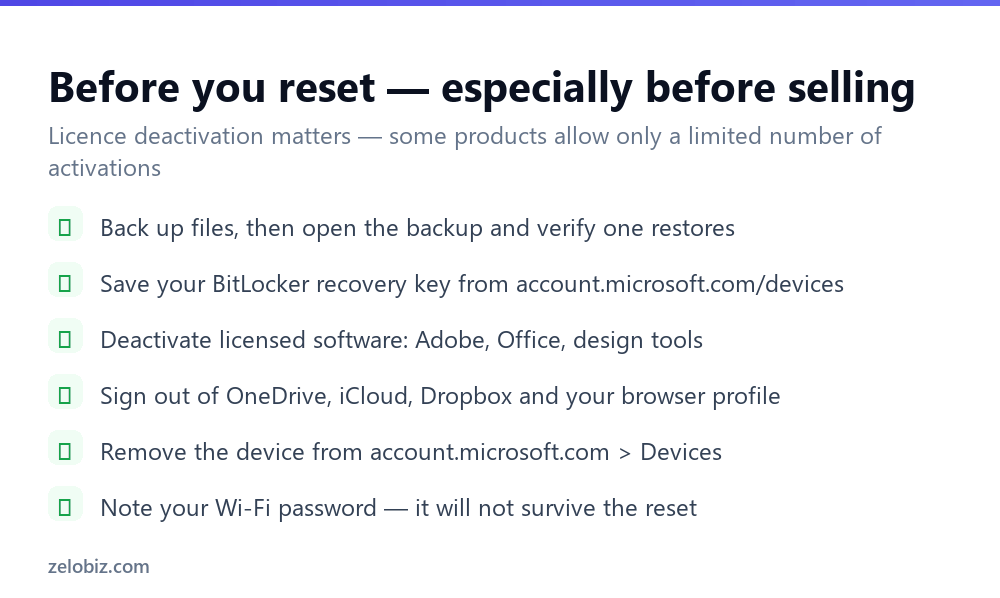
Back up, then verify the backup
Copy what matters to an external drive or cloud storage — and then open the backup and confirm a file actually restores. An unverified backup is not a backup. This is the step people skip and regret, because after the reset there is no undo.
Save your BitLocker recovery key
Many laptops encrypt the drive by default now, often without the owner realising. If a reset is interrupted or something goes wrong, you may be asked for a 48-digit recovery key before Windows will boot.
Find it at account.microsoft.com/devices, under your device’s details. Save it somewhere that isn’t the laptop you’re about to wipe — the number of people who store it in a document on the encrypted drive is not small.
Deactivate licensed software
Adobe products, some Microsoft Office licences and most professional design and engineering tools tie activations to specific machines, and many allow only a couple. Wiping the laptop without deactivating burns one permanently, and recovering it means an argument with support.
Cloud download or local reinstall
Windows offers two ways to source the fresh copy, and the choice matters more than it appears.
Cloud download is usually the better choice. Local reinstall uses recovery files stored on the same drive, and if those are corrupt — which is often why someone is resetting — it fails partway through and leaves you worse off. Cloud download also arrives more up to date, so there’s less patching afterwards.
What a reset does and doesn’t fix
Resetting is a genuine fix for software problems: a machine slowed by years of accumulated software, malware you can’t shift, corrupted system files, a Windows install that has simply gone wrong.
It fixes nothing physical. If the laptop overheats, the battery dies in an hour, the fan grinds, or the drive is failing, a reset changes none of that — and on a failing drive, the intensive writing involved can finish it off. Check the drive’s health first if you suspect hardware; a reset on a dying disk can turn a recoverable situation into a lost one.
💡 Pro tip: Before resetting to fix slowness, try the cheaper options: uninstall what you don’t use, disable startup programs in Task Manager, and free up disk space. Those take twenty minutes and often solve it.
The manufacturer’s own recovery partition
Laptops from Dell, HP, Lenovo, ASUS and others usually ship with a recovery partition that restores the machine to its exact factory state — the original Windows version plus all the manufacturer’s bundled software.
You reach it by pressing a key during startup: F11 on many machines, F9 on HP, F12 on Dell, or a dedicated Novo button on Lenovo. It varies, and the manufacturer’s support site will confirm which.
Windows’ own Reset this PC is generally the better option. It gives you a current Windows version rather than whatever shipped years ago, and it doesn’t reinstall the trial antivirus and bundled utilities. Use the recovery partition when Windows won’t boot at all, or when you specifically need the machine exactly as sold.
SSDs, hard drives and what ‘wiping’ means
The Clean data option behaves differently depending on what kind of drive is in the laptop, and it’s worth understanding why.
On a traditional hard drive, Clean data writes over every sector. That’s why it takes hours, and afterwards the old data is genuinely gone.
On an SSD, overwriting works differently because the drive decides internally where data physically lives. Windows issues TRIM commands that tell the drive to discard the old blocks, which is effective in practice, though a small amount may persist in areas the operating system can’t address. For consumer purposes — selling a laptop on a marketplace — this is entirely sufficient.
If the machine held genuinely sensitive material, the stronger option is enabling BitLocker encryption before resetting. Encrypted data without the key is unreadable regardless of what survives on the platters or in the flash.
Resetting a work or school laptop
If the laptop belongs to an employer or an institution, don’t reset it. Devices enrolled in Intune, Azure AD or a school management system are often locked so a reset either fails or re-enrols automatically — and where it succeeds, you may wipe configuration IT needs to get it working again.
There may also be company data on it that should be preserved or destroyed to a specific standard. Hand it back and let their process handle it. The same applies to a personal laptop you’ve enrolled in a work system: unenrol it properly first, or the reset can leave the device in a state where it won’t accept a personal account.
Resetting when Windows won’t start
If the laptop won’t boot into Windows, you can still reset it from the recovery environment.
Power on and off three times — interrupt the boot each time by holding the power button — and Windows enters automatic repair on the fourth attempt. From there choose Troubleshoot › Reset this PC and the process is the same as from within Windows.
If even that fails, you’ll need installation media: another computer, an 8GB USB stick, and Microsoft’s Media Creation Tool. That route reinstalls Windows completely and is the last resort before concluding the hardware is at fault.
After the reset
If you’re keeping the laptop, expect an hour or two of setup. Windows Update will want several rounds of patches, some hardware may need manufacturer drivers — fingerprint readers and function keys are the usual gaps — and every application needs reinstalling.
Do updates first, drivers second, applications last. Installing software before Windows is fully patched sometimes means reinstalling it again afterwards.
If you’re selling, stop once the reset finishes. Leave the laptop at the initial setup screen where it asks for a language — that’s the state a buyer expects, and it proves nothing of yours remains. Don’t create an account to ‘check it works’; that just puts your details back on the machine.
- ✓Turn on Clean data if the laptop is leaving your hands
- ✓Verify your backup by restoring a file from it
- ✓Save the BitLocker key somewhere other than that laptop
- ✓Deactivate Adobe and other licensed software first
- ✓Keep it plugged in for the whole process
- ✕Selling a laptop after ‘Remove everything’ without Clean data
- ✕Resetting a drive you suspect is failing
- ✕Using local reinstall when the local files may be corrupt
- ✕Creating an account after resetting a laptop you’re selling
- ✕Assuming a reset will fix overheating or battery problems
Frequently asked questions
How do I factory reset a Windows laptop?
Settings, System, Recovery, then Reset this PC. Choose Keep my files or Remove everything, then pick Cloud download or Local reinstall. On Windows 10 the path is Settings, Update & Security, Recovery.
Does factory reset delete everything?
Not securely by default. ‘Remove everything’ marks files as deleted but they remain recoverable with free software. You must also enable Clean data under Change settings to overwrite the drive properly.
How long does a factory reset take?
Thirty to sixty minutes for a normal reset. With Clean data enabled it can take several hours because the drive is being overwritten. Keep the laptop plugged in throughout.
Will a factory reset remove viruses?
Usually yes, if you choose Remove everything, since the whole system partition is rebuilt. Very rare firmware-level infections can survive, but ordinary malware and ransomware will not.
Do I lose Windows after a factory reset?
No. Your Windows licence is tied to the hardware and reactivates automatically. You won’t need a product key.
What should I do before selling my laptop?
Back up and verify, deactivate licensed software, sign out of all cloud accounts, remove the device from account.microsoft.com, save your BitLocker key, then reset with Remove everything and Clean data enabled. Leave it at the initial setup screen.
- →Try this before resetting — how to free up disk space
- →Or remove what you don’t use: how to uninstall a program
- →Find what’s slowing it down with how to open Task Manager
- →Patch it fully afterwards: how to update Windows