
To sell on Amazon, register for a seller account (Individual, a per-item fee, or Professional, a flat monthly fee, depending on expected volume), decide between FBA (Fulfilled by Amazon — they store, pack, and ship for you) or FBM (Fulfilled by Merchant — you handle it yourself), then build a listing with a strong title, clear images meeting Amazon’s technical requirements, and competitive pricing against what similar listings are actually winning sales at, not just any price shown.
FBA vs FBM — the decision that shapes everything else
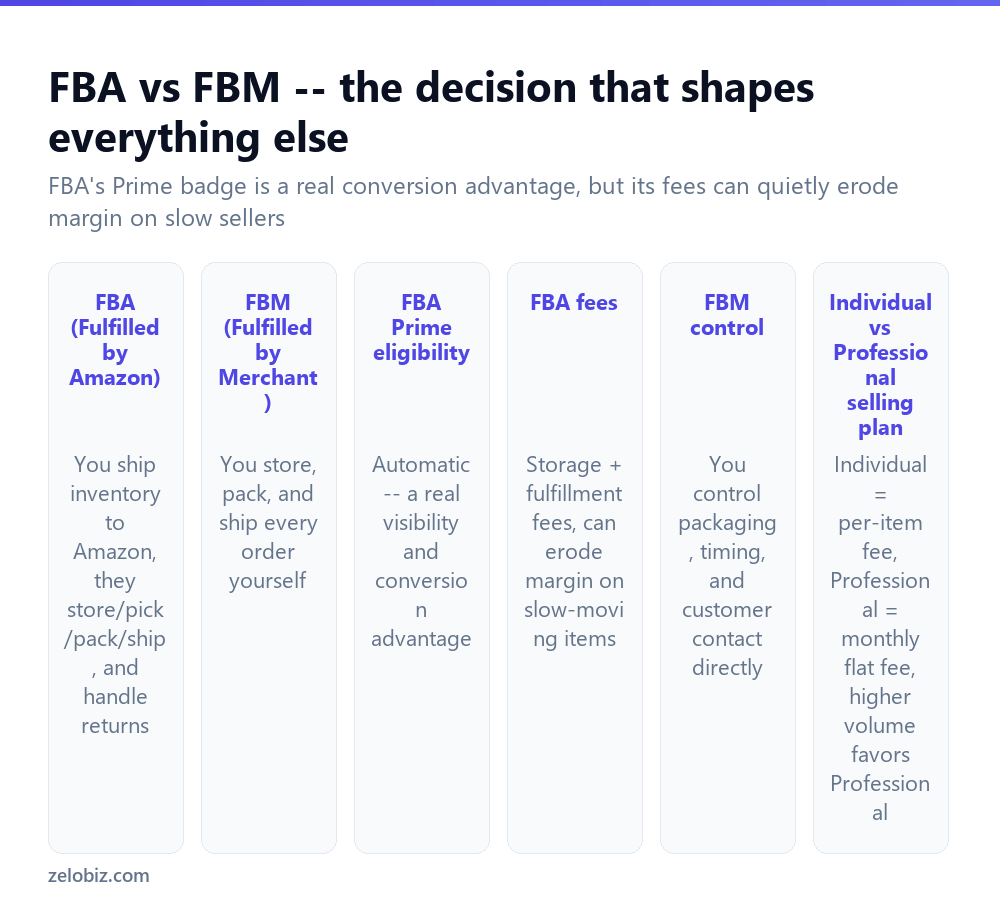
This is the first real strategic decision, and it affects nearly everything that follows — fees, how hands-on the business is day to day, and how the listing appears to buyers.
FBA (Fulfilled by Amazon) — you ship inventory to an Amazon warehouse, and Amazon handles storage, picking, packing, shipping, and customer returns for each order. Listings fulfilled this way automatically qualify for Prime eligibility, a real and measurable conversion advantage, since many buyers filter search results to Prime-eligible items specifically or simply trust the faster guaranteed shipping.
FBM (Fulfilled by Merchant) — you store the inventory yourself and handle packing and shipping for every order personally. This gives full control over packaging, timing, and direct customer contact, and avoids FBA’s storage and fulfillment fees, but loses the automatic Prime badge (though FBM sellers can separately qualify for Seller Fulfilled Prime under certain performance requirements).
FBA’s fees genuinely erode margin on slow-moving or low-value items, where storage fees accumulate against inventory that isn’t turning over quickly. It suits fast-moving products well; a niche, slow-selling item can do better financially under FBM despite losing the automatic Prime badge.
Individual vs Professional selling plan
Individual plan charges a per-item fee on top of Amazon’s standard referral fee, with no monthly base cost — suited to low, occasional sales volume.
Professional plan charges a flat monthly fee regardless of volume, which becomes more cost-effective once you’re selling more than roughly 40 items a month (the rough breakeven point against the Individual plan’s per-item fee, though exact numbers shift with fee changes). Professional also unlocks bulk listing tools and additional selling features not available on Individual.
Building the listing
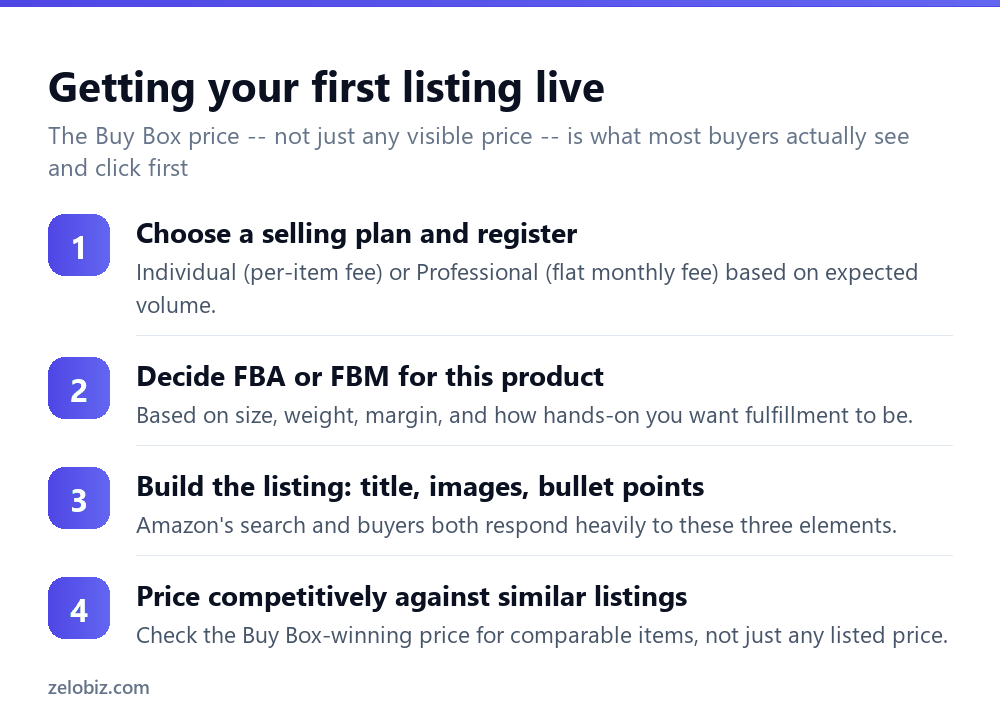
Choose a plan and register based on expected volume, then decide FBA or FBM for the specific product, weighing size, weight, margin, and how hands-on you want the fulfillment side to be.
Build the listing itself — title, main and secondary images, and bullet points are what both Amazon’s search algorithm and buyers respond to most heavily. The title should include the key product identifiers a buyer would search (brand, what it is, key distinguishing feature), and bullet points should cover the specific benefits and specs a buyer actually cares about, not generic marketing language.
Price it against the Buy Box-winning price for comparable listings, not just any price you see displayed — the Buy Box is the featured “Add to Cart” listing most buyers click without ever browsing other seller offers for the same product, and its price is a far more accurate benchmark than an arbitrary competing listing that may rarely actually get purchased.
Winning the Buy Box
For products with multiple sellers offering the identical item, only one seller’s offer is featured as the default “Buy Box” at any given time — and it accounts for the large majority of actual sales on that listing, since most buyers never click through to see alternative sellers.
Amazon’s Buy Box algorithm weighs price, fulfillment method (FBA generally has an edge), seller performance metrics (order defect rate, shipping time, customer response time), and inventory availability. There’s no way to simply pay for it or guarantee it — consistently strong seller metrics and competitive pricing are what earn it over time.
Amazon’s fee structure
Beyond the Individual/Professional plan fee, Amazon charges a referral fee (a percentage of the sale price, varying by product category) on every sale regardless of fulfillment method. FBA sellers additionally pay fulfillment fees (based on item size and weight) and storage fees (based on how much space inventory occupies and how long it sits before selling).
Calculate all applicable fees against your actual cost and target price before committing significant inventory to a product — a product that looks profitable on price alone can have thin or negative real margin once the full fee structure is factored in, particularly for FBA on a bulky or slow-moving item.
A worked example: choosing FBA or FBM for a real product
Say you’re launching a handmade ceramic mug — lightweight, moderate margin, and likely to sell steadily but not explosively fast given the handmade, higher-price nature of the product.
A fragile, moderate-margin item like this is a genuine judgment call. FBA’s Prime badge could meaningfully boost conversion for a product buyers might otherwise hesitate on due to shipping time, but Amazon’s fulfillment handling of a fragile ceramic item carries some real breakage risk in their standard packing process, and storage fees accumulate against inventory that may move more slowly than a mass-market product would.
A reasonable approach: start with a small FBM batch to validate real demand and gather initial reviews with full control over careful, fragile-item packing, then evaluate moving to FBA once sales velocity and breakage rates (from customer feedback) are better understood. This avoids committing significant inventory to Amazon’s warehouse for an unproven, breakage-prone product before knowing whether the demand and FBA’s handling quality actually support it.
Managing inventory and avoiding stockouts
For FBA sellers specifically, running out of inventory doesn’t just pause sales — it can also hurt the listing’s search ranking and Buy Box standing, since Amazon’s algorithm factors in consistent availability. Reordering inventory with enough lead time to arrive at Amazon’s warehouse and clear their receiving process before stock actually runs out is worth planning deliberately, particularly since FBA shipments can take longer to be processed and available for sale than the shipping time alone would suggest.
For FBM sellers, the same principle applies but with more direct control — you can typically react faster to reorder your own stock than coordinating a shipment into Amazon’s fulfillment network, which is one practical tradeoff in FBM’s favor for a product where demand is hard to predict precisely in the early going.
When a listing isn’t getting sales
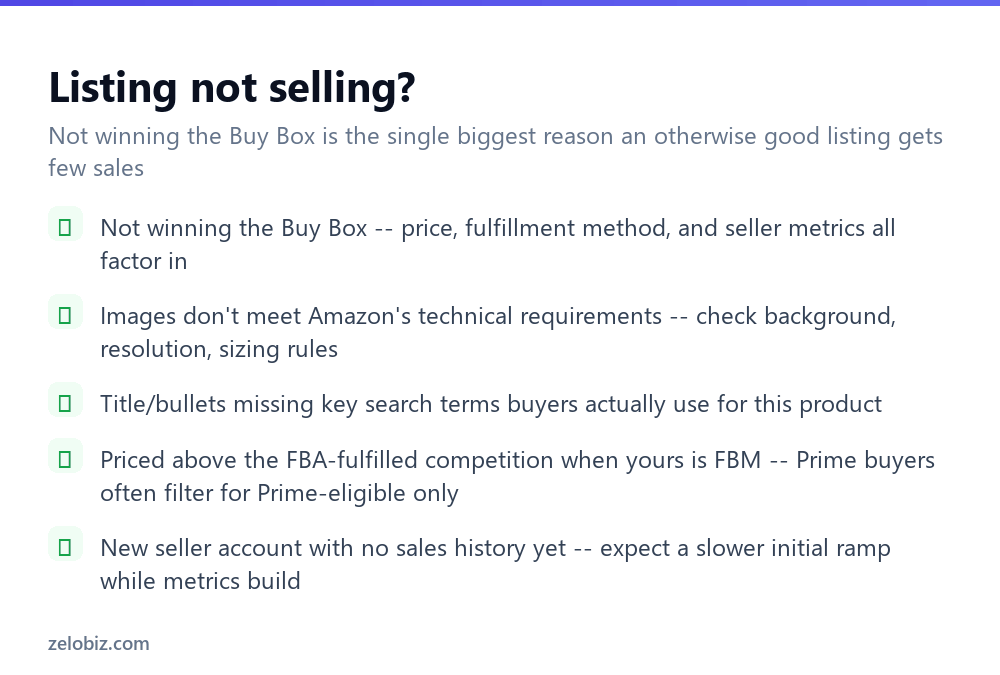
Not winning the Buy Box — review price competitiveness, fulfillment method, and your account’s performance metrics, since all three factor into who wins it.
Images not meeting Amazon’s technical requirements — Amazon enforces specific rules on main image background (pure white), minimum resolution, and sizing; a listing violating these can be suppressed or simply perform worse in search.
Title and bullets missing key search terms — review what terms buyers actually use for this specific product category and confirm they appear naturally in the listing text.
FBM priced the same as FBA competition — Prime-focused buyers often filter to Prime-eligible items only, meaning an FBM listing needs to be genuinely more competitively priced to be seen as worth the tradeoff of losing guaranteed Prime shipping.
A quick reference
Unsure whether a product is FBA-appropriate: fast-moving, sturdy, and reasonably sized items generally favor FBA; fragile, slow-moving, or bulky ones often do better starting on FBM. Losing the Buy Box despite a competitive price: check fulfillment method and account performance metrics, since price is only one of several factors the algorithm weighs. Margin looks thin after fees: recalculate with the full referral, fulfillment, and storage fee stack before committing to a larger inventory order.
- ✓Choose FBA or FBM based on the specific product’s margin, size, and sales velocity
- ✓Price against the Buy Box-winning price, not just any visible competing price
- ✓Calculate full fees (referral, fulfillment, storage) before committing inventory
- ✓Meet Amazon’s technical image requirements exactly, especially the main image
- ✓Expect a slower initial ramp as a new seller building account performance history
- ✕Assuming FBA is automatically the better choice for every product
- ✕Pricing against an arbitrary competing listing rather than the Buy Box price
- ✕Committing significant inventory before calculating real margin after all fees
- ✕Using non-compliant product images and wondering why the listing underperforms
- ✕Pricing an FBM listing the same as Prime-eligible FBA competition
Frequently asked questions
How do I start selling on Amazon?
Register for an Individual or Professional selling plan, decide FBA or FBM fulfillment for your product, and build a listing with a strong title, compliant images, and competitive pricing.
What’s the difference between FBA and FBM on Amazon?
FBA means Amazon stores, packs, and ships your inventory and it qualifies for Prime. FBM means you handle storage and shipping yourself, with more control but no automatic Prime badge.
Should I choose the Individual or Professional Amazon selling plan?
Individual suits low, occasional volume with a per-item fee. Professional’s flat monthly fee becomes more cost-effective at roughly 40+ sales a month.
What is the Buy Box on Amazon and why does it matter?
It’s the featured ‘Add to Cart’ offer on a shared listing, accounting for most actual sales since buyers rarely click through to see other sellers. Price, fulfillment method, and seller metrics all factor into winning it.
What fees does Amazon charge sellers?
A referral fee (percentage of sale price) on every sale, plus a plan fee, and for FBA sellers, additional fulfillment and storage fees.
Why isn’t my Amazon listing selling?
Most commonly: not winning the Buy Box, non-compliant product images, or a title and bullet points missing the search terms buyers actually use.
- →Compare against selling on eBay: how to sell on eBay
- →A better fit for handmade or craft items: how to sell on Etsy
- →Sell without holding inventory yourself: how to start dropshipping
- →Other realistic ways to earn online: how to make money online