
Help me write Gmail drafting is the AI feature the largest number of people in a business will actually touch, and it is also the one surrounded by the most confidently wrong information about what it costs you.
Two things worth establishing before anything else. The plan that gives you nothing in Sheets still gives you this. And the usage figure repeated across most articles on the subject does not appear anywhere in Google’s documentation.
Short answer: Help me write is available on Business Starter, Standard and Plus, on all three Enterprise tiers, and on Frontline Plus. You must be 18 or over. Google’s published AI usage limits page lists which features are metered and Gmail drafting is not on that list, so the widely quoted 500 a month figure is not Google’s number. Limits that do exist apply per user and are not pooled. Verified 31 August 2026.
Which Plans Include It
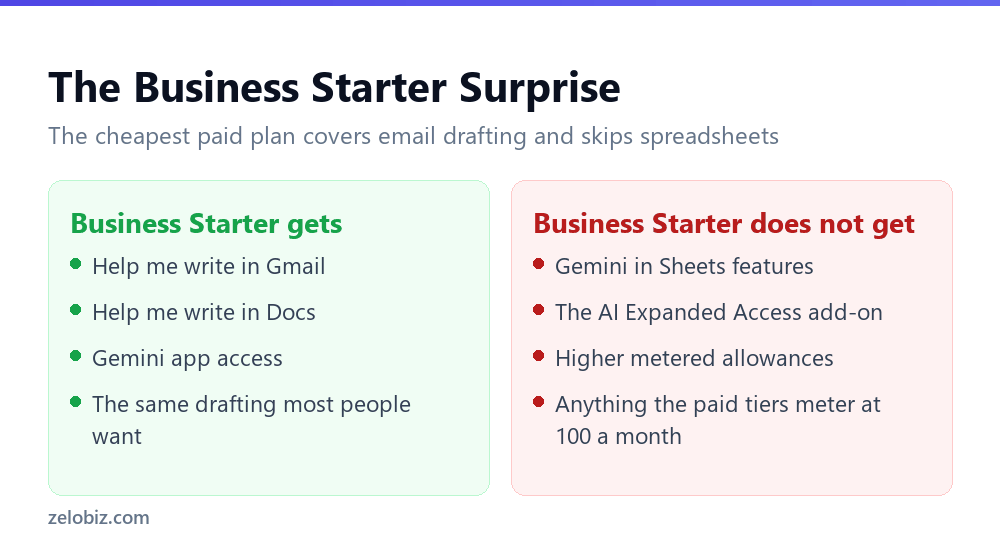
Google lists Help me write as available on Business Starter, Business Standard and Business Plus, on Enterprise Starter, Standard and Plus, and on Frontline Plus. That list is broader than the one for spreadsheet features, and the gap between them is the most useful thing on this page if you are choosing a plan.
Business Starter has no Gemini in Sheets. It does have Help me write in Gmail. For a team whose AI use is drafting and replying rather than building spreadsheets, the cheapest paid tier already covers the work, and the upgrade buys capability they will not open.
The reverse case is real too. If your team lives in spreadsheets, Starter gives you nothing where it matters. We worked through that decision in full in our guide to which Workspace plan you actually need for Gemini in Sheets.
📊 Note: Two eligibility details that catch people. You must be 18 or over to use these features, and Google notes some AI features may not be available in your language. An administrator can also turn some of them off, so a missing feature is not always a licensing question.
The 500 a Month Figure Is Not Google’s
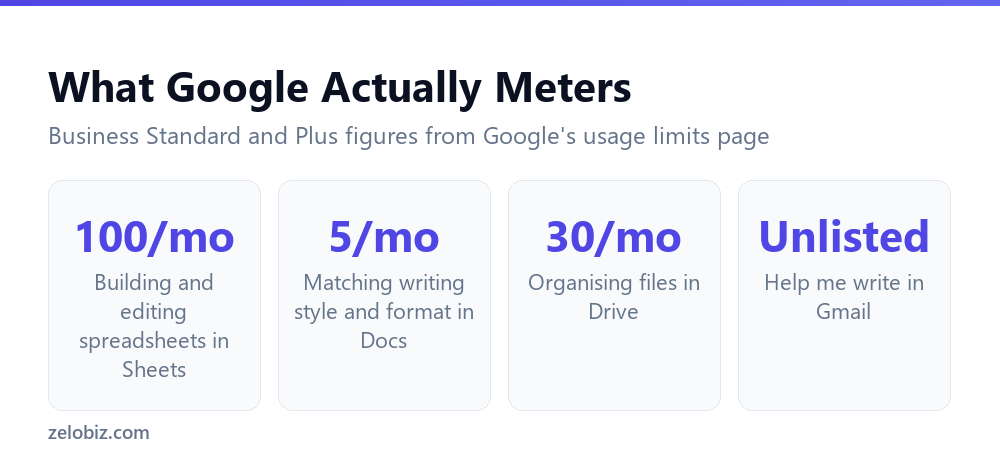
Search for how many times you can use Help me write and you will be told 500 a month, often with the added detail that Gmail and Docs share the allowance. That number appears on a lot of sites. It does not appear on Google’s own page about AI usage limits.
What that page does list is a specific set of metered features with specific numbers. Gmail drafting is absent from it.
⚠️ Watch out: Absence from that list is not a promise of unlimited use, and it is not a commitment Google has made. It means the specific number circulating online has no documented source. Treat your own usage as the evidence, and check the page again if you are planning around it.
Two details that do matter
Google states that limits apply to each user and are not shared. This settles a question that comes up whenever a team is sizing a plan. Buying ten seats does not create a pool of ten allowances that a heavy user can draw down. Each person gets their own, and one colleague running out tells you nothing about anybody else.
The counting rule is equally practical. A prompt counts if it succeeds and generates a response. Allowances reset at midnight Pacific on the first day of each month, which is worth knowing if you are somewhere that turns over a day earlier.
What Google Documents, and What It Leaves Out
Google describes the feature as drafting new emails or refining existing text based on a prompt. That description is accurate and it is also thinner than most people assume when they use it on a reply.
The documentation does not spell out what context the feature reads from the thread you are replying to. It is easy to assume it has absorbed the whole conversation and is answering the question in it. Nothing in Google’s own material commits to that, and the sensible working assumption is the conservative one.
What that means in practice
Treat every draft as having been written by somebody who skimmed the thread rather than read it. Before sending a reply, check that it answers the question that was actually asked, because a draft that answers a plausible nearby question reads perfectly well and is completely useless to the recipient.
This is the same discipline that assisted drafting needs in Outlook, where a fluent message invents the commitments you left unspecified. We covered that in drafting email with Copilot, and the check transfers directly.
💡 Pro tip: Read the original message and the draft reply side by side once, looking only for whether the questions asked have answers. Everything else in the draft is style, and style is not what gets you a confused reply two days later.
Getting a Draft Worth Sending
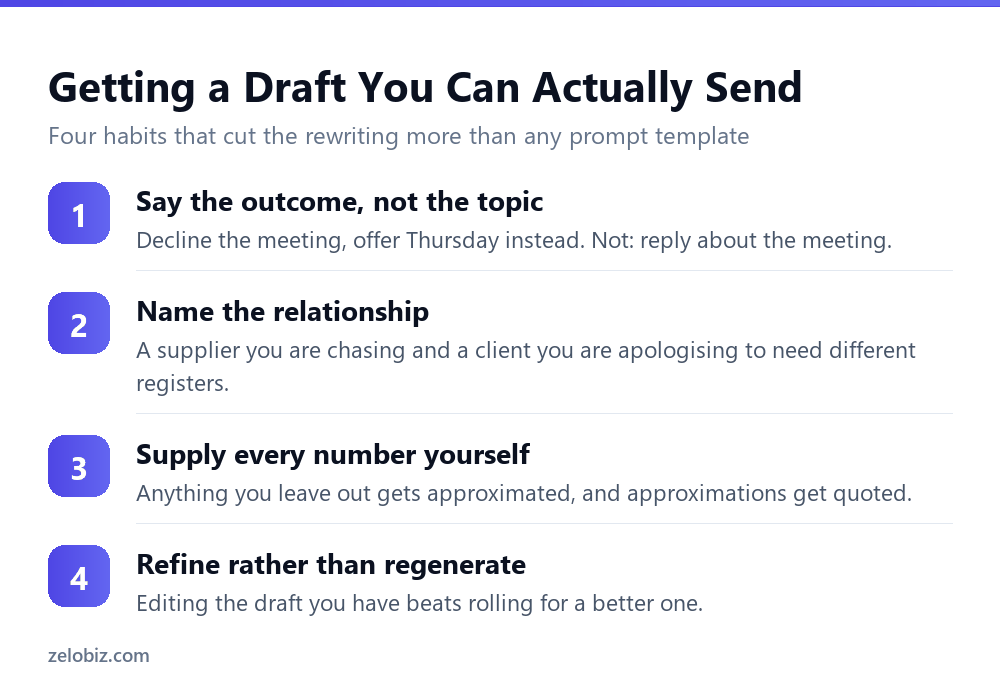
The quality of what comes back tracks the specificity of what you asked for, and most weak prompts fail in the same way: they name a subject instead of an outcome.
Say what you have decided
Reply about the invoice gives the model a topic and no position, so it invents one. Tell them we dispute the invoice and will not pay until the figures are agreed gives it the position, and the draft becomes an execution problem rather than a guessing game.
Name the relationship
Chasing a supplier and apologising to a client want different registers, and the model cannot infer which one you are in from the text of your prompt alone. One clause fixes it.
Supply the numbers
Any figure you leave out will be approximated or omitted, and an approximated figure in an email is a figure somebody will quote back. If the amount, the date or the reference matters, it goes in the prompt.
Refine instead of rerolling
The feature refines existing text as well as drafting new text. When a draft is nearly right, adjusting it beats generating a fresh one, because the second attempt will differ in ways you did not ask for and you will end up rereading the whole thing again.
Three Features People Keep Confusing
A good share of the questions about this feature are really questions about a different one. Gmail has offered several kinds of writing assistance over the years, they look similar in passing, and they are controlled separately.
The practical consequence is that switching something off and still seeing suggestions does not mean the setting failed. It usually means you turned off a different feature from the one that is producing what you are looking at.
It cuts the other way too. Somebody who reports that the AI in Gmail is useless is often describing the two or three word predictions from Smart Compose rather than the drafting feature, and has never opened the one they were told about.
📊 Note: When a colleague says the AI in Gmail does or does not work, ask what they clicked. The answer usually identifies which of the three they mean, and the conversation gets much shorter.
When Not to Reach for It
Assisted drafting saves typing. When typing is not the expensive part of the message, it has little to offer.
- Short replies. Prompting and checking a two line answer costs more than writing it.
- Anything contested. If the exchange might be read by somebody else later, you want to have chosen every sentence.
- Messages built on facts you have not confirmed. Get the fact first, otherwise you are proofreading a draft against nothing.
- Correspondence with someone who knows your voice. The register shift is noticeable and it becomes the subject of the reply.
For the automation that handles volume rather than wording, rules do far more work than drafting does. We compared the two approaches in AI email triage in Outlook, and the reasoning applies to Gmail filters in the same way.
Common Questions
Which Google Workspace plans include Help me write in Gmail?
Business Starter, Business Standard and Business Plus, plus Enterprise Starter, Enterprise Standard and Enterprise Plus, and Frontline Plus. The list is wider than the one for Gemini features in Sheets, which Business Starter does not get at all.
Is there a 500 a month limit on Help me write?
That figure does not appear on Google’s published AI usage limits page, which lists the features that are metered and does not include Gmail drafting among them. Absence from the list is not a guarantee of unlimited use, but the number itself has no documented source at Google.
Are Gemini usage limits shared across my team?
No. Google states that limits apply to each user and are not shared. Buying more seats does not create a pool that a heavy user can draw from, and one person running out says nothing about anyone else’s remaining allowance.
When do Gemini usage limits reset?
At 12 AM Pacific on the first day of each month. A prompt counts against your allowance only if it succeeds and generates a response.
Does Help me write read the email thread I am replying to?
Google documents the feature as drafting new emails or refining existing text based on a prompt, and does not spell out what it reads from the surrounding thread. The safe working assumption is the conservative one, so check that the draft answers the question that was actually asked.
Why can I not see Help me write in my Gmail?
Three documented possibilities beyond licensing. You must be 18 or over, some AI features are not available in every language, and an administrator can turn some features off for the organisation.
Should I buy Business Standard just for email drafting?
Not on the strength of Gmail alone, since Business Starter already includes Help me write. The upgrade is worth it when your team needs the spreadsheet features, which Starter does not include in any form.
The Short Version
- →Business Starter includes Help me write in Gmail. It includes nothing in Sheets.
- →The 500 a month figure is not on Google’s usage limits page.
- →Metered features are listed explicitly. Gmail drafting is not one of them.
- →Limits apply per user and are not pooled across a team.
- →Google does not document what the feature reads from the thread. Assume little.
- →State a decision in the prompt. Anything left open gets invented.