
AI email triage sounds like the obvious use for Copilot, and for part of the job it is. For the larger part it loses to a feature Outlook has had since the 1990s, because a rule runs when your laptop is shut and it does not consume a licence.
The useful question is not which tool is smarter. It is which decisions in your inbox are actually decisions, because most of them are not.
Short answer: Anything that repeats and has a deterministic test should be a rule. Anything needing judgement, or that happens once, is where Copilot earns its place. Rules run server side whether Outlook is open or not, cost nothing per message, and work in shared mailboxes where Copilot is unavailable. The limit on rules is a 256 KB storage budget, not a number. Verified 31 August 2026.
The Rules Limit Is Not a Number of Rules
Search for how many Outlook rules you can have and you will find confident answers in the region of one hundred to two hundred. Microsoft’s own documentation says something different, and the difference changes how you should build them.
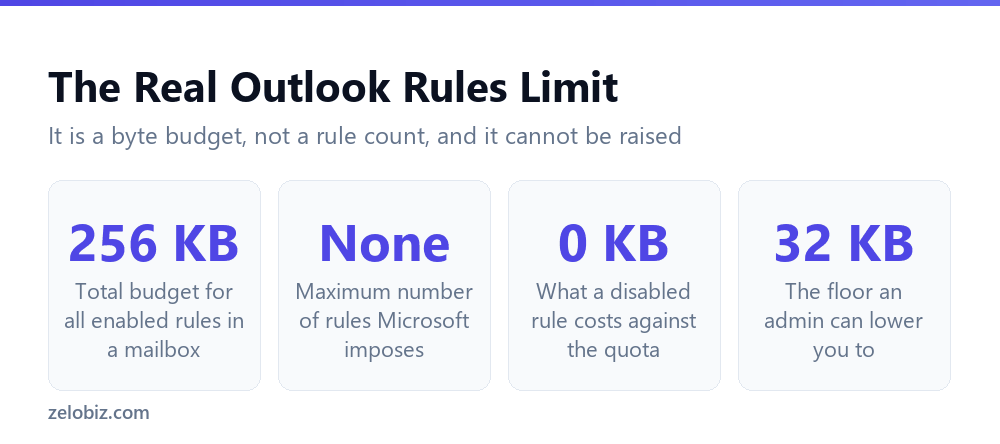
Inbox rules are limited to 256 KB total for all rules in a mailbox. Microsoft states there is no maximum number of rules a user can create. You get a byte budget, and rules consume it at different rates depending on how long the name is and how many conditions you applied.
Two consequences people miss
The first is that rule names cost you. A rule called Move newsletters is cheaper than one called Move all newsletter and marketing email from external senders to the Reading folder. That feels like trivia until you hit the ceiling and start deleting rules you still want.
The second is more useful. The quota applies only to enabled rules, and Microsoft places no restriction on how many disabled rules a mailbox can hold. A rule you switch off stops counting. If you run seasonal rules, or one set for a project that ended, disabling beats deleting, because you keep the logic and free the space.
You cannot buy your way out of it
In Exchange Online the quota cannot be raised. An administrator can only lower it, and the valid range runs from 32 KB up to the 256 KB default. That is the opposite of what most people assume when they ask their IT team for more room.
An admin can check where a mailbox stands with a single Exchange Online PowerShell command.
Get-Mailbox -Identity "you@example.com" | Format-List RulesQuotaSet-Mailbox -Identity "you@example.com" -RulesQuota "200 KB"
⚠️ Watch out: When you reach the limit, the warning you get is that you cannot create any more rules or cannot update an existing one. It does not tell you which rules are expensive, so if you are close to the ceiling, shorten the names of your longest rules before you start deleting anything.
Where the Line Actually Falls
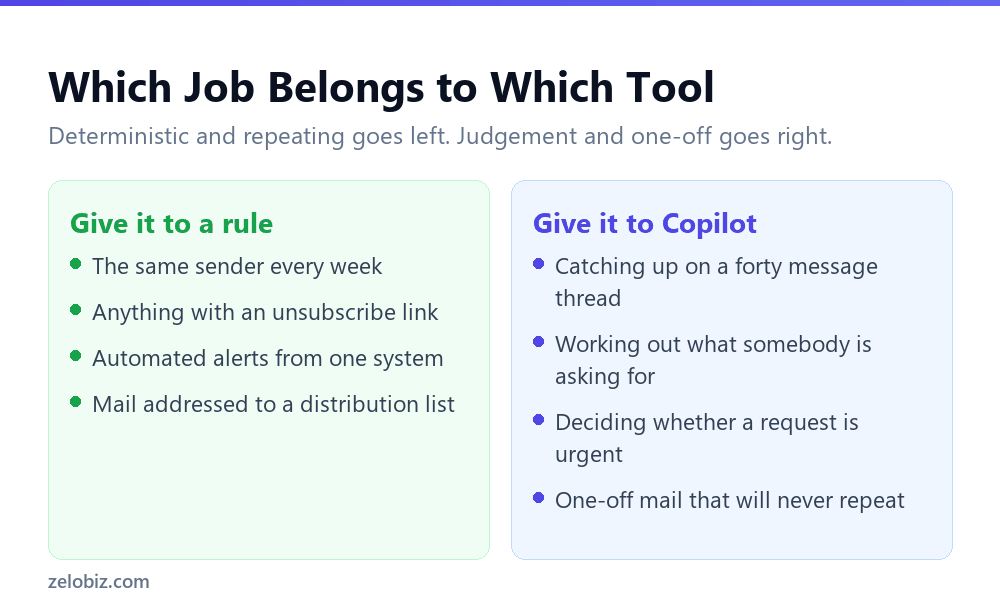
A rule is a test with a yes or no answer. If you can write the condition down without using the word usually, it belongs in a rule. If you cannot, no amount of configuration will make it reliable and you are better off reading the message.
That test sorts an inbox faster than any feature comparison. Sender addresses, list headers, subject prefixes and unsubscribe links are all deterministic. Urgency, intent and whether something needs your involvement are not.
The row that surprises people is the last one. Asking an assistant to find the important message is reasonable, but treat the answer as a shortlist rather than a verdict. It has no idea which of your projects is politically fraught this month.
Rules Run Without You. Copilot Does Not.
This is the practical difference that decides most of it, and it has nothing to do with intelligence.
Server side rules live on Exchange and run whether Outlook is open or not, on any device. Mail is already sorted when you next look. New Outlook for Windows, Outlook on the web and the mobile apps work with server side rules, so what you set up in one place applies everywhere.
Classic Outlook for Windows also supports client only rules, which do things Exchange cannot do on its own. Those run only while Outlook is running on that machine. If a rule works at your desk and appears broken on your phone, this is almost always why.
Order matters more than people expect
Rules run from top to bottom in the order they appear in the Rules window. A broad rule sitting above a narrow one will swallow the mail the narrow one was written for.
The usual symptom is a rule that works for weeks and then quietly stops. Nothing changed in the rule. Something was added above it. Before debugging the rule itself, look at what is sitting on top of it.
💡 Pro tip: Put your narrowest rules at the top and your catch-all rules at the bottom. If you build the list in the order you thought of the rules, you will end up with the reverse of what you want.
Writing Conditions That Do Not Rot
Most rules that stop working were built on something that looked stable and was not. The fix is choosing conditions that belong to the message rather than to the person who sent it.
Match the address, not the display name
A rule keyed on the words Jane Cooper breaks the day Jane marries, changes her display name, or sends from her phone with a different profile. The address behind it usually outlives all of that. Where the whole organisation matters, match the domain instead of the individual.
Prefer headers to subject keywords
Subject lines are written by people, and people improvise. A rule matching the word invoice will miss Invoice_final_v2 sent as an attachment with an empty subject, and it will catch a colleague asking whether anyone has seen the invoice. Bulk mail carries an unsubscribe header precisely because it is machine generated, which makes it a far more dependable test than anything in the subject.
Be careful with contains
The condition that causes the most quiet damage is a broad contains test near the top of the list. It matches more than you pictured, it sits above the narrow rules, and because it moves mail rather than deleting it, nobody notices for weeks.
💡 Pro tip: When a rule misfires, resist rewriting it immediately. Check its position in the list first, then check whether the condition describes the message or the sender. Those two checks explain nearly every broken rule.
The Shared Mailbox Problem
Copilot features are unavailable on shared and delegate mailboxes, as well as group and archive mailboxes. Anyone whose actual job is triage, meaning support desks and enquiries addresses, is working in exactly the mailbox type Copilot does not cover.
That is not a small carve-out. It means the highest volume inboxes in most organisations have to be handled with rules, categories and quick steps. The assisted drafting we covered in drafting email with Copilot is unavailable there too, so the whole workflow has to be built differently.
📊 Note: If you are evaluating Copilot licences for a support team, test it in the shared mailbox before you buy rather than in the tester’s own inbox. The features behave completely differently in the two places, and the personal inbox demo will look excellent.
A Layout That Survives Contact With a Real Inbox
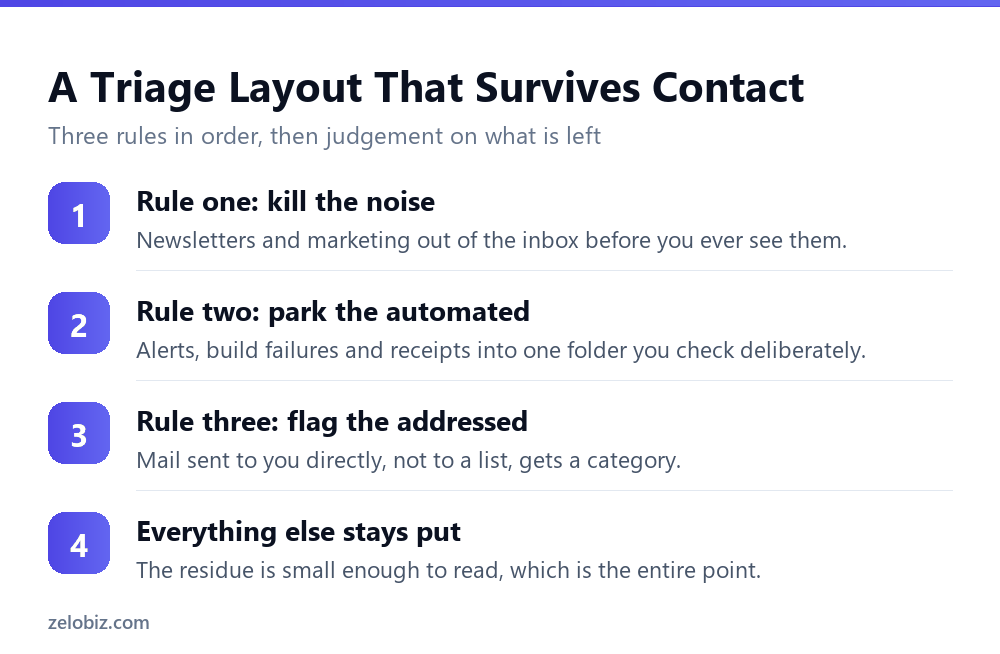
Elaborate rule sets fail because they demand maintenance nobody does. A small set that handles the bulk works better, and it leaves quota spare for the specific rules you add later.
Take out the marketing first
Bulk mail is the largest single category in most inboxes and the easiest to identify. Getting it out before anything else means every rule after it runs on a smaller, more meaningful set of messages.
Park the automated alerts
Monitoring notifications, build results, delivery confirmations and receipts share a property: you need them findable, not visible. One folder per system, checked when you choose, beats a stream of them arriving between real messages.
Mark what was addressed to you personally
Mail sent directly to your address behaves differently from mail sent to a list you happen to be on. A rule that categorises the former gives you a reliable signal without moving anything, which matters because moving mail you actually need is how people lose trust in their own rules.
What remains after those three is usually small enough to read properly, and reading it properly is the job. The same logic applies to any scheduled automation: decide what should never be automatic first. Our guide to automating a Google Sheets report works through the same decision in a different tool.
⚠️ Watch out: If you build a forwarding rule with several destination addresses, test it. Microsoft notes the number of addresses you can forward to may be limited by your account settings, and a rule with too many simply will not work rather than failing loudly.
Common Questions
How many rules can I have in Outlook?
There is no maximum number. Microsoft documents a 256 KB total storage limit for all enabled rules in a mailbox, and the space each rule uses depends on the length of its name and the number of conditions. Short, simple rules let you have far more of them.
Can my administrator increase the Outlook rules limit?
Not in Exchange Online. The quota can only be decreased, within a valid range of 32 KB to 256 KB, using Set-Mailbox with the RulesQuota parameter. The 256 KB default is already the ceiling.
Do disabled rules count against the limit?
No. The quota applies only to enabled rules, and there is no restriction on how many disabled rules a mailbox can hold. Disabling a seasonal or finished rule frees its space while keeping the logic for later.
Why did my Outlook rule stop working?
Check what sits above it. Rules run top to bottom in the order shown in the Rules window, so a broader rule added later and placed higher will process the mail first. The other common cause is a client only rule that runs solely when Outlook is open on that machine.
Should I use Copilot or rules for email triage?
Rules for anything deterministic and repeating, since they run server side without you and cost nothing per message. Copilot for judgement calls and one-off situations, such as summarising a long thread or working out what a message is really asking for.
Does Copilot work for triaging a shared support inbox?
No. Copilot features are unavailable on shared, delegate, group and archive mailboxes. Shared support addresses have to be handled with rules, categories and quick steps, so test any Copilot plan in the shared mailbox itself before buying licences.
Do Outlook rules work when my computer is off?
Server side rules do, because they run on Exchange rather than in the app. Client only rules, which exist in classic Outlook for Windows, run only while Outlook is open on that machine, which is why some rules appear to work at your desk and not on mobile.
The Short Version
- →The rules limit is 256 KB of storage, not a count. Microsoft sets no maximum number.
- →Long rule names cost real space. Disabled rules cost nothing.
- →The quota cannot be raised in Exchange Online, only lowered.
- →Rules run top to bottom. A new broad rule above an old narrow one breaks it.
- →Deterministic and repeating goes to a rule. Judgement goes to Copilot.
- →Shared and delegate mailboxes have no Copilot, so triage there is rules only.