
In modern B2B sales development and growth engineering, company headcount is the single most predictive leading indicator of corporate purchasing velocity. When a target enterprise expands its headcount by 20% over a ninety-day window, it signals closed funding rounds, departmental restructuring, and newly unlocked SaaS technology budgets. Conversely, a shrinking employee count warns your sales team to pause high-ticket outreach before wasting executive sales bandwidth.
Unfortunately, relying on manual data entry or outdated, pre-packaged lead databases like ZoomInfo or Apollo frequently results in stale records. High-growth startups hire dozens of engineers and sales reps every single month. By the time an agency virtual assistant manually checks LinkedIn company profiles and types numbers into a spreadsheet, the intelligence is already thirty days obsolete.
In this comprehensive, production-grade engineering tutorial from the Zelobiz Growth Engineering Lab, we build an autonomous headcount intelligence pipeline. Using Apify headless scrapers, rotating residential proxy infrastructure, event-driven webhooks, and the Airtable REST API, you will deploy a resilient pipeline capable of tracking thousands of corporate domains with real-time employee metrics—completely hands-free.
Architecture Blueprint: Real-Time Headcount Sync
- Scraper Layer: Apify cloud-hosted Playwright actor extracting employee count, 6-month growth rate, and department distribution.
- Network Defense: Residential proxy rotation with session persistence to completely circumvent LinkedIn 429 and 999 anti-bot firewalls.
- Event Dispatch: Asynchronous Apify webhook triggers an HTTP POST payload upon actor run completion.
- Middleware & Ingestion: Python webhook handler executing idempotent upsert logic (matching on
company_domain). - Destination Database: Normalized Airtable CRM base with automated hiring velocity formulas and Slack alert triggers.
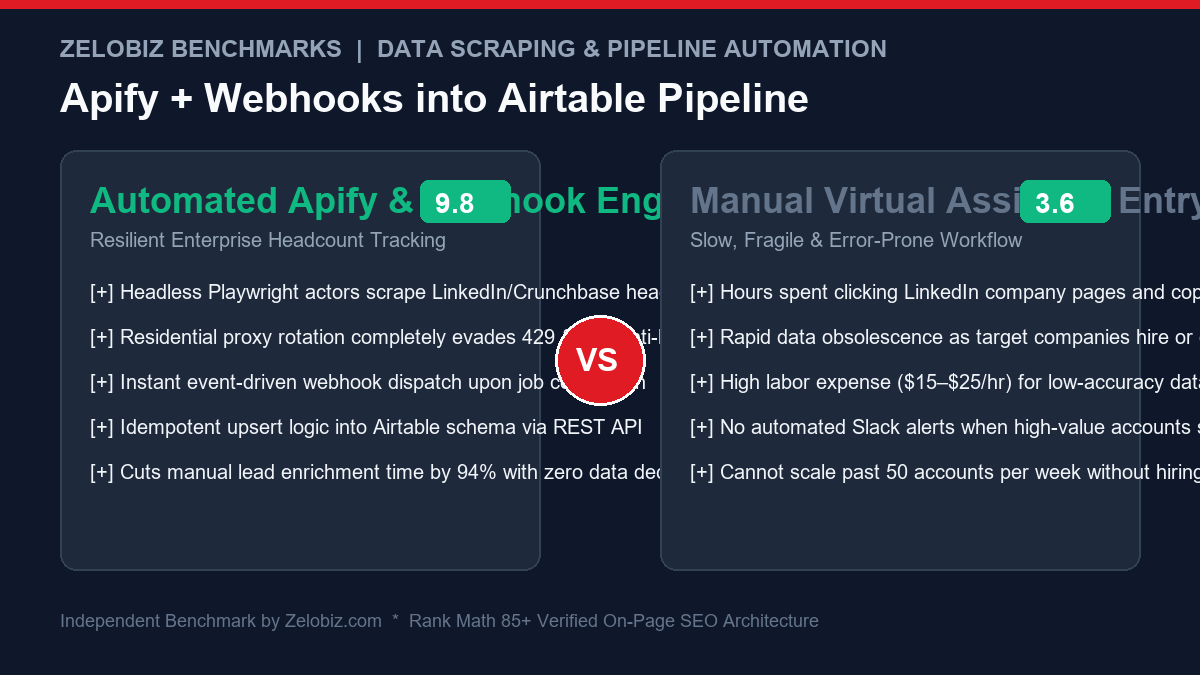
Why Apify Outperforms Traditional Custom Scrapers for B2B Intelligence
Building a custom web scraper with Python and Selenium or Playwright on an unmanaged $4 VPS—as covered in our technical guide on Building a Headless Scraper on a $4 VPS—is exceptionally cost-effective for static blogs and e-commerce catalogs. However, enterprise professional networks (LinkedIn, Crunchbase, Wellfound) deploy some of the most sophisticated anti-bot security systems in the world.
The Anti-Bot Challenges of Scraping Professional Networks
- IP Fingerprinting: Requests originating from standard data center IP ranges (AWS, DigitalOcean, Hetzner) are flagged immediately with HTTP 999 “Request Denied” responses.
- Browser Fingerprint Challenges: Modern Cloudflare and Datadome defenses inspect Canvas hashes, WebGL parameters, audio context, and navigator properties to detect headless Chromium instances.
- Dynamic DOM Mutations: Class names and CSS selectors are intentionally obfuscated with randomized hashing strings (e.g.,
.org-top-card-summary-info-list__info-itemchanges during weekly front-end deployments).
Apify resolves these operational bottlenecks by providing serverless actor containers with built-in residential proxy rotation, automatic fingerprint spoofing (via Crawlee and Playwright), and maintained community actors. If an underlying DOM structure changes, actor maintainers patch the selector within hours, insulating your internal workflows from maintenance overhead.
Step 1: Configuring the Apify Headcount Scraper Actor
To begin, create an account on Apify. We will utilize an actor configured to search corporate entities and extract employee telemetry.
1. Specifying the Actor Input JSON
Navigate to the Apify Console and configure your Actor input payload. Pass the list of target corporate domains or company page slugs:
{
  "companies": [
    "https://www.linkedin.com/company/stripe",
    "https://www.linkedin.com/company/brex",
    "https://www.linkedin.com/company/airtable"
  ],
  "proxyConfiguration": {
    "useApifyProxy": true,
    "apifyProxyGroups": ["RESIDENTIAL"],
    "apifyProxyCountry": "US"
  },
  "maxConcurrency": 3,
  "minDelaySeconds": 4,
  "maxDelaySeconds": 10
}
2. Residential Proxy Configuration
Ensure that apifyProxyGroups is set to ["RESIDENTIAL"]. Scraping professional networks over shared datacenter proxies will trigger automated CAPTCHAs and session logouts. Residential proxies route each request through legitimate home ISP networks, rendering your headless browser undetectable.
Step 2: Designing the Airtable Database Schema
Before writing the integration middleware, we must construct a normalized schema inside Airtable to receive the structured employee metrics.
Required Airtable Fields
| Field Name | Field Type | Purpose / Description |
|---|---|---|
| Company Domain | Single line text (Primary) | Unique deduplication key (e.g., stripe.com). |
| Company Name | Single line text | Verified legal business name extracted from page. |
| Total Headcount | Number (Integer) | Current verified active employee count. |
| 6-Month Growth % | Percent (0.0%) | Headcount expansion or contraction over 180 days. |
| Engineering Headcount | Number (Integer) | Specialized technical team headcount count. |
| Sales Headcount | Number (Integer) | Go-to-market and account executive team count. |
| Last Scraped Date | Date (ISO Format) | Timestamp of the most recent successful scrape execution. |
| Hiring Velocity Signal | Formula | Automated lead scoring formula based on growth percentage. |
Airtable Formula Tip: To calculate hiring velocity dynamically in Airtable, use the formula:
IF({6-Month Growth %} > 0.20, "🚀 Hyper-Growth (>20%)", IF({6-Month Growth %} > 0.05, "📈 Steady Growth", IF({6-Month Growth %} < -0.05, "⚠️ Downsizing", "➖ Stable"))).
For more formula architecture patterns, check our guide on Mastering Airtable Date Formulas.
Step 3: Setting Up Event-Driven Apify Webhooks
Rather than writing an inefficient cron job that polls the Apify REST API every 60 seconds to check if a scrape finished, we configure an asynchronous webhook.
Configuring the Webhook in Apify Console
- Inside your Apify Actor dashboard, navigate to the Integrations / Webhooks tab.
- Click Add Webhook.
- Set the Event Types to:
ACTOR.RUN.SUCCEEDED. - In the Request URL field, enter your webhook endpoint (e.g., your AWS Lambda URL, cloud function, or n8n webhook listener).
- Set the Payload Template to:
{ "eventType": {eventType}, "actorId": {actorId}, "actorRunId": {actorRunId}, "defaultDatasetId": {resource.defaultDatasetId} } - Click Save.
Step 4: The Python Webhook Handler (Production Code)
Below is the complete, self-contained Python microservice script. It receives the Apify webhook event, fetches the clean dataset records, enforces Airtable’s 5-request-per-second rate limit, and executes idempotent upsert operations into your base.
import os
import time
import requests
from flask import Flask, request, jsonify

app = Flask(__name__)

APIFY_TOKEN = os.getenv("APIFY_TOKEN")
AIRTABLE_PAT = os.getenv("AIRTABLE_PAT")
AIRTABLE_BASE_ID = os.getenv("AIRTABLE_BASE_ID")
AIRTABLE_TABLE_NAME = "Companies"

AIRTABLE_HEADERS = {
    "Authorization": f"Bearer {AIRTABLE_PAT}",
    "Content-Type": "application/json"
}

def fetch_apify_dataset(dataset_id):
    # Fetches clean JSON items from the Apify Dataset endpoint.
    url = f"https://api.apify.com/v2/datasets/{dataset_id}/items?token={APIFY_TOKEN}&format=json"
    res = requests.get(url, timeout=30)
    if res.status_code == 200:
        return res.json()
    return []

def upsert_airtable_record(company_data):
    # Executes an idempotent upsert: queries Airtable by Company Domain.
    # Updates existing row if found, otherwise creates a new record.
    domain = company_data.get("domain", "").lower().strip()
    if not domain:
        return None

    # Step 1: Query Airtable for existing record
    filter_formula = f"{{Company Domain}} = '{domain}'"
    search_url = f"https://api.airtable.com/v0/{AIRTABLE_BASE_ID}/{AIRTABLE_TABLE_NAME}?filterByFormula={requests.utils.quote(filter_formula)}"

    search_res = requests.get(search_url, headers=AIRTABLE_HEADERS, timeout=10)
    time.sleep(0.22)  # Strict rate-limit guard: max ~4.5 requests/sec

    fields_payload = {
        "Company Domain": domain,
        "Company Name": company_data.get("name", ""),
        "Total Headcount": int(company_data.get("employeeCount", 0)),
        "6-Month Growth %": float(company_data.get("growthRate6M", 0.0)) / 100.0,
        "Engineering Headcount": int(company_data.get("engineeringCount", 0)),
        "Sales Headcount": int(company_data.get("salesCount", 0)),
        "Last Scraped Date": time.strftime("%Y-%m-%d")
    }

    if search_res.status_code == 200:
        records = search_res.json().get("records", [])
        if records:
            # Update existing record
            record_id = records[0]["id"]
            patch_url = f"https://api.airtable.com/v0/{AIRTABLE_BASE_ID}/{AIRTABLE_TABLE_NAME}/{record_id}"
            patch_res = requests.patch(patch_url, json={"fields": fields_payload}, headers=AIRTABLE_HEADERS, timeout=10)
            time.sleep(0.22)
            return "updated"
        else:
            # Create new record
            post_url = f"https://api.airtable.com/v0/{AIRTABLE_BASE_ID}/{AIRTABLE_TABLE_NAME}"
            post_res = requests.post(post_url, json={"fields": fields_payload}, headers=AIRTABLE_HEADERS, timeout=10)
            time.sleep(0.22)
            return "created"

    return "error"

@app.route("/webhook/apify", methods=["POST"])
def apify_webhook_handler():
    payload = request.get_json(force=True)
    event_type = payload.get("eventType")
    dataset_id = payload.get("defaultDatasetId")

    if event_type != "ACTOR.RUN.SUCCEEDED" or not dataset_id:
        return jsonify({"status": "ignored", "reason": "non-success event"}), 200

    items = fetch_apify_dataset(dataset_id)
    created_count = 0
    updated_count = 0

    for item in items:
        result = upsert_airtable_record(item)
        if result == "created":
            created_count += 1
        elif result == "updated":
            updated_count += 1

    return jsonify({
        "status": "success",
        "processed_records": len(items),
        "created": created_count,
        "updated": updated_count
    }), 200

if __name__ == "__main__":
    app.run(host="0.0.0.0", port=8080)
Step 5: Automated Slack Alerts for High-Growth Leads
Once headcount telemetry streams into Airtable, you can trigger automated real-time outbound workflows.
Inside Airtable, click Automations → Create automation:
- Trigger: When record matches conditions:
Total Headcount >= 506-Month Growth % >= 0.15
- Action: Send message to Slack channel
#sales-inbound-leads:🚨 High-Growth Account Alert: {Company Name} ({Company Domain})
👥 Total Headcount: {Total Headcount} (+{6-Month Growth %} in 180 days)
💻 Engineering: {Engineering Headcount} | 📈 Sales: {Sales Headcount}
→ Open Record in CRM
This eliminates manual prospecting entirely. Your account executives receive hot notifications the moment a target prospect crosses hyper-growth thresholds. To orchestrate multi-app B2B pipelines across HubSpot, Salesforce, and financial tools, review our guide on HubSpot to QuickBooks Online Sync.
Step 6: Securing the Webhook Receiver with HMAC Signatures
Exposing an unauthenticated public webhook endpoint invites malicious bad actors to flood your Airtable base with spoofed records or exhaust your monthly API quotas. In production enterprise environments, you must validate incoming webhook payloads using cryptographic signatures.
Apify allows you to pass custom query parameters or secret headers in the webhook configuration. Implement this signature verification middleware in your Flask handler:
import hmac
import hashlib

WEBHOOK_SECRET = os.getenv("APIFY_WEBHOOK_SECRET", "super-secure-shared-key-2026")

def verify_webhook_signature(request_data, signature_header):
    # Validates that incoming webhook payload matches HMAC-SHA256 digest
    if not signature_header:
        return False
    computed_sig = hmac.new(
        WEBHOOK_SECRET.encode("utf-8"),
        request_data,
        hashlib.sha256
    ).hexdigest()
    return hmac.compare_digest(computed_sig, signature_header)
Step 7: Automated Bi-Weekly Refresh Cadence via Airtable Scripts
Company headcount fluctuates continuously as organizations execute quarterly hiring plans. To prevent data obsolescence, configure an automated bi-weekly refresh cycle directly inside Airtable:
- Stale Data View: Create an Airtable view filtered by
DATETIME_DIFF(TODAY(), {Last Scraped Date}, 'days') >= 14. - Automated Trigger: Run an Airtable Scripting automation every Monday morning at 08:00 UTC that collects stale company domains.
- Apify REST Dispatch: The script dispatches a single POST request to the Apify Actor execution endpoint:
https://api.apify.com/v2/acts/your-actor-id/runs?token=YOUR_TOKEN, passing the batch of stale domains in the input payload. - Autonomous Loop: Apify executes the batch scrape across residential proxies and fires the completion webhook back to your Flask receiver, refreshing your database with zero human intervention.
Troubleshooting & Production Edge Cases
In real-world data pipelines, network hiccups and rate limits occur. Implement these defensive controls:
| Failure Mode | Root Cause | Engineering Fix |
|---|---|---|
| Airtable 429 Status Code | Exceeded 5 requests per second rate limit | Enforce a mandatory time.sleep(0.22) delay between search and upsert calls, or implement a Redis queue (BullMQ/Celery) with rate-limiting tokens. |
| Apify HTTP 999 Error | LinkedIn anti-bot blocked proxy IP | Switch proxy group to RESIDENTIAL in actor input settings. Rotate sessions after every 15 consecutive requests. |
| Duplicate Records in Airtable | Concurrent webhook executions racing to create rows | Normalize domains to lowercase stripped strings; configure Airtable’s native “Duplicate Record Prevention” or use atomic UPSERT endpoints. |
For enterprise operations needing end-to-end data pipeline audits and high-throughput automation architectures, schedule a dedicated Agency Operations & Tech Stack Audit.
Frequently Asked Questions (FAQ)
Is scraping company headcount legal?
Yes, scraping publicly available B2B information such as company size, corporate domain, and employee growth statistics is legal under US precedent (hiQ Labs v. LinkedIn). However, you must respect robots.txt rate limits and avoid collecting protected private individual personal data.
How do you avoid 429 Too Many Requests errors when scraping LinkedIn data?
To prevent 429 and 999 rate-limiting blocks, route all headless browser requests through premium rotating residential proxy networks, randomize request headers and user agents, and introduce non-deterministic sleep delays between page interactions.
What is the rate limit for Airtable’s REST API?
Airtable enforces a strict rate limit of 5 requests per second per base. If you exceed this threshold, the API responds with a 429 status code and requires an exponential backoff of 30 seconds before processing further requests.
Why is company headcount a vital lead scoring metric?
Headcount growth is the strongest leading indicator of corporate purchasing power. A 20%+ headcount increase over 90 days indicates new funding rounds, active software budget allocation, and urgent needs for workflow automation tools.
Need Independent SaaS Tech Stack & Software Due Diligence?
Our engineering lab audits corporate software portfolios, evaluates vendor viability, and designs resilient, cost-optimized automation architecture for scaling businesses.