
Apple Intelligence requirements get treated as a hardware question: is your device new enough. That’s three of the four actual gates. The fourth is a settings requirement almost nobody checks, and it’s the one that quietly blocks the feature on hardware that otherwise qualifies completely.
This covers exactly which devices meet the hardware bar, the OS versions and storage figure required, and the language-matching rule that catches more people than the hardware requirement does.
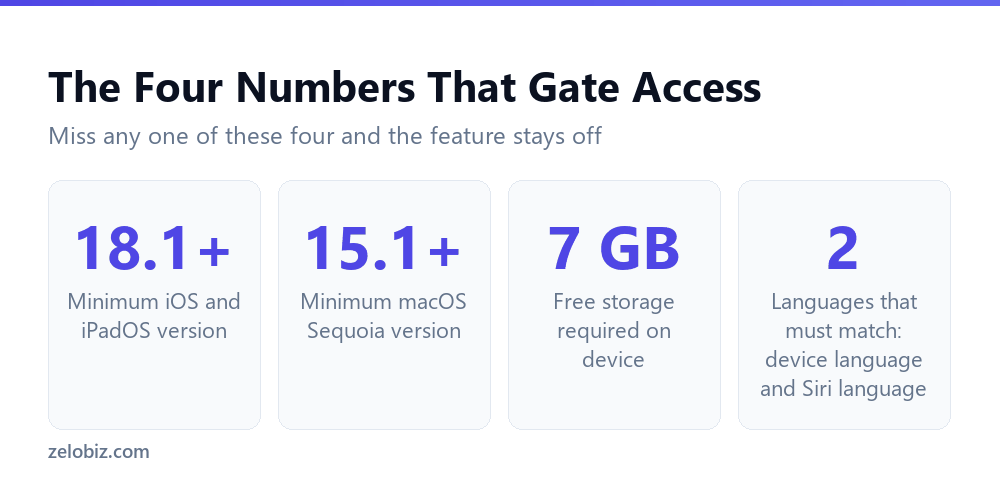
Short answer: Apple Intelligence needs an iPhone 15 Pro or iPhone 16 or later, an iPad mini with the A17 Pro chip or an iPad with M1 or later, or a Mac with Apple silicon, running iOS or iPadOS 18.1, macOS Sequoia 15.1, or later. The device needs 7 GB of free storage. Critically, your device language and Siri language must be set to the same supported language, and mismatched settings will block the feature even on fully qualifying hardware. Verified directly against Apple’s own support page on 5 September 2026.
Which Devices Actually Qualify
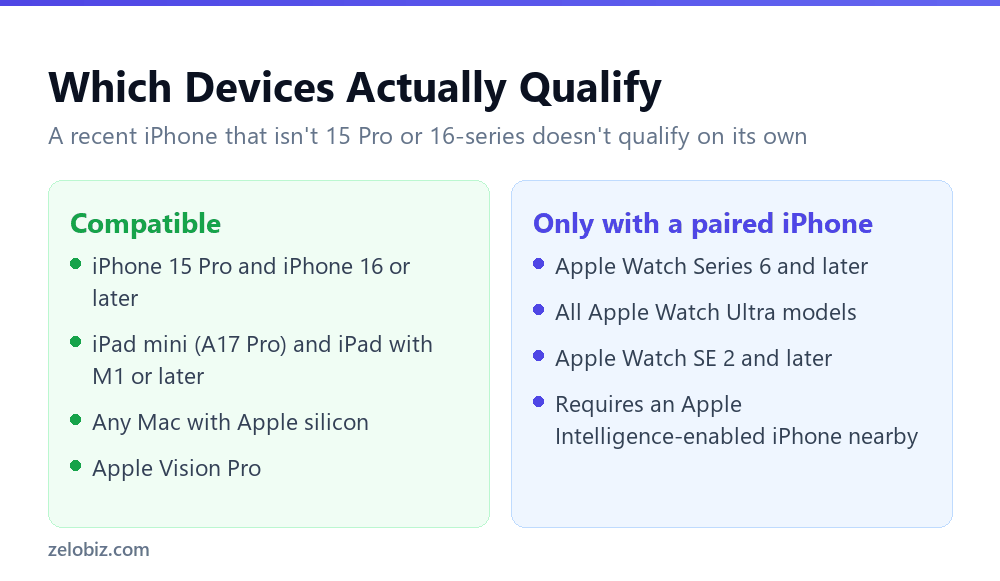
Apple’s own compatibility list is more specific than the general framing of any recent iPhone suggests. On iPhone, only iPhone 15 Pro models and iPhone 16 models or later qualify. An iPhone 15 or 15 Plus, despite being the same generation as the 15 Pro, does not meet the requirement.
On iPad, it’s iPad mini with the A17 Pro chip specifically, or any iPad with an M1 chip or later. On Mac, the requirement is simpler: any Mac with Apple silicon, meaning the M series chips, qualifies regardless of which specific model.
Apple Watch is a special case: Series 6 and later, all Ultra models, and SE 2 and later qualify, but only when paired with an Apple Intelligence-enabled iPhone. The watch itself never runs the feature independently; it depends entirely on the paired phone meeting the requirement first.
OS Version and Storage
Beyond the hardware, the device needs a current enough operating system and free space to actually install the feature.
Minimum OS versions
iOS 18.1 or later, iPadOS 18.1 or later, macOS Sequoia 15.1 or later, visionOS 2.4 or later, and watchOS 11 or later. These are minimums, and Apple has continued extending the feature set in later updates, so staying current gets you more than the baseline experience these version numbers unlock.
7 GB of storage, with one exception
The device needs 7 GB of storage available, and Apple specifically notes this requirement doesn’t apply to Apple Watch, since the watch relies on the paired iPhone for processing rather than storing the models locally itself.
⚠️ Watch out: A device sitting close to full storage can pass every hardware and OS check and still fail to enable Apple Intelligence purely on the 7 GB requirement. Check available storage before assuming a missing feature means outdated hardware.
The Language Rule That Actually Catches People
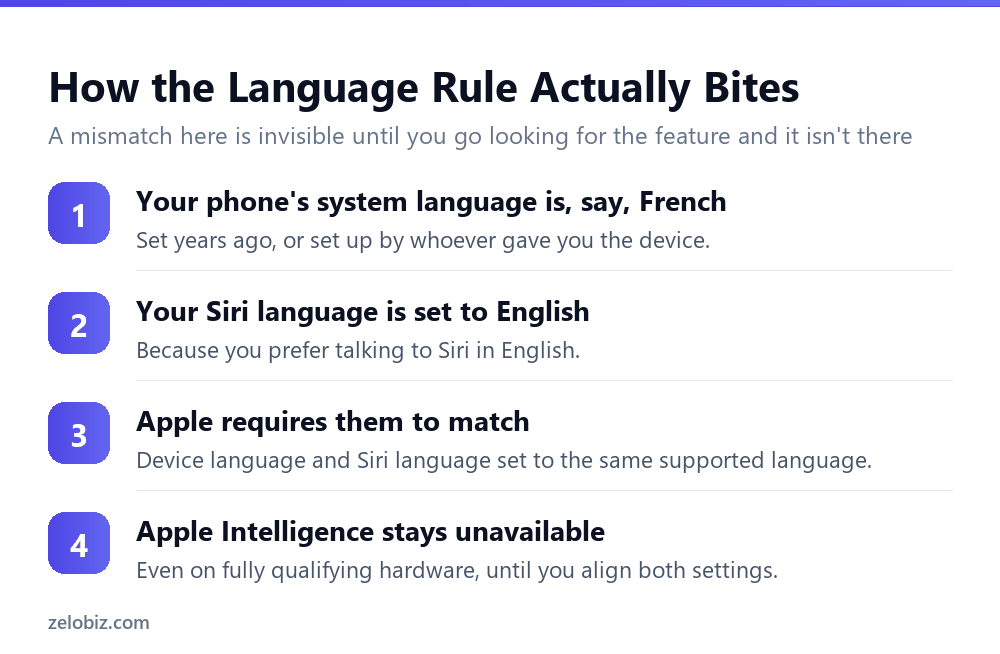
Apple states this requirement plainly: device language and Siri language set to the same supported language. It sits quietly alongside the hardware specs and gets far less attention, despite catching a real and specific group of users.
Anyone whose system language differs from their Siri language, whether from buying a device abroad, inheriting one set up by someone else, or deliberately running the interface in one language while talking to Siri in another, will find Apple Intelligence unavailable regardless of how new or capable their hardware is.
💡 Pro tip: If Apple Intelligence appears missing on hardware you’ve confirmed is compatible, check Settings for both the device language and the Siri language before troubleshooting anything else. This single mismatch is a common, invisible cause and takes seconds to fix once you know to look for it.
📊 Note: This requirement also means Apple Intelligence isn’t simply a per-region toggle. Two people in the same country, same device, same iOS version, can have different access purely based on how their language settings happen to be configured.
Why Apple Draws the Hardware Line Where It Does
The specific model cutoffs, iPhone 15 Pro rather than iPhone 15, M1 rather than any Mac, aren’t arbitrary marketing tiers. They map to a real capability difference: the on-device neural processing needed to run Apple Intelligence’s models locally, at acceptable speed, without sending every request to a server.
The iPhone 15 Pro’s A17 Pro chip introduced a more capable neural engine than the standard iPhone 15’s A16, which is the practical reason one qualifies and the other, released the same year, does not. The same logic applies to the iPad mini’s jump to A17 Pro specifically rather than a lesser chip in the same product line.
Understanding this explains why the list looks the way it does rather than following a simpler recent versus old pattern. A device’s age isn’t the deciding factor. Its specific silicon is, which is also why two phones launched in the same product event can land on opposite sides of the requirement.
Checking Your Own Device Against All Four Gates
Given how the requirements stack, working through them in a specific order saves time over guessing at which one is the problem.
- Confirm the exact model. iPhone 15 Pro or 16 series and later, iPad mini A17 Pro or iPad with M1 and later, or any Apple silicon Mac.
- Check the OS version. 18.1 or later for iOS and iPadOS, 15.1 or later for macOS Sequoia.
- Check available storage. At least 7 GB free, except on Apple Watch.
- Check both language settings. Device language and Siri language need to match, and both need to be a language Apple Intelligence actually supports.
Once the hardware and settings line up, the actual features unlock in stages rather than all at once. What Apple Intelligence sends to its own private servers versus what stays entirely on-device is covered in Private Cloud Compute: how Apple verifies its own servers, and the specific privacy trade-off when Siri hands a request to ChatGPT is covered in ChatGPT in Siri: what changes the moment you sign in.
A Worked Example
Concrete numbers make the language rule easier to spot in practice. Someone buys a used iPhone 15 Pro that was previously configured in Germany, resets it, but only changes the device’s display language to English during setup without separately checking Siri’s language.
The phone meets every hardware requirement: qualifying model, current iOS, plenty of storage. Apple Intelligence still doesn’t appear, or appears with features missing, because Siri’s language was never updated during that reset and remains German while the interface reads in English. Nothing in the setup process necessarily flags this as the specific blocker, since the phone otherwise works normally in English throughout.
The fix is two taps in Settings, but finding it requires knowing the language check exists as a distinct requirement rather than assuming the display language alone covers it. This exact scenario, a device reset without a full language reconfiguration, is one of the more common paths into this specific problem.
A second common path is a device shared or handed down within a household. A parent sets up a phone with Siri configured in one language for their own use, then passes the device to a family member who changes only the interface language to something else before starting to use it day to day. The mismatch persists silently until someone specifically goes looking for Apple Intelligence and finds it absent.
Both scenarios share the same underlying lesson: a language mismatch doesn’t announce itself. The phone works normally in every other respect, which is exactly why this specific requirement is worth checking directly rather than waiting for a symptom that points to it clearly.
Common Questions
Which iPhones support Apple Intelligence?
iPhone 15 Pro models and iPhone 16 models or later. The standard iPhone 15 and 15 Plus, despite being the same generation, do not meet the requirement.
Does Apple Intelligence work on any iPad?
Only iPad mini with the A17 Pro chip, or any iPad with an M1 chip or later. Older iPad models, including ones released more recently but without an M1 or A17 Pro chip, don’t qualify.
How much storage does Apple Intelligence need?
7 GB of free storage on the device. This requirement doesn’t apply to Apple Watch, which relies on a paired iPhone rather than storing models locally.
Why is Apple Intelligence missing even though my device qualifies?
Check whether your device language and Siri language are set to the same supported language. Apple states this explicitly as a requirement, and a mismatch here blocks the feature even on fully compatible hardware.
Does Apple Watch run Apple Intelligence on its own?
No. Compatible Apple Watch models, Series 6 and later, all Ultra models, and SE 2 and later, only get Apple Intelligence features when paired with an Apple Intelligence-enabled iPhone.
What is the minimum OS version needed?
iOS 18.1 or later, iPadOS 18.1 or later, macOS Sequoia 15.1 or later, visionOS 2.4 or later, and watchOS 11 or later, depending on the device.
Can two people with identical devices have different Apple Intelligence access?
Yes. If their device language and Siri language settings differ, one may have access and the other may not, even on identical hardware running the identical OS version.
What Happens When a Region Doesn’t Support Your Language Yet
The language requirement has a related, easily confused edge case: Apple Intelligence supports specific languages on a rolling basis, and a device set to a language the feature doesn’t support yet won’t be fixed by matching device and Siri settings, since there’s no matching supported language to align them to.
This is a genuinely different problem from the mismatch case covered above, and it’s worth distinguishing before assuming a settings fix will help. A mismatch between two supported languages is fixable in Settings immediately. A language Apple Intelligence hasn’t added support for yet requires waiting for that support to arrive, which follows Apple’s own rollout schedule rather than anything adjustable on the device.
Checking all four requirements together, rather than assuming a single glance at hardware settles the question, is the habit that actually finds the answer the first time instead of the third. Hardware, OS version and storage are the checks most guides already cover. Language matching is the one worth adding to that list yourself, since it rarely appears in the general advice and it’s the specific check most likely to explain an otherwise confusing gap between a device that should work and one that doesn’t.
The Short Version
- →Only iPhone 15 Pro and 16-series or later qualify, not the standard 15 or 15 Plus.
- →iPad needs an A17 Pro chip (mini) or M1 and later for other models.
- →Any Apple silicon Mac qualifies. Storage needs 7 GB free.
- →Device language and Siri language must match. This is the check people skip.
- →Apple Watch only gets the feature through a paired, compatible iPhone.
- →Two identical devices can have different access based purely on language settings.